Desktop Pet
approvedby xiaosong8584
A cute 3D cartoon robot inside your note-taking editor. - This plugin has not been manually reviewed by Obsidian staff.
Desktop Pet for Obsidian
Project: https://github.com/xiaosong8584/obsidian-desktoppet


A cute 3D cartoon robot desktop pet floating inside your Obsidian window. Built with parametric geometry (Sphere / Cylinder / Capsule / Torus), zero external assets, install and play.
✨ Features
- 🎨 3D Cartoon Robot — Rounded head + dot eyes (with highlights) + antenna + chest core + blush, all parametric, no external assets
- 🖱️ Drag & Click — Drag with mouse, touch or stylus to reposition; click triggers scale pulse + happy eyes + speech bubble
- 💤 Idle Animations — Breathing float, gentle sway, random blinks (2.5–6s), arm swing, antenna wiggle
- 🎭 5 Color Schemes — Soft Blue, Mint, Coral Pink, Lavender, Warm Orange
- 📏 Size Slider — 0.5x to 2.0x
- 🌗 Theme Aware — Bubble & shadow use Obsidian CSS variables (
--background-secondary,--background-modifier-box-shadow), auto-follow theme - 🎚️ Status Bar Toggle — One-click show/hide, also via
Ctrl+Pcommand palette (status bar is desktop-only) - 🔌 Fully Transparent — Doesn't block Obsidian content (outer
pointer-events: none, only pet is interactive) - ♻️ Full Lifecycle —
onunloadreleases renderer / geometry / material / rAF / listeners
📸 Screenshots
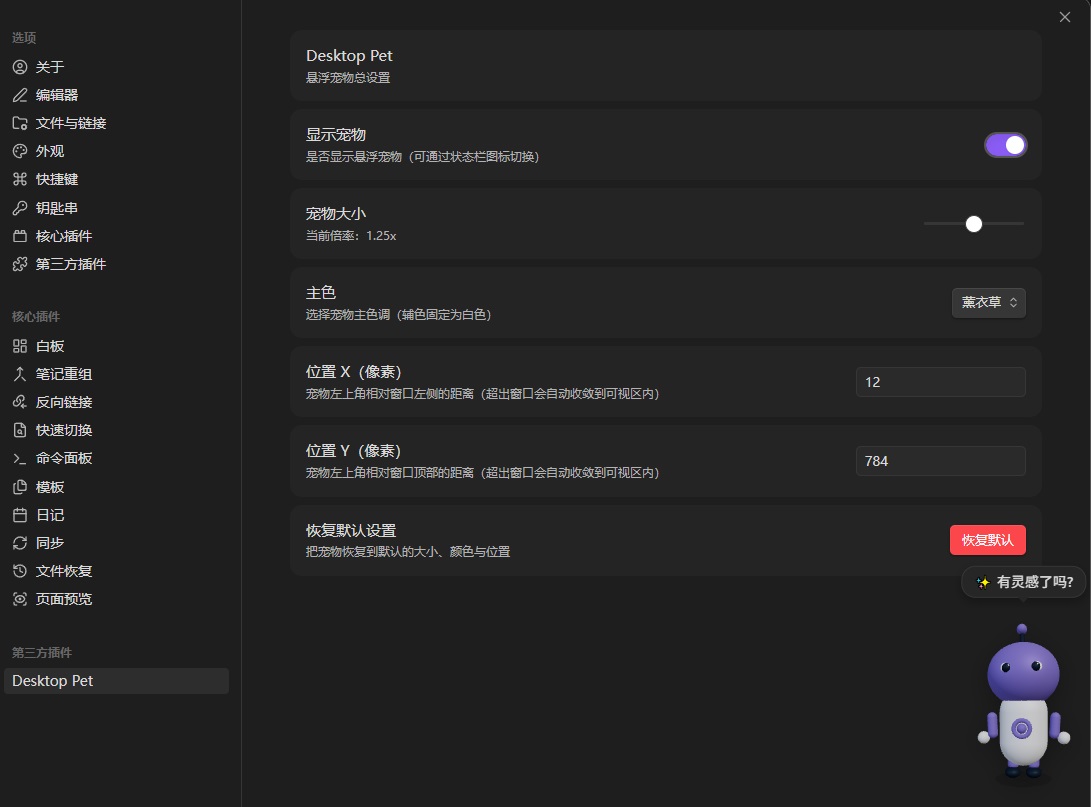
Settings panel — visibility toggle, size slider (1.25x), primary color, position X/Y and reset. The pet itself is visible in the bottom-right corner, showing a speech bubble.
⚙️ Development Setup
- Install Node.js 18+ (20 LTS recommended)
- Clone or open the project:
cd obsidian-desktoppet npm install - Build commands:
npm run dev          # watch mode: rebuild on save (non-minified, inline sourcemap)
npm run build        # production build: tsc type-check + minified main.js
npm run build:dev    # one-off development build (non-minified, inline sourcemap; exits when done)
📦 Install to Obsidian
- Run
npm run buildto generatemain.js - Open Obsidian → Settings → Third-party plugins → Disable Restricted Mode
- Copy the build artifacts only into
.obsidian/plugins/desktoppet/:
Source<your-vault>/.obsidian/plugins/desktoppet/ ├── main.js # required (build artifact) ├── manifest.json # required └── styles.css # required.tsfiles are not needed in the plugin directory. - Restart Obsidian (or refresh the plugin list)
- Search "Desktop Pet" in the plugin list and enable
Note: Works on both desktop and mobile (
isDesktopOnly: false). Interaction is built on Pointer Events, so mouse, touch and stylus all drive the same drag / click logic.
🎮 Usage
- Command palette —
Ctrl+P→ search "Show/Hide Pet" - Status bar — Robot icon in the bottom-right corner, click to toggle (desktop only)
- Drag — Press and drag the pet (mouse, touch or stylus) to any position
- Click — Click the pet body → scale pulse + happy eyes + speech bubble
- Settings — Settings → Community plugins → Desktop Pet
- Visibility toggle
- Pet size (0.5x – 2.0x)
- Primary color (5 soft schemes)
- Position X / Y (pixels)
- Reset to default
📚 Documentation
🗂️ Project Structure
desktoppet/
├── main.ts              # Plugin entry (Plugin class + lifecycle + commands + status bar)
├── pet/
│   ├── PetScene.ts      # Three.js scene (renderer / scene / camera / lights / rAF loop)
│   ├── PetModel.ts      # Parametric 3D robot model (geometry composition)
│   ├── PetAnimator.ts   # Animation controller (idle / blink / click / drag tilt)
│   └── PetInteraction.ts # Interaction layer (Pointer Events drag + click)
├── settings/
│   └── SettingsTab.ts   # Settings panel + DEFAULT_SETTINGS
├── styles.css           # Floating container / bubble / status bar styles (theme aware)
├── manifest.json        # Obsidian plugin manifest
├── package.json         # npm dependencies
├── tsconfig.json        # TypeScript config
├── esbuild.config.mjs   # Build script
├── images/              # README screenshots
└── README.md            # This file
🛠️ Tech Stack
- Language — TypeScript (strict mode, no
any) - 3D Rendering — Three.js
0.160.x - Build — esbuild + Obsidian standard plugin template
- Dependencies — Only
threeat runtime; everything else is dev-only
🔍 Key Implementation Details
Primary Color Replacement
PetModel tags the material it builds for the body/antenna/limbs with material.userData.isPrimary = true. PetScene.applyColor() walks the model and swaps exactly those materials to the target color — nothing else is touched.
No color-value heuristics ("white/dark/blush are not primary"): a heuristic both under-matches (the primary color could never be changed back if it happened to equal the detail color) and over-matches (any new auxiliary material of an unexpected shade would be repainted as primary).
Click Pulse
Click feedback (scale pulse + happy eyes + antenna bounce) is driven entirely by the animation loop's elapsed clock:
scalePulse = 1 + Math.sin(t * Math.PI) * 0.3;
group.scale.setScalar(scalePulse);
PetAnimator.triggerClickFeedback() reads the cached lastElapsed written by update(). It must not query performance.now() — that clock counts from page load while the loop's elapsed counts from scene creation, so mixing the two made elapsed - clickStartAt permanently negative and the feedback never converged.
The pet's visual size is controlled solely by the container / canvas size; the model itself always stays at 1:1 inside it.
Speed-Aware Drag Tilt
During drag, compute a tilt target from the X velocity (-0.3 ~ +0.3 rad), then smooth it with a first-order low-pass filter:
tiltCurrent += (tiltTarget - tiltCurrent) * Math.min(1, delta * 8);
The filter runs every frame (not only while dragging), so releasing the pointer lets the tilt decay back to zero instead of staying frozen at its last angle.
Transparent Background
WebGLRenderer({ alpha: true })+setClearColor(0x000000, 0)- CSS container
pointer-events: none, only inner canvaspointer-events: auto - Outer layer doesn't block Obsidian content interaction
- While hidden, the canvas gets an explicit
pointer-events: none—opacity: 0alone still receives hits
⚠️ Known Limitations
- On touch devices the pet area captures the pointer (
touch-action: none), so scrolling / zooming gestures that start on the pet itself are suppressed by design — drag it from elsewhere if you need to scroll - Position is clamped to the viewport, so the pet can never be dragged (or configured) off-screen; on a very small window a large pet will sit pinned to the top-left corner
- Speech bubble appears at the top of the container; may be clipped if the pet is near the window top edge
- No hover effect yet (could add slight scale + highlight boost)
🚀 Future Directions
- Hover effects
- Multiple robot shapes (sphere / block / humanoid)
- Emotion system (fall asleep after idle)
- Custom keyboard shortcuts
- Multi-touch gestures (e.g. pinch to resize)
- More phrases, multi-language
- Obsidian note integration (e.g. open new note on click, show last-modified time)
📄 License
MIT © xiaosong8584
For plugin developers
Search results and similarity scores are powered by semantic analysis of your plugin's README. If your plugin isn't appearing for searches you'd expect, try updating your README to clearly describe your plugin's purpose, features, and use cases.