by Zhijie Deng
Track job applications, recruitment stages, deadlines, and preparation notes in a central Markdown database.
Application Flow
Track job applications, recruitment stages, deadlines, and preparation notes in Obsidian. Free and open source, with English and Chinese interfaces. No QuickAdd or Dataview dependency.
在 Obsidian 中记录投递、招聘阶段、截止日期和准备笔记。免费开源,支持中英文界面,无需 QuickAdd 或 Dataview。
Add an application
- Open the command palette: ⌘ P on Mac, Ctrl P on Windows or Linux.
- Search Application Flow: Add application and press Enter.
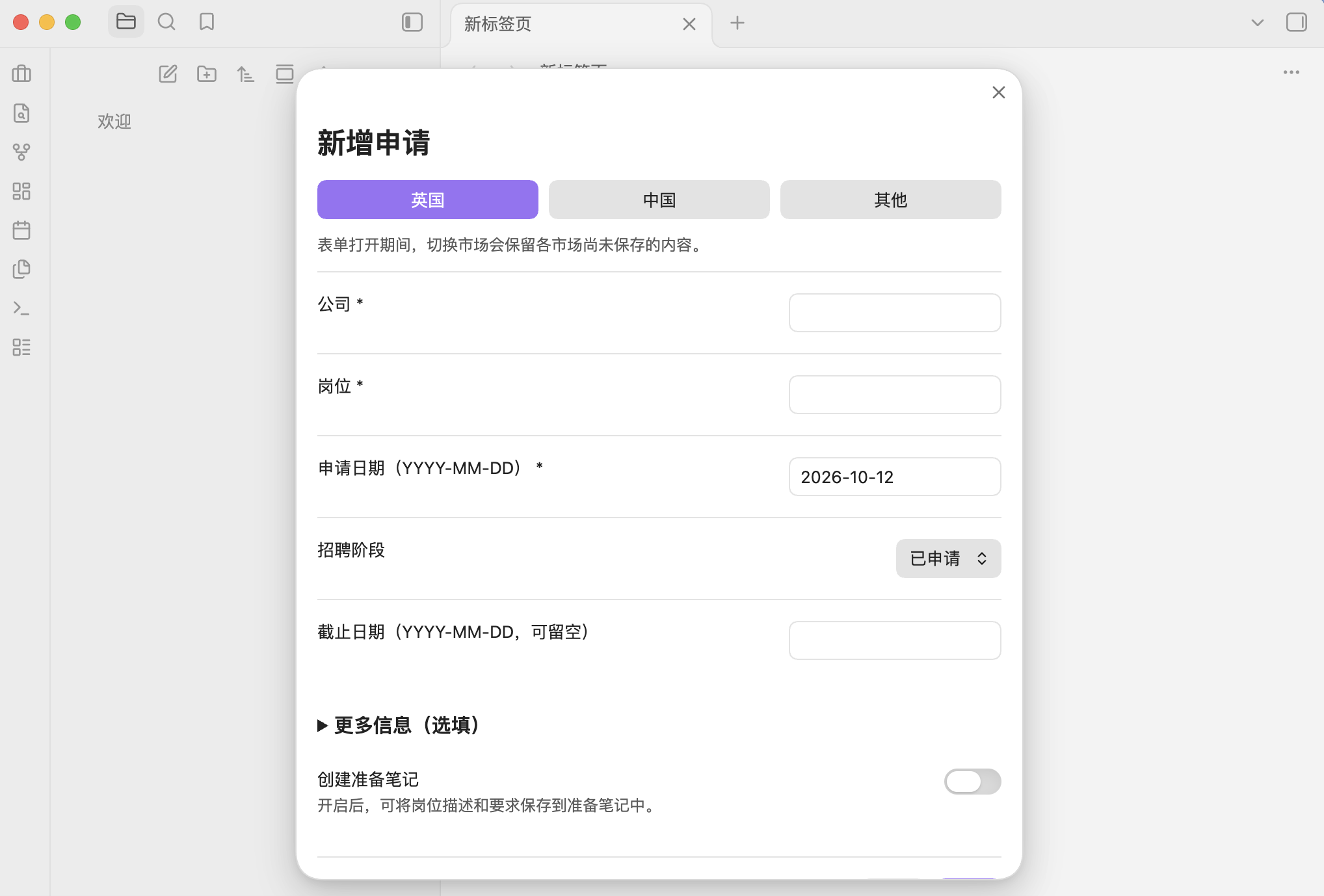
- Choose a market, fill in the company, role, application date, and stage, then save.
- Expand More information for optional fields. Enable Create preparation note to keep the job description and requirements.
新增申请
- Mac 按 ⌘ P,Windows 或 Linux 按 Ctrl P,打开命令面板。
- 搜索 新增申请,按回车。
- 选择市场,填写公司、岗位、申请日期和招聘阶段,保存即可。
- 其他内容在「更多信息」里补充;需要保留 JD 和岗位要求时,开启「创建准备笔记」。
Dashboard
Close the application form with Esc, then click the briefcase icon in the left ribbon. Search or filter your records, and click Update to change stages, deadlines, and history notes.
You can also use the command Application Flow: Open dashboard / update application. The dashboard opens as a tab, not a file in your vault.
求职总览
按 Esc 关闭申请表单,点击左侧工具栏的 公文包图标。在总览里搜索或筛选申请,点击「更新」修改招聘阶段、截止日期和流程备注。
也可以通过命令面板搜索「打开总览/更新申请」。总览是独立标签页,不会在文件列表中生成笔记。
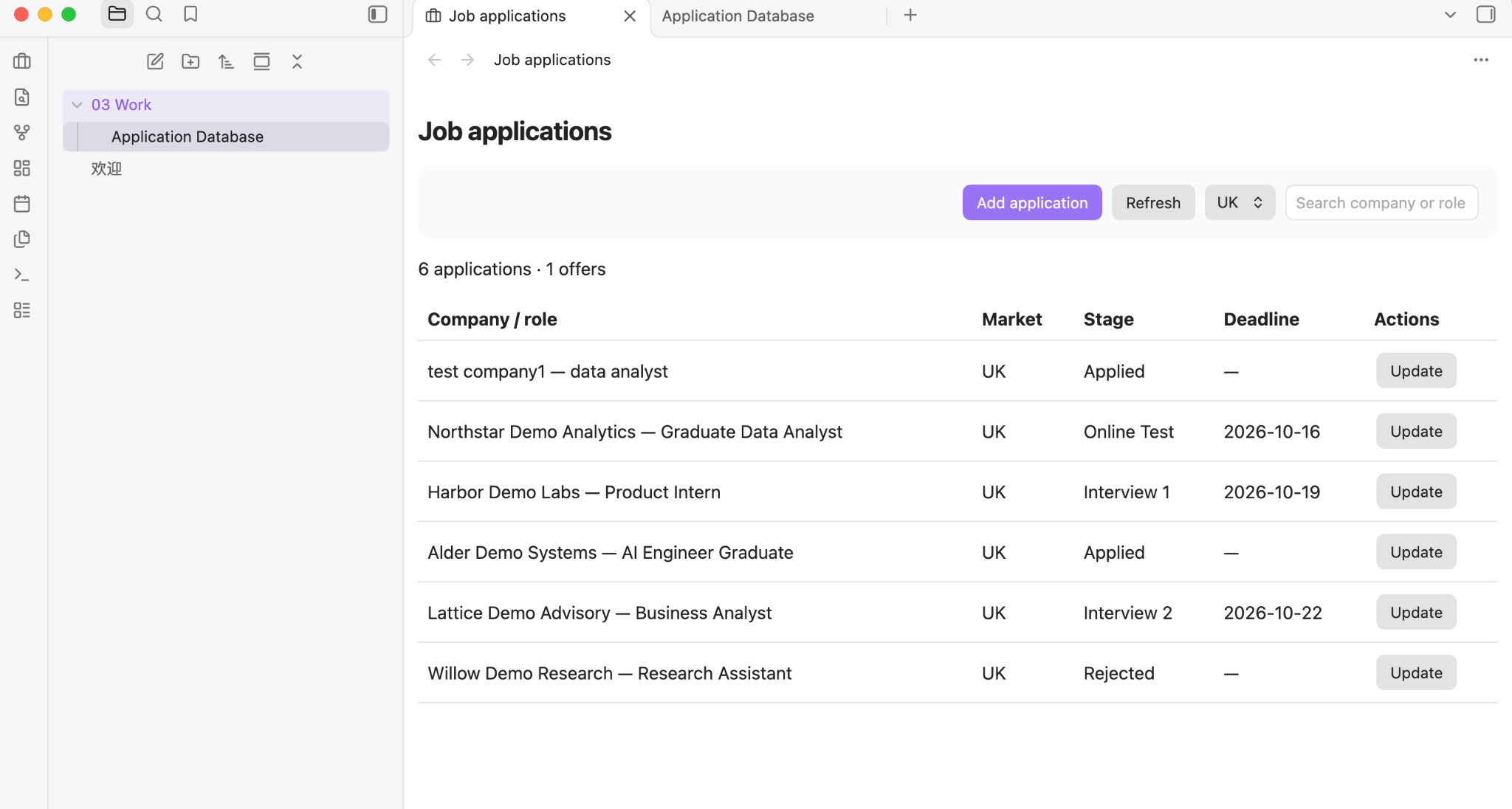
Fictional demo data. In version 1.2.0, the application count follows the filter; the offer count covers the whole database.
截图使用虚构演示数据。1.2.0 的申请数量跟随筛选条件,录用数量统计整个数据库。
Settings
Under Settings → Application Flow, choose your interface language, database file, and preparation notes folder. Language changes leave existing records untouched; reopen an application form to see the new language.
Assign direct shortcuts under Settings → Hotkeys by searching for Application Flow.
设置
在「设置 → Application Flow」中选择界面语言、数据库文件和准备笔记目录。切换语言不会改写已有记录;已经打开的申请表单需重新打开。
需要一键新增或打开总览,可在「设置 → 快捷键」中搜索 Application Flow,自行绑定按键。
Demo
Download the demo database, place it at the root of a test vault, and set the database path to Application-Database-Demo.md. It contains 12 fictional applications. Switch back to your original database path when finished.
把演示数据库放在测试仓库根目录,将数据库路径设为 Application-Database-Demo.md,即可查看 12 条虚构申请。体验后改回原路径即可。
Project details
- Advanced setup and migration
- Data model
- Original QuickAdd and Dataview workflow
- GitHub Releases
- MIT License
Build and validate with Node.js 22 or newer:
npm run check
npm run build
npm test
Data stays in your vault; the plugin uses no telemetry or external services. Automated tests cover data operations and mocked UI interactions. Mobile testing remains pending.
For plugin developers
Search results and similarity scores are powered by semantic analysis of your plugin's README. If your plugin isn't appearing for searches you'd expect, try updating your README to clearly describe your plugin's purpose, features, and use cases.