by malweis
Prepares your note for posting on Discord: adds paragraph indentation, strips frontmatter and tags, and splits into 2,000 or 4,000 character chunks with copy buttons.
Discord Export
An Obsidian plugin that prepares your notes for posting on Discord.
This is mainly a personal tool. I write a lot in Obsidian and regularly share that text on Discord. Manually splitting long notes to fit Discord's message limits and in some cases, formatting oddities, got kinda annoying the moment I start doing it with long text. This plugin is made to automate that in a (what I hope is) simple way.
What it does
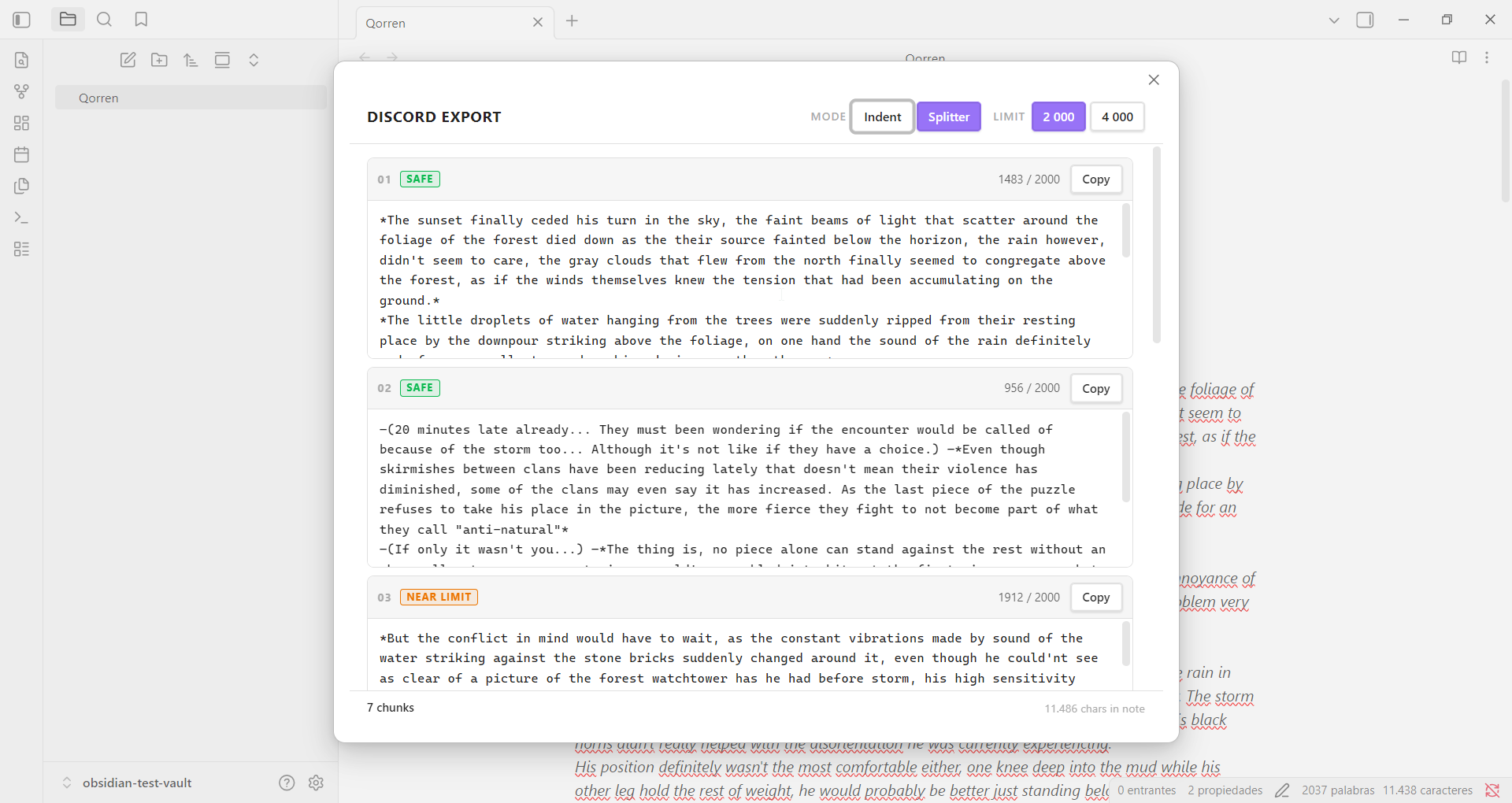
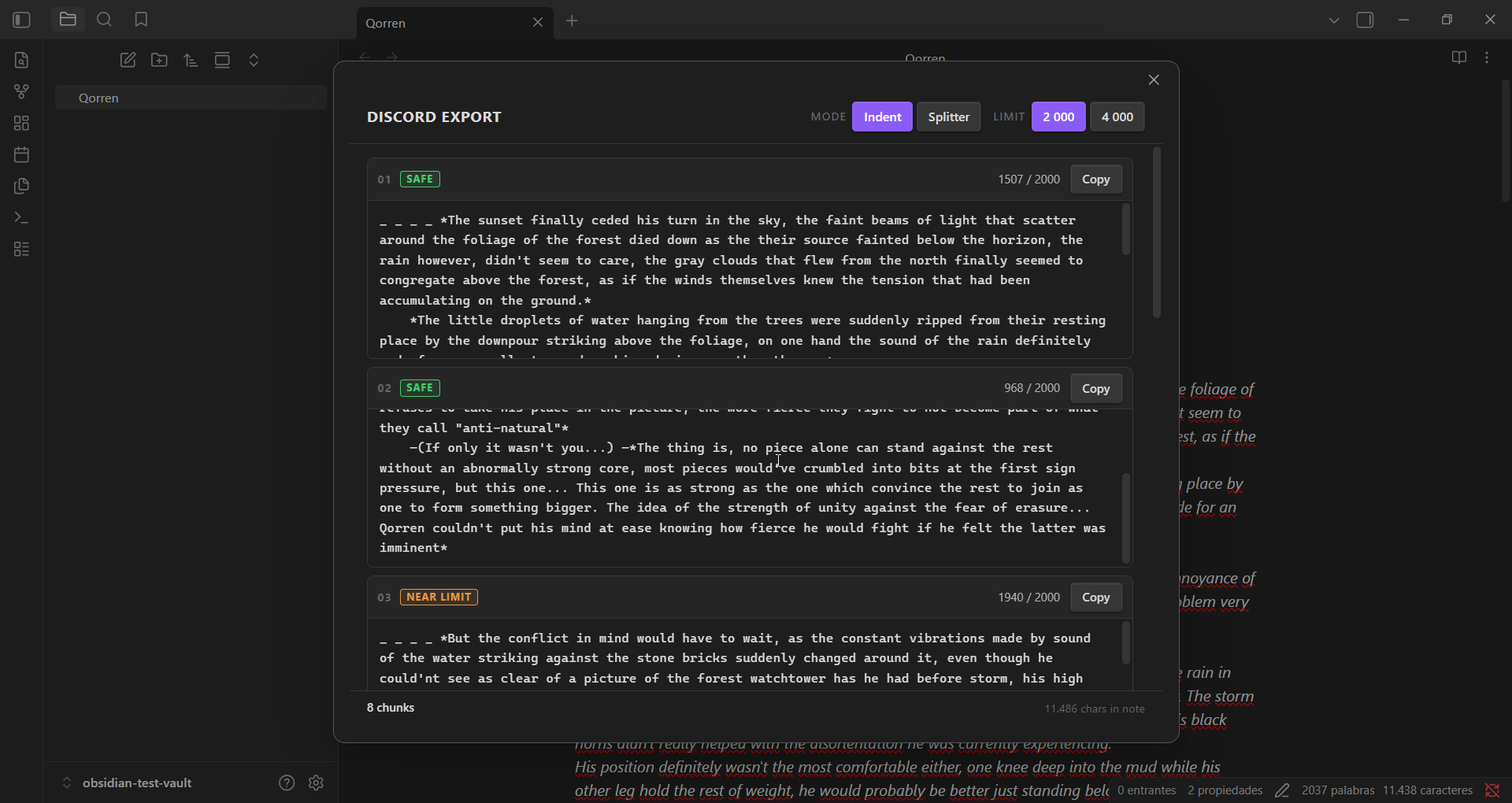
When you trigger the command, a modal opens showing your note split into numbered chunks that fit within Discord's character limit. Each chunk has its own Copy button to paste the chunks needed into discord one by one.
I use a lot of indentation in the things I write, but sometimes discord handles them weirdly, so the plugin has an indentation mode where it just straight up converts line jumps into indents that discord can handle.
Features
- Automatic splitting — chunks your note at paragraph boundaries
- Export selection — export just the highlighted text instead of the whole note
- Indent mode — adds Discord-compatible indentation to every paragraph
- Splitter mode — splits only, no indentation added
- 2000 / 4000 character limit — toggle between standard and Nitro limits
- Ignore blocks — wrap content in
{...}to strip it from the output - Breakpoints — force a chunk split at any point with
+++
Usage
Open the note you want to export, then run Discord Export: Export note to Discord from the command palette (Ctrl+P). You can assign a hotkey in Settings → Hotkeys.
The modal will show all chunks ready to copy.
Exporting a selection
If you only want to share a snippet, highlight it and either run Discord Export: Export selection to Discord from the command palette or right-click the selection and pick Export selection to Discord. The modal works the same, just with the selected text (the header will say Selection so you know which one you're looking at).
If you run it with nothing selected you'll get a small notice instead of the modal.
Special syntax
Ignore blocks {...}
Wrap anything in curly braces and it will be stripped from the output entirely.
He looked serious, his eyes fixed on the horizon.
{add character portrait here}
—We leave at dawn. —he said, turning away.
Output:
He looked serious, his eyes fixed on the horizon.
—We leave at dawn. —he said, turning away.
Ignore blocks can span multiple lines:
The village burned through the night.
{
  insert map image here
  reference: scene-3-map.png
}
By morning, nothing remained.
Breakpoints +++
Place +++ on its own line to force a new chunk to start at that point, regardless of how full the current chunk is. Think of it like <br> in HTML — it's a one-way split marker
He looked serious, his eyes fixed on the horizon.
—We leave at dawn. —he said, turning away.

+++

The village burned through the night.
This produces two chunks: everything before the +++ and everything after, this is to have a way control text separation if needed.
Settings
Open Settings → Community plugins → Discord Export.
| Setting | Description | Options | Default |
|---|---|---|---|
| Character limit | Maximum characters per chunk. Use 4000 if you have Discord Nitro. | 2000 / 4000 | 2000 |
| Default mode | Whether to add indentation or just split the text. | Indent / Splitter | Indent |
| Indent Markdown lines | In Indent mode, also indent headings, lists and quotes. Off keeps them rendering as Markdown on Discord. | On / Off | Off |
Character limit and mode can also be overridden per session directly inside the modal.
Privacy
Discord Export does not make any network requests. All processing happens locally inside Obsidian. No note content or data is sent anywhere.
Development
This project uses pnpm instead of npm. Given the recent supply chain vulnerabilities in the npm ecosystem, pnpm just felt like a safer default
pnpm install
pnpm dev      # watch mode — rebuilds on save
pnpm build    # production build
pnpm test     # processor tests
pnpm release patch   # bump version (patch / minor / major), commit and tag
pnpm release updates package.json, manifest.json and versions.json, commits and tags the new version but doesn't push. Pushing the tag is what triggers the GitHub release.
Before releasing, write the update notes in release-notes/<version>.md and commit them. That file becomes the description of the GitHub release, and pnpm release won't run without it.
Compiled output goes to main.js at the repo root. To test locally, copy main.js, manifest.json, and styles.css into your vault's .obsidian/plugins/discord-export/ folder and reload Obsidian.
If you want pnpm dev to build straight into a test vault, create a .env file at the repo root (it's gitignored) pointing at the plugin folder:
DEV_PLUGIN_DIR=C:/path/to/test-vault/.obsidian/plugins/discord-export
License
MIT — see LICENSE
For plugin developers
Search results and similarity scores are powered by semantic analysis of your plugin's README. If your plugin isn't appearing for searches you'd expect, try updating your README to clearly describe your plugin's purpose, features, and use cases.