Emoji Autocomplete
approvedby kraxen72
Forked from Emoji Shortcodes
Smart suggestions when typing emoji shortcodes & more! :star:
Obsidian Emoji Autocomplete

Easily insert emoji by their shortcodes
✨ This plugin was featured on Obsidian Addict, in several articles - Thank you!
Features
- Get autocomplete/typeahead suggestions for emoji
- Highlight matched part of suggestion (optional)
- Consider emoji history in suggestions (optional)
- Supports searching by emoji tags (optional)
- typing
shufflewill find 🔀 (twisted_rightwards_arrow) - Show original shortcode inline when an emoji is found by tag (optional)
- typing
- Hide OS unsupported emoji (optional)
- Immediately replace emoji / keep as shortcode & show in preview mode
- Use text style for ©, ®, and ™ (enabled by default; optional)
- Remove diacritics when searching for an emoji (optional)
- Replace flag emoji with nicer font (optional)
- Improved performance over Emoji Shortcodes - more information
- Uses the gemoji library to always have an up-to-date list of emoji
- Uses the uFuzzy library and a custom sorting algorithm for better fuzzy search suggestions
Example
:joy:will become 😂:heart:will become ❤
Disclaimers
- This plugin is incompatible with Emoji Shortcodes (this is a full replacement) and Icon Shortcodes
How to install
- Go to Community Plugins in your Obsidian Settings and disable Safe Mode
- Click on Browse and search for "Emoji Autocomplete"
- Click install
- Toggle the Plugin on in the Community Plugins Tab
How to install (from source)
git cloneit into<your vault>/.obsidian/pluginsnpm iorpnpm i(ideal)npm run devorpnpm dev(ideal)- Turn the plugin on inside of Obsidian
For a one-off development build, run pnpm build:dev. Both development commands
copy the plugin into /mnt/c/Blackhole (WSL) or /media/win/#blackhole (Linux),
when that vault exists. Set OBSIDIAN_VAULT=/path/to/vault to use another vault,
or OBSIDIAN_VAULT='' to build without copying. Reload Emoji Autocomplete in
Obsidian after building, or use the Hot Reload plugin with pnpm dev.
Advisory review
Run pnpm review, then open reports/obsidian-review.html for the official
Obsidian ESLint checks.
All enabled rules are warnings. The review runs separately from tests and builds,
and installs no commit hooks. Editor ESLint integrations also show these warnings.
On GitHub, open the Obsidian advisory review workflow's Summary for findings linked to source lines. The HTML report is also available as a workflow artifact. The job allows failures and is not a dependency of the test or release workflows. Some warnings need judgment, particularly sentence-case suggestions for code examples. This is a source review; the community directory also checks releases and CSS separately.
New releases contain only main.js, manifest.json, and styles.css.
The release workflow attempts to attest all three files; an attestation service failure
is reported without blocking publication. Existing releases are not changed automatically.
Support plugin development
If you find this Plugin helpful, consider it's further development or just say a small thank you
Support KraXen72
Creator of Emoji Autocomplete and all the features on top of Emoji Shortcodes


Support phibr0
Creator of Emoji Shortcodes, the plugin Emoji Autocomplete was initially based on
Credits
Thanks to @claremacrae for rigorous testing of this plugin, which led to a significant performance improvements. libraries / packages that were used but modified or otherwise embedded (not in package.json)
is-emoji-supportedmodified the canvas withwillReadFrequently: trueand custom cache handlingcountry-flag-emoji-polyfilltook the font and wrote custom applying logiclucideicon pack andicones.js.orgfor several nice svg icons
Performance Improvements
Emoji shortcodes has an issue where it slows down the Tasks and Dataview plugins by a huge amount.
(You can check the progress on the issue in in this issue)
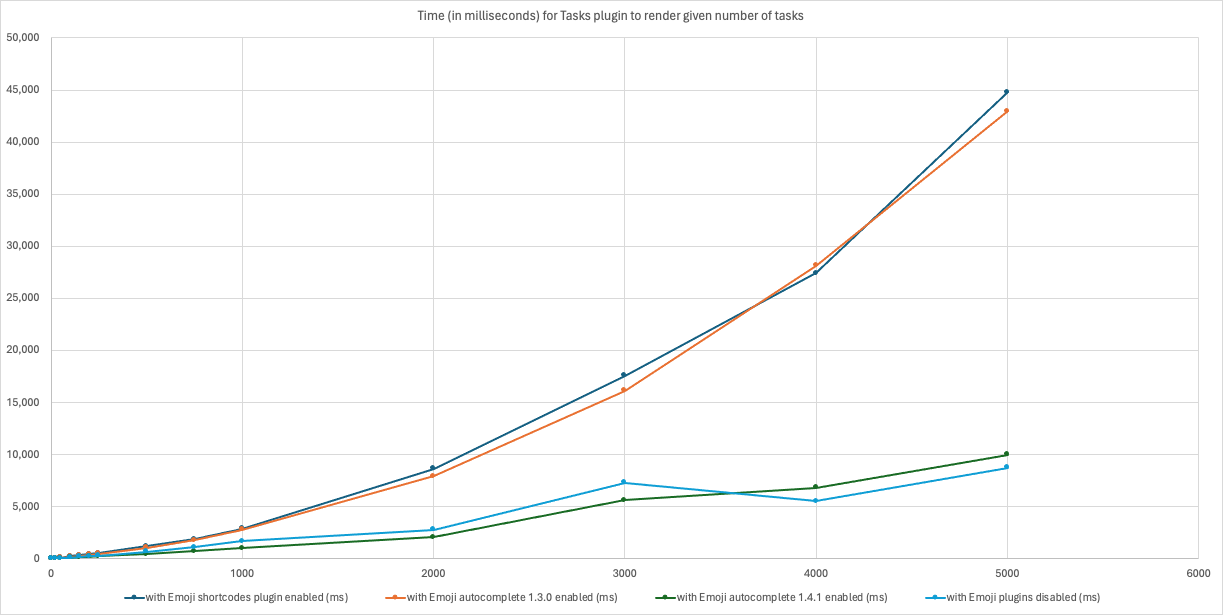
credit: @claremacrae 03/2024
Shortcode rendering uses textContent to avoid forced layout, indexed emoji lookups, and one pass through the DOM. Unchanged text nodes are left untouched. Run pnpm test to check these performance safeguards, cached font detection, and the suggestion result limit; release builds run these tests too.
Twemoji Windows font
Twemoji Windows provides a font with fixes for keycaps and combined emoji in Windows/Chromium apps. Install the TTF from its latest release, add Twemoji Windows after your text font in Obsidian, then use Clear & Re-check in this plugin's settings.
For plugin developers
Search results and similarity scores are powered by semantic analysis of your plugin's README. If your plugin isn't appearing for searches you'd expect, try updating your README to clearly describe your plugin's purpose, features, and use cases.