by poli
Forked from wanghuan9/obsidian-feishu-lark-cli-sync
Publish Markdown notes, folders, and PDFs to Feishu/Lark Docs and keep them in sync through the local lark-cli.
Feishu Docs Publisher
English | 简体中文
Publish Markdown notes, folders, and PDFs to Feishu/Lark Docs and keep them in sync through the local lark-cli.
Use it when Obsidian is the local source of truth and Feishu/Lark is where the team reads, comments, and collaborates.
Network & Third-Party Account Disclosures
- Third-Party Account: Sync requires a Feishu or Lark account signed in through the local
lark-cli(lark-cli auth login). This plugin does not ask for an app secret. - Network Access: Publish, sync, overwrite, link lookup, and
lark-cliversion checks run the locallark-cli. That program sends HTTPS requests to the official Feishu/Lark Open APIs (open.feishu.cnfor Feishu accounts,open.larksuite.comfor Lark accounts). Requests run when you sync or publish, and also from save-triggered sync and the Gitpre-pushhook when those modes are enabled. There is no separate telemetry channel. - Credential Storage: Login credentials stay in the local
lark-cliauth store. This plugin does not write app secrets or access tokens into notes,data.json, or logs. Document URLs and bindings are stored in plugin data, and optionally in note frontmatter when that setting is enabled.
Origin & Credits
Forked from wanghuan9/obsidian-feishu-lark-cli-sync by huan.wang (wanghuan) under the MIT License. The original repository and the author's GitHub account are no longer available. The original "Feishu Lark CLI Sync" plugin was archived in the Obsidian community directory. This project continues from 0.1.26, maintained by totok22, with added published-link management, PDF sync and dedup, and related sync fixes, under the new plugin ID feishu-docs-publisher. It is not officially affiliated with the original author. It is unrelated to zktww/feishu-lark-sync ("Feishu Lark Sync"), which is an independent codebase. The original copyright is retained in LICENSE.
Migrating from Feishu Lark CLI Sync
The plugin id changed from feishu-lark-cli-sync to feishu-docs-publisher, so Obsidian stores this plugin's data in a new folder. On desktop startup, if .obsidian/plugins/feishu-docs-publisher/data.json is not already present, the plugin copies data.json and lark-sync-state.json from .obsidian/plugins/feishu-lark-cli-sync/ when those files exist. The old folder is left unchanged.
Disable the archived plugin after the new one is enabled so the two copies do not sync the same notes.
The Git pre-push hook reads the new folder when its data.json exists, and otherwise falls back to the old folder. Opening Obsidian once refreshes the hook helper scripts when the hook was installed by this plugin or its predecessor. Install the hook again from settings if the Git Hook status does not show as installed.
To copy the files before opening Obsidian:
mkdir -p "/path/to/your/vault/.obsidian/plugins/feishu-docs-publisher"
cp "/path/to/your/vault/.obsidian/plugins/feishu-lark-cli-sync/data.json" \
  "/path/to/your/vault/.obsidian/plugins/feishu-docs-publisher/data.json"
cp "/path/to/your/vault/.obsidian/plugins/feishu-lark-cli-sync/lark-sync-state.json" \
  "/path/to/your/vault/.obsidian/plugins/feishu-docs-publisher/lark-sync-state.json"
Skip a file that does not exist. An existing file in the new folder is not overwritten.
Installation
Option 1: Community plugins
After this plugin is listed in the community plugin browser:
- Open Settings → Community plugins.
- Turn off Restricted mode and click Browse.
- Search for
Feishu Docs Publisher, click Install, and then Enable.
Option 2: Manual installation from a release
- Download
main.js,manifest.json, andstyles.cssfrom GitHub Releases. - Create
.obsidian/plugins/feishu-docs-publisher/in your vault. - Place the three files in that folder.
- Reload community plugins and enable Feishu Docs Publisher.
The Git hook scripts are embedded in main.js and are written into .git/hooks when you install the hook. A community or release install does not need extra script files in the plugin folder.
Option 3: Build from source
git clone https://github.com/totok22/feishu-docs-publisher.git
cd feishu-docs-publisher
npm install
npm run build
./install.sh "/path/to/your/vault"
The install script copies the built plugin into .obsidian/plugins/feishu-docs-publisher/. If that vault already has a hook installed by this plugin, the script refreshes the hook helper scripts. Restart Obsidian and enable Feishu Docs Publisher.
The GitHub repository and the vault plugin folder are both feishu-docs-publisher.
Prerequisites
Install and log in to lark-cli first:
npm install -g @larksuite/cli
lark-cli version
lark-cli auth login
lark-cli auth status
Use lark-cli >= 1.0.53. Older versions may create documents titled Untitled or fail during sync. Upgrade with:
npm install -g @larksuite/cli@latest
If Obsidian cannot find lark-cli, set its absolute path in plugin settings (which lark-cli).
Usage
Single-note sync
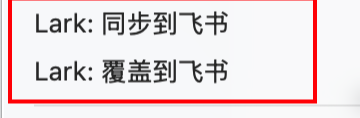
Markdown files, PDFs, and folders share four context-menu actions:
Lark: Sync to Feishu/Lark: sync the selected note, PDF, or folder; publish it when no binding exists.Lark: Overwrite sync to Feishu/Lark: overwrite from local content and remove other same-name documents in the corresponding remote parent.Lark: Set Feishu/Lark link: bind an existing remote document, PDF, or folder.Lark: Open Feishu/Lark link: open the bound remote page; disabled when no URL is available.
The command palette's Overwrite sync to Feishu/Lark performs the same single-note operation. A remote file may be bound to only one local file. Link assignment, binding recovery, and sync check for conflicts; existing shared bindings must be corrected before syncing.
Explicit overwrite retains the bound document. Without a binding, it chooses one stable existing match. The binding is saved and the local-content write confirmed before other same-name documents in that remote parent are deleted. Normal sync, save-triggered sync, and Git hooks do not delete duplicates. A document bound to another local file cannot be deleted as a duplicate.
Before deleting a duplicate wiki document, the plugin moves its child pages under the retained document. Folder overwrite recursively overwrites Markdown and PDF files and resets folder document bodies to native sub-page lists. If sibling Markdown notes use identical document titles, overwrite stops and asks you to use distinct titles.
Sync is one-way from Obsidian to Feishu/Lark. The local Markdown note is the source.
Bindings are stored in plugin data. With “Write binding to frontmatter” enabled, this optional field is also written:
---
lark_doc_url: "https://example.feishu.cn/docx/xxxx"
---
Local images
![[diagram.png]]
![[diagram.png|600]]
![[diagram.png|600x400]]

PNG, JPEG/JPG, GIF, WebP, and BMP are supported. Images must stay inside the current vault. HTTP(S) images continue through the Markdown import path. Save-after-sync and Git pre-push both sync bound notes that reference an image when only that image changes.
Folder sync
Right-click a folder and choose Lark: Sync to Feishu/Lark. The plugin creates the matching remote hierarchy, syncs Markdown and PDF files, and rewrites Markdown internal links in the uploaded content.
In a wiki (/wiki/...) or personal document library, each folder is itself a document. The plugin inserts a native Feishu/Lark sub-page list into folder documents at every level. Feishu/Lark maintains those document links; the plugin does not generate the links or embed child document content.
Normal folder sync reuses an existing list and preserves other content on the folder page. Folder overwrite resets the folder page body to its native sub-page list. Drive targets (/drive/folder/...) use ordinary folders and do not receive a list.
Supported link forms:
Detailed design: 02-database.md
[Component design](03-components.md#section)
[[04-api|API design]]
Local notes remain unchanged.
Published files
Click the paper-plane ribbon icon, or use the command palette, to open Published files. Copying links and browsing saved records are available in this window.
Each row shows the filename and local path. Use Open in Feishu to view the file. The More menu offers copy link, open local file, sync, set link, and remove saved link. Removing a saved link keeps both local and Feishu files.
Older versions may not have recorded links when frontmatter was disabled. Use Find existing links to match note filenames inside associated Feishu folders. If several files match, set the link manually. This action never creates Feishu files.
PDF files
Folder sync uploads PDFs as native files inside the matching Drive folders or wiki nodes. A PDF context menu can also upload one file; a blank default target uploads a standalone PDF to the Drive root.
Supported PDF references:
[[papers/report.pdf]]
![[papers/report.pdf]]
[[report.pdf|Read the report]]
![[report.pdf#page=2]]
[Read the report](papers/report.pdf)
After uploading PDFs, folder sync rewrites these references into native Feishu/Lark file references. First-time single-note publishing, manual updates, and save-triggered sync also reuse existing PDF bindings. For a PDF outside the synced folder, upload it separately or bind its existing remote URL before syncing the note. Local wiki links and embeds remain unchanged.
Feishu/Lark displays the remote PDF filename. Aliases, page numbers, and preview dimensions are omitted; embeds also become clickable file references. PDFs are not converted to Docx or expanded into page previews. Unpublished, pending, missing, and code-example references stay literal. Duplicate filenames are resolved with Obsidian's link resolver.
Git hooks also reuse PDF bindings and rewrite references with vault paths or paths relative to the note. Short filenames in other folders require Obsidian's resolver; include a path when using a hook.
Persistent bindings and content hashes skip unchanged PDFs. Changes overwrite the same file token and preserve its link. Local renames migrate the association while preserving the remote name. PDFs update through manual or folder sync; save-triggered sync and Git hooks still cover Markdown and referenced images only.
Explicit PDF overwrite replaces the same remote file even when the local file is unchanged. Without a binding, it first reuses a same-name file. After a successful upload, it removes other same-name PDFs from that remote parent.
An upload timeout keeps a pending record and stops blind retries. Reconcile the existing remote file through the binding editor before retrying. If no remote file was created, disconnect the pending local record and upload again.
Auto sync
Auto sync only handles already bound documents. Publish once with Lark: Sync to Feishu/Lark so the binding is saved. Later save-after-sync or Git hook sync can then update that file. Frontmatter is optional.
Trigger modes
Off: manual sync only.Sync after save: while Obsidian is running, sync bound Markdown notes after file save events.Git pre-push hook: sync bound Markdown notes beforegit push.
Sync after save depends on Obsidian receiving file change events. It runs for edits inside Obsidian, and for edits from another editor while Obsidian has the vault open. It does not run when Obsidian is closed.
Git pre-push hook depends only on git push. Install it from the Git Hook settings section. If sync fails, the current git push is blocked.
Settings
Default target: Wiki URL, wiki node token, folder token, or blank for the personal library.Title source: use the first Markdown heading or the file name.Write binding to frontmatter: also store the remote URL in note frontmatter. The plugin-data binding remains either way.Sync strategy: automatic by default. Small changes use incremental sync. Large, complex, or unsafe changes fall back to a full overwrite.Sync state cache: how many document states are kept for precise sync.
Incremental sync and remote history
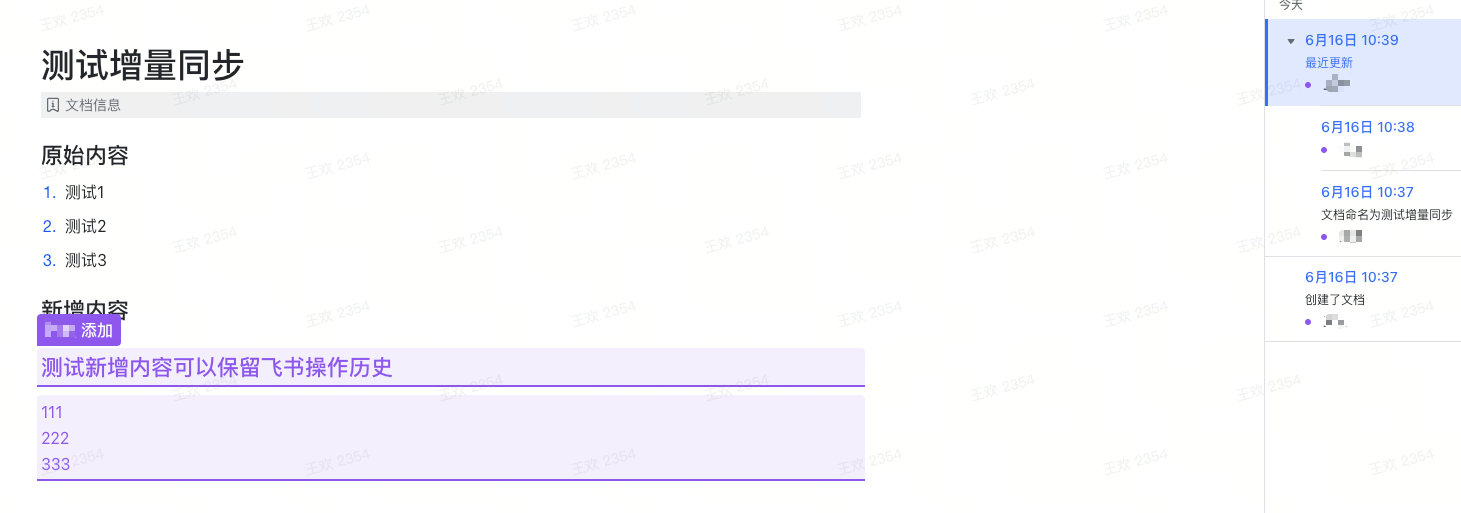
The plugin splits Markdown into top-level blocks and records their Feishu/Lark block ids. Later syncs update changed blocks, such as replacing, inserting, or deleting a paragraph, without rewriting the whole document. Feishu/Lark can keep the corresponding history. The remote document is rewritten when you choose overwrite, or when the automatic strategy decides the change is too large or too complex for an incremental update.
Publication bindings and pending attempts are stored in .obsidian/plugins/feishu-docs-publisher/data.json. They are independent of sync-state cache trimming.
Precise sync state is stored at:
.obsidian/plugins/feishu-docs-publisher/lark-sync-state.json
Notes
- Auto sync only handles already bound notes and does not publish unbound files.
- If a remote document was edited manually, merge those edits back into the local Markdown file first. Local Markdown is the source of truth.
Development
npm install
npm test
npm run build
npm test typechecks and runs the test suite. npm run build writes main.js, which is gitignored. npm run check runs tests and the production build.
Pushing a tag that exactly matches manifest.json and package.json version (for example 0.2.0, with no v prefix) runs .github/workflows/release.yml. That workflow verifies the tag, runs npm ci and npm run check, attests main.js, manifest.json, and styles.css, and opens a draft GitHub release containing those files.
npm version updates manifest.json and adds the new version to versions.json through scripts/version-bump.mjs.
License
MIT License. Copyright (c) 2026 huan.wang and Copyright (c) 2026 totok22. See LICENSE.
For plugin developers
Search results and similarity scores are powered by semantic analysis of your plugin's README. If your plugin isn't appearing for searches you'd expect, try updating your README to clearly describe your plugin's purpose, features, and use cases.