by André Santos
Interactive fifth edition (2014 rules) character sheets: SRD 5.1 included, manual mode, optional import of your own data and compendium links.
5e Character Sheet
Interactive fifth edition (2014 rules) character sheets that live inside your Obsidian notes.
Create a character in a few clicks, keep your friends' characters next to your campaign notes, and roll straight from the sheet.


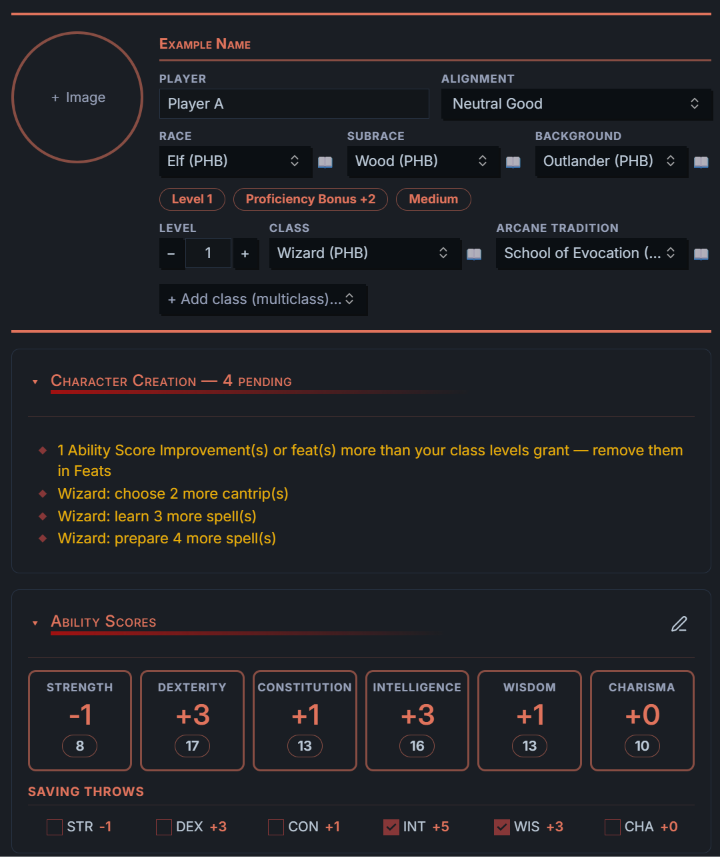
Unofficial fan project. Not affiliated with, endorsed, sponsored or approved by Wizards of the Coast. See Legal.
Highlights
- Everything in one note. Race, class (multiclass included), background, ability scores, combat, skills, features, spells, inventory, personality and a diary, saved in the note itself.
- Rules done for you. Racial bonuses, proficiency, saves and skills, AC, hit points, spell save DC, spell slots (single and multiclass), class features by level and a creation checklist that tells you what is still missing.
- Works with or without game data. Manual mode for homebrew and quick notes, the SRD 5.1 built in, or import the books you own.
- Roll from the sheet. Click any bonus to roll; Shift-click for advantage, Ctrl/Cmd-click for disadvantage. Uses Dice Roller when installed.
- Linked to your notes. Optional links and page previews to a compendium,
[[links]]in every text field, and Initiative Tracker integration.
A quick tour
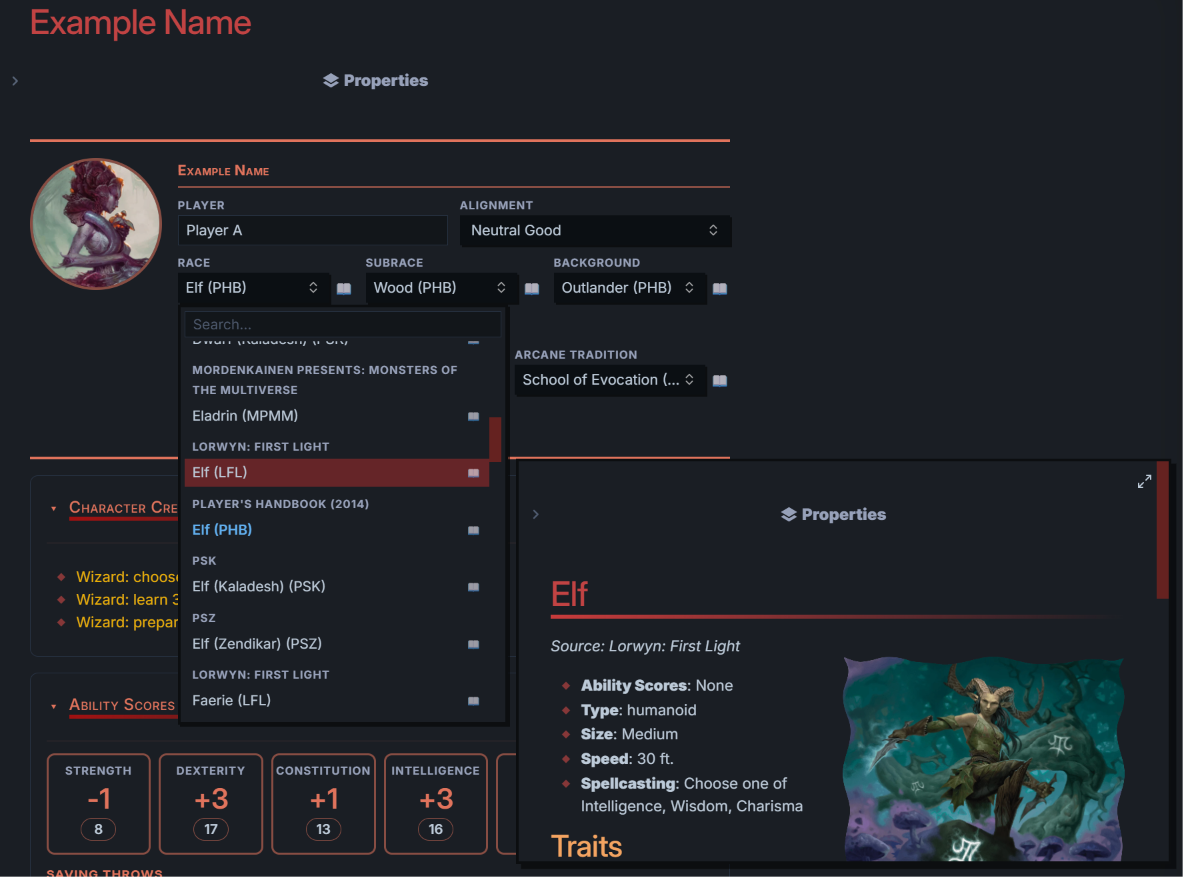
Choose race, class and background
Searchable menus grouped by book. Hover an option to preview its compendium note before choosing.
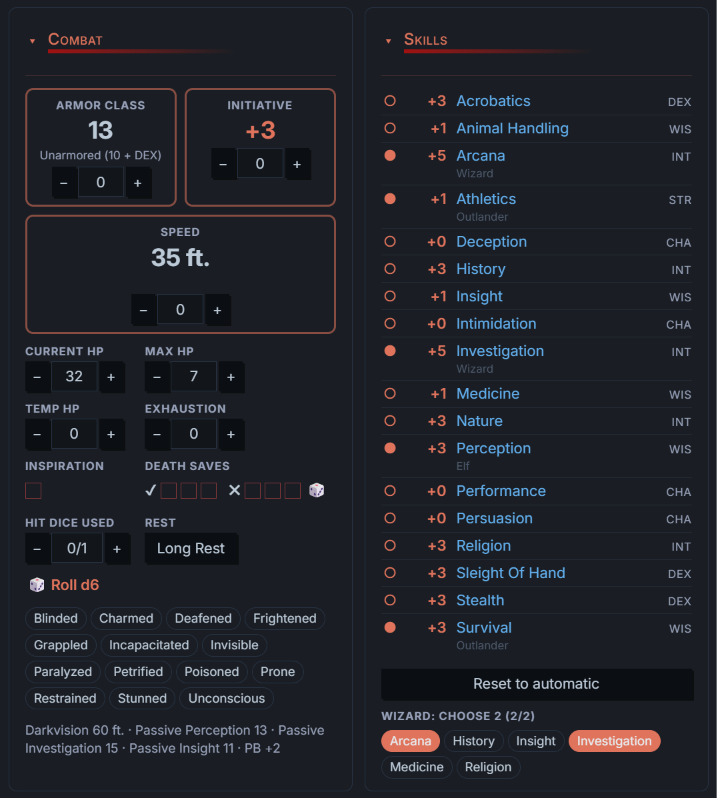
Combat and skills
AC, initiative and speed are calculated from your equipment, class and race, and can be adjusted with + and −. Track HP, temporary HP, exhaustion, death saves, hit dice and conditions. Skills show where each proficiency comes from; click the dot to cycle none → proficient → expertise.
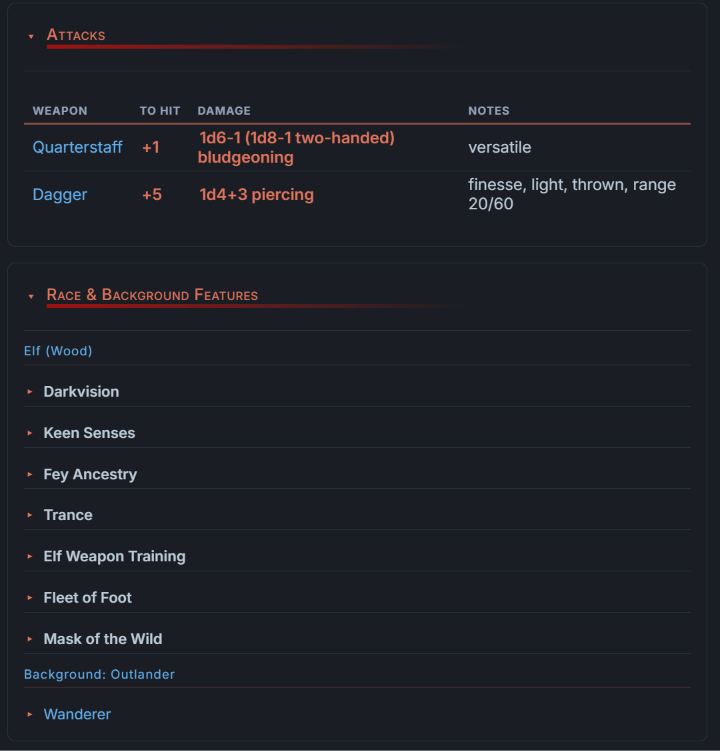
Attacks and features
Attacks come from your equipped weapons. Race, background and class features are filled in as you level up; expand any of them to read the full text.
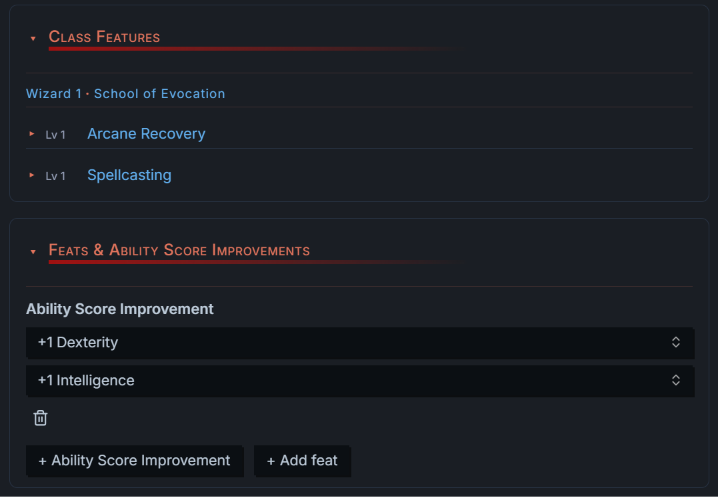
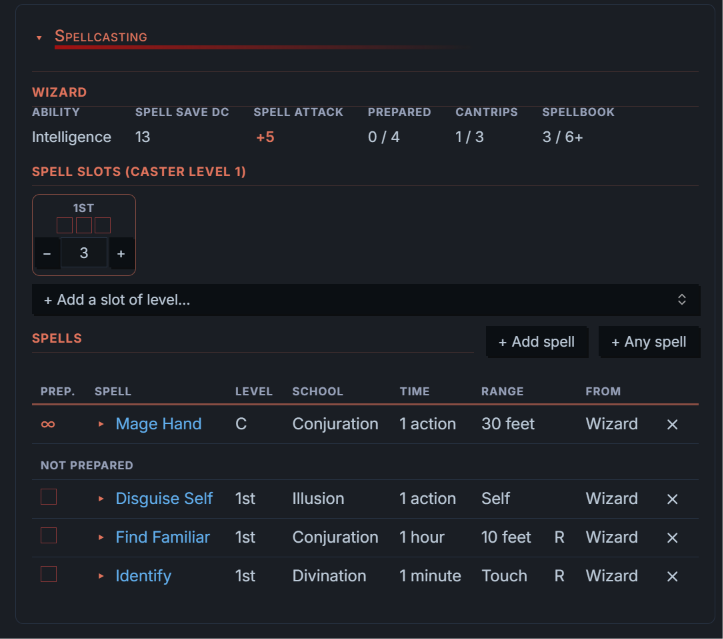
Spellcasting
Spell save DC, spell attack, prepared and known counts, and slots per level that you can tick off or adjust. Prepared spells stay at the top of the list.
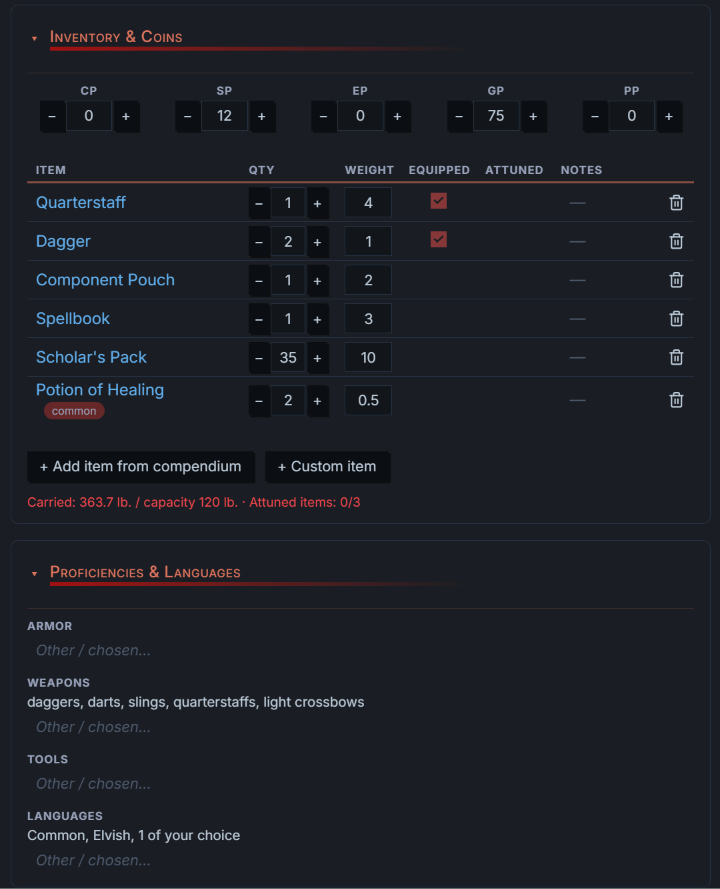
Inventory and proficiencies
Items with quantity, weight, equipped and attuned (max 3), coins, carrying capacity, and the proficiencies and languages your choices give you.
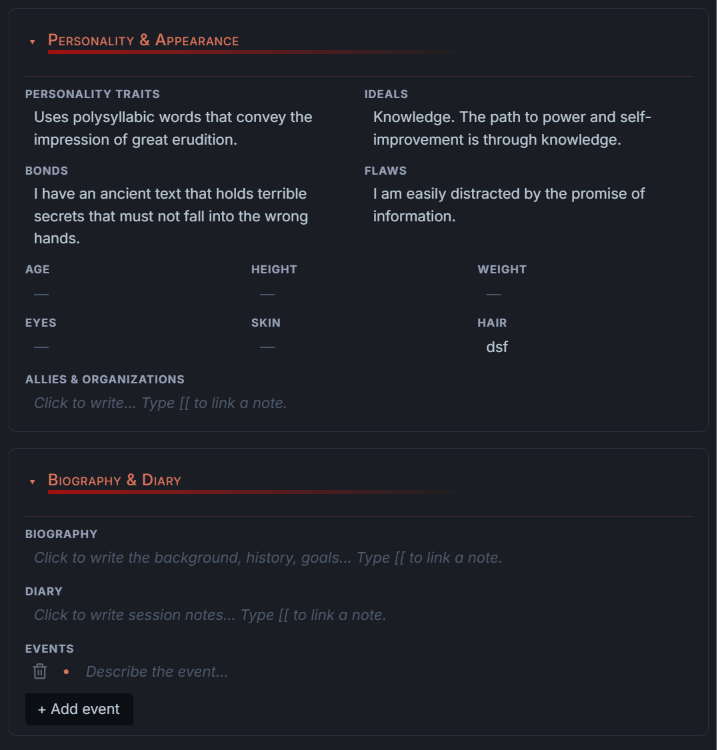
Personality, biography and diary
Plain text when you read, a text box when you click. Type [[ to link any note in your vault.
All features
- Header with portrait, name, player, alignment, race, subrace, background and classes (multiclass supported, with prerequisites checked).
- Ability scores with Point Buy (validated), Standard Array, 4d6 rolls or manual entry; racial bonuses applied automatically; an edit mode keeps the view clean.
- Combat: AC from equipped armour/shield (Unarmored Defense included), HP from hit dice and CON, hit dice, death saves, inspiration, exhaustion, conditions and a Long Rest button.
- Saves and skills with proficiency/expertise, passive scores, Jack of All Trades.
- Race, background and class features filled in by level, with class resources (Ki, Rage, Sorcery Points…).
- Feats and Ability Score Improvements counted against the ASIs your class levels grant.
- Spellcasting: spell save DC, spell attack, prepared/known counts, spell slots for single and multiclass casters (Pact Magic separate), slots you can add or remove, and a spell list with prepared spells first. Domain/oath/circle spells are added automatically.
- Inventory and coins, attunement (max 3), carrying capacity, attacks from equipped weapons.
- Personality, appearance, biography, diary and events: rendered Markdown with
[[links]]; click to edit, type[[to pick a note. - Rolls: click any bonus to roll; Shift-click = advantage, Ctrl/Cmd-click = disadvantage. Uses the Dice Roller plugin when it is installed, a built-in roller otherwise.
- Initiative Tracker: the sheet keeps
name,level,hp,acandmodifierin the note's properties, which Initiative Tracker reads for players linked to a note.
The screenshots show content imported from the books the author owns. The plugin itself ships only the SRD 5.1; see Rules data.
Requirements
- Obsidian 1.4 or later.
- Desktop (Windows, macOS, Linux) and mobile (Android, iOS). Mobile works but has had less testing.
- Nothing else is required. The plugins and tools below are optional and add extra features.
Installation
From Community plugins (once the plugin is listed): Settings → Community plugins → Browse, search for 5e Character Sheet, install and enable it.
Manually (before it is listed, or to try a specific version):
- Download
main.js,manifest.jsonandstyles.cssfrom the latest release. - Put them in
<your vault>/.obsidian/plugins/fifth-edition-character-sheet/(create the folder;.obsidianis hidden in most file browsers). - Restart Obsidian, or reload plugins, and enable 5e Character Sheet in Settings → Community plugins.
With BRAT: add this repository as a beta plugin. BRAT installs and updates it from the GitHub releases.
Recommended plugins and tools (optional)
| Plugin or tool | What it adds to the sheet |
|---|---|
| Page preview (core plugin, on by default) | Previews of compendium notes when hovering links and the options of the race, class, subclass and background menus. |
| Dice Roller | Rolls go through Dice Roller (including its 3D dice and roll history, if you enable them there). Without it the sheet uses its own roller. |
| Initiative Tracker | Add the character as a player linked to its note: name, level, HP, AC and initiative modifier are read from the sheet and kept in sync. |
| ttrpg-convert-cli (command-line tool) | Generates a compendium of notes from your own data. With it, races, classes, features, spells, items and conditions on the sheet link to those notes. |
Getting started
- Run 5e Character Sheet: New character from the command palette or the ribbon icon, and give the character a name and a folder.
- Choose where the rules come from in Settings → 5e Character Sheet → Rules data (see below). Manual mode is the default.
- Fill in the sheet. Click the pencil on Ability Scores to edit scores; click any text to edit it.
Adding a sheet to any note
The sheet is a code block, so any note can hold one:
```character-sheet-5e
```
The character's data is saved in that note's properties. Put your own notes, headings and links above or below the block as usual.
Settings
- Characters folder: optional. Where new characters are created. Leave it empty to use the last folder you created a character in (the vault root the first time).
- Rules data: none (manual mode), SRD 5.1 or imported data (see below).
- Compendium folder: optional, only for links (see Compendium links).
Rules data
| Source | What you get |
|---|---|
| None (manual mode) — default | Everything is typed in: race, class, features, spells, AC, HP, speed. Simple maths stays automatic: modifiers, proficiency bonus, saves, skills, passive Perception, initiative, spell DC and attack. |
| SRD 5.1 (included) | Menus and automatic rules for the SRD 5.1 content (9 races, 12 classes with one subclass each, 319 spells, equipment). |
| Imported from 5etools | All the content of the books you own (see below). |
Switching sources never loses information: manual fields and data-driven choices are stored separately.
Importing your own data
Only for content you are entitled to use. The plugin does not download anything.
- Copy the
datafolder of a 5etools copy into your vault. A hidden folder such as.5etools/datakeeps those files out of your file list and search. - In the settings choose Imported from 5etools, enter that folder (e.g.
.5etools/data) and press Import now. - Optional: Only 2014 rules leaves out the 2024 core books; Only entries with a note imports exactly what your compendium contains.
The data is converted on your device and stored in the plugin's folder in your vault. After the import you can delete the copied data folder.
Compendium links (optional)
If you keep a compendium generated by ttrpg-convert-cli, set Compendium folder to the folder that contains its compendium and rules folders. Races, classes, subclasses, features, spells, items and conditions then link to those notes, with page previews on hover. With Only entries with a note the importer keeps exactly what your compendium contains.
Privacy and file access
- The plugin works offline: it makes no network requests and has no telemetry.
- It only reads files inside your vault.
- It reads the list of files in your vault only when you ask for it:
- Portrait image: clicking the portrait lists the images in your vault so you can choose one.
- Links in text fields: typing
[[lists your notes so you can choose one to link. - Compendium links: only the notes inside the compendium folder you set are read, to match races, classes, spells and items to their notes.
- Import: only the 5etools folder you set is read; the converted data is stored in the plugin's own folder.
Notes and limitations
- Character data is stored in the note's frontmatter (
dndproperty, hidden from the Properties panel). Links written inside the sheet work and preview, but Obsidian does not count them as backlinks. - Spell lists, class tables and features come from the data source; homebrew content can be added in manual mode.
- Optional class features from Tasha's Cauldron are shown and marked as optional rather than chosen individually.
Development
npm install
npm run data:srd   # rebuilds data/srd-5.1.json from a 5etools data folder (FIVETOOLS_DATA)
npm test           # rules engine, SRD and manual-mode tests
npm run build      # bundles dist/main.js, manifest.json, styles.css
data/imported.json, vendor/ and local.config.json are personal and git-ignored. For npm run data:import, npm run install-vault and the tests that use personal data, set VAULT and COMPENDIUM as environment variables or in local.config.json:
{ "vault": "../My Vault", "compendium": "Resources/Compendium" }
Legal
This work includes material taken from the System Reference Document 5.1 ("SRD 5.1") by Wizards of the Coast LLC and available at https://dnd.wizards.com/resources/systems-reference-document. The SRD 5.1 is licensed under the Creative Commons Attribution 4.0 International License available at https://creativecommons.org/licenses/by/4.0/legalcode.
Only SRD 5.1 content is distributed with this plugin. Content imported by a user from their own files stays on their computer and is their responsibility.
Dungeons & Dragons, D&D and Wizards of the Coast are trademarks of Wizards of the Coast LLC. 5etools, ttrpg-convert-cli, Dice Roller and Initiative Tracker are independent projects of their respective authors.
The bundled SRD data is derived from the data files of 5etools (MIT License, Copyright (c) 2017 TheGiddyLimit and contributors); the full notice is in THIRD_PARTY_NOTICES.md.
The plugin's code is released under the MIT License.
For plugin developers
Search results and similarity scores are powered by semantic analysis of your plugin's README. If your plugin isn't appearing for searches you'd expect, try updating your README to clearly describe your plugin's purpose, features, and use cases.