ttrpg-stats
unlistedby ThopDev
TTRPG Stats allows you create your character sheet with dynamic components that allow you to track your hp, spellslots, gold and way more.
TTRPG Stats
TTRPGStats is a plugin for Obsidian that lets you build your character sheet with dynamic components for tracking HP, spell slots, currency, skills, and more.
Disclaimer
This plugin is currently pending submission to the Obsidian community plugins list.
Workaround:
Install BRAT and add the following repo: https://github.com/thopdev/TTRPGStats
How to use
Create a component by adding a code block with the component name:
```ttrpgstats-hp
```
The plugin saves all data to your note's frontmatter properties, so you can read and edit them without the plugin as well.
Component Configurator
You can also insert and edit components using the built-in configurator instead of writing YAML by hand.
To insert a new component: Click the + circle icon in the ribbon, or run the command TTRPG Stats: Insert component from the command palette. Pick a component, fill in the form, and click Insert — the code block is added at your cursor.
To edit an existing component: Place your cursor inside an existing ttrpgstats-* code block and open the configurator. It will detect the block, pre-fill all fields with the current values, and replace the block when you click Insert.
Components
HP — Hit Points
Code block: ttrpgstats-hp
No configuration needed. The component reads and writes to property names configured in the plugin settings.
Shows current/max HP with Heal and Damage buttons. When HP reaches 0, death save checkboxes appear automatically (3 successes / 3 failures).
Settings (configured in plugin settings, not the code block):
| Setting | Default |
|---|---|
| Max health property name | max_health |
| Current health property name | current_health |
| Death save success property | death_save_success |
| Death save failure property | death_save_failure |
Examples:
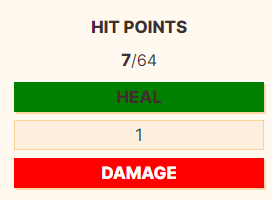
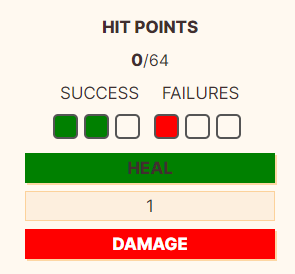
Tracker
Code block: ttrpgstats-tracker
Tracks a countable resource (spell slots, ki points, etc.) as a row of checkboxes with optional event buttons.
id: spellslots_1
name: Spell Slots (1st)
max: 4
color: Blue
events:
  - name: short
    calc: devideMaxUp
  - name: long
    calc: max
TrackerConfig
| Name | Type | Required | Default | Description |
|---|---|---|---|---|
| id | string | Yes | Property name used to save the current value | |
| name | string | No | Label shown above the tracker | |
| max | number | Yes | Maximum value | |
| color | string | No | Blue | Checkbox fill color |
| events | TrackerEvent[] | No | Buttons that trigger value changes |
TrackerEvent
| Name | Type | Required | Default | Description |
|---|---|---|---|---|
| name | string | Yes | Button label | |
| calc | zero max decrease increase devideMaxUp devideMaxDown double | No | zero | Action triggered by the button |
Examples:
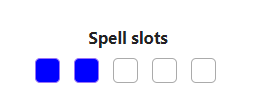
Tracker Buttons
Code block: ttrpgstats-button
A row of buttons that fire events on all trackers on the page. Use this alongside multiple trackers to trigger rest actions etc. in one click.
buttons:
  - name: Short Rest
    id: short
    color: green
  - name: Long Rest
    id: long
    color: red
TrackerButtonListConfig
| Name | Type | Required | Default | Description |
|---|---|---|---|---|
| buttons | TrackerButtonConfig[] | Yes | List of buttons to render | |
| name | string | No | Label shown above the buttons |
TrackerButtonConfig
| Name | Type | Required | Default | Description |
|---|---|---|---|---|
| name | string | Yes | Button label | |
| id | string | Yes | Event id to fire — matches name in TrackerEvent | |
| color | string | No | White | Button color |
Examples:
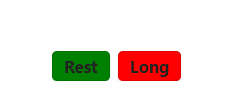
Valuta — Currency Tracker
Code block: ttrpgstats-valuta
Tracks multiple currency denominations with Add and Remove buttons. Supports automatic conversion between denominations.
id: coins
allowNegative: false
convert: false
displayNull: true
valutas:
  - platinum: 1000
  - gold: 100
  - electrum: 50
  - silver: 10
  - copper: 1
ValutaConfig
| Name | Type | Required | Default | Description |
|---|---|---|---|---|
| id | string | No | coins | Property name used when convert: true to store the total value |
| allowNegative | boolean | No | false | Allow values to go below zero |
| convert | boolean | No | false | Store a single total value and always display in optimal denominations |
| displayNull | boolean | No | true | Show denominations that are currently 0 |
| valutas | Valuta[] | Yes | List of denominations. Each entry is name: multiplier |
Each entry in valutas is a key/value pair where the key is the currency name and the value is its worth in base units. Example: gold: 100 means 1 gold = 100 copper.
Modes:
convert: false(default) — each denomination is stored as its own property. When removing, if a denomination doesn't have enough, it automatically borrows from higher denominations (e.g. removing 1 silver from 10 gold → 9 gold 9 silver). A Simplify button collapses values into the fewest coins possible.convert: true— all value is stored as a single total in base units and always displayed in the optimal breakdown.
Skills
Code block: ttrpgstats-skills
Displays a skill list with ability modifiers, proficiency bonuses, and totals. Reads ability scores and proficiency bonus from your note's properties.
proficiency: proficiency_bonus
modifiers: false
sort: ability
abilities:
  str: str
  dex: dex
  con: con
  int: int
  wis: wis
  cha: cha
skills:
  - name: Athletics
    ability: str
  - name: Stealth
    ability: dex
    proficient: true
  - name: Perception
    ability: wis
    proficient: true
  - name: Persuasion
    ability: cha
    expertise: true
    comment: Bardic inspiration
SkillConfig
| Name | Type | Required | Default | Description |
|---|---|---|---|---|
| proficiency | string | No | proficiency_bonus | Property name to read proficiency bonus from |
| abilities | Record<string, string> | No | str/dex/con/int/wis/cha → same names | Maps ability abbreviation to property name. Override to point to different properties |
| modifiers | boolean | No | false | When true, treats ability scores as already-computed modifiers instead of raw scores |
| sort | name ability | No | Default display order. name = alphabetical, ability = grouped by ability | |
| skills | SkillItem[] | Yes | List of skills to display |
SkillItem
| Name | Type | Required | Default | Description |
|---|---|---|---|---|
| name | string | Yes | Skill name | |
| ability | string | Yes | str | Ability abbreviation this skill uses |
| proficient | boolean | No | false | Adds proficiency bonus to the total |
| expertise | boolean | No | false | Adds double proficiency bonus to the total |
| comment | string | No | Small italic note shown below the skill name |
The component displays columns: proficiency icon (○ / ● / ★), skill name, ability modifier, proficiency bonus, and total. A sort button in the header cycles between Default / A–Z / Ability grouping.
For plugin developers
Search results and similarity scores are powered by semantic analysis of your plugin's README. If your plugin isn't appearing for searches you'd expect, try updating your README to clearly describe your plugin's purpose, features, and use cases.