by Johannes Kaindl
View and triage hledger journals: filterable transaction table, balance and category dashboards, and categorizer-rule management synced with an external importer.
Finance Ledger
🇬🇧 English · 🇩🇪 Deutsch
An Obsidian plugin that renders hledger journals as filterable tables with balance and category dashboards, transaction triage and categorizer-rule management — fed by a companion Python importer.




Plugin ID:
finance-ledger(until 2026-06-10:finance).
Status
As of 2026-08-17 — importer port, stages E0–E3: the built-in import now writes
journal.ledger, accounts.ledger, opening_balances.ledger and the account and
contract notes — without Python. It only touches what it produced itself: anfangssaldo_eur,
created, foreign frontmatter fields and everything below the AUTO-GENERATED marker
survive every run. Verified by npm run smoke:gui against a running Obsidian (21/21;
control run with the patch path removed: 15/20). Reports and dimension notes (E4–E7) still
come from the Python importer, run from a terminal.
As of 2026-10-03 — the subprocess is gone entirely: the import dialog, its
anti-duplicate preview and the re-import button no longer start the Python importer. The
plugin loads no Node module at all (tests/bundle.test.ts guards the built main.js), which
is what the Obsidian store review flags as Shell Execution and Direct Filesystem Access.
Before that, as of 2026-08-04 — stages E0+E1: CSV import runs inside the plugin
itself (TypeScript, no Python subprocess). Verified byte-for-byte against the Python
importer on real data: journal.ledger identical (1,576 transactions, 12 CSVs).
Reproducible with npm run parity.
As of 2026-06-10 (post phase 1 of the publication track): slices 1–10 plus the F15
design system merged. Mobile readiness (Platform.isMobile guards) and the design system
(KSP palette + finance tokens + light mode) integrated.
Slice-10 detail-pages layer: the importer writes 7 additional wikilink axes, 2 new note classes (transaction types + mandates) and a life-area layer into the vault. Plugin code unchanged (tolerant of extended note schemas).
Tests: 684 green. Bundle size: ~165 kB (main.js).
Features
Views
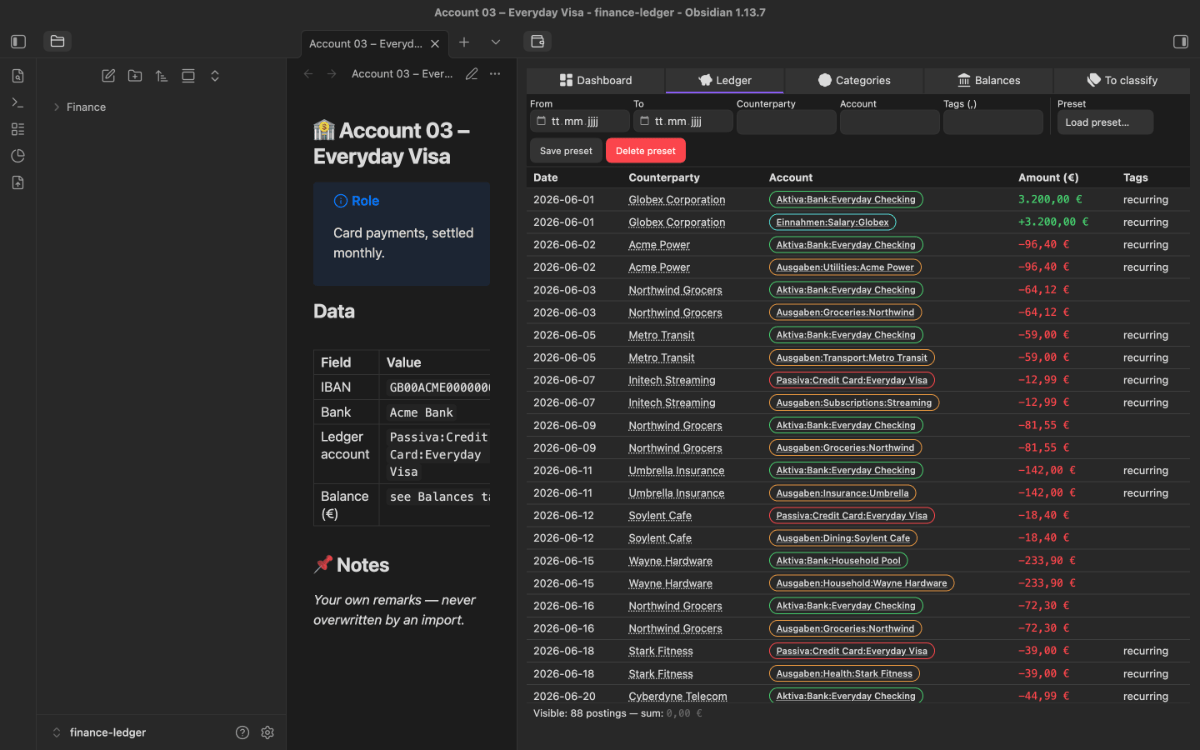
- Ledger viewer — sortable and filterable table of every transaction in
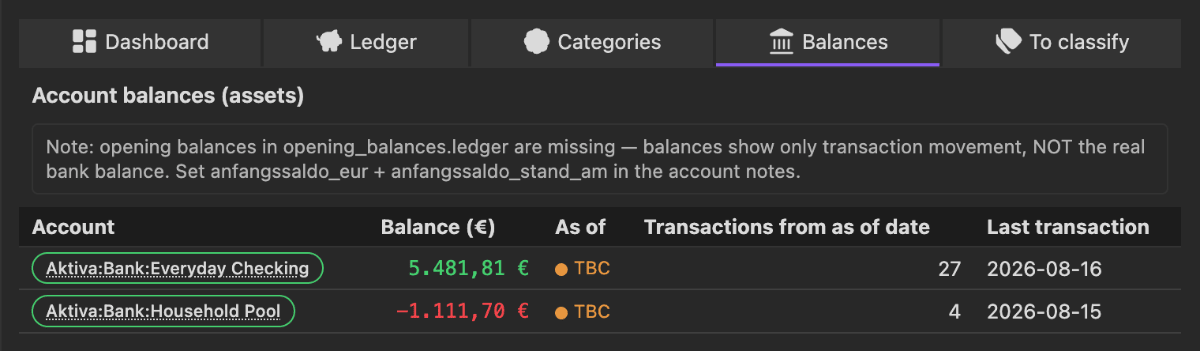
journal.ledger, with click-through navigation to category, account and payee notes - Balance overview — as-of-aware: shows
opening balance (as-of date per account) + transactions after that date. Transactions before the as-of date are filtered out, so the bootstrap workflow never double-counts. Accounts withoutanfangssaldo_eur:get a TBC marker. - Category overview — hierarchical aggregate of all categories with percentage share
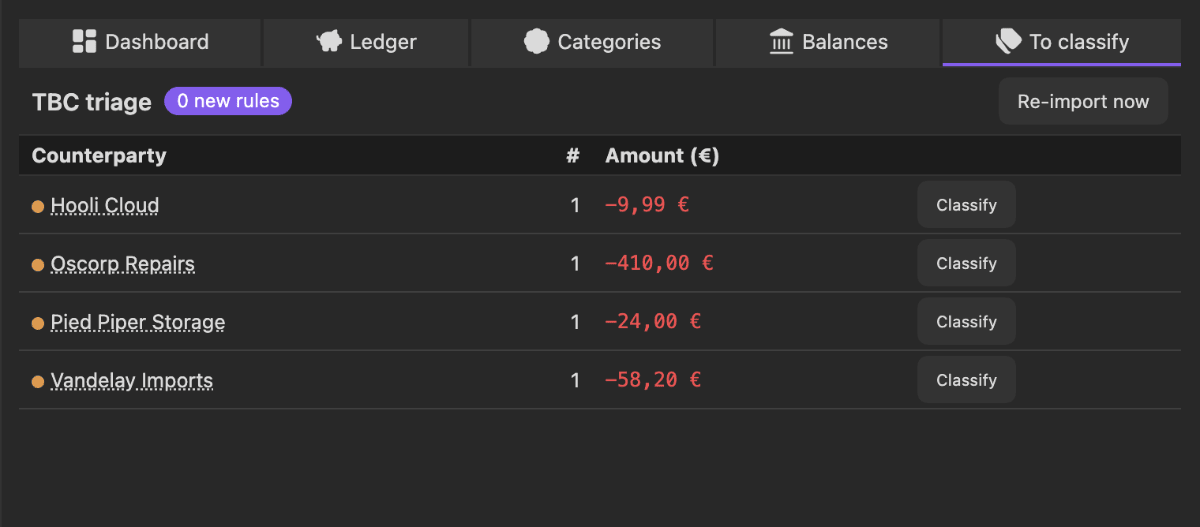
- TBC triage — every
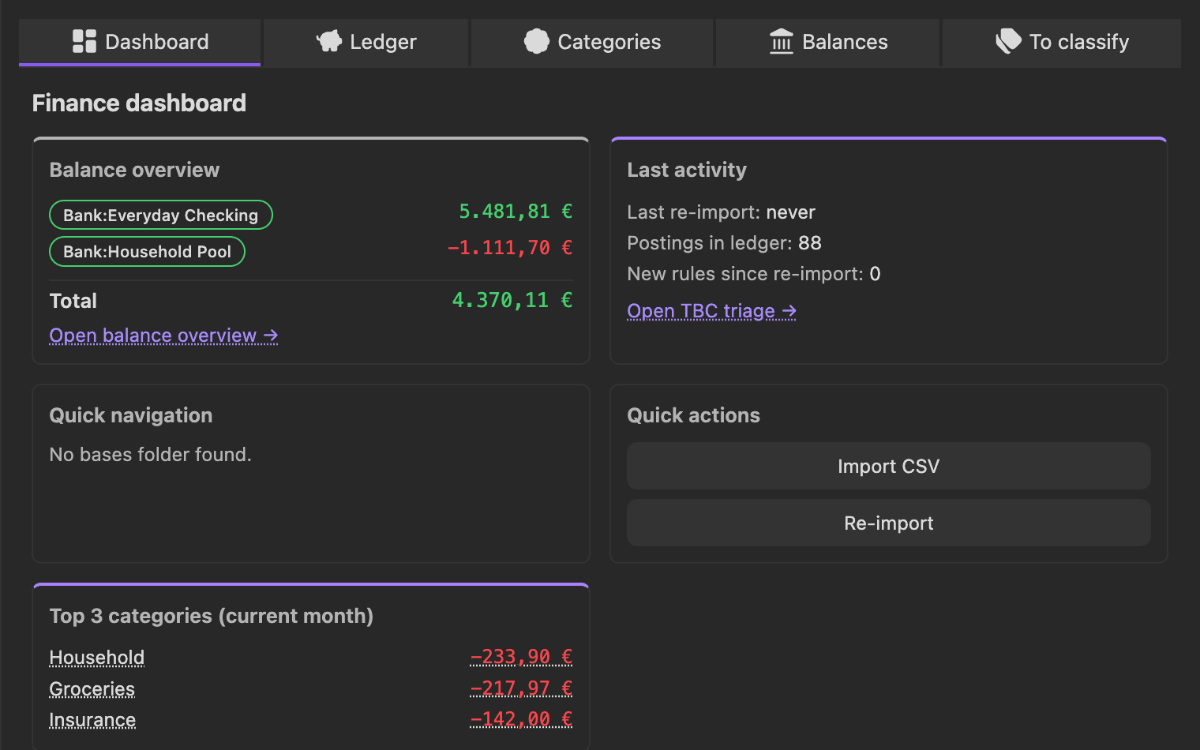
:tbc:transaction with a one-click action: assign account, save categorizer rule, remove tag - Finance dashboard — five-card overview (balances, TBC backlog, recurring items, top spending categories, upcoming contract payments)
Actions
- Rebuild journal from CSVs (built-in) — a command that produces
journal.ledgerandaccounts.ledgerinside the plugin: no Python, nouv, no subprocess. Works on mobile too. Account configuration comes from akonten.yamlin the vault (setting: accounts file). - CSV import modal — add several CSVs, see an anti-duplicate preview per file, then run the import. All of it inside the plugin: no Python, no subprocess, no temporary files outside the vault — so it works on mobile too.
- Re-import — re-runs the built-in import with a UI lock and counter reset
- Snapshot before writing rules — a dated copy of the rule folder, kept under grandfather-father-son rotation (the 6 newest of today, plus the oldest of each of the last 7 days, 4 weeks and 6 months)
- Categorizer rule modal — define a new pattern rule with a live match counter and
conflict check; writes to
categorizer-rules/ - Account suggestions — type-ahead built from
accounts.ledgerplus a frontmatter crawl, deduplicated - Deep-link URI —
obsidian://finance?mode=ledger&filter=…to drive the filters from outside
What it looks like

How it works
The plugin does not compute from raw data — it reads the hledger journal the importer wrote and turns it into views. The one place where it does compute is the account balance:
As-of-aware balance logic
The plugin parses opening_balances.ledger with a small dedicated parser
(src/aggregator/openingBalances.ts):
parseOpeningBalances(text: string): Map<account, {amount, standAm}>
computeSaldo(account) = opening.amount + Sum(tx where tx.date > opening.standAm).
Bootstrap workflow: you put the current bank balance and today's date into the account
note's frontmatter (anfangssaldo_eur + anfangssaldo_stand_am). The importer turns that
into opening_balances.ledger. The plugin then filters out transactions before the as-of date.
Requirements
- Obsidian 1.8.7 or newer, desktop and mobile (
isDesktopOnly: false). - An hledger journal in the vault —
journal.ledger,accounts.ledgerand optionallyopening_balances.ledger. Without a journal the views show nothing. - For the built-in journal rebuild from CSVs: a
konten.yamlin the vault. No Python, nouv— this path works on mobile as well. - Only for the re-import through the companion repository (reports and note generators):
desktop,
uv, and a checkout of the Python importer.
Install
This plugin is not distributed through the community store. It lives on its own forge, and there are two ways to get it.
Recommended — via AnySource Sideloader, which installs and updates plugins from any git forge. Subscribe to this catalog once:
https://git.jkaindl.de/jkaindl/obsidian-catalog/raw/branch/main/catalog.json
Finance Ledger then appears in the sideloader's plugin list and updates like any other plugin — no manual copying, and every download is checksum-verified.
By hand, if you would rather not add another plugin:
- Download
main.js,manifest.jsonandstyles.cssfrom the latest release. - Copy them into
<vault>/.obsidian/plugins/finance-ledger/. - Obsidian → Settings → Community plugins → enable Finance Ledger.
Updates then have to be repeated by hand — the sideloader route exists to avoid exactly that.
From source: npm install && npm run build produces the same files; npm run deploy puts
them straight into a configured vault (see Build and deploy).
Usage
The pie-chart icon in the ribbon opens the dashboard. Everything else lives in the command palette:
| Command | View |
|---|---|
Open finance dashboard | five-card overview: balances, TBC backlog, recurring items, top spending, upcoming contracts |
Open ledger viewer | the filterable transaction table |
Open balance overview | balance per account, corrected for the as-of date |
Open category overview | hierarchical category aggregate |
Open TBC triage | the open :tbc: transactions with one-click assignment |
Rebuild journal from CSVs (built-in) | rebuilds journal.ledger and accounts.ledger — no external process |
Finance: import CSV | multi-file upload with deduplication (desktop only) |
The usual loop: rebuild or import the journal → work through TBC triage (each assignment also writes a categorizer rule, so the same transaction lands by itself next time) → read the dashboard.
From outside, the plugin can be driven through
obsidian://finance?mode=ledger&filter=….
Configuration
Settings → Community plugins → Finance Ledger:
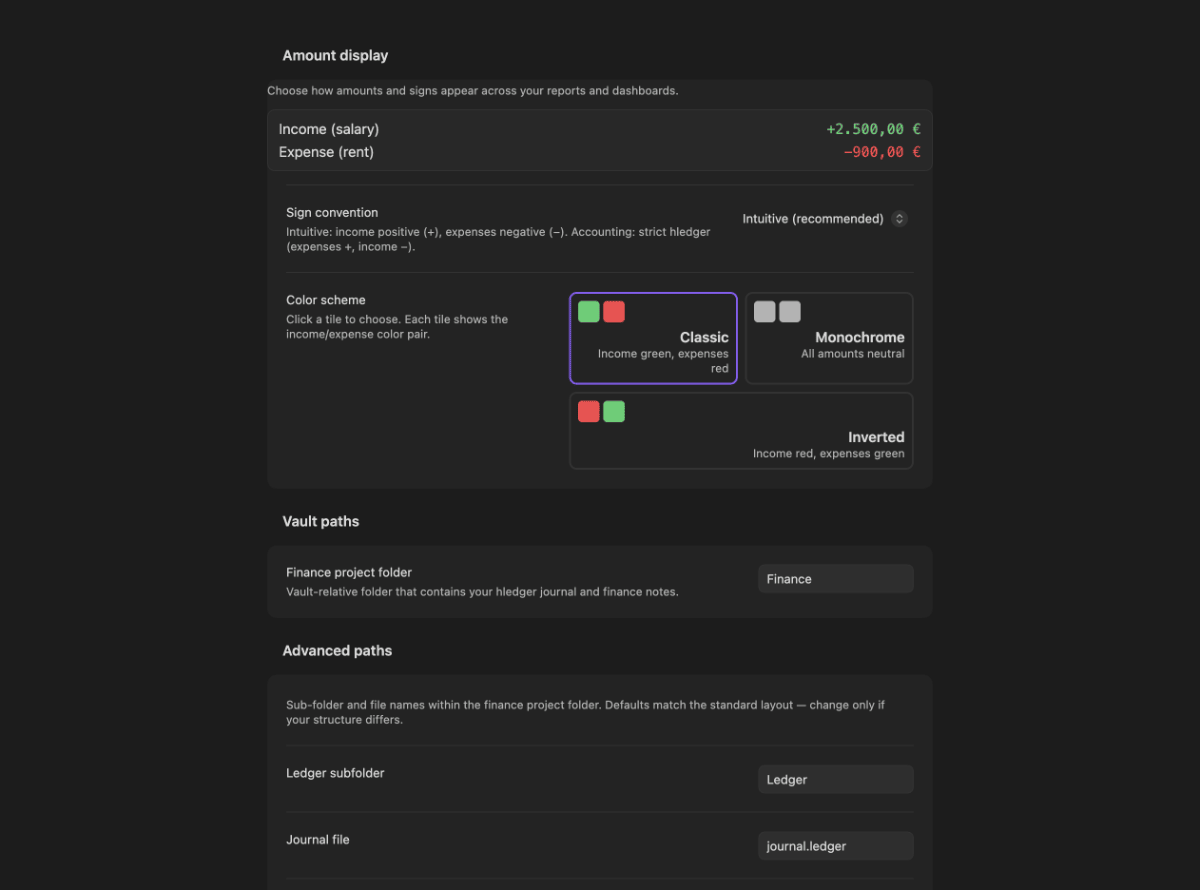
- Amount display: sign mode (intuitive: income +, expenses − · accounting: raw, as in hledger) plus a colour scheme (classic / monochrome / inverted) shown as swatch tiles with a live preview. Cash flow follows the setting, balances stay sign-based; colour follows the account type and is orthogonal to the sign.
- Vault-relative paths to ledger, accounts, contracts and categorizer rules
uvbinary path, with auto-detect fallback- Filter presets (create, edit, delete — stored locally)
Documentation
The full documentation lives in docs/:
- Getting started — from the install to your first balance overview.
- Troubleshooting — the exact message you see, what it means, what to do.
- Design system — tokens and where they are wired.
Design system
The plugin uses three layers:
- Obsidian CSS variables for layout, typography, borders and surfaces (theme-agnostic)
--fl-*tokens for finance-specific semantics (credit/debit/TBC colours, account-type accents, money display, typed card top borders)- the KSP signal palette as the foundation of the
--fl-*tokens, with light-mode corrections for AA contrast
Wired into five views — balance overview, finance dashboard, ledger view, TBC triage and
category overview. Money values carry .fl-money plus a sign colour, account chips a
data-type outline, cards a data-card top border, status dots .fl-txn-state. The
light-mode bridge dims the signal colours to keep AA contrast.
Detailed documentation: docs/design.md (high level plus wiring state)
and docs/design/README.md (canonical token files).
Mobile status
- No desktop-only paths left (as of 2026-10-03): the CSV import modal, the preview and the re-import all run inside the plugin. The Python subprocess and the Node filesystem access are gone, so the platform guards that went with them are gone too. ⚠️ Not yet verified on a physical phone or tablet — the code path is free of Node APIs and covered by tests, but the file picker on mobile has not been exercised.
- Still desktop-bound: reports and dimension notes (monthly/quarterly/yearly reports, category, payee, transaction-type and mandate notes). Those come from the Python importer, run from a terminal — the plugin offers the full command as a copy button.
- Mobile icons: on iPhone and iPad some placeholder icons are still visible after the last icon fix — diagnosis is pending on a desktop with mobile dev tools.
The companion importer
The Python CLI importer that produces the journal is a separate project and is not
published yet. Its output in the vault lives under <vault>/<financeRoot>/Ledger/ plus
the note folders (German names, as the code expects them) 10-Konten, 20-Verträge,
30-Sparziele, 40-Monatsberichte, 45-Kategorien, 55-Categorizer-Rules, 60-Empfänger,
70-Quartalsberichte, 80-Jahresberichte and 05-Bases.
Everything the plugin needs beyond that journal — the built-in rebuild from CSVs — it does on its own.
Output note schema (marker system)
Every note the importer writes (account, report, category, payee, rule) uses a marker pattern that protects user edits:
---
frontmatter
---
<user-editable header>

<!-- BEGIN: AUTO-GENERATED -->
auto section (tables, mermaid charts, bases embeds, cross-references)
<!-- END: AUTO-GENERATED -->

## 📌 Notes
user edit zone — untouched on re-runs.
On top of that: mermaid charts (pie for top categories, bar and xy-line for trends) and
collapsible bases embeds inside [!quote] callouts.
Budget layer
Monthly reports carry a budget section: target (12-month average) / actual / forecast (linear extrapolation) / difference / traffic light (🟢 below 90 % of target, 🟡 90–110 %, 🔴 above 110 %). A caveat warning appears when the average rests on fewer than 12 months.
Build and deploy
npm install                # once
npm test                   # vitest run (684 green)
npm run build              # esbuild → main.js (repo root)
npm run dev                # esbuild --watch (inline sourcemap, no minify)
npm run deploy             # build + copy manifest.json, main.js, styles.css into a vault
npm run deploy copies into the target set through an environment variable:
export OBSIDIAN_PLUGIN_DIR="<vault>/.obsidian/plugins/finance-ledger"
npm run deploy
Then in Obsidian: Settings → Community plugins → turn off safe mode → enable Finance
Ledger. On updates, run npm run deploy again and reload the plugin (toggle it off and
on, or Cmd+R).
Repository layout
| Path | Purpose |
|---|---|
src/ | TypeScript sources (views, ui, parser, resolver, state, types, utils, aggregator, categorizer rules) |
src/aggregator/openingBalances.ts | as-of-aware parser for opening_balances.ledger |
src/aggregator/saldo.ts | as-of-aware computeSaldo |
tests/ | vitest specs (684 tests green) |
docs/design/ | canonical design-system source of truth |
docs/design.md | high-level design-system explanation |
styles.css | plugin styles with tokens and utilities |
manifest.json | Obsidian plugin manifest (id: finance-ledger) |
main.js | esbuild output (committed, as Obsidian plugins require) |
package.json | npm scripts |
esbuild.config.mjs | bundle config |
vitest.config.ts | test config |
tsconfig.json | TypeScript config |
AGENTS.md | architecture conventions for coding agents |
CHANGELOG.md | release notes |
License
- Code: AGPL-3.0-or-later (
LICENSE) - Documentation and prose: CC BY-SA 4.0 (
LICENSE-DOCS)
Copyright © 2026 Johannes Kaindl.
For plugin developers
Search results and similarity scores are powered by semantic analysis of your plugin's README. If your plugin isn't appearing for searches you'd expect, try updating your README to clearly describe your plugin's purpose, features, and use cases.