Find-n-Replace
approvedby gapmiss
A VSCode-style vault-wide search & replace sidebar view. - This plugin has not been manually reviewed by Obsidian staff.
Find-n-Replace
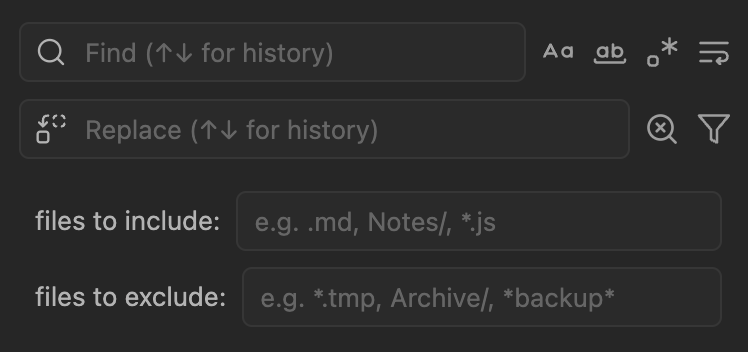
Vault-wide search and replace for Obsidian with regex support, multi-selection, and file filtering.
[!CAUTION] This plugin modifies vault files directly. Maintain backups before bulk replacements.
Features
- Search all text files (md, txt, js, css, json, etc.)
- Regex with capture groups (
$1,$2,$&) - Multiline patterns across lines
- Case-sensitive and whole-word matching
- Multi-select matches with Ctrl/Cmd+click
- File filtering by extension, folder, or glob pattern
- Search history with ↑↓ navigation
- Click results to jump to location
Installation
Install from community.obsidian.md
From Obsidian's settings or preferences:
- Community Plugins > Browse
- Search for "Find-n-Replace"
Manually:
- download the latest release archive
- uncompress the downloaded archive
- move the
find-n-replacefolder to/path/to/vault/.obsidian/plugins/ - Settings > Community plugins > reload Installed plugins
- enable plugin
or:
- download
main.js,manifest.json&styles.cssfrom the latest release - create a new folder
/path/to/vault/.obsidian/plugins/find-n-replace - move all 3 files to
/path/to/vault/.obsidian/plugins/find-n-replace - Settings > Community plugins > reload Installed plugins
- enable plugin
Usage
- Open via Command Palette:
Find-n-Replace: Open - Enter search term (results appear as you type)
- Optional: Click filter icon to limit by file type or folder
- Enter replacement text
- Replace individual matches, selected matches, or all
Search options: Match Case, Whole Word, Regex, Multiline
Selection: Ctrl/Cmd+click to multi-select, Escape to clear
Examples
| Search | Replace | Result |
|---|---|---|
TODO | DONE | Simple text replacement |
(\d{4})-(\d{2})-(\d{2}) | $2/$3/$1 | Date format conversion |
\[\[(.+?)\]\] | $1 | Remove wikilink brackets |
\s{2,} | | Collapse multiple spaces |
Commands
- Open
- Focus search/replace input
- Perform search
- Clear search and replace
- Toggle match case/whole word/regex/multiline
- Replace selected/all matches
- Select all results
- Expand/collapse all
Assign hotkeys in Settings → Hotkeys → search "Find-n-Replace"
Settings
- Search history: Enable/disable, max entries (10-200)
- Max results: Limit displayed results (default: 1000)
- Auto search: Toggle search-as-you-type
- Confirm destructive actions: Prompt before Replace All
- Default filters: Set default include/exclude patterns
- Logging level: Silent to Trace for debugging
Development
npm install
npm run dev      # watch mode
npm run build    # production
npm test         # run tests
License
MIT
For plugin developers
Search results and similarity scores are powered by semantic analysis of your plugin's README. If your plugin isn't appearing for searches you'd expect, try updating your README to clearly describe your plugin's purpose, features, and use cases.