Focus Explorer
approvedby Wanten
An Obsidian file explorer with folder focus. - This plugin has not been manually reviewed by Obsidian staff.
Focus Explorer
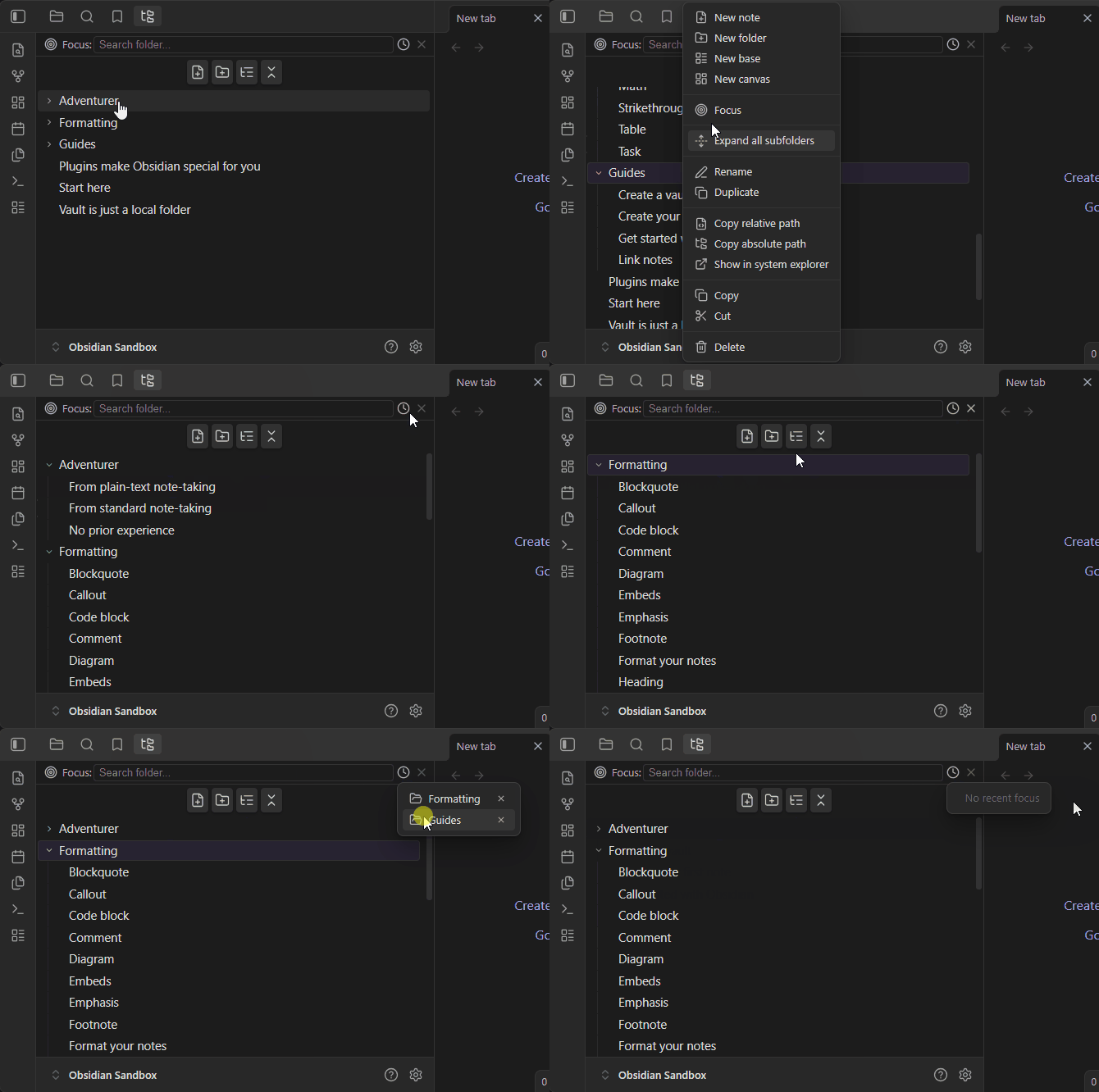
An Obsidian file explorer with folder focus at its core.
Folder focus
Right-click any folder → Focus to show only that folder's subtree. Everything outside it is hidden, so you can work on one area of your vault without distraction. Great for large vaults, per-project workflows, or when attachments and archives keep drowning out the notes you actually care about.
Choosing a folder to focus
Three ways to pick the target, all from the focus bar at the top of the view:
- Search input — click it (or just start typing) to list every folder in the vault with a fuzzy filter as you type; matches jump straight into parents/children hierarchies. Click a row or press Enter to focus it.
- Recent history — the clock button lists recently focused folders for one-click re-focus. Entries you no longer need can be removed individually right inside the menu.
- Context menu — right-click any folder in the tree → Focus, or use Clear focus on empty areas / the same menu.
The clear (×) button exits focus mode and restores your previous expansion state exactly as it was.
What focus mode does
- Only the focused subtree is rendered; expanding folders never leaks content from outside it.
- Creation lands inside the focused folder: New note / New base / New canvas always go to the focused root — even the header buttons skip Obsidian's new-note location setting while it points outside the focused subtree.
- Search, drag & drop targets, and auto-reveal all respect the focus boundary — dragging a file onto empty space moves it into the focused folder instead of the vault root.
- Focus state is persisted across restarts and follows folder renames automatically.
File tree essentials
Beyond focus, this is a full explorer: indentation guides and expand/collapse chevrons (folders first), inline creation at the correct position and depth, rename (F2) that preserves each file's extension, duplicate, delete-to-trash with confirmation, copy/cut/paste and drag & drop with multi-select support, keyboard navigation (arrows / Enter / F2 / Delete), middle-click to open in a new tab, and an auto-reveal toggle that keeps the tree synced with the active editor file.
Installation
Manual install: copy main.js, manifest.json, and styles.css into VaultFolder/.obsidian/plugins/focus-explorer/, reload Obsidian, and enable the plugin in Settings → Community plugins.
License
For plugin developers
Search results and similarity scores are powered by semantic analysis of your plugin's README. If your plugin isn't appearing for searches you'd expect, try updating your README to clearly describe your plugin's purpose, features, and use cases.