Frontmatter Input
approvedby Scott Gray
Use checkboxes and radio buttons in your markdown files to set frontmatter tags. - This plugin has not been manually reviewed by Obsidian staff.
Frontmatter Input
An Obsidian plugin to manage frontmatter tags through interactive nested checkbox and radio button lists — no more typing tags manually.


Overview
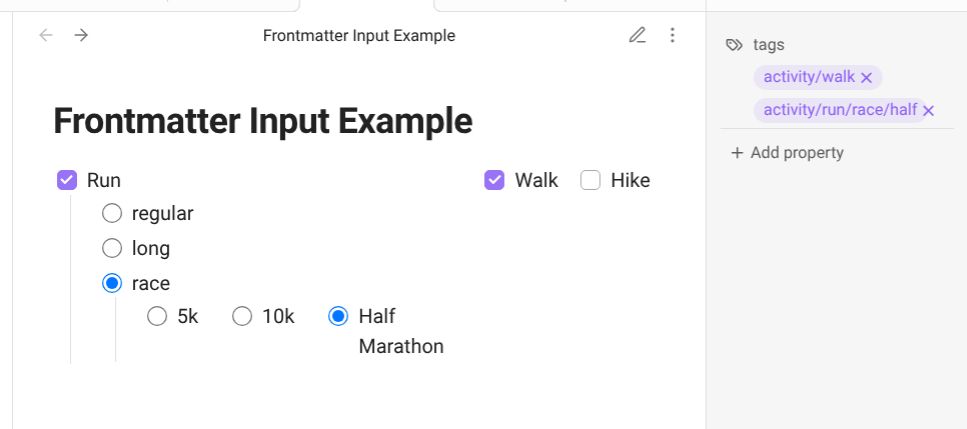
Define your tag structure once in a frontmatterinput code block using simple YAML. The plugin renders a clickable UI inside your note — check a box and the tag is added to your frontmatter; uncheck it and the tag (and all its children) are removed. Works great in templates.
Features
- Checkboxes for multi-select tagging, radio buttons for exclusive single-selection
- Nested hierarchies — child lists appear only when their parent is selected, building structured tags like
activity/run/race/10k - Smart cleanup — unchecking a parent removes all its child tags automatically
- Flexible layout — choose vertical or horizontal orientation per list
- Duplicate prevention — only unique tags are written to frontmatter
- Template-friendly — embed in note templates for consistent tagging across your vault
Installation
Option 1: Community Plugins (Pending Review)
The plugin has been submitted to the Obsidian community plugin list. Once approved it will be searchable directly in Settings > Community Plugins.
Option 2: BRAT (Recommended while pending)
BRAT (Beta Reviewers Auto-update Tester) is the standard Obsidian way to install plugins awaiting review.
- Install BRAT from Community Plugins if you haven't already
- Open Settings > BRAT > Add Beta Plugin
- Paste:
scottgrayart/Frontmatter-input - Enable the plugin under Settings > Community Plugins
BRAT will also notify you of future updates automatically.
Option 3: Manual Installation
- Go to the latest release
- Download
main.js,manifest.json, andstyles.css - Create the folder
.obsidian/plugins/frontmatter-input/inside your vault - Copy the three downloaded files into that folder
- Enable the plugin under Settings > Community Plugins
Usage
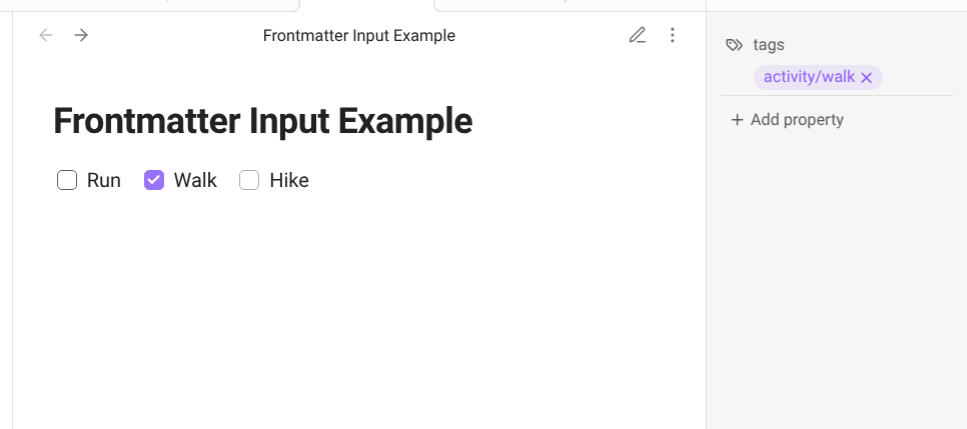
Add a frontmatterinput code block to any note or template. The plugin renders it as an interactive list in Reading view and Live Preview.
Minimal example
```frontmatterinput
btns:
- Option A: { tag: option-a }
- Option B: { tag: option-b }
- Option C: { tag: option-c }
```
Full example — workout log
```frontmatterinput
root: activity
orientation: horizontal
btns:
- Run:
    tag: run
    type: radio
    btns:
    - Regular: { tag: regular }
    - Long: { tag: long }
    - Race:
        tag: race
        type: radio
        orientation: horizontal
        btns:
        - 5k: { tag: 5k }
        - 10k: { tag: 10k }
        - Half Marathon: { tag: half }
- Walk: { tag: walk }
- Hike: { tag: hike }
```
Selecting Run > Race > 10k adds activity/run/race/10k to your frontmatter tags. Deselecting Run removes all three tags at once.
YAML Reference
Top-level options
| Key | Values | Default | Description |
|---|---|---|---|
root | any string | (none) | Prefix added to the start of every tag path |
orientation | vertical / horizontal | vertical | Layout direction for this list |
type | checkbox / radio | checkbox | Selection mode for this list |
btns | list | (required) | The items in this list |
Button options
Each item under btns uses the label as its key. The value can be shorthand or expanded:
Shorthand (no nesting needed):
btns:
- My Label: { tag: my-label }
Expanded (use when adding nested lists, type, or orientation):
btns:
- My Label:
    tag: my-label
    type: radio
    orientation: horizontal
    btns:
    - Child A: { tag: child-a }
    - Child B: { tag: child-b }
Tag naming rules
Tag values must follow Obsidian's tag rules: lowercase letters, numbers, hyphens, underscores, and forward slashes only. No spaces. Use quotes around values containing special characters: tag: "my-tag".
YAML tips
- Indentation uses 2 spaces (not tabs)
- Comments start with
# - The
rootattribute only applies to the top-level list, not nested lists
How tags are structured
The root value and each nested tag value are joined with / to form the final tag:
root: activity
  tag: run
    tag: race
      tag: 10k
→ activity/run/race/10k
If no root is set, the chain starts at the first selected tag.
Contributing
Bug reports and feature requests are welcome. Please open an issue with a description and, if relevant, the YAML block that reproduces the problem.
Support
If this plugin saves you time, consider supporting its development:


License
MIT — see LICENSE for details.
For plugin developers
Search results and similarity scores are powered by semantic analysis of your plugin's README. If your plugin isn't appearing for searches you'd expect, try updating your README to clearly describe your plugin's purpose, features, and use cases.