by 熊猫别熬夜
F2 to quick rename the current note, or an embedded note/image under the cursor (including wiki aliases and markdown image alt text).
F2 Quick Rename
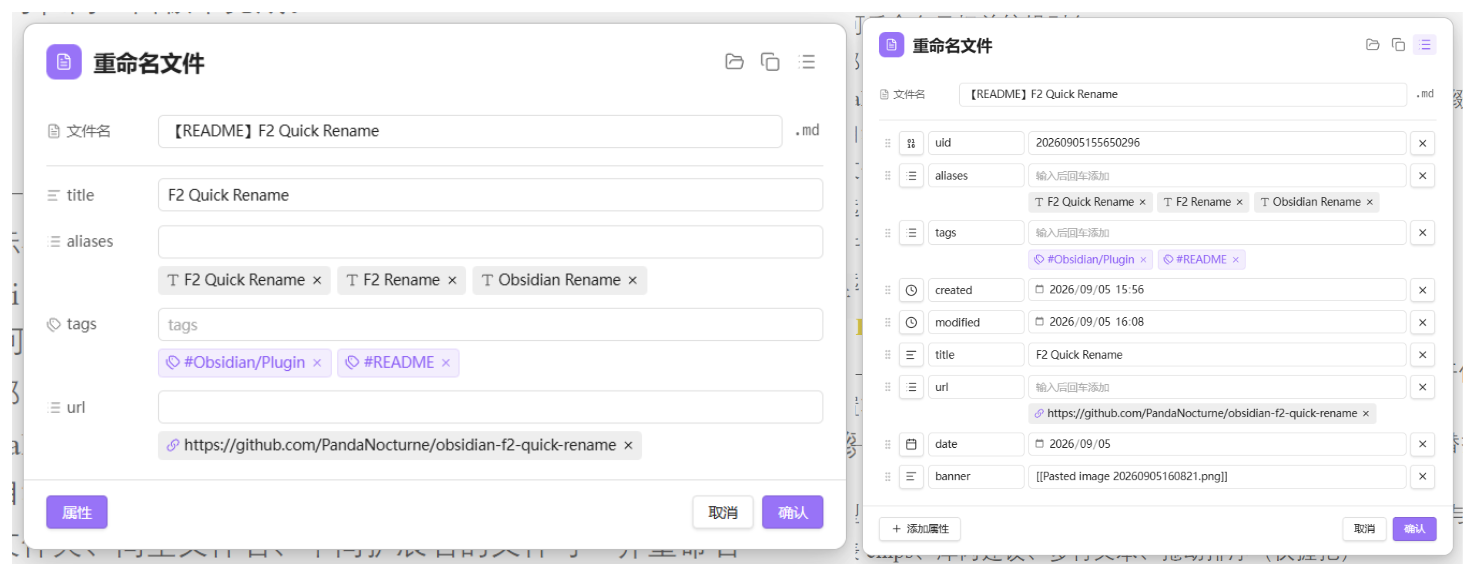
Obsidian plugin for fast renaming: the current note, embeds under the cursor, and frontmatter properties in one panel.
Features
Rename
- F2 — rename the current file, or the embed / link under the cursor
- Cursor on a heading — uses Obsidian’s built-in Rename heading
- Wiki embeds (
![[file|alias]]) and markdown images () — rename the target and edit the alias - External URLs — edit link URL and display title
- Excalidraw — edit the stem without
.excalidraw/.excalidraw.md, restore on save - Companion files (same folder, same basename, different extension) can be renamed together
- Optional: copy the new basename to the clipboard after renaming the active note
- File explorer context menu: F2 Quick rename
- Optional: double-click the extension suffix in the panel to edit it (off by default)
Properties (F2 / F5)
- F2 — show only properties configured in settings; you can add more for this session; the next open shows the configured set again (merge write; other frontmatter keys are kept)
- F5 — full frontmatter panel (add / edit / delete / reorder / change type); replaces the whole frontmatter block
- Types aligned with Obsidian: text, list, number, checkbox, date, date & time
- List chips, vault suggestions, multiline text, drag reorder (grip only)
- Optional auto-save while the panel is open
- Optional Collapse by default for the properties section (F5 still opens expanded)
Header tools
- Show in folder —
app.showInFolder(desktop) - Copy wikilink — shortest
[[wikilink]] - Header icon switches by file kind: note, Canvas, Excalidraw, Bases, attachment, link
Language
Settings → General → Language:
- System default (follows Obsidian)
- 简体中文
- English
Commands
| Command | Suggested hotkey (set manually) |
|---|---|
| Rename file or embed | F2 |
| Rename and edit all properties | F5 |
| Rename attachments | F1 |
| Copy and delete file | Ctrl/Cmd+Shift+X |
No default hotkeys are registered (to avoid conflicts). Bind them under Settings → Hotkeys.
Install
Recommended: install with BRAT (Obsidian42 — BRAT) until the plugin is in the community catalog.
- Install and enable BRAT from Settings → Community plugins → Browse
- Command palette → BRAT: Add a beta plugin for testing
- Paste:
https://github.com/PandaNocturne/obsidian-f2-quick-rename - Enable F2 Quick Rename in Settings → Community plugins
BRAT can also check for updates (or auto-update on startup in BRAT settings).
Manual
- Build or download
main.js,manifest.json, andstyles.css - Copy them to
<Vault>/.obsidian/plugins/ftwo-quick-rename/ - Enable F2 Quick Rename in Settings → Community plugins
Develop
npm install
npm run dev
With Hot Reload, rebuilds apply automatically.
Production build:
npm run build
Settings overview
- General — UI language
- Feature toggles — embeds, aliases, headings, companions, clipboard, properties, auto-save, edit extension
- Document properties — default collapse; configure fields, separators, and side-by-side rows for the F2 panel
Privacy
Runs fully offline. No network requests, telemetry, or vault data uploaded.
License
BSD Zero Clause License (0BSD) — Copyright (C) 2026 by PandaNocturne.
For plugin developers
Search results and similarity scores are powered by semantic analysis of your plugin's README. If your plugin isn't appearing for searches you'd expect, try updating your README to clearly describe your plugin's purpose, features, and use cases.