Front Matter Title
approvedby snezhig
Define a title in frontmatter to be displayed as the filename.
Front Matter Title
A plugin for Obsidian that shows a friendly title from your note's frontmatter everywhere in the app — without renaming the file.
If your notes are named like timestamps (202208251731.md), random IDs, or any scheme that isn't human‑readable, this plugin lets you keep those filenames while Obsidian displays the title you actually wrote in the note's frontmatter.
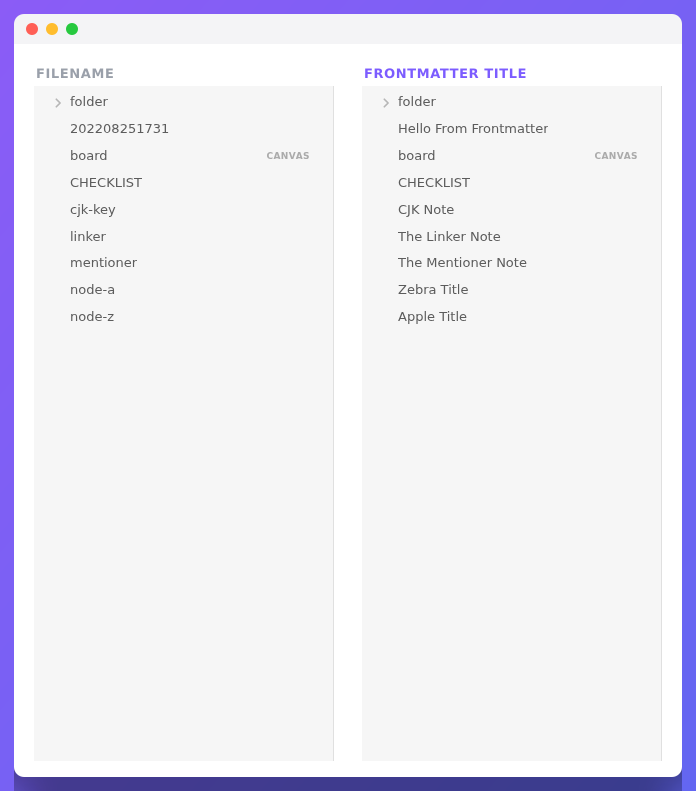
[!IMPORTANT] The plugin never renames or edits your files. It only changes what Obsidian displays. Your filenames on disk stay exactly as they are.
What you get
You choose where the title is shown — turn each one on or off in settings:
- File explorer, Search, Quick switcher / suggestions, Bookmarks and Backlinks — see titles instead of filenames while you navigate.
- Tabs, note header, inline title and the window frame — see the title while you read and write.
- Graph and Canvas — nodes and cards show titles too.
- Links — optionally rewrite
[[202208251731]]link text to the note's title.
See the full list with screenshots in Features.
- Installation
- Quick start
- Features
- Templates · Template examples
- Settings reference
- Processor (advanced)
- FAQ & troubleshooting
- API
Installation
From the Obsidian app (recommended)
Open Settings → Community plugins → Browse, search for Front Matter Title, install it and enable it.
Using BRAT
Install via the BRAT plugin and point it at this repository.
Manual
Download the latest obsidian-front-matter-title-*.zip from the latest release and unpack it into your vault under .obsidian/plugins/.
Quick start
Three steps, about a minute:
1. Add a title to a note's frontmatter. Open any note and put a title at the top:
---
title: My readable note title
---
2. Tell the plugin which key to read. Open Settings → Front Matter Title. The Common main template is title by default — that means the plugin reads the title key from each note. Leave it as is to use the example above.
3. Turn on where you want it shown. In the same settings page, enable the Explorer feature. The note in your file explorer now shows My readable note title instead of the filename.
That's it. Enable more places from Features, and learn how to build smarter titles in Templates.
A frontmatter value used as a title must be a string, a number, or a list. If a key is missing or empty, the plugin falls back to the original filename. See Template examples for every case.
API
Looking to integrate with another plugin? See the API provider.
Thank you
If you like this plugin and would like to buy me a coffee, you can!

Note
Feel free to open an issue for bugs, mistakes, or ideas for this plugin.
For plugin developers
Search results and similarity scores are powered by semantic analysis of your plugin's README. If your plugin isn't appearing for searches you'd expect, try updating your README to clearly describe your plugin's purpose, features, and use cases.