GalleryHub
approvedby Cardy
Art asset gallery: manage images, videos, audio and links with AI generation prompts, waterfall gallery, filtering, and an infinite canvas for curation. - This plugin has not been manually reviewed by Obsidian staff.
GalleryHub
English | 中文
An art asset gallery plugin for Obsidian — manage images, videos, audio and links together with AI generation prompts. Waterfall gallery + infinite canvas for curation, with 100% of your data staying in your local vault.



Preview
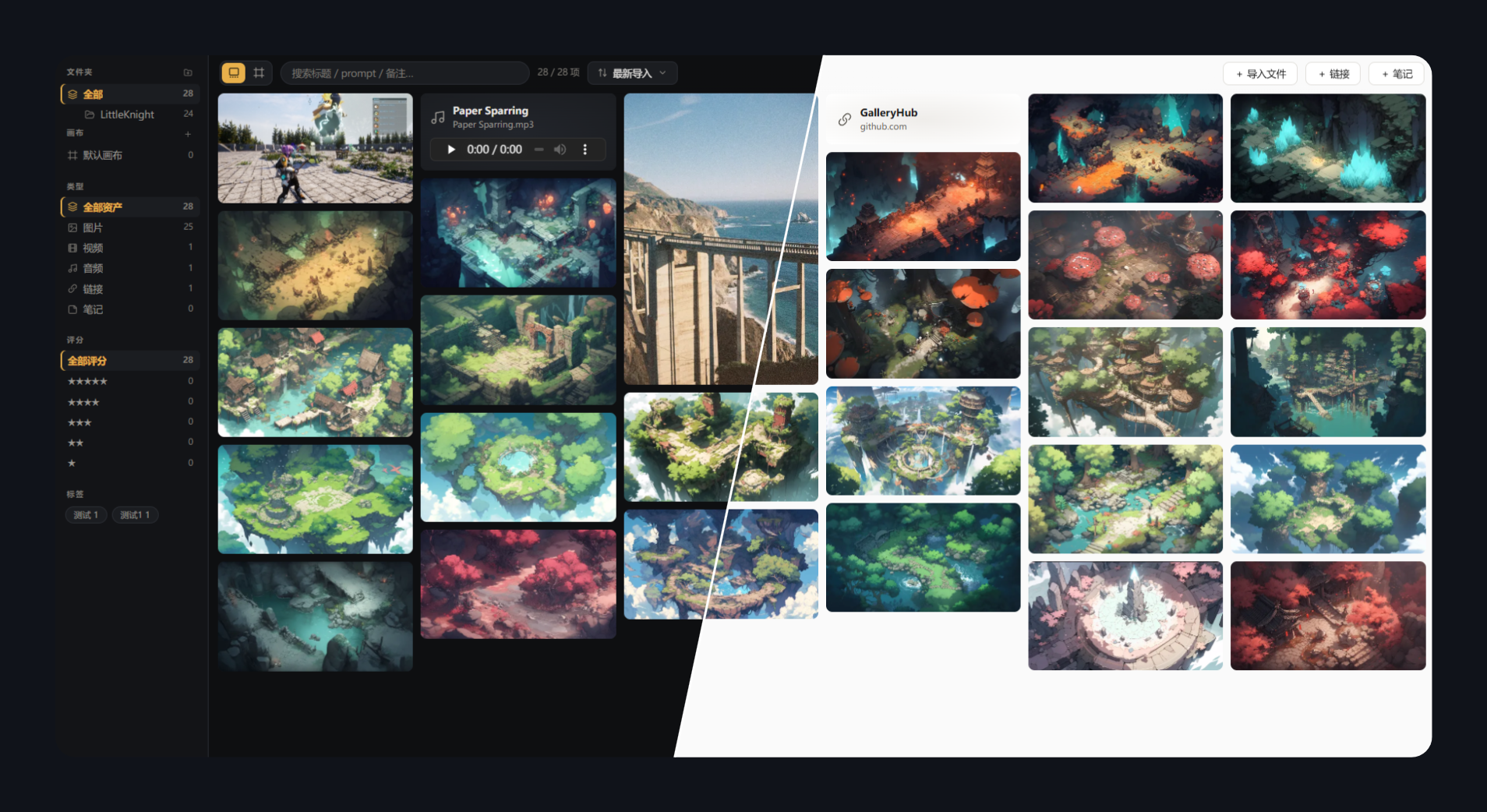
Gallery — masonry browsing with sidebar filters (dark / light):
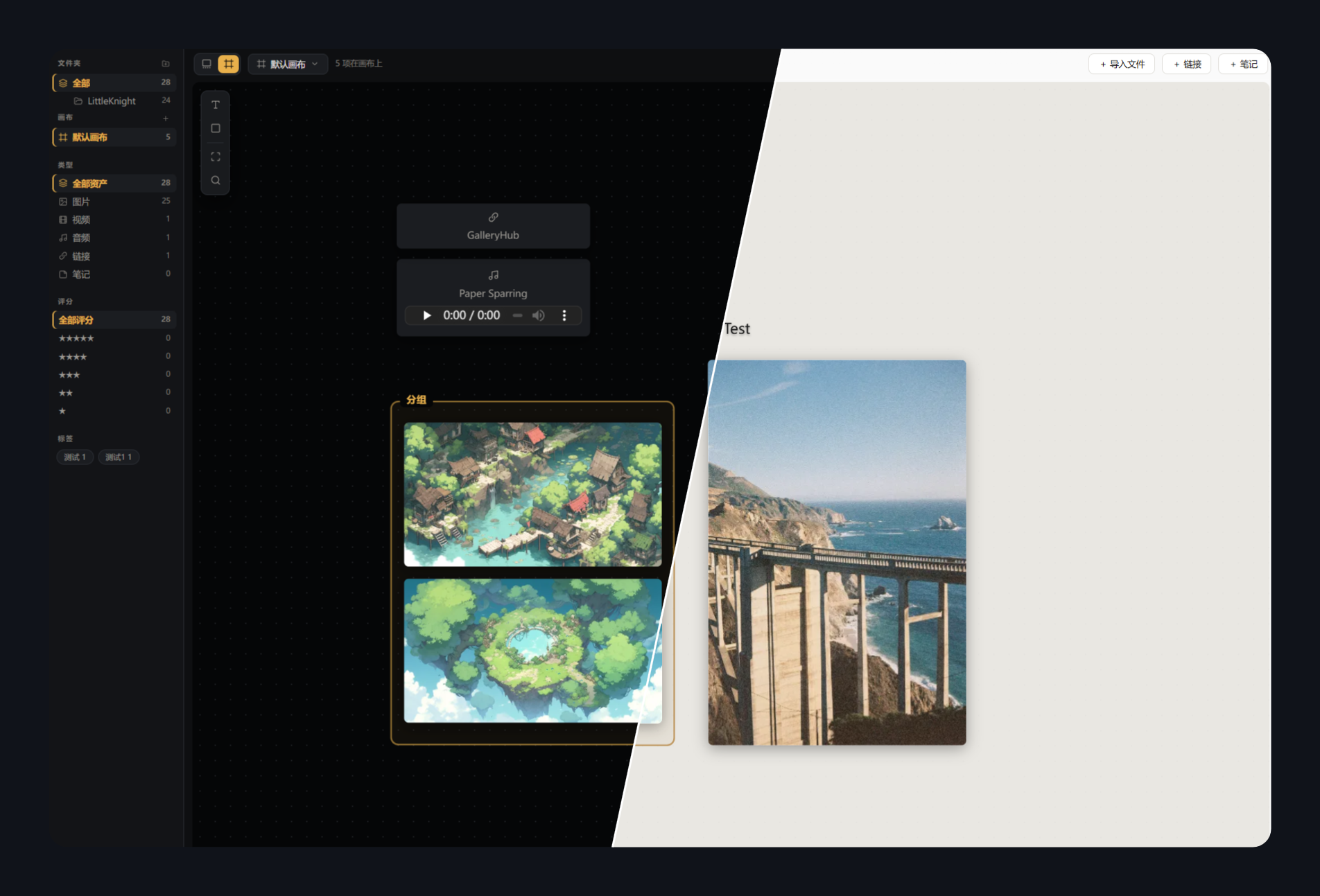
Canvas — PureRef-style curation boards with annotations:
Why
Art assets end up scattered everywhere: AI-generated images and their prompts, photography, reference images, video/audio clips, inspiration links… Existing tools each cover only a slice — Eagle/Billfish are asset libraries with no canvas and closed data formats; PureRef is a canvas that doesn't manage a long-term library; Firefly Boards / Figma Weave attach prompts but keep your assets in the cloud. Nothing covers four asset types + prompt metadata + local data ownership at once.
GalleryHub brings it all into Obsidian: data (JSON + original files) lives inside your vault and syncs with whatever you already use, browsing lives next to your notes, and everything stays portable forever.
Features
Gallery (waterfall/masonry)
- Four asset types: images / videos (hover to play) / audio (inline player) / links
- True masonry layout: aspect ratios preserved, dimensions captured at import to prevent layout shift, column count adapts to pane width
- Filtering: folder tree / boards / type / multi-select star rating / tag cloud — each module can be toggled in settings
- Search across title, prompt, note and file name; sorting by import time, title, rating or type
- Multi-select & batch ops: Ctrl+click / checkmark / Space to select; batch move, delete (optionally to system trash), edit tags (append/replace/remove) and rating, send to board
Folder tree
- Full mapping of the
assets/directory tree with nested expand/collapse - Context menu: new subfolder (inline rename), rename (F2), delete (to trash)
- Drag & drop: move folders, drop cards into folders (whole selection), drop OS files onto a folder for targeted import
- Library paths stay in sync after rename/move — nothing breaks
Infinite canvas (PureRef-style curation)
- Pan (Space/middle-click), zoom at pointer (0.05x–8x), marquee selection with group drag
- Cards: drag, proportional resize, bring to front / send to back, double-click for details
- The same asset can live on multiple boards with independent layouts
- Text and frame annotations: inline editing, font size & bold, 8-color palette
- Drop files straight onto the canvas — they're imported and placed where you dropped them
- Multiple boards: create / rename / delete, quick access from the sidebar
Detail lightbox
- Large viewer: click to zoom to native size, drag to pan; prev/next navigation (buttons or ←/→)
- Inline title editing, star rating, tag chips editor, source link, custom source file location
- AI generation section (collapsible): prompt / negative (one-click copy), model / seed
- Actions: open original in Obsidian, open in browser, reveal in system explorer, remove from library
Themes & language
- Dark (charcoal + amber) / Light (warm white + gold) / follow Obsidian
- UI in English and 中文, defaults to following Obsidian's language
Data design
Your vault/
└── GalleryHub/            # location configurable in settings
    ├── gallery.json        # the single database (open schema, versioned)
    ├── gallery.json.bak    # automatic per-session backup
    └── assets/             # original files, organized in folders
- Plain text + original files — readable without the plugin, portable forever
- Debounced saves, write-ahead backup, read-only guard on corruption, auto-reload on external (cloud-sync) changes
- Each item records: path, title, tags, rating, source, note,
gen(prompt/negative/model/seed…),layouts(per-board positions)
Installation
Not yet in the community store — manual install:
- Grab
manifest.json/main.js/styles.cssfrom a release (or build them yourself) - Put them in
<vault>/.obsidian/plugins/gallery-hub/ - Settings → Community plugins → enable GalleryHub
- Click the ribbon icon; the data folder is created automatically on first run
Development
npm install
npm run dev      # watch build, outputs straight into your vault's plugin folder (path in esbuild.config.mjs)
npm run build    # production build → dist/main.js
npm run deploy   # copy manifest / main.js / styles.css into the plugin folder
Code and data are fully separated: this repo holds only source; assets and the database live in your vault.
Architecture
src/
├── main.ts       plugin entry: view registration, commands, settings, theme/locale
├── view.ts       GalleryView: masonry, sidebar (tree/boards/filters), multi-select, mode switch
├── canvas.ts     CanvasBoard: infinite canvas (pan/zoom/cards/text/frames/palette)
├── store.ts      data layer: gallery.json I/O, debounced saves, backups, boards & elements CRUD
├── importer.ts   import & file ops: ingest, folder tree operations, batch move/delete
├── detail.ts     detail lightbox and all dialogs (link/folder/confirm/batch edit)
├── i18n.ts       lightweight dictionary (en/zh) with typed keys
└── types.ts      data contracts and defaults
License
MIT © DuranceX
For plugin developers
Search results and similarity scores are powered by semantic analysis of your plugin's README. If your plugin isn't appearing for searches you'd expect, try updating your README to clearly describe your plugin's purpose, features, and use cases.