GitHub Publish
approvedby Olivier Rouiller
Publish your vault notes for free in a few clicks - This plugin has not been manually reviewed by Obsidian staff.
Publish your notes for free in a few clicks
The Plugin allows you to publish your vault in minutes without the configuration and learning curve of the free solutions. The plugin uses Quartz as a site generator and GitHub Pages for hosting, but does all the configuration setup for you.
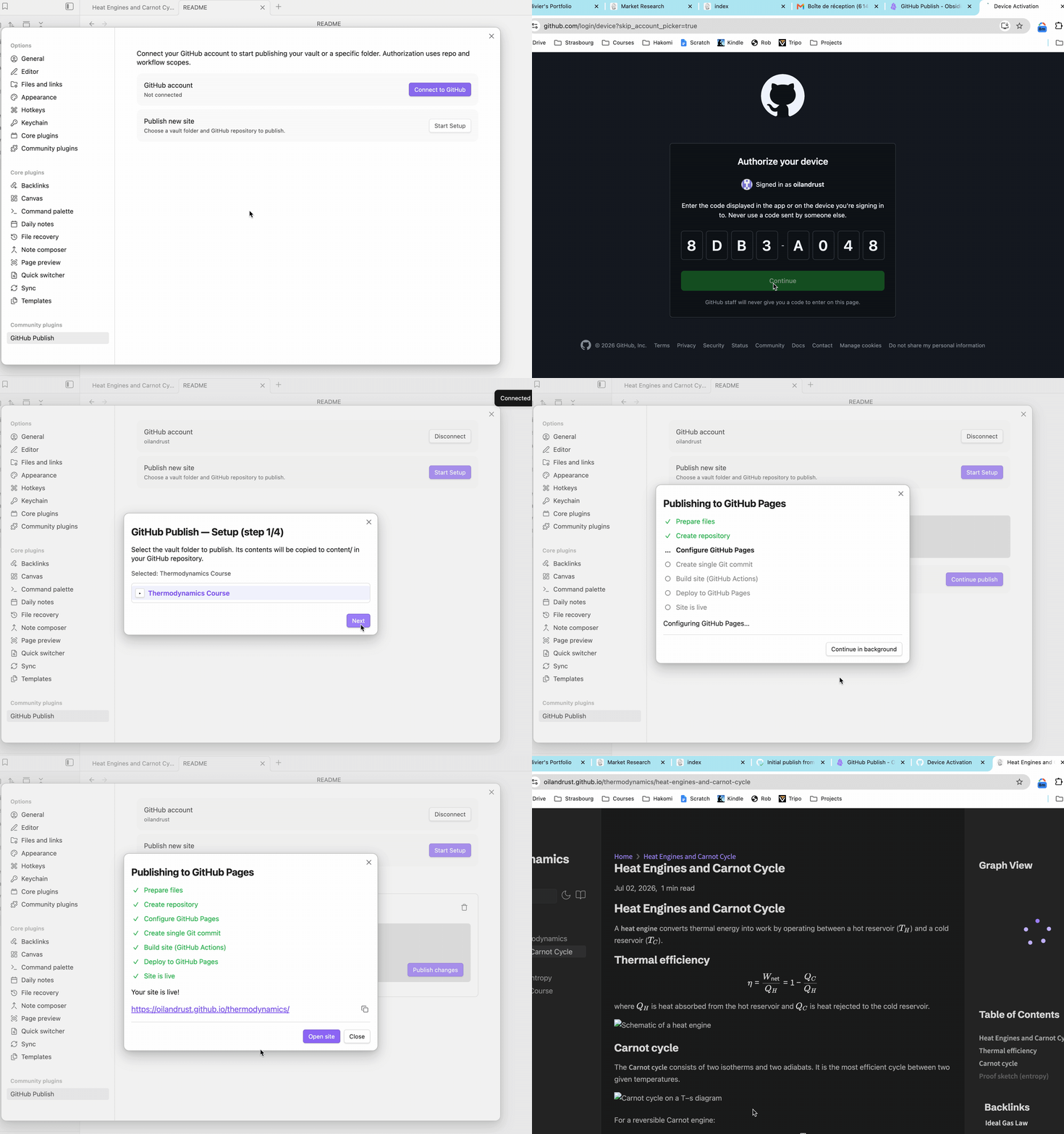
Easy steps:
- Authenticate with your GitHub account,
- Give permissions (public repo and actions)
- Select the folder you want to publish, and the name of the site
- Your site will be live in a minute!
GitHub Permissions
The plugin requires a few permissions from your GitHub account; those are the permissions and why we ask for them.
We don't store your OAuth token in any service or database, the token is only stored in the Obsidian plugin data on your machine and used when you publish or update a site. We don't keep track of registered GitHub user ids, only GitHub does.
- Public Repo: The plugin uses this permission to create new repositories on your behalf, list existing public repositories, and create commits to upload content.
- Workflow: The plugin uses this to set up GitHub Actions that build the website when you publish new content. We do not read any data from your repositories other than that, and the plugin does not delete repositories or touch data outside the content/ folder.
Live Demo
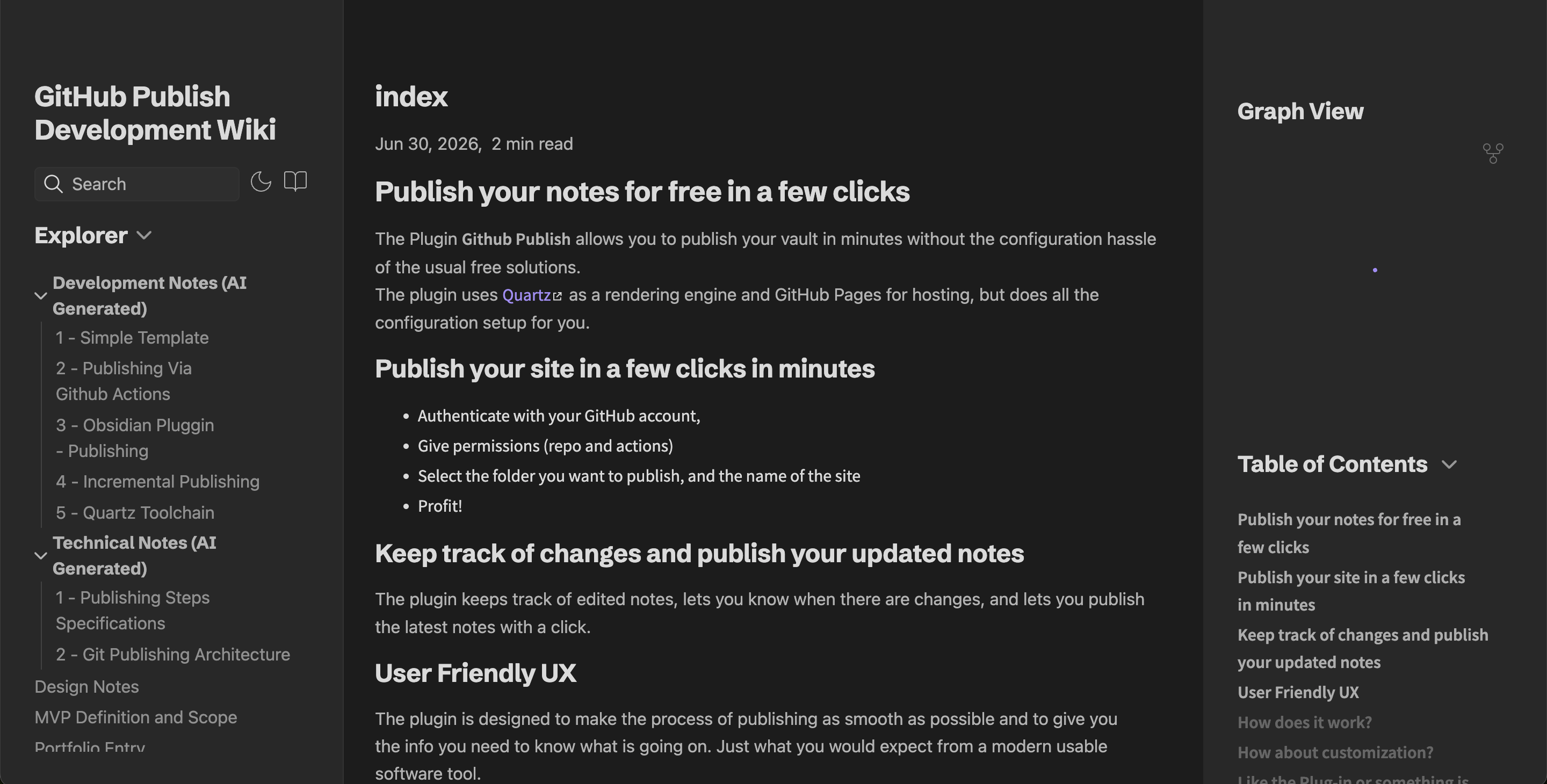
Checkout the Wiki of the project that is published with the Quartz template.
Keep track of changes and publish your updated notes
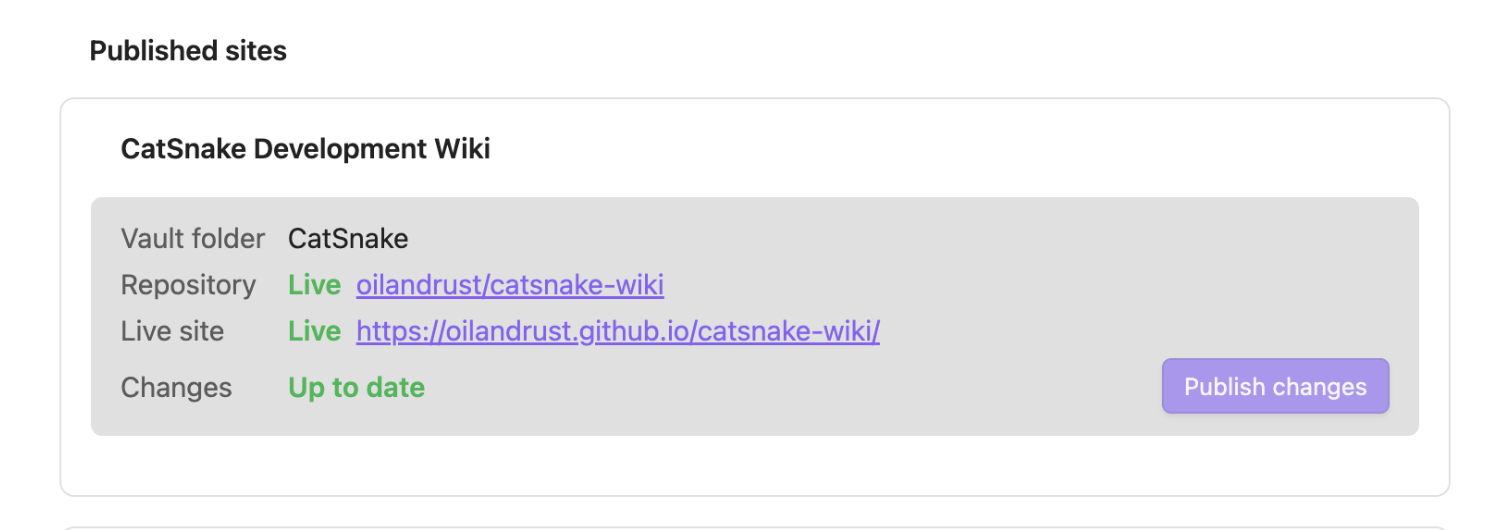
The plugin keeps track of your published sites, lets you know when there are changes, and lets you publish the latest notes with a click.
Features
- One-click setup — choose a content folder, site name, and repository; the plugin handles the rest
- Quartz by default — Obsidian-flavored markdown, backlinks, and graph view out of the box
- Incremental publishes — only changed notes are uploaded after the initial publish
- Multi-site — publish several folders from one vault to separate repositories
- Progress tracking — monitors GitHub Actions until the site is live
How it works
- You authenticate with GitHub (device flow OAuth).
- On first publish, the plugin creates a repo containing your notes under
content/, a pinned Quartz toolchain, and a deploy workflow. - A commit to
maintriggers GitHub Actions, which buildsdist/and deploys to GitHub Pages. - Later publishes diff your vault folder against a stored manifest and push only what changed.
index.md and home page
Quartz expects an index.md file in the top level content/ folder. If the folder that you try to publish do not contain an index.md, the plugin will create one automatically, feel free to edit it.
Configuration
The pluggin settings lets you edit Quartz configuration file in the settings. The configuration is published with the content when it changed and is applied on a new publish build.
This allows to chose and configure Quartz pluggins, themes, colors, analytics, etc. More info about Quartz configuration can be found here.
Enjoying the pluggin or missing some features?
Get in touch! The plugin is in an early prototype version, and I am curious to know what features you would like to see. Get in touch directly via email: orouiller@gmail.com.
Some Issue?
Please report issues and bugs on the GitHub Issue Page
News
Release notes and product updates are posted on the project wiki:
Contributing
The best way to contribute right now is to open a GitHub issue — ask for features, report bugs, or share feedback. Pull requests are welcome, but issue reports and feature requests help most at this stage.
Install
Download the latest release, then install into your vault:
<vault>/.obsidian/plugins/github-publish/
From the Obsidian community store: install as usual — the Quartz toolchain is embedded in main.js and loaded in memory when you publish.
From a GitHub release: download main.js, manifest.json, and styles.css into your plugin folder. The Quartz toolchain is embedded in main.js — no separate assets/ folder is required.
For development: symlink or copy this repository into your vault (after npm run build:plugin):
<vault>/.obsidian/plugins/github-publish/
The folder should contain manifest.json, main.js, and styles.css.
Usage
| Command | Description |
|---|---|
| GitHub Publish: Set up site | Wizard for a new published site |
| GitHub Publish: Publish changes | Push note updates (picks a site if you have several) |
Published sites appear as cards in the plugin settings, each with its own Publish changes button and live status.
If publish fails with an UpdateRef permissions error, disconnect and reconnect GitHub so your token includes the workflow scope.
Deleting a published Site
The Pluggin currently do not implement deletion of site and repository. Please delete the repository on your GitHub account, you can find a link to it in the site status of the puggin settings.
Telemetry
Published sites optionally report anonymous usage counters when their GitHub Pages deploy workflow runs (no user, vault, repository, or IP data).
License
For plugin developers
Search results and similarity scores are powered by semantic analysis of your plugin's README. If your plugin isn't appearing for searches you'd expect, try updating your README to clearly describe your plugin's purpose, features, and use cases.