Publish to Git Repo
approvedby Novelty Liu
An Obsidian plugin that publishes vault notes **together with their images** to a GitHub repository. Incremental, atomic, and safe to re-run. - This plugin has not been manually reviewed by Obsidian staff.
Publish to Git Repo
Translations: 中文
An Obsidian plugin that publishes vault notes together with their images to a GitHub repository. Incremental, atomic, and safe to re-run.
Flag a note with gh-publish: true and run Publish to Git Repo — the note (and any images it embeds) lands in your repo as clean Markdown + image files. It is pure file sync: it does not render or host a website. Pair it with any static-site generator (Jekyll, Hugo, Eleventy, Astro, …) or simply use the repo as a Markdown archive. It currently pairs smoothly with the Amytis digital garden setup.
- Co-located assets — a note with images becomes a folder (
index.md+images/); a plain-text note stays a single.mdfile. - Incremental — only new and changed notes are uploaded; unchanged notes are skipped, so re-running is cheap and idempotent.
- Atomic — every change in a run lands in a single commit. If a run is interrupted or fails, nothing partial is committed.
- Re-runnable — running the command again never duplicates or re-uploads unchanged content.
Design inspired by
oleeskild/obsidian-digital-garden, but lighter: it only syncs files from your vault to a GitHub repo.
Quick start
1. Create a target repository
Create a (public or private) GitHub repository to hold your published notes. Initialize it with at least one commit before publishing — for example tick Add a README when creating the repo, or push an initial commit yourself. The plugin publishes onto an existing branch and cannot bootstrap an empty repository.
2. Create a GitHub token
Create a token with Contents: Read and write permission for that repository.
- Fine-grained token (recommended): Repository access → your repo; Repository permissions → Contents: Read and write.
- Classic token: check the
reposcope.
3. Install the plugin
- From Community plugins (when available): Settings → Community plugins → Browse → search "Publish to Git Repo" → Install → Enable.
- Manually: copy
main.js,manifest.json, andstyles.cssinto<vault>/.obsidian/plugins/publish-to-git-repo/, then enable the plugin in Settings → Community plugins.
4. Configure the settings
Settings → Publish to Git Repo:
| Field | Example |
|---|---|
| GitHub token | your token from step 2 |
| Repository | owner/repo |
| Branch | main (default) |
| Base path | notes (optional) |
| Default storage path | posts (required) |
5. Flag a note and publish
Add this to a note's frontmatter:
---
gh-publish: true
---
Then run the Publish to Git Repo command (Command palette: Cmd/Ctrl+P). You'll see a preview of what will change before anything is uploaded.
That's it — your note and its images are now in your repo. Run the command again any time; only what changed gets uploaded.
Commands
| Command | What it does |
|---|---|
| Publish to Git Repo | Scans all gh-publish: true notes, shows a preview, and uploads the new/changed ones in one commit. |
| Mark/unmark for publishing | Toggles gh-publish on the active note. Marking also seeds an empty gh-path for you to fill in; unmarking removes both (a gh-path value you typed is kept). Only available when a Markdown note is open. |
You can assign hotkeys to both via Settings → Hotkeys.
Settings
| Setting | Required | Notes |
|---|---|---|
| GitHub token | ✅ | Needs Contents: Read and write (classic token: check repo) |
| Repository | ✅ | owner/repo |
| Branch | — | Defaults to main |
| Base path | — | Root prefix inside the repo, e.g. notes |
| Default storage path | ✅ | Relative to the base path, e.g. posts |
| Published base URL | — | When set, the plugin writes gh-published-url back into each note; left unset otherwise |
⚠️ The token is stored in plaintext in
<vault>/.obsidian/plugins/publish-to-git-repo/data.json. Don't share that vault or itsdata.jsonin public environments.
Frontmatter flags
---
gh-publish: true              # allow this note to be published
gh-path: essays/2024          # optional, relative to base path; overrides the default storage path for this note
gh-published: true            # managed by the plugin — written back after publishing
gh-published-url: https://... # managed by the plugin — publish link (only when Published base URL is set)
---
gh-publish— the master switch. Only notes where this is exactlytrueare published. Prefer the Mark/unmark for publishing command to set it: it writes booleantrue(not the string"true", which the plugin ignores) and also adds an emptygh-pathplaceholder.gh-path— optional per-note sub-folder. If empty or whitespace-only, the note uses the default storage path instead — an empty value does not publish to the repo root. The path must be relative and must not contain..(invalid values fail that note). The Mark/unmark for publishing command adds it as an empty placeholder when marking, so you can fill it in; unmarking removes that empty placeholder (a value you set is preserved).gh-published/gh-published-url— written back automatically by the plugin after each successful publish to record status. You don't need to set or edit them. Changing or removing them does not trigger or prevent a republish — republishing is driven by content comparison, not these flags.
Path layout
Whether a note becomes a folder depends on whether it embeds images or other assets:
| Case | Path in repo |
|---|---|
| Note without images/assets | {base}/{default path or gh-path}/{note name}.md |
| Note with images/assets | {base}/{default path or gh-path}/{note name}/index.md |
| Embedded images & assets | {...}/{note name}/images/{asset name} |
{base} is the base path if set. The note name is sanitized (path-illegal characters removed; CJK characters and spaces preserved). Two notes that sanitize to the same remote path (same name + same storage path) are reported as failures so neither overwrites the other.
For gh-published-url, the filename marker is the note name with the .md extension and any leading YYYY-MM-DD- date prefix removed — kept as-is, no slugification.
Example. With base path notes and default storage path posts, the note 2024-03-01-hello.md containing one image ![[pic.png]]:
notes/posts/hello/index.md
notes/posts/hello/images/pic.png
The same note with no images becomes a single file:
notes/posts/hello.md
Removing the last image from a note switches its layout from a folder (
hello/index.md) to a flat file (hello.md) on the next publish. The old folder is not deleted automatically — see Known limitations.
Link rewriting
| In your vault | In the repo |
|---|---|
![[pic.png]] |  |
[[wikilinks]] | Kept as-is (not processed) |
![[note]] note embeds | Not processed |
Image embeds are resolved through Obsidian's metadata cache (not text matching), so a literal ![[...]] inside a code block is never touched. Embeds the plugin can't resolve are reported as failures — never silently dropped.
How it works
This section explains the publish flow and the guarantees behind it. (For the code architecture and internals, see README-developers.md.)
The publish flow
- Scan. Find every note with
gh-publish: true. - Read the remote. Fetch the repo's current file tree once (file paths and their hashes — no file contents downloaded).
- Classify. For each note, build exactly what would be published, compute its hash, and compare it with the remote. Each note falls into one bucket:
- new — not in the repo yet → will be uploaded
- changed — content differs from the repo → will be uploaded
- unchanged — identical to the repo → skipped
- failed — an embed couldn't be resolved → blocked, but doesn't stop the rest
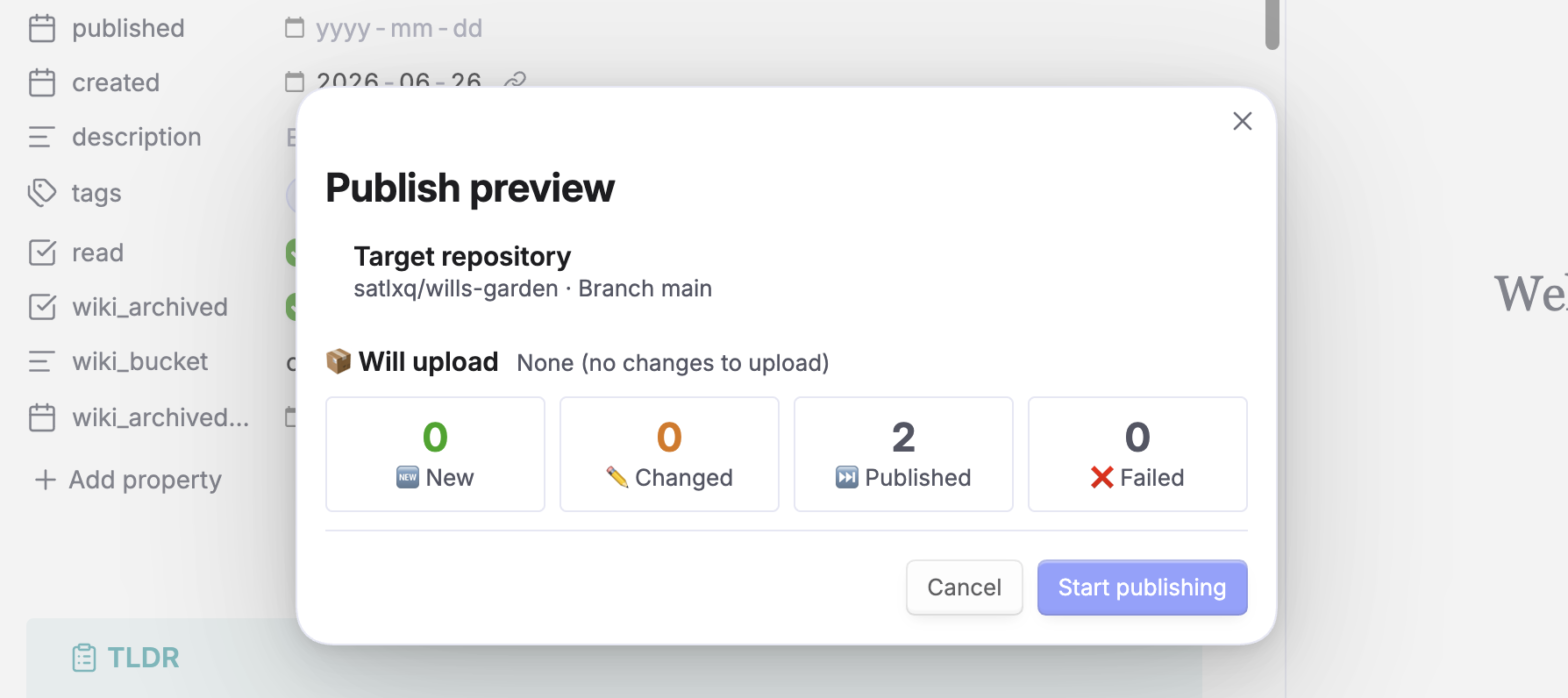
- Preview. A confirmation modal shows the buckets and the target repo/branch before anything is uploaded.
- Upload. After you confirm, a progress card runs: the new/changed files are uploaded, then everything is committed in one atomic commit.
- Write back. On success,
gh-published(andgh-published-url, if configured) is written back into each note's frontmatter. - Report. A summary modal shows what was published.
Guarantees
- Idempotent & incremental. The plugin hashes what would be published and compares it to the remote, so unchanged notes are never re-uploaded and running twice never duplicates content. Edits made to the repo outside the plugin are respected too — the plugin re-aligns to the real remote state on every run.
- Atomic. All changes in a run land in a single commit. If a step fails before the commit, nothing is committed — there's no half-uploaded state.
- Stable output. Published Markdown is produced deterministically: plugin-owned
gh-*frontmatter is stripped and embeds rewritten consistently, so a note's bytes don't drift between runs and its content hash stays stable. - Safe to cancel. The progress card's Stop button cancels between note/asset analysis and uploads, after the current operation finishes. The button is disabled when commit finalization starts. Already-uploaded, uncommitted blobs are ignored by Git.
- Conflicting filenames are blocked. Different assets in one note cannot share a remote filename:
a/pic.pngandb/pic.pngwould both becomeimages/pic.png. The preview reports the collision; rename the conflicting assets before publishing. Repeated references to the same file are allowed. - Local state can be repaired. If a local frontmatter write fails after publication, the report preserves remote success and shows a separate warning. Run publishing again and confirm the local-state repair; unchanged content is not uploaded again. Failed-note details are retained in the final report and copied report.
- Co-located images. Each note carries its own copy of the images it uses — no shared image folders, no broken links.
Known limitations
- Shared images are duplicated. The same image referenced by several notes is copied into each note's
images/folder (one copy per note). - Layout-switch leftovers. When a note loses its last image and switches from a folder to a flat file, the old folder stays in the repo. Clean it up manually.
- No delete sync. Removing
gh-publishor deleting a note does not remove the corresponding file from the repo. - Wikilinks & note embeds.
[[wikilinks]]are kept as-is, and![[note]]note embeds are not expanded. - Large images on mobile. Images are base64-encoded for upload; very large images are memory-heavy on mobile — compress them first.
- Token is plaintext. Stored in
data.jsonin your vault (the settings page warns about this). - Empty target repo. The plugin does not create the first commit. Initialize the repository (README or any commit) and confirm the branch name if publish fails with an uninitialized-repo error.
For developers
Build steps, architecture, and internals live in README-developers.md (English only).
For plugin developers
Search results and similarity scores are powered by semantic analysis of your plugin's README. If your plugin isn't appearing for searches you'd expect, try updating your README to clearly describe your plugin's purpose, features, and use cases.