by Niklas J. Thaler
Run Claude Code sessions as terminal views inside Obsidian, with a cockpit dashboard.
Glasscockpit
English | Deutsch
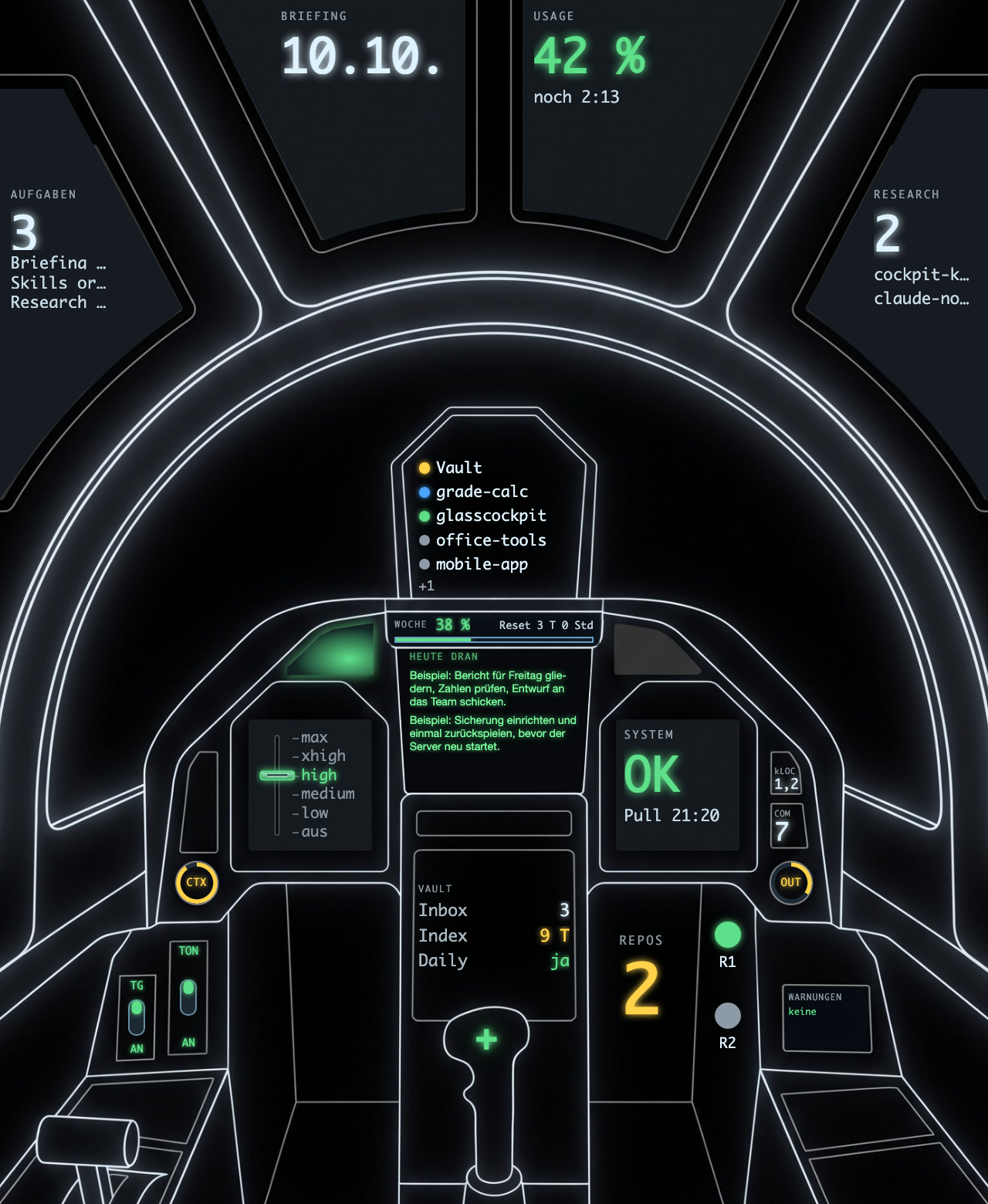
Glasscockpit is an Obsidian plugin that runs Claude Code sessions as terminal tabs inside your vault. A dashboard shows usage limits, context size, tasks, vault status and GitHub search results, either as cards or as a cockpit picture. The photo above uses example data.
The plugin's settings and labels are in German. There is no English interface yet.
Requirements
- macOS on Apple Silicon. Intel Macs are untested.
- Obsidian 1.13 or newer (desktop only).
- The Claude Code CLI (
claude), installed and logged in. jq, for the status line (optional, see "First steps").
Installation
Option A: without the ZIP (BRAT, or the community store once the plugin is listed).
- Install the plugin with BRAT (repository
nyko073006/glasscockpit) or from the community plugins list. Both fetchmain.js,manifest.jsonandstyles.cssonly. - Enable Glasscockpit under Settings, Community plugins.
- Open Settings, Glasscockpit, section "Binärdateien", and press "Binärdateien laden". The plugin downloads the terminal library
node-ptyfor your Mac once and checks it (see "Network" below). Then start a session.
Option B: the complete ZIP.
- Download the ZIP from the GitHub release: https://github.com/nyko073006/glasscockpit/releases/latest
- Unzip it. You get a folder
glasscockpitwithmain.js,manifest.json,styles.cssandnative/. - Move the folder to
<your vault>/.obsidian/plugins/. - In Obsidian, open Settings, Community plugins, and enable Glasscockpit.
The plugin is not in the community store yet. native/ holds the terminal library node-pty as a compiled binary (Option B ships it, Option A downloads it). On first start the plugin removes the macOS quarantine flag from that folder (xattr).
First steps
Open the command palette and run "Neue Claude-Sitzung" (new Claude session) or "Dashboard öffnen" (open dashboard). Settings are under Settings, Glasscockpit.
Most vault-related settings start empty. Empty means "not set up", never an error. The matching card or field then shows "aus" or "nicht eingerichtet" and the plugin reads nothing for it:
| Setting | Empty means |
|---|---|
| Projektordner | "Neue Sitzung" offers no project subfolders. |
| Briefing-Ordner | No briefing card, no automatic git pull. |
| Aufgabenliste | The task card shows "fehlt" with a button to create the file. The default name is Cockpit Tasks.md. |
| Inbox-Ordner, Index-Datei, Ordner der Daily Notes | The vault panel shows "aus" for that line. |
| Lint-Befehl | No lint button. |
| Radare | No radar lamps. A radar is a name plus the path to a JSON state file you write yourself. |
Telegram, the research searches and the other switches have their own defaults, listed under "Disclosures".
Status line
Claude Code can show a status line. This repo ships one that also feeds the usage card, the token counter and the context gauge. It needs jq.
npm run deploy:statusline
This copies statusline/statusline-command.sh to ~/.claude/statusline-command.sh. It replaces a file that already exists there. Then point Claude Code at it in ~/.claude/settings.json:
{ "statusLine": { "type": "command", "command": "~/.claude/statusline-command.sh", "refreshInterval": 30 } }
Without the status line the plugin works, but the usage card and the context and token gauges stay empty.
Handoff signal (optional)
A Stop hook shows a coloured banner "Session clearable" after an answer in which Claude reports the session as ready to hand off: a code block whose first line starts with Handoff:, or the word "clearable" without "not"/"nicht" before it. The banner only appears once the session has enough context and enough of your own messages. Both thresholds are settings ("Handoff frühestens ab Kontext (%)", default 10, and "Handoff frühestens ab Nachrichten", default 2). Slash commands do not count as messages. The hook reads the context from the status line; without it only the message threshold applies. It needs python3. The banner text is German.
npm run deploy:hook
This copies hooks/clearable-banner.py to ~/.claude/hooks/clearable-banner.py. Then register it in ~/.claude/settings.json:
{ "hooks": { "Stop": [ { "hooks": [ { "type": "command", "command": "python3 \"$HOME/.claude/hooks/clearable-banner.py\" 2>/dev/null || true", "timeout": 10 } ] } ] } }
For Claude to set the signal, add an instruction to your CLAUDE.md, for example: "When the session is ready to hand off, end the answer with a code block that starts with Handoff:."
Handoffs
The plugin can continue a project from the handoff note of an earlier session. It is off until you set two paths.
| Setting | Meaning |
|---|---|
hubsDir | Vault folder with one subfolder per project. Empty = off. |
handoffsDir | Folder name inside each project folder that holds its handoff notes. Empty = off. |
hubSuffix | Ending of the project's hub note. Default " - PMO HUB.md". |
handoffPrompt | First message of a continued session. {datei} becomes the handoff path, {auftrag} the next task. |
A handoff is a Markdown note with this frontmatter:
status: offen            # offen = waiting, aufgenommen = taken up
erstellt: 2026-01-05
naechster_auftrag: Short description of the next task
The hub note may name the project's repo folder with repo: ~/path/to/repo. ~ is your home folder. Without repo, or if the folder does not exist, the session starts in the vault and the entry says so.
Per project the newest open handoff counts. The field "Neue Sitzung" on the dashboard shows "N offen". The new-session menu lists each one as "Weiter" above the normal entries, and Enter without typing picks the top entry. The plugin sets status: aufgenommen (and aufgenommen: <date>) only once the session is running, so a failed start leaves the handoff open.
Minimum contrast in the terminal
Claude Code sends some text (for example the question of a choice prompt) as fixed white. In a light Obsidian theme that text is invisible. The setting "Mindestkontrast im Terminal" (1 to 21, default 4.5, 1 = off) lifts text that is too pale for the background up to that contrast ratio. It applies at once to open terminals.
Banner auto-dismiss
The macOS banner (setting "macOS-Banner") closes itself after "Banner ausblenden nach (Sekunden)" (1 to 60, default 6) and does not stay in Notification Center. Each session has at most one banner: a new one replaces the old one. Open banners are closed when the plugin is disabled. A click brings the session to the front. If @electron/remote is unavailable in Obsidian, the plugin falls back to the window's web notification; then closing is not guaranteed.
Skip permission prompts
The switch "Rechteabfragen überspringen" is off by default.
Warning: when it is on, new sessions start with --dangerously-skip-permissions. Claude then runs commands and edits files without asking you. Turn it on only in folders and vaults where you accept that.
The switch applies to sessions started after you change it. Running sessions keep their mode.
Disclosures
This follows the disclosure rules of the Obsidian developer policies.
Runs programs.
claudein a terminal session, and your$SHELLfor shell sessions. On load the plugin starts your login shell once ($SHELL -i -l -c) to readPATHandLANG.git pull --ff-onlyin the briefing folder, only if you set one (every 5 minutes by default, while a dashboard is open).git statusin your project folders, for the repo panel. No fetch.afplayfor the alert sound,xattrfor the quarantine flag,psto find the parent process for the IDE bridge.
Reads outside the vault.
~/.claude/projects/: the Claude transcripts, to count tokens, find the last code block and show the active session.~/.claude/skills/,agents/,commands/,settings.jsonandplugins/installed_plugins.json: to list skills, agents and commands in the launcher. The same folders under the vault and the project folder are read too.~/.claude/cockpit/:usage.jsonandsessions/*.json(written by the status line script), plus the plugin's own files below.- Telegram only if enabled: the
.envfile named in settings (default~/.claude/channels/telegram/.env) for the bot token, andaccess.jsonnext to it for the chat ID. The token is read for each message and never stored by the plugin. - Radar state files at the paths you enter.
Writes outside the vault.
~/.claude/cockpit/tokens-today.json(today's output tokens for the status line; switch "Tokens für die Statuszeile schreiben", on by default),thresholds.json(context thresholds from your settings) andresearch.json(cache of GitHub results).~/.claude/ide/<port>.lock: lock file of the IDE bridge (switch "IDE-Brücke", on by default). It lets Claude sessions started by the plugin see your selection and open notes. The server listens on127.0.0.1only. The lock file is removed on exit.npm run deploy:statuslinewrites~/.claude/statusline-command.sh. You run that yourself.npm run deploy:hookwrites~/.claude/hooks/clearable-banner.py; you run that yourself too. The hook reads~/.claude/cockpit/thresholds.json,sessions/*.jsonand the session transcript, and appends a log to~/.claude/hooks/clearable-banner.log.
Writes inside the vault. The plugin's data.json (settings, session list), the folder native/darwin-<arch>/ inside the plugin folder when you press "Binärdateien laden" (plus a temporary folder .native-download-* there while it runs, removed afterwards), the task file when you press "Anlegen" or tick a task, and the result of git pull in the briefing folder.
Network.
- GitHub search (
api.github.com/search/repositories) for the Research card, without a token. It sends your search lines from the settings and nothing else. Without a token GitHub allows 10 searches per minute. - Telegram (
api.telegram.org), only if you enable "Telegram, wenn eine Sitzung fertig ist" or "…eine Frage hat" (both off by default). It sends a short status text. - Binary download, only when you press "Binärdateien laden" in the settings, never automatically: one ZIP (about 40 KB) with the compiled
node-ptyfor your Mac fromgithub.com/nyko073006/glasscockpit/releases/download/<plugin version>/glasscockpit-native-darwin-<arch>.zip. The plugin sends no data beyond the request itself. The address is fixed in the code. Before anything is installed, every file of the download is compared against a SHA256 list that is built into the plugin (no extra files, no symbolic links, every checksum must match); on any mismatch nothing is changed. The downloaded files are native code that Obsidian then loads, so the checksums are the safeguard: they come from the plugin itself, not from the download. - Claude Code itself talks to Anthropic. That is the
claudeprogram, not this plugin.
No telemetry. The plugin sends no usage data, no analytics and no crash reports.
No affiliation. Glasscockpit is not connected to Anthropic or Obsidian and not endorsed by either. "Claude" and "Obsidian" are trademarks of their respective owners.
Limits
- macOS only.
native/holds binaries for Apple Silicon (arm64) and Intel (x64); the loader picks by architecture. The arm64 build is the tested one, x64 is untested inside Obsidian. - The interface is German.
- Parts of the IDE bridge use an unofficial protocol of Claude Code and may break with an update. Errors only go to the developer console.
- Some behavior can only be checked inside Obsidian. Tests cover the logic, not the whole plugin.
License
MIT, see LICENSE. Third-party licenses are in THIRD-PARTY-NOTICES.md.
The background image assets/cockpit-bg.jpg was generated with Google Flow (Nano Banana Pro).
For plugin developers
Search results and similarity scores are powered by semantic analysis of your plugin's README. If your plugin isn't appearing for searches you'd expect, try updating your README to clearly describe your plugin's purpose, features, and use cases.