GLSL Viewer
approvedby iy0yi
Preview GLSL shaders.
GLSL Viewer
Preview GLSL shaders on Obsidian.
Features
Shadertoy Compatibility (Limited)
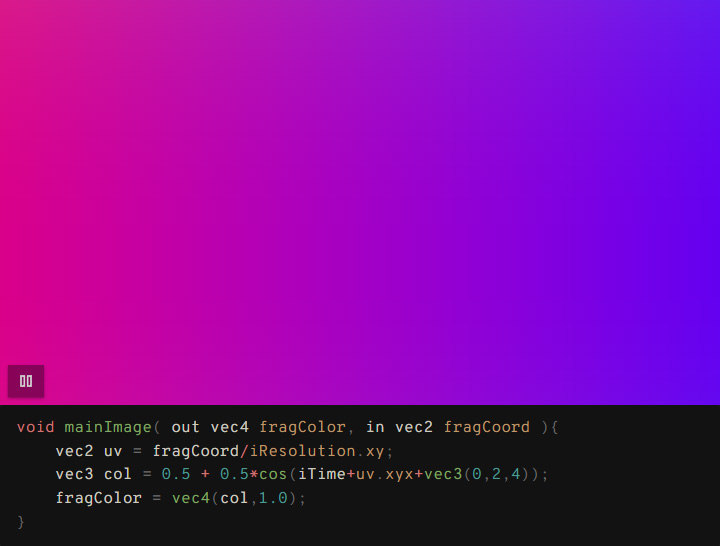
Same syntax as Shadertoy - easily port your creations and reuse code snippets between platforms
Custom Textures
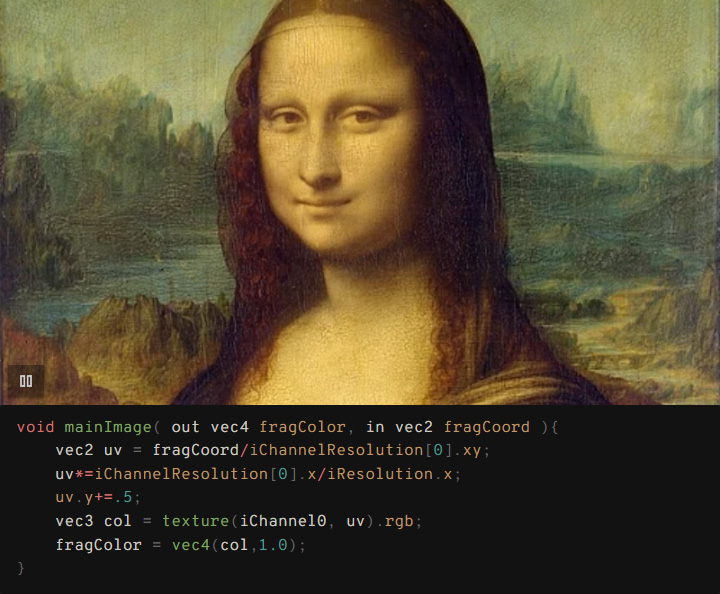
Load images from your vault as textures (iChannel0-3)
Template System
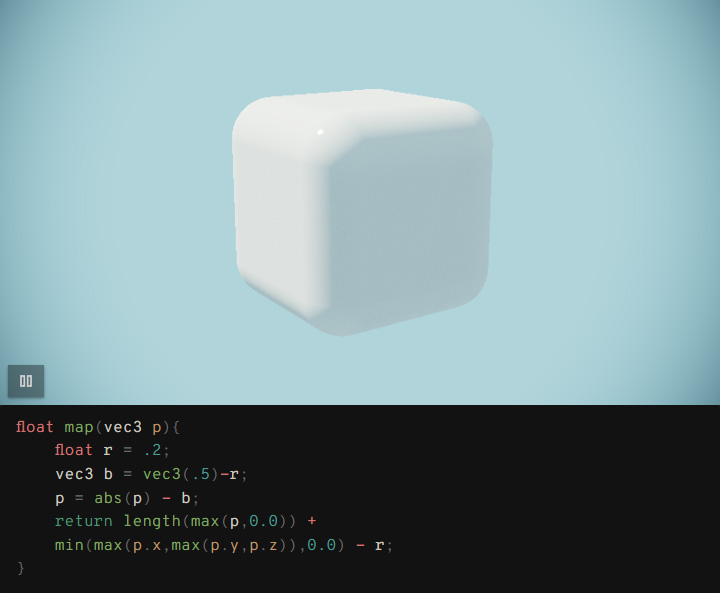
Use templates to simplify complex shaders - write minimal code, get maximum results
And more
- 📸 Thumbnail generation: Automatic thumbnails for non-autoplay shaders
- ⚙️ Configurable canvas ratio, autoplay, and code visibility
- 🔧 Flexible configuration using comments in code blocks
- 🎯 Texture shortcuts: Quick reference to frequently used textures
- 📁 Texture browser: Visual texture selection with folder filtering
- 🙈 @hideCode: Show only the viewer or with code
- 📁 Configurable folders: Set custom locations for templates and thumbnails
- 🎯 Works with syntax highlighters: No conflicts with other code plugins (Shiki Highlighter)
Installation
- Copy this plugin to your Obsidian plugins folder
- Enable the plugin in Obsidian settings
Usage
Use standard glsl code blocks with @viewer directive:
Directive Styles:
Single-line comments:
```glsl
// @viewer
// @aspect: 0.75
// @autoplay: true
void mainImage(out vec4 fragColor, in vec2 fragCoord) {
    vec2 uv = fragCoord / iResolution.xy;
    vec3 col = 0.5 + 0.5 * cos(iTime + uv.xxy + vec3(0, 2, 4));
    fragColor = vec4(col, 1.0);
}
```
Multi-line comments:
```glsl
/*
@viewer
@aspect: 0.75
@autoplay: true
@hideCode: true
@iChannel0: assets/texture.png
*/
void mainImage(out vec4 fragColor, in vec2 fragCoord) {
    vec2 uv = fragCoord / iResolution.xy;
    vec3 col = 0.5 + 0.5 * cos(iTime + uv.xxy + vec3(0, 2, 4));
    fragColor = vec4(col, 1.0);
}
```
Basic Example
```glsl
// @viewer
void mainImage(out vec4 fragColor, in vec2 fragCoord) {
    vec2 uv = fragCoord / iResolution.xy;
    vec3 col = 0.5 + 0.5 * cos(iTime + uv.xxy + vec3(0, 2, 4));
    fragColor = vec4(col, 1.0);
}
```
Setting Example
```glsl
// @viewer
// @aspect: 1.0
// @autoplay: true
// @iChannel0: assets/images/texture.jpg
// @hideCode: true
void mainImage(out vec4 fragColor, in vec2 fragCoord) {
    vec2 uv = (fragCoord-iResolution.xy*.5) / iResolution.y;
    uv+=vec2(sin(iTime),cos(iTime));
    vec3 texColor = texture(iChannel0, uv * 2.0).rgb;
    vec3 col = texColor;
    fragColor = vec4(col, 1.0);
}
```
Template Example
Templates enable the creation of complex shader patterns with minimal code.
Create custom templates in your configured templates folder (default: GLSL Templates/).
Share complex setups across multiple shaders.
```glsl
// @viewer
// @template: raymarching.glsl
vec4 map(vec3 p) {
    float d = length(p) - .5;  // Sphere distance function
    return vec4(d, COL_S2);     // Return distance and material color
}
```
Using Textures
Three ways to specify textures:
- Shortcuts:
tex1(configured in settings) - Filenames:
wood.png(when Texture Folder is set) - Full paths:
images/wood.png(relative to vault root)
Texture Shortcuts
Create shortcuts for frequently used textures in plugin settings.
Shortcuts are always relative to your Texture Folder setting:
```glsl
// @viewer
// @iChannel0: tex1      // Uses shortcut 'tex1' → {TextureFolder}/wood.png
// @iChannel1: noise     // Uses shortcut 'noise' → {TextureFolder}/noise.jpg
void mainImage(out vec4 fragColor, in vec2 fragCoord) {
    vec2 uv = fragCoord / iResolution.xy;
    vec3 tex = texture(iChannel0, uv).rgb;    // wood texture
    vec3 n = texture(iChannel1, uv).rgb;      // noise texture
    fragColor = vec4(mix(tex, n, 0.5), 1.0);
}
```
Configure shortcuts in Settings → GLSL Viewer → Texture Shortcuts
Configuration Options
Comment Settings
| Setting | Description | Default |
|---|---|---|
@viewer | Enable viewer for glsl code blocks | - |
@aspect: number | Canvas aspect ratio (height/width) | 0.5625 |
@autoplay: true/false | Auto-start animation | false |
@hideCode: true/false | Hide code block, show viewer only | false |
@template: filename | Use template from templates folder | - |
Note: @viewer directive is required only for glsl code blocks. glsl-viewer blocks are always processed.
Available Uniforms
vec3 iResolution- Screen resolution ✅float iTime- Elapsed time ✅float iTimeDelta- Frame delta time ✅int iFrame- Frame number ✅vec4 iMouse- Mouse position (Shadertoy-compatible) ✅vec4 iDate- Date info (year, month, day, seconds) ✅sampler2D iChannel0-3- Textures ✅vec3 iChannelResolution[4]- Texture resolutions (width, height, 1.0) ✅
Technical Details
- Shader Type: Fragment shaders only
- Entry Point:
mainImage(out vec4 fragColor, in vec2 fragCoord) - Textures: Load images from anywhere in your vault with flexible path resolution
- Templates: Custom templates with
@TEMPLATE_LINESplaceholder replacement - Thumbnails: Auto-generated for non-autoplay shaders, stored in configurable folder
- Texture Folder: Serves as base directory for relative texture paths and shortcuts
Plugin Settings
Access via Settings → Community plugins → GLSL Viewer:
Display Settings:
- Default Aspect Ratio: Canvas ratio for new shaders
- Default Autoplay: Whether new shaders auto-start by default
- Default Hide Code: Whether to hide code blocks by default
Folders: (in setup priority order)
- Thumbnails Folder: Where generated thumbnails are stored (default:
GLSL Thumbnails) - Texture Folder: Base folder for texture paths and browsing (optional)
- Templates Folder: Where GLSL templates are stored (default:
GLSL Templates)
Texture Shortcuts:
- Create shortcuts for frequently used textures (e.g.,
tex1,noise) - All shortcuts are relative to the Texture Folder setting
Creating Templates
- Create a
.glslfile in your Templates Folder (default:GLSL Templates/) - Use
@TEMPLATE_LINESwhere your code should be inserted - Reference with
// @template: filename.glsl
Development
npm install
npm run dev    # Development mode
npm run build  # Production build
License
MIT License
Compatibility
- Obsidian: v1.0.0+
- Shiki-highlighter
For plugin developers
Search results and similarity scores are powered by semantic analysis of your plugin's README. If your plugin isn't appearing for searches you'd expect, try updating your README to clearly describe your plugin's purpose, features, and use cases.