by Genglin Zheng
View JSON as a collapsible rich tree with inline previews for images, colors, links, timestamps, JWT and more. Format, validate, convert to YAML or a table.
JSON Toolbox
Full online version (30+ JSON tools): https://jsontoolbox.cc Chinese docs: README.zh.md
View JSON in Obsidian as a collapsible rich tree with inline previews for images, colors, links, timestamps, JWTs, Base64 and more — then format, validate, convert to YAML, or turn it into a table.
Features
- Reading-mode auto-render:
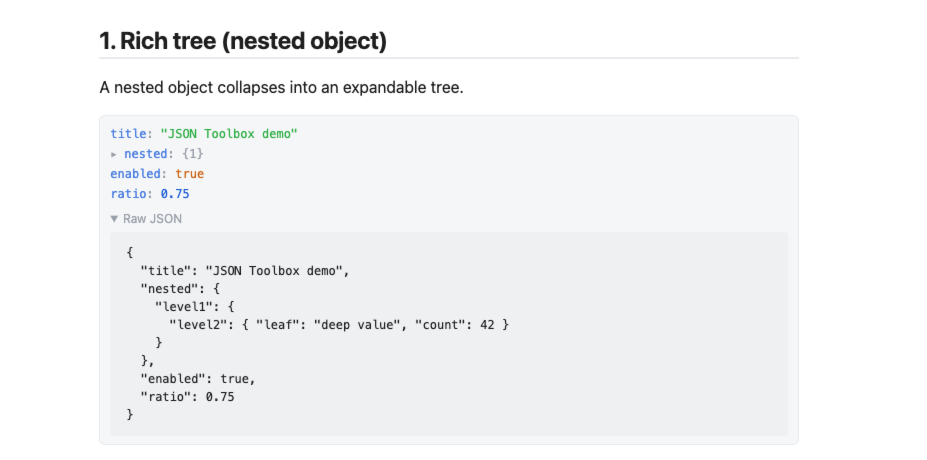
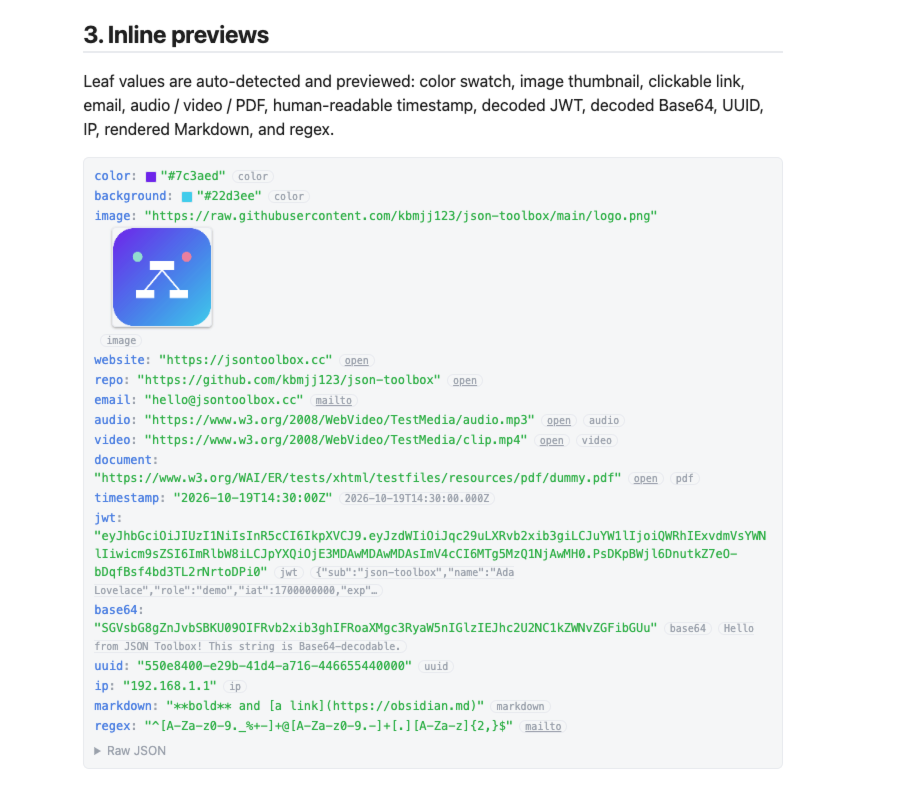
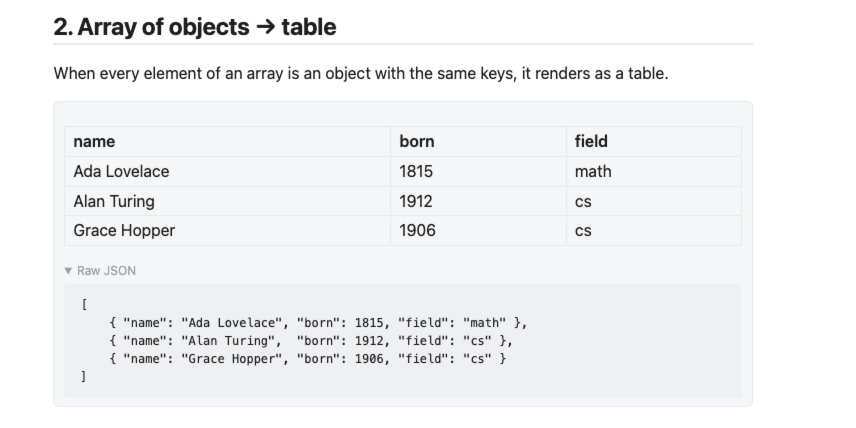
json/yamlcode blocks turn into a collapsible rich tree automatically; arrays of objects render as a table. - 14 inline preview kinds: image, color swatch, clickable URL, email, audio, video, PDF, timestamp, JWT, Base64 (incl. inline images), UUID, IP, Markdown, regex.
- Keep original source: the original JSON / YAML is preserved in a collapsible section under every preview.
- 5 commands: Open JSON Viewer · Format JSON · Validate JSON · JSON ↔ YAML · JSON → Table/CSV.
- Fully local: parsing, formatting and conversion run inside your vault. No telemetry, no accounts, no cloud sync.
- 6 settings toggles, localized to your Obsidian language (Chinese / English).
Example
Copy the block below into a json code block in reading mode to see the rich tree, the array-of-objects table, and every inline preview (color, image, link, email, media, timestamp, JWT, Base64, UUID, IP, Markdown, regex):
{
  "title": "JSON Toolbox demo",
  "nested": {
    "level1": {
      "level2": { "leaf": "deep value", "count": 42 }
    }
  },
  "color": "#7c3aed",
  "background": "#22d3ee",
  "image": "https://raw.githubusercontent.com/kbmjj123/json-toolbox/main/logo.png",
  "website": "https://jsontoolbox.cc",
  "repo": "https://github.com/kbmjj123/json-toolbox",
  "email": "hello@jsontoolbox.cc",
  "audio": "https://www.w3.org/2008/WebVideo/TestMedia/audio.mp3",
  "video": "https://www.w3.org/2008/WebVideo/TestMedia/clip.mp4",
  "document": "https://www.w3.org/WAI/ER/tests/xhtml/testfiles/resources/pdf/dummy.pdf",
  "timestamp": "2026-10-19T14:30:00Z",
  "jwt": "eyJhbGciOiJIUzI1NiIsInR5cCI6IkpXVCJ9.eyJzdWIiOiJqc29uLXRvb2xib3giLCJuYW1lIjoiQWRhIExvdmVsYWNlIiwicm9sZSI6ImRlbW8iLCJpYXQiOjE3MDAwMDAwMDAsImV4cCI6MTg5MzQ1NjAwMH0.PsDKpBWjl6DnutkZ7eO-bDqfBsf4bd3TL2rNrtoDPi0",
  "base64": "SGVsbG8gZnJvbSBKU09OIFRvb2xib3ghIFRoaXMgc3RyaW5nIGlzIEJhc2U2NC1kZWNvZGFibGUu",
  "uuid": "550e8400-e29b-41d4-a716-446655440000",
  "ip": "192.168.1.1",
  "markdown": "**bold** and [a link](https://obsidian.md)",
  "regex": "^[A-Za-z0-9._%+-]+@[A-Za-z0-9.-]+[.][A-Za-z]{2,}$",
  "people": [
    { "name": "Ada Lovelace", "born": 1815, "field": "math" },
    { "name": "Alan Turing",  "born": 1912, "field": "cs" },
    { "name": "Grace Hopper", "born": 1906, "field": "cs" }
  ]
}
Screenshots
Place images in
assets/screenshots/using the exact filenames below (broken images before they are added are expected placeholders).
Commands
| Command | What it does |
|---|---|
| Open JSON Viewer | View selected JSON as a collapsible rich tree with inline previews |
| Format JSON | Pretty-print selected JSON (2-space indent) |
| Validate JSON | Validate selected JSON and locate the error |
| JSON ↔ YAML | Convert selection between JSON and YAML (auto-detects direction) |
| JSON → Table/CSV | Turn a JSON array/object into a table |
Inline previews
Automatically detected on leaf values: color, image, audio, video, pdf, url, email, timestamp, jwt, base64, uuid, ip, markdown, regex.
Settings
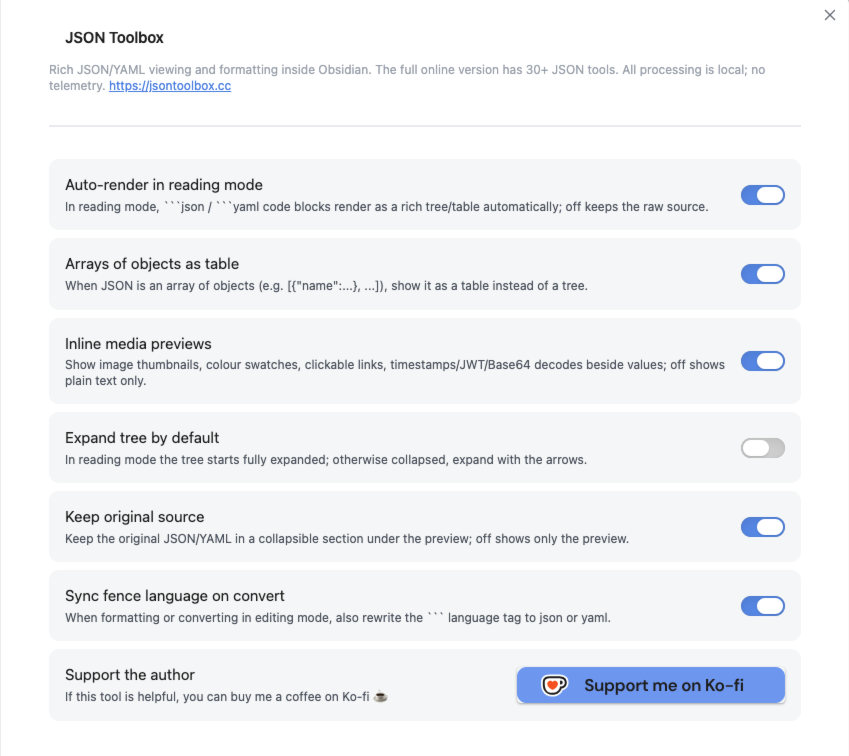
The settings tab offers 6 toggles:
- Auto-render in reading mode
- Arrays of objects as table
- Inline media previews
- Expand tree by default
- Keep original source
- Sync fence language on convert
Labels follow your Obsidian interface language (Chinese / English); command names stay in English.
Privacy
All processing (parsing, formatting, validation, conversion) happens locally — no telemetry, no accounts, no cloud sync.
One exception: inline media previews (image / audio / video / PDF) fetch the remote URL found in your JSON in order to render the preview. Nothing is uploaded — the URL is only fetched to render the preview.
Install
From the community store (recommended)
- Settings → Community plugins → Browse, search for JSON Toolbox
- Install and enable
Manual / BRAT
Download main.js, manifest.json, styles.css from the GitHub Release into <vault>/.obsidian/plugins/json-toolbox/.
Support
If this tool helps you, you can buy me a coffee on Ko-fi: https://ko-fi.com/kbmjj123
License
MIT
For plugin developers
Search results and similarity scores are powered by semantic analysis of your plugin's README. If your plugin isn't appearing for searches you'd expect, try updating your README to clearly describe your plugin's purpose, features, and use cases.