by David Hurt
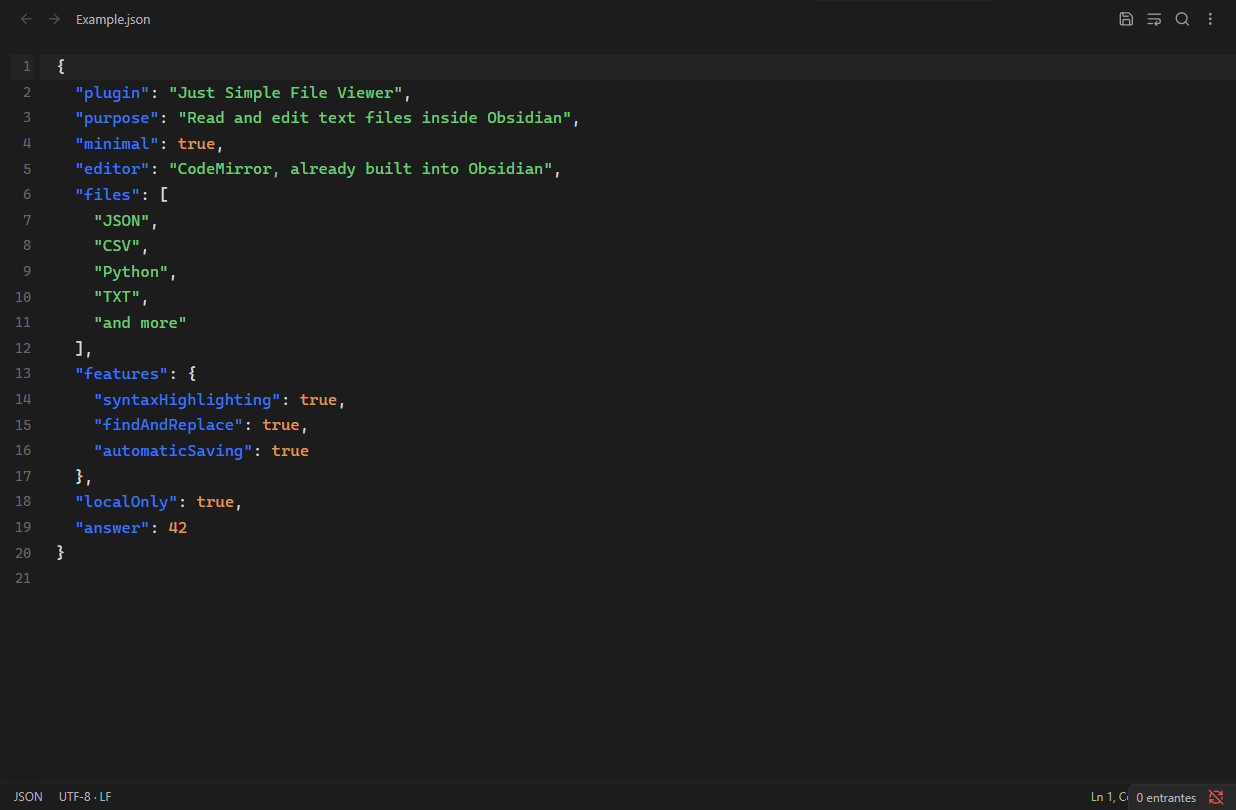
A deliberately minimal text file editor. Open JSON, CSV, Python and more in native tabs, with syntax highlighting and automatic saving.
Just Simple File Viewer
There are already Obsidian plugins that open many kinds of files and offer extensive editing features. Just Simple File Viewer deliberately aims for minimalism: a small, focused way to read and edit text files in normal Obsidian tabs.
Open JSON, CSV, Python, TXT, configuration files and other text files, edit the source directly, and keep everything in your vault. It reuses the CodeMirror editor already built into Obsidian and bundles only selected syntax parsers. The JavaScript is about 80 KiB uncompressed, including license notices.
No Office viewers, document conversion engines, separate editor runtime, accounts or remote services. Just text.
Features
- Normal Obsidian tabs, splits and pop-out windows.
- Automatic saving after 750 ms without typing, plus immediate save with Ctrl/Cmd+S and on tab close.
- Syntax highlighting for JSON, JavaScript, TypeScript, Python, CSS, HTML/XML, YAML, TOML, shell scripts, diff and properties files.
- Other languages and CSV/TSV remain editable plain text.
- Find and replace with case matching, whole words and regular expressions (Ctrl/Cmd+F or Ctrl/Cmd+H).
- Undo/redo, multiple selections, line numbers, indentation and optional word wrap (Alt+Z).
- Native theme colors and monospace font; no separate editor theme to configure.
- Checks file contents before editing and refuses known binary formats.
- Atomic conflict checking: external changes are reloaded when the tab is clean; concurrent edits show a conflict banner instead of silently overwriting either version.
- If a dirty tab closes after a conflict or save failure, its local edits are saved in a separate recovery copy.
Use
Click a supported file in the vault file explorer. For any other text extension, right-click a file and choose Open as text, or use Just Simple File Viewer: Open text file from the command palette and enter its path relative to the vault, such as folder/example.json. The command opens that specific file without enumerating the vault. This also handles files without extensions, such as Makefile, and dotfiles that Obsidian exposes through its vault API. Obsidian's hidden configuration folder is outside this API.
In settings, add extensions separated by commas. Reload the plugin to apply extension associations. Markdown, Canvas, Bases, SVG and extensions already owned by another view keep their normal default viewer; Open as text can explicitly open their textual source. Known Office, PDF, image, archive and executable extensions are excluded.
CSV is edited as source text, not a table. HTML and SVG are shown as text and never executed or rendered. There are no code execution, language server, completion, preview or Office features.
Text format and large files
Version 0.1 supports UTF-8, including UTF-8 with BOM. Other encodings are refused without changing the file; convert a copy to UTF-8 first. Standard LF, CRLF and CR line endings, the BOM and the absence of a final newline are preserved. A file with mixed line endings adopts its first line-ending convention when edited.
Files up to 20 MiB can be opened. Syntax highlighting is omitted above 1,048,576 characters. CodeMirror only renders the visible part of the document, although the file itself must fit in memory. These limits are safeguards, not a promise of identical performance on every device.
Install
Requires Obsidian 1.13.0 or later.
- Download
main.js,manifest.jsonandstyles.cssfrom the latest release. - Create
<vault>/.obsidian/plugins/just-simple-file-viewer/and copy the three files into it. - Reload Obsidian and enable Just Simple File Viewer under Settings → Community plugins.
Development
npm ci
npm run check
npm run dev
Uses Obsidian's existing CodeMirror 6 modules for editing, history, search and viewport rendering. Only selected MIT-licensed CodeMirror stream parsers are included in the plugin bundle. No Monaco, React, network access, telemetry, CDN or separate editor runtime. See THIRD-PARTY-NOTICES.md.
The minimum app version is a conservative API baseline. Desktop integration is tested in the development vault; mobile compatibility uses the same public APIs but requires device testing.
For plugin developers
Search results and similarity scores are powered by semantic analysis of your plugin's README. If your plugin isn't appearing for searches you'd expect, try updating your README to clearly describe your plugin's purpose, features, and use cases.