Kanban Moonlight
approvedby Tyliz
A native Kanban board plugin for Obsidian. Transform your markdown notes into an interactive, visual Kanban board with drag & drop, customizable columns, categories system, and completion tracking. - This plugin has not been manually reviewed by Obsidian staff.
Kanban Moonlight

A native Kanban board plugin for Obsidian. Transform your markdown notes into an interactive, visual Kanban board using frontmatter metadata.
Features
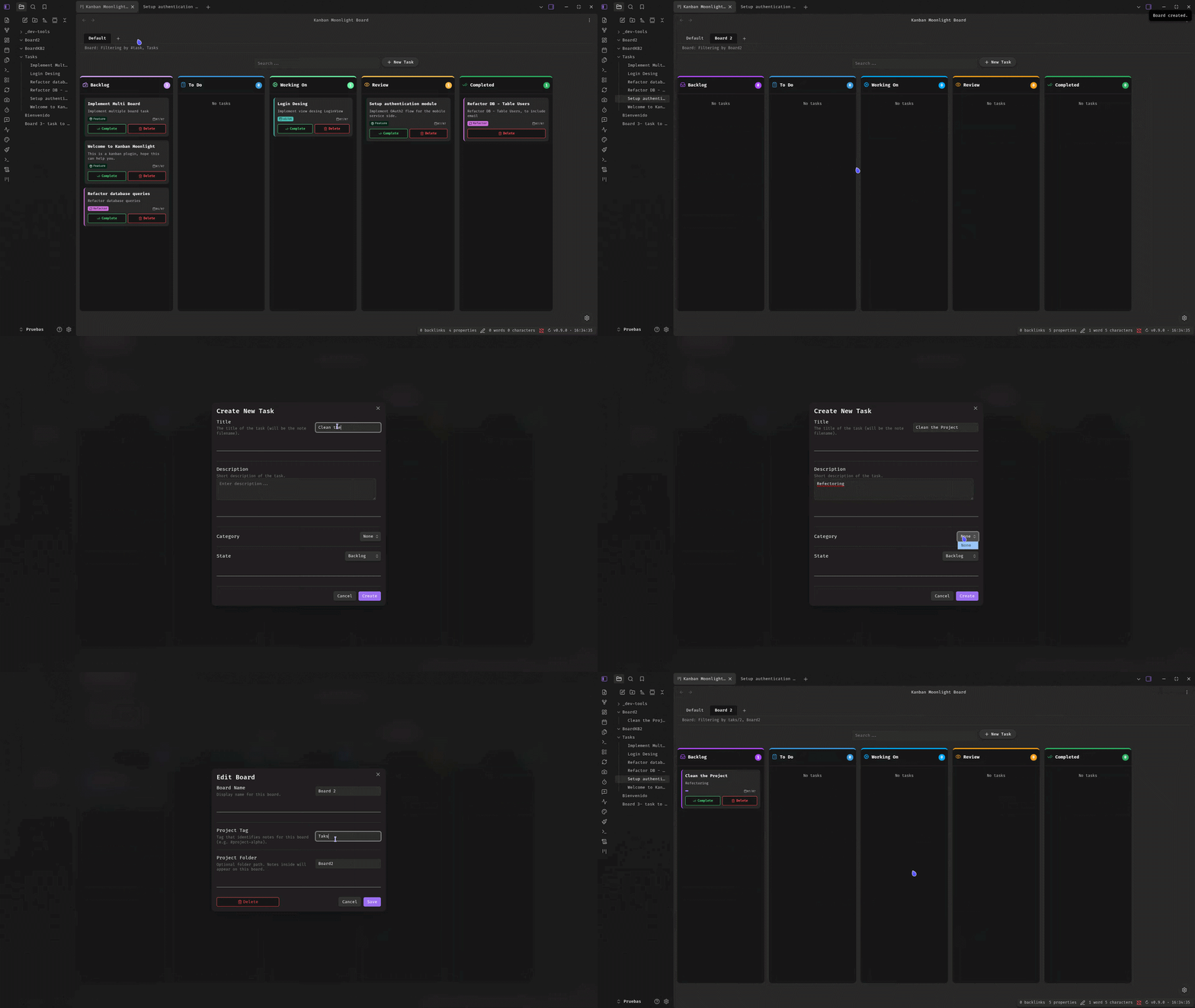
- Multi-board Support: Create and manage multiple independent Kanban boards, each with its own columns, categories, tag, and folder configuration.
- Board Tabs: Switch between boards via a tab bar at the top of the Kanban view.
- Three View Modes: Toggle between Board, Gantt Chart, and Dashboard views.
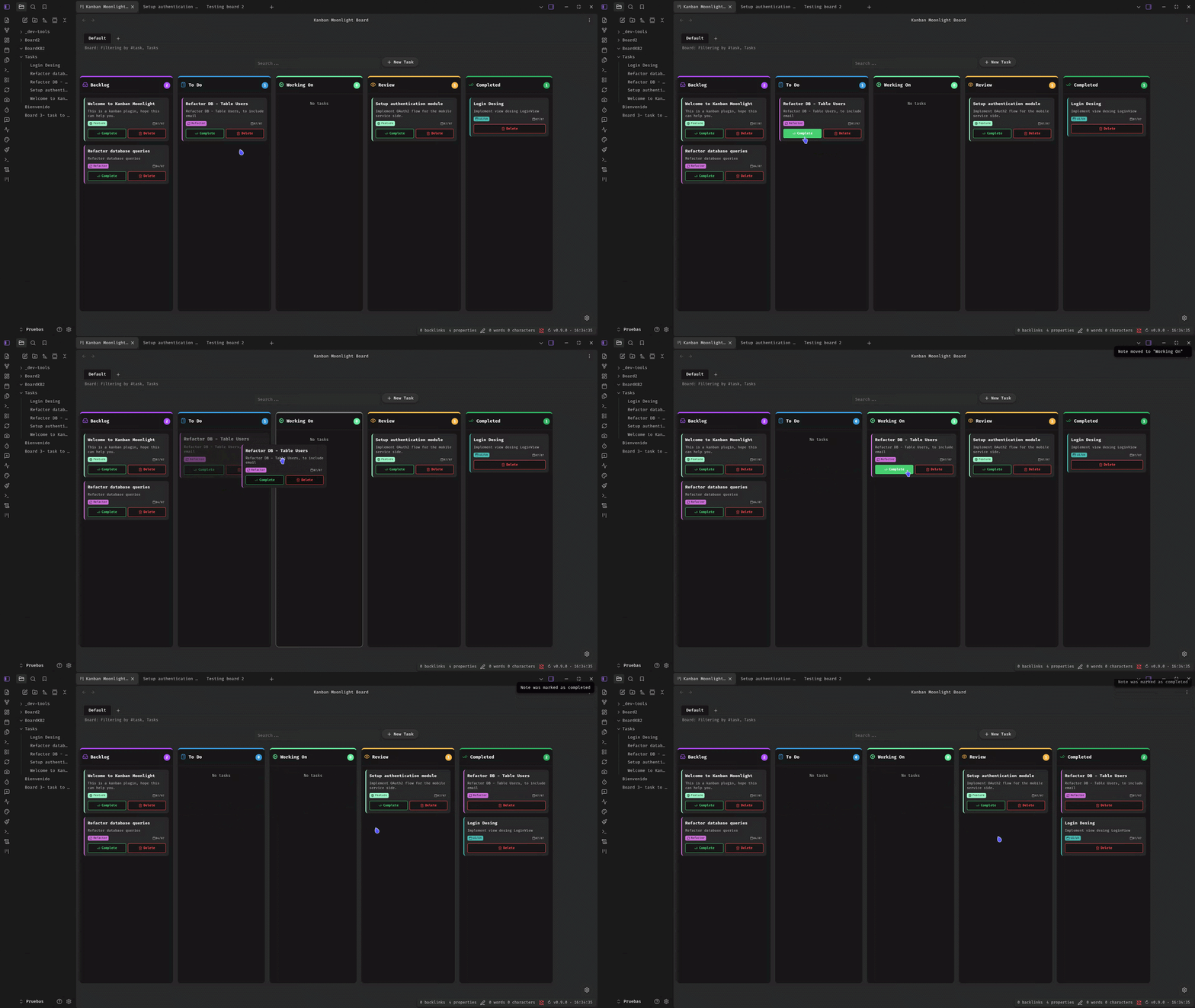
- Drag & Drop: Move notes between columns by dragging cards — frontmatter
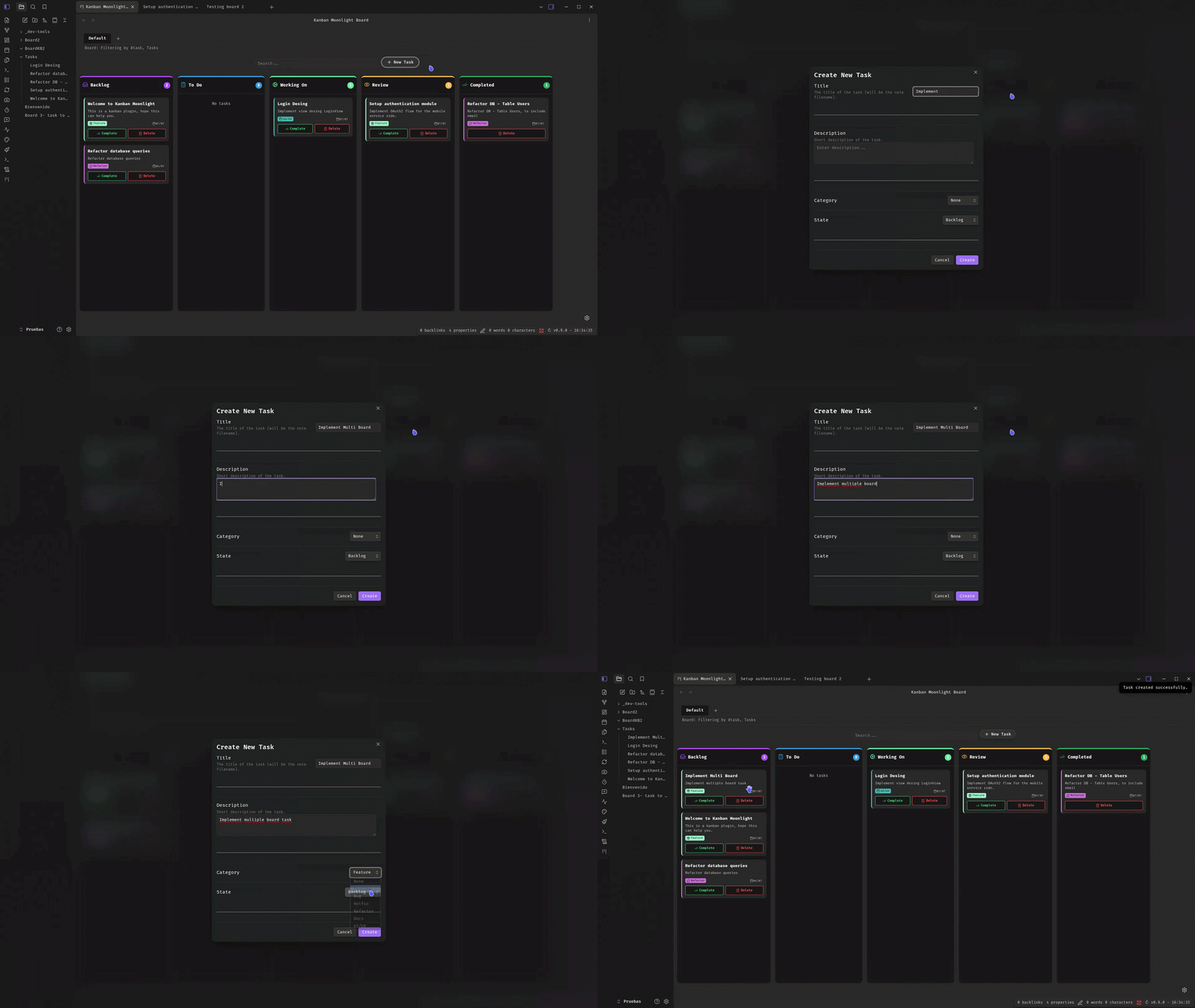
stateis updated automatically with a full history log. - Create Task: Create new tasks directly from the Kanban board or via the command palette. A modal lets you set title, description, category, and initial column.
- Delete Task: Remove tasks with a single click. A confirmation dialog prevents accidental deletion. Also available as a command.
- Search / Filter: Real-time search across note titles, descriptions, categories, and tags with debounced input.
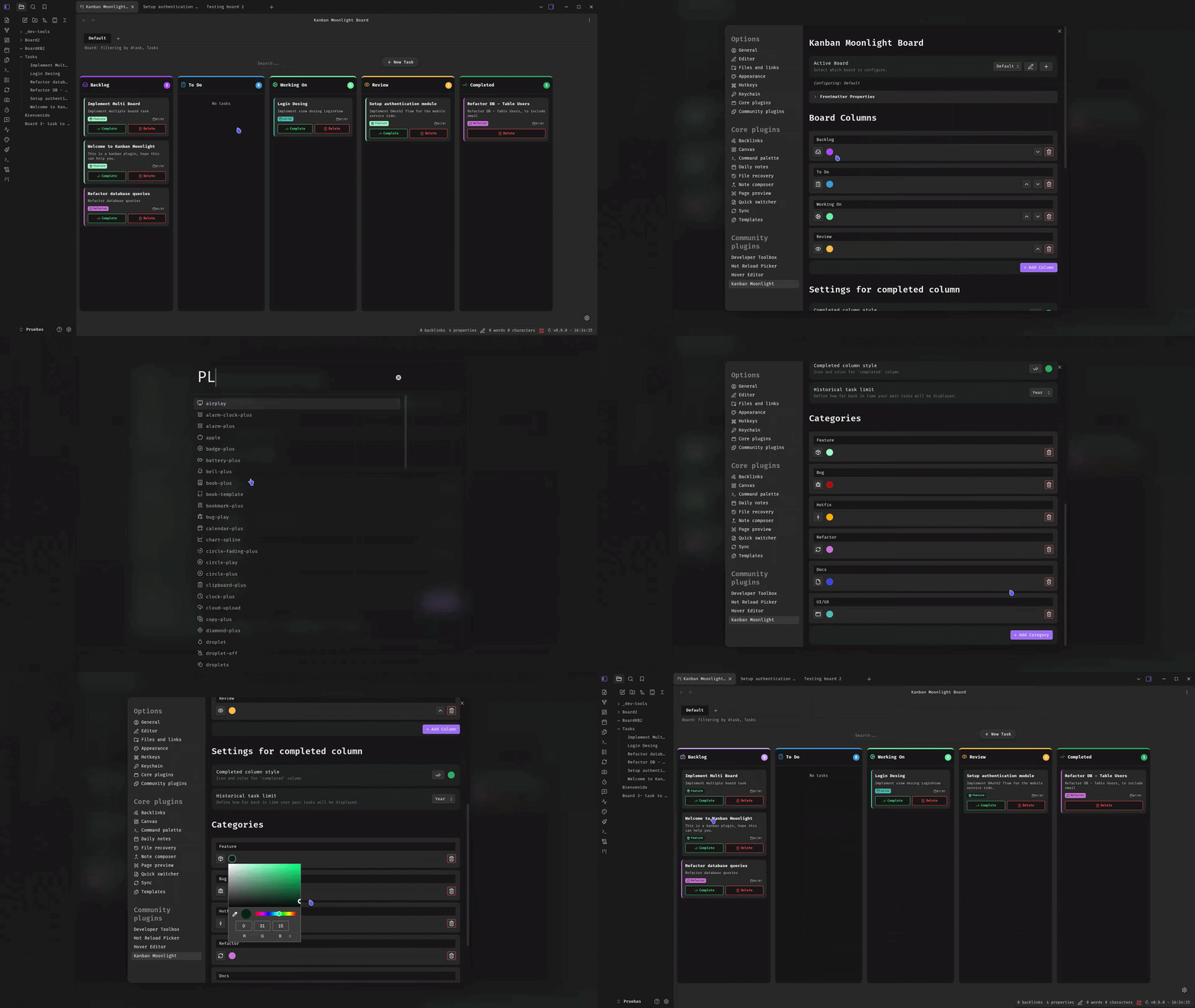
- Customizable Columns: Add, remove, reorder and rename columns. Configure each column's icon and color. Each board has its own column configuration.
- Categories System: Define categories with icons and custom colors to classify notes (displayed as colored borders and tags with automatic contrast text).
- Completion Tracking: Mark tasks as complete with a single click. Completed notes appear in a dedicated column with a configurable time window (day/week/month/year).
- History Log: Every state change, creation, and completion is recorded in the note's frontmatter
historyarray with timestamp and origin. - Gantt Chart: Visual timeline of tasks with Day/Week/Month zoom levels. Task start/end dates are calculated from history events. Configurable start column per board.
- Dashboard: Overview with tasks by status, by person, by category, and recent activity.
- Auto-refresh: The board refreshes automatically when notes are modified, created, or deleted.
- Icon Selector: Choose from hundreds of Lucide icons for columns and categories via a searchable suggest modal.
- Sorting: Notes are sorted by modification time (most recent first) within each column.
- Quick Settings: Access Settings directly from the Kanban view via the gear icon.
- i18n: English and Spanish built-in, auto-detected from Obsidian's locale.
Gantt Chart
The Gantt chart provides a visual timeline of your tasks. Switch to the Gantt view tab to see your tasks as horizontal bars on a timeline.
How dates are calculated
| Field | Source |
|---|---|
| Start | Date of the created event in the task's history (or file creation) |
| End | Last completed event in history, or today if not completed yet |
Each board has a Start Column setting that determines which column marks the beginning of work. The Gantt chart uses this to calculate task duration from history events.
Zoom levels
- Day: Individual days with month headers. Best for short-term planning.
- Week: Weeks with day abbreviations. Good for medium-range views.
- Month: Months with date ranges (1-7, 8-14, etc.). Best for long-term overview.
Features
- Synchronized scrolling between task list and timeline.
- Today line indicator.
- Color-coded bars based on task state.
- Task labels with contrast text for readability.
- Weekend highlighting in Day and Week views.
Dashboard
The Dashboard provides an overview of your project:
- Tasks by Status: Bar chart showing task distribution across columns.
- Tasks by Person: List of assigned tasks per team member.
- Recent Activity: Timeline of recent state changes.
How it works
Each board filters notes by a combination of tag and/or folder. Notes are displayed as Kanban cards based on their frontmatter:
| Frontmatter property | Default | Description |
|---|---|---|
tags | #task | Tag that determines which notes appear on the board (configurable per board) |
state | backlog | Current column ID (backlog, todo, workingOn, review, or custom column IDs) |
description | — | Short description shown on the card |
category | — | Category for color-coded borders and tags |
history | — | Auto-generated log of state changes (array of { state, stateId, date, from } objects) |
All frontmatter property names are configurable in Settings. Each board has its own columns, categories, and completed column configuration.
Installation
From Obsidian Community Plugins (pending review)
- Open Settings → Community plugins
- Disable Restricted mode if enabled
- Click Browse and search for "Kanban Moonlight"
- Install and enable the plugin
Manual install
- Download the latest release from the releases page
- Extract
main.js,manifest.json, andstyles.css(if present) to<vault>/.obsidian/plugins/kanban-moonlight/ - Reload Obsidian and enable the plugin in Settings → Community plugins
Usage
- Click the Kanban icon in the left ribbon or open the board via command palette.
- Use the tab bar to switch between boards, or click + to create a new board.
- Switch between Board, Gantt, and Dashboard views using the view tabs.
- Click + New Task or run the Create New Task command to add a task.
- Fill in the title (required), description, category, and initial column.
- Drag cards between columns to update their state.
- Click Complete to mark a task as done, or Delete to remove it.
- Use the search bar to filter cards in real time.
- Click the gear icon (bottom-right) to open Settings.
Settings
| Setting | Description |
|---|---|
| Board Selector | Switch between boards. Create new boards or edit existing ones. |
| Frontmatter Properties | Collapsible section showing the configured property names for state, description, and category. |
| Columns | Add, remove, reorder, rename columns per board. Change each column's icon and color. |
| Completed Column | Customize the completed column's icon, color, and time window (day/week/month/year) per board. |
| Start Column | Select which column marks when a task begins (used by the Gantt chart). |
| Categories | Define note categories with icons and custom colors per board. |
| People | Manage team members with name, email, color, and notes. |
Each board has its own independent configuration for columns, categories, completed column, and start column. Board settings (name, tag, folder) are managed via the Board Modal.
Commands
| Command | Description |
|---|---|
| Create New Task | Opens a modal to create a new kanban task. |
| Delete Kanban Task | Deletes the currently open note if it's a kanban task. |
Demos
Demo 1 — Drag & drop and task completion
Demo 2 — Creating tasks
Demo 3 — Customizing the board
Demo 4 — Multiple boards
Translation
Kanban Moonlight includes built-in translations for:
- English (default)
- Spanish
The language is automatically detected from your Obsidian locale settings.
Development
# Install dependencies
npm install

# Development (watch mode)
npm run dev

# Production build
npm run build

# Lint
npm run lint
Compatibility
- Desktop: ✅ Full support
- Mobile: ✅ Full support
- Obsidian minimum version: v1.7.2
Support
License
MIT
For plugin developers
Search results and similarity scores are powered by semantic analysis of your plugin's README. If your plugin isn't appearing for searches you'd expect, try updating your README to clearly describe your plugin's purpose, features, and use cases.