KOHi
approvedby chiahsien
Import KOReader highlights and notes into your vault. - This plugin has not been manually reviewed by Obsidian staff.
KOHi — KOReader Highlights for Obsidian
Import highlights and notes from KOReader into your Obsidian vault.
KOHi scans your KOReader device for .sdr metadata directories, parses the Lua-serialized annotations, and generates one Markdown note per book — with full control over the output format via Nunjucks templates.
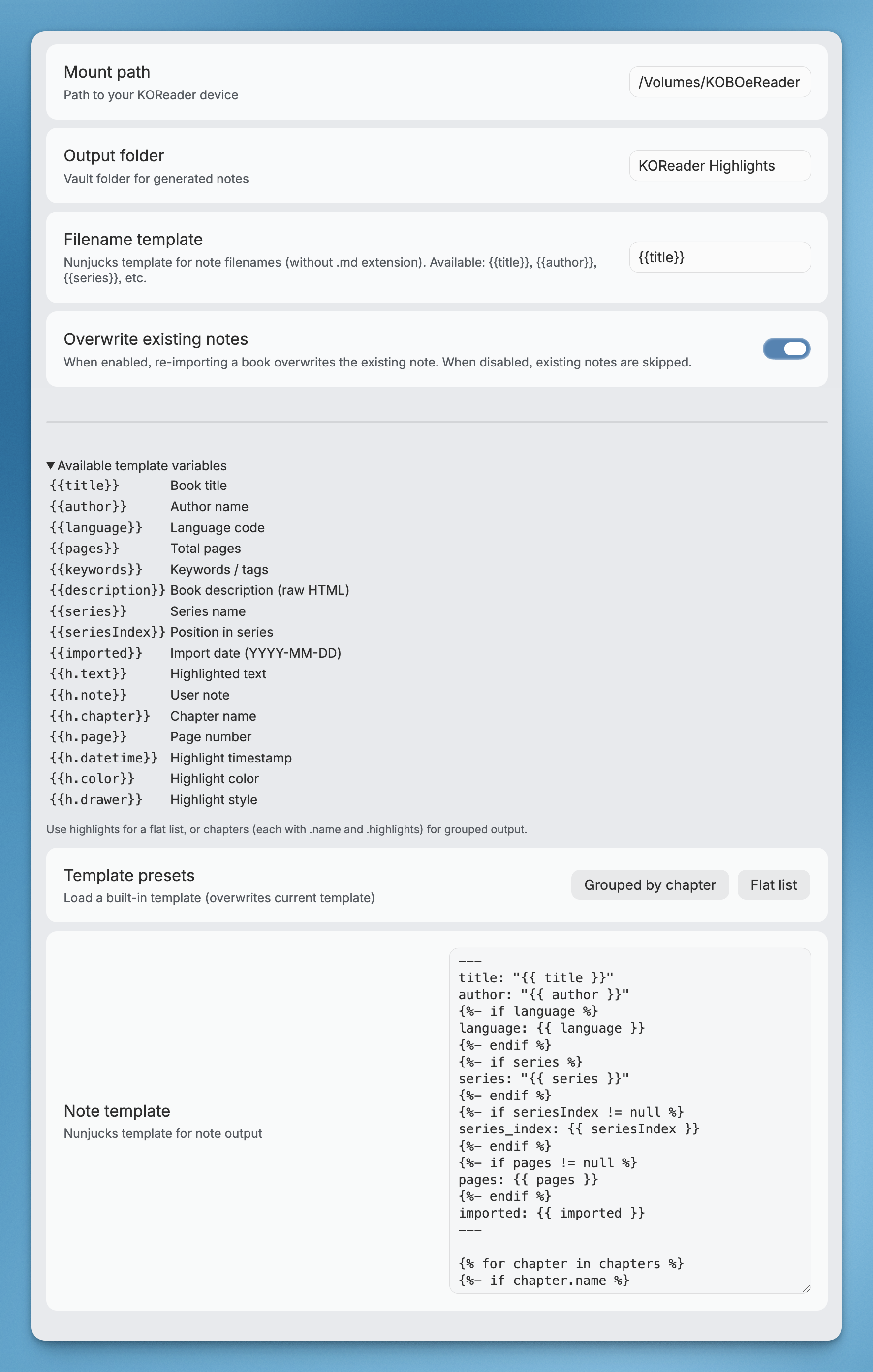
Features
- Auto-detect all 3 KOReader storage modes — book folder,
koreader/docsettings, andkoreader/hashdocsettings - Customizable templates — Nunjucks-based templates with access to book metadata, highlights, and chapter grouping
- Selective import — import all books at once, or pick specific ones via fuzzy search
- Clean filenames — illegal characters are sanitized automatically
- Overwrite on re-import — simple, predictable behavior
Usage
- Connect your Kobo (or other KOReader device) via USB
- Open Obsidian → Settings → KOHi → set Mount path (e.g.
/Volumes/KOBOeReader) - Command Palette → KOHi: Import all highlights or KOHi: Import selected highlights
- Notes appear in your configured output folder
Settings
| Setting | Description | Default |
|---|---|---|
| Mount path | Absolute path to your mounted KOReader device | — |
| Output folder | Vault folder for generated notes | KOReader Highlights |
| Filename template | Nunjucks template for note filenames (e.g. {{author}} - {{title}}) | {{title}} |
| Overwrite existing | Whether to overwrite notes on re-import or skip them | On |
| Skip imported books | Hide previously imported books from future imports. Turn off to re-import. | Off |
| Note template | Nunjucks template for note output | See below |
Template
Notes are generated using Nunjucks templates. You can customize the output format in plugin settings.
Available variables
Book level:
| Variable | Description |
|---|---|
{{title}} | Book title |
{{author}} | Author name |
{{language}} | Language code |
{{pages}} | Total pages |
{{keywords}} | Keywords / tags |
{{description}} | Book description (raw HTML from EPUB) |
{{series}} | Series name |
{{seriesIndex}} | Position in series |
{{imported}} | Import date |
Highlight level (within loops):
| Variable | Description |
|---|---|
{{h.text}} | Highlighted text |
{{h.note}} | User note (if any) |
{{h.chapter}} | Chapter name |
{{h.page}} | Page number |
{{h.datetime}} | Highlight timestamp |
{{h.color}} | Highlight color (e.g. yellow, green, red) |
{{h.drawer}} | Highlight style (lighten, underscore, strikeout, invert) |
Two data structures are provided for flexibility:
highlights— flat array, original reading orderchapters— grouped by chapter, each with anameandhighlightsarray
Default template
---
title: "{{title}}"
author: "{{author}}"
{% if language %}language: {{language}}{% endif %}
{% if series %}series: "{{series}}"{% endif %}
{% if seriesIndex != null %}series_index: {{seriesIndex}}{% endif %}
{% if pages != null %}pages: {{pages}}{% endif %}
imported: {{imported}}
---
{% if description %}
{{description}}

---
{% endif %}
{% for chapter in chapters %}
{% if chapter.name %}
## {{chapter.name}}
{% endif %}
{% for h in chapter.highlights %}
> {{h.text}}
{% if h.page %}
>
> — p.{{h.page}}
{% endif %}
{% if h.note %}

> [!note]
> {{h.note}}
{% endif %}

{% endfor %}
{% endfor %}
Flat list (no chapter grouping)
---
title: "{{title}}"
author: "{{author}}"
{% if series %}series: "{{series}}"{% endif %}
{% if seriesIndex != null %}series_index: {{seriesIndex}}{% endif %}
imported: {{imported}}
---
{% if description %}
{{description}}

---
{% endif %}
{% for h in highlights %}
> {{h.text}}
{% if h.page %}
>
> — p.{{h.page}}
{% endif %}
{% if h.note %}

> [!note]
> {{h.note}}
{% endif %}

{% endfor %}
Installation
From community plugins
- Open Obsidian → Settings → Community plugins → Browse
- Search for KOHi
- Click Install, then Enable
Via BRAT
- Install the BRAT plugin
- BRAT settings → Add Beta Plugin → paste
chiahsien/obsidian-kohi
Manual install
- Download
main.js,manifest.json, andstyles.cssfrom the latest release - Create a folder
<vault>/.obsidian/plugins/kohi/ - Copy the downloaded files into that folder
- Restart Obsidian → Settings → Community plugins → Enable KOHi
Build from source
git clone https://github.com/chiahsien/obsidian-kohi.git
cd obsidian-kohi
npm install
npm run build
Then copy main.js, manifest.json, and styles.css into your vault's plugin folder as described above.
Development
Prerequisites
- Obsidian ≥ 1.7.2
- Node.js ≥ 18
- npm
Setup
git clone https://github.com/chiahsien/obsidian-kohi.git
cd obsidian-kohi
npm install
Commands
| Command | Description |
|---|---|
npm run dev | Start esbuild in watch mode |
npm run build | Type-check + production build |
npm run lint | Run ESLint checks |
npm test | Run tests once |
npm run test:watch | Run tests in watch mode |
Project structure
src/
├── types.ts              # Shared interfaces (Book, Highlight, BookData, etc.)
├── lua-parser.ts         # Recursive descent parser for KOReader Lua metadata
├── scanner.ts            # Three-phase .sdr directory scanner
├── book-parser.ts        # Metadata → BookData extraction + chapter grouping
├── note-generator.ts     # Nunjucks template rendering
├── note-writer.ts        # Vault file creation with filename sanitization
├── multi-select-modal.ts # Fuzzy-search book picker modal
├── settings.ts           # Plugin settings tab
└── main.ts               # Plugin entry point + commands
Hot-reload during development
- Build with
npm run dev(watch mode) - Symlink or copy the repo into your test vault:
ln -s /path/to/obsidian-kohi /path/to/vault/.obsidian/plugins/kohi - Enable the plugin in Obsidian → changes are picked up on reload (Cmd+R)
License
MIT

For plugin developers
Search results and similarity scores are powered by semantic analysis of your plugin's README. If your plugin isn't appearing for searches you'd expect, try updating your README to clearly describe your plugin's purpose, features, and use cases.