Kobo Highlights Importer
approvedby ogkevin
Forked from bitwiseops/obsidian-kobo-highlights-import
Import highlights from Kobo devices.
Obsidian Kobo Highlight Importer
This plugin aims to make highlight import from Kobo devices easier.
How to use
Once installed, the steps to import your highlights directly into the vault are:
- Connect your Kobo device to PC using a proper USB cable
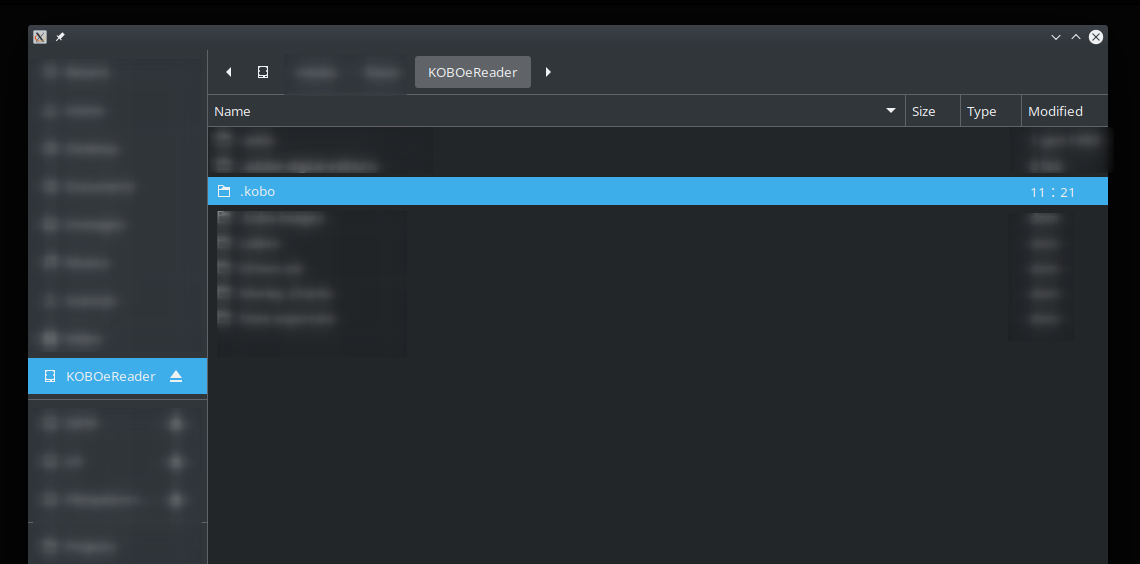
- Check if it has mounted automatically, or mount it manually (e.g. open the root folder of your Kobo using a file manager)
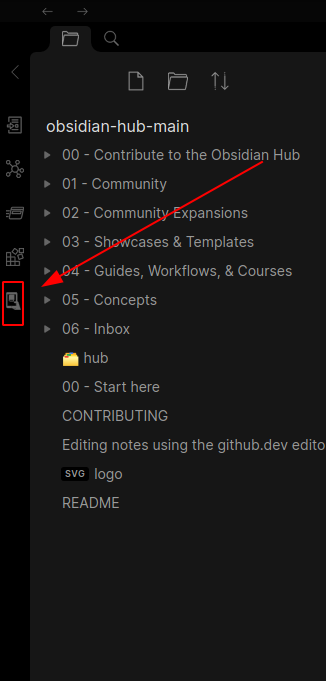
- Open the import window using the plugin button
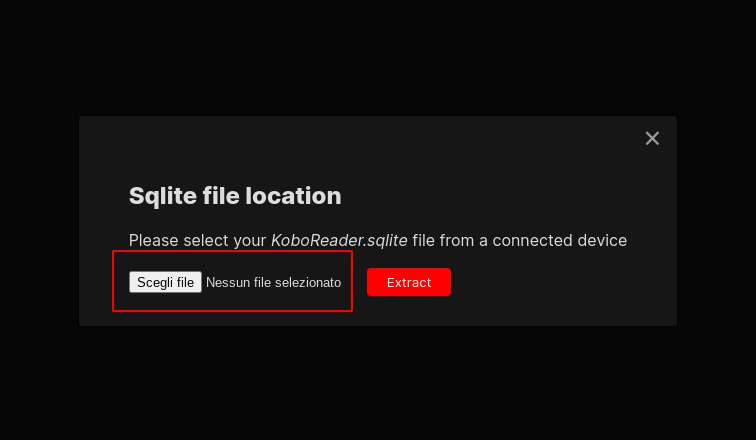
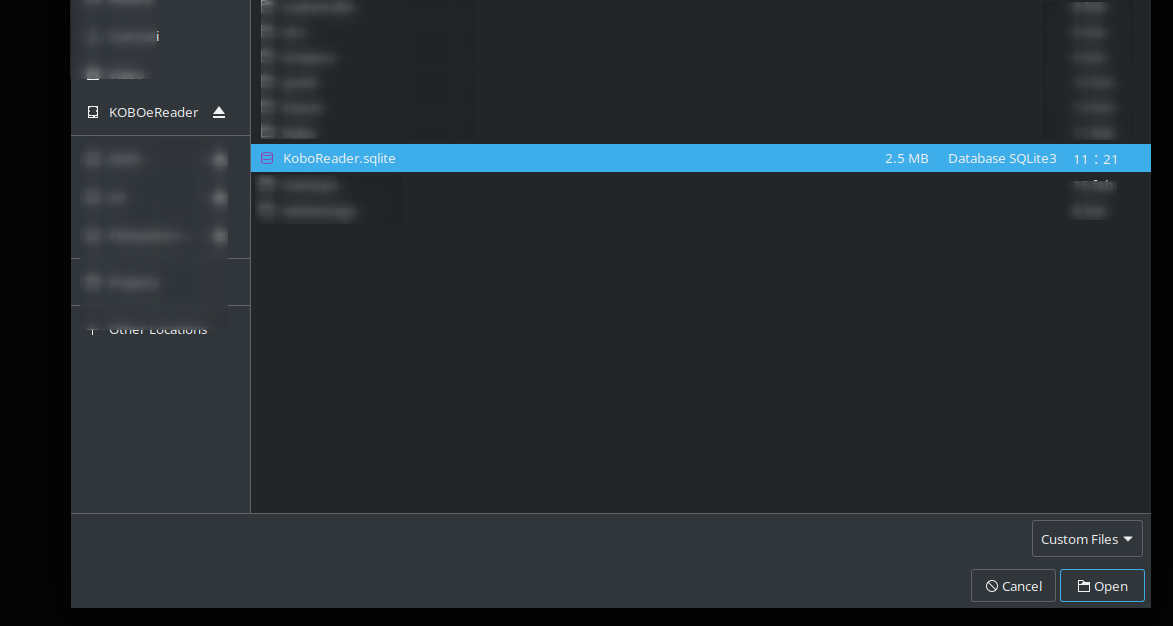
- Locate KoboReader.sqlite in the .kobo folder ( this folder is hidden, so if you don't see it you should enable hidden files view from system configs )
- Extract
Templating
The plugin uses Eta.js for templating. You can fully customize the output using Eta's template syntax. See the Eta.js template syntax documentation for details.
The default template is:
---
title: "<%= it.bookDetails.title %>"
author: <%= it.bookDetails.author %>
publisher: <%= it.bookDetails.publisher ?? '' %>
dateLastRead: <%= it.bookDetails.dateLastRead?.toISOString() ?? '' %>
readStatus: <%= it.bookDetails.readStatus ? it.ReadStatus[it.bookDetails.readStatus] : it.ReadStatus[it.ReadStatus.Unknown] %>
percentRead: <%= it.bookDetails.percentRead ?? '' %>
isbn: <%= it.bookDetails.isbn ?? '' %>
series: <%= it.bookDetails.series ?? '' %>
seriesNumber: <%= it.bookDetails.seriesNumber ?? '' %>
timeSpentReading: <%= it.bookDetails.timeSpentReading ?? '' %>
---

# <%= it.bookDetails.title %>

## Description

<%= it.bookDetails.description ?? '' %>

## Highlights

<% it.chapters.forEach(([chapterName, highlights]) => { -%>
## <%= chapterName.trim() %>

<% highlights.forEach((highlight) => { -%>
<%= highlight.text %>

<% if (highlight.note) { -%>
**Note:** <%= highlight.note %>

<% } -%>
<% if (highlight.dateCreated) { -%>
*Created: <%= highlight.dateCreated.toISOString() %>*

<% } -%>
<% }) -%>
<% }) %>
Variables
The following variables are available in your template:
| Variable | Type / Structure | Description |
|---|---|---|
bookDetails | Object | Book metadata: title, author, publisher, dateLastRead, readStatus, percentRead, isbn, series, seriesNumber, timeSpentReading, description |
chapters | Array of [chapterName, highlights] | Each highlights is an array of bookmarks for that chapter |
ReadStatus | Enum mapping | Maps read status values to their string labels |
highlight | Object | Each highlight/bookmark: - bookmarkId: Unique ID- text: The raw highlight text- contentId: Content identifier- note: Optional note/annotation (if any)- dateCreated: Date when the highlight was created- color: Optional color of the highlight (if any) (0 for yellow, 1 for red, 2 for blue, 3 for green) |
Example usage
<% it.chapters.forEach(([chapterName, highlights]) => { -%>
## <%= chapterName %>
<% highlights.forEach(h => { -%>
<%= h.text %>
<% if (h.note) { -%>
**Note:** <%= h.note %>
<% } -%>
<% if (h.dateCreated) { -%>
*Created: <%= h.dateCreated.toISOString() %>*
<% } -%>
<% }) -%>
<% }) %>
Date formatting examples
<!-- YYYY-MM-DD format -->
*Created: <%= h.dateCreated.getFullYear() %>-<%= String(h.dateCreated.getMonth() + 1).padStart(2, '0') %>-<%= String(h.dateCreated.getDate()).padStart(2, '0') %>*

<!-- Localized date -->
*Created: <%= h.dateCreated.toLocaleDateString() %>*

<!-- Localized date and time -->
*Created: <%= h.dateCreated.toLocaleString() %>*
For more advanced syntax, see the Eta.js template syntax documentation.
Template example using Obsidian callouts to display color of highlights
---
title: "<%= it.bookDetails.title %>"
author: <%= it.bookDetails.author %>
publisher: <%= it.bookDetails.publisher ?? '' %>
dateLastRead: <%= it.bookDetails.dateLastRead?.toISOString() ?? '' %>
readStatus: <%= it.bookDetails.readStatus ? it.ReadStatus[it.bookDetails.readStatus] : it.ReadStatus[it.ReadStatus.Unknown] %>
percentRead: <%= it.bookDetails.percentRead ?? '' %>
isbn: <%= it.bookDetails.isbn ?? '' %>
series: <%= it.bookDetails.series ?? '' %>
seriesNumber: <%= it.bookDetails.seriesNumber ?? '' %>
timeSpentReading: <%= it.bookDetails.timeSpentReading ?? '' %>
---

# <%= it.bookDetails.title %>

## Description

<%= it.bookDetails.description?.replace(/<[^>]*>/g, '') ?? '' %>

## Highlights

<% it.chapters.forEach(([chapterName, highlights]) => { -%>
### <%= chapterName.trim() %>

<% highlights.forEach((highlight) => { const calloutMap = {'1': 'failure', '2': 'info', '3': 'success'}; const calloutType = calloutMap[highlight.color] ?? 'quote'; const calloutText = highlight.text.split('\n').map(line => '> ' + line).join('\n'); -%>
> [!<%= calloutType %>]
<%= calloutText %>

<% if (highlight.note) { -%>
**Note:** <%= highlight.note %>

<% } -%>
<% }) -%>
<% }) %>
Helping Screenshots
Contributing
Please feel free to test, send feedbacks using Issues and open Pull Requests to improve the process.
For plugin developers
Search results and similarity scores are powered by semantic analysis of your plugin's README. If your plugin isn't appearing for searches you'd expect, try updating your README to clearly describe your plugin's purpose, features, and use cases.