Life in Weeks
approvedby Michael Baumann
Render a life-in-weeks grid over your vault's weekly and daily notes. Click a cell to open its note, long-press for the day view. - This plugin has not been manually reviewed by Obsidian staff.
Life in Weeks – Obsidian Plugin
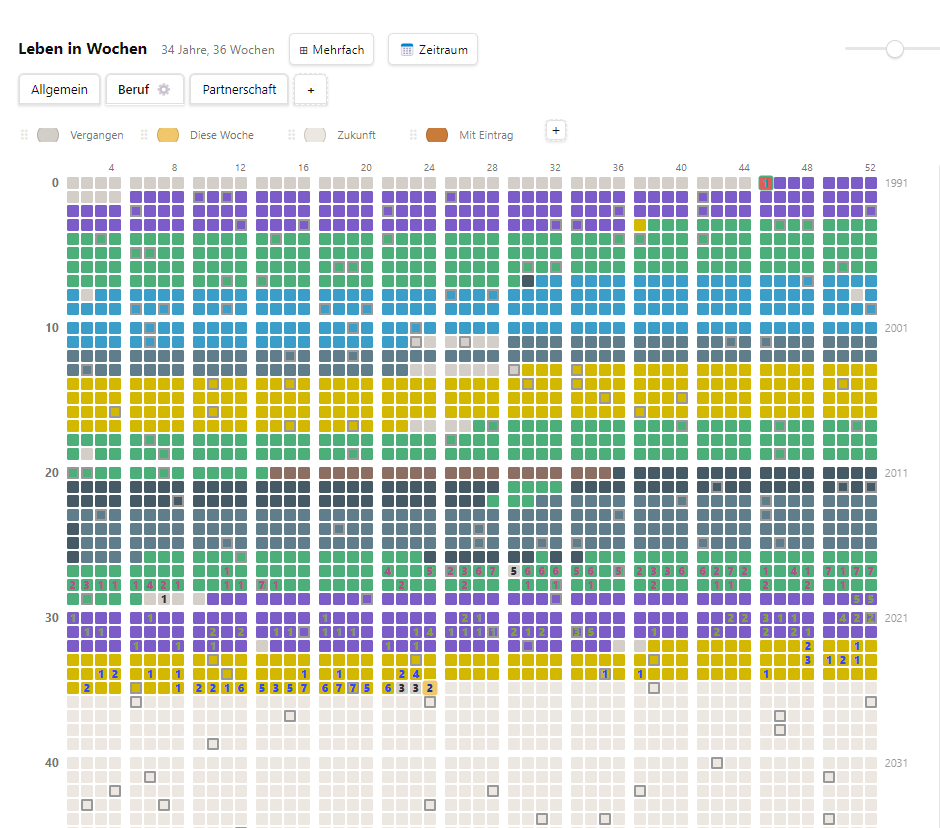
A "Life in Weeks" grid rendered over the weekly and daily notes in your vault. Each cell is one week of your life – click it to open or create the matching note. Great for journaling and for tracking separate timelines (children, pets, relationships, jobs …) side by side.
- Click a cell to open its note, long-press for the day view
- Set weekly colors and titles
- Multi-select to edit many weeks at once
- Add tabs for separate grids, each with its own legend (sortable by drag on desktop, arrows on mobile)
Installation
- Open Settings → Community plugins and turn off restricted mode if needed
- Browse → search for "Life in Weeks"
- Install → Enable
- Click the calendar icon in the left sidebar
Manual install (fallback)
- Download
main.js,manifest.jsonandstyles.cssfrom the latest release - Copy them into
<your-vault>/.obsidian/plugins/lifeweeks/ - Settings → Community plugins → Reload, then enable Life in Weeks
First start
A setup screen asks for:
- Birth date (
YYYY-MM-DD) - Life expectancy in years (number of grid rows, default 90)
- Base folder in your vault (default
Bibliothek/Diary) – whereWeekly basis/andDaily basis/live
Tabs are auto-detected from the subfolders of Weekly basis/ – no extra configuration needed.
Usage
| Action | Cell with note | Cell without note |
|---|---|---|
| Short click | Opens the note | Quick-Edit (color / title / create) |
| Right-click | Quick-Edit | Quick-Edit |
| Long-press (½ s) | Day view (Mon–Sun) + weekly palette | Day view + weekly palette |
| Middle-click | Opens the note in a background tab | – |
-
Today: the 📝 button in the header opens (or creates) today's daily note in the current tab; right-/middle-click opens it in a background tab.
-
Commands: Open today's daily note and Jump to current week are available in the command palette (assign hotkeys in Settings → Hotkeys). Both open the Life in Weeks view first if needed.
-
Duplicates: if two files exist for the same week (or day), the one with content (or a title) is shown and the tooltip / day view warns with a ⚠ and lists the file names, so you can merge or delete the extra file yourself. Nothing is deleted automatically.
-
Counter bar: the line below the grid counts every entry reachable from the current tab – week notes plus the daily notes that fall into the tab's timeline.
-
Background tabs (desktop): right-click or middle-click a day in the day view, or the Open note button in Quick-Edit / day view, to open that note in a new Obsidian tab without leaving the grid. The panel stays open, so you can queue several days or weeks and read them afterwards.
-
Multi-select: the ⊞ button or 📅 Date range, then drag across cells and edit them together (empty input moves the selected notes to the trash).
-
Zoom: slider, Ctrl+wheel, or pinch on mobile – always centered on the current week. A button next to the slider cycles fit-width → fit-height → 1:1.
-
Tabs: + in the tab bar creates a folder under
Weekly basis/; ⚙ opens the tab settings (see below). Renaming the folder in Obsidian renames the tab – legend, timeline and (if enabled) the tab's own daily folder follow automatically. -
Colors: the palette in Quick-Edit, day view and multi-select starts with the legend entries of the current tab (round swatches, name on hover), followed by the standard colors. Edit the legend below the grid and the palette updates.
-
Language: follows the Obsidian UI language (DE/EN); date formats adapt to your locale.
-
Open mode: Settings → "Open notes in" – Automatic / Split right / Main tab bar. Every note opens in its own tab (in split mode: as a new tab inside the right-hand group). If the note is already open somewhere, the plugin jumps to that tab instead of opening a duplicate.
Tabs and timelines
Each tab is one grid with its own legend. By default every tab uses your timeline (birth date and life expectancy from the plugin settings), which is handy for tracking topics side by side – Work, Health, Travel …
Click ⚙ on the active tab to change this:
- Own timeline – the tab starts at a different date and runs for a different number of years. Use it for a child, a pet, a relationship, a job or a project: enter the start date as "birth date" and the duration in years; the grid then shows that period week by week, with milestones and the birthday marker counted from the start date. Tabs with an own timeline show a small · next to their name. Week notes still use the same file-name scheme, so a tab can later be moved between timelines without renaming files.
- Show milestones – toggles the milestone markers for this tab (see next section).
- Own daily docs – see Shared vs. own daily notes.
Milestones
Milestones are the "round" moments of a life that never fall on a birthday: 10,000 days, 1,000 weeks, 500 months, 1 billion seconds … The plugin computes them from the (tab's) start date and marks the matching week with a thin outline; hover or long-press the cell to see the labels in the tooltip (🎯).
Included are, per unit:
| Unit | Regular steps | Plus "fun" numbers |
|---|---|---|
| Days | every 1,000 | repdigits and sequences from 3 digits (111, 2222, 1234 …) |
| Weeks | every 100 | from 3 digits |
| Months | every 100 | from 3 digits |
| Quarters | every 100 | from 2 digits (11, 22, 123 …) |
| Minutes | every 1,000,000 | from 7 digits |
| Seconds | every 100,000,000 | from 9 digits |
Milestones are purely computed – nothing is written to your vault. They can be switched off per tab in the tab settings.
Shared vs. own daily notes
The long-press day view lists the seven days of a week and opens or creates the daily note for each day. Where those daily notes live depends on the tab:
- Shared (default): all tabs read and write
{base folder}/Daily basis/. There is exactly one daily note per date, and it appears in the day view of every tab – the week notes are per tab, the days are yours. This is what you want for topic tabs (Work, Health …) that all describe the same person. - Own daily docs: enabled in the tab settings, the tab uses
{base folder}/Daily basis/{Tab}/instead. Use this for tabs that describe someone else (a child, a pet) so their days are not mixed into your own daily notes.
Existing daily notes are never moved when you flip the switch – the tab just starts looking in the other folder.
Sync across devices
Legends (colors and labels per tab) and the tab settings (own timeline, milestones, own daily docs) are stored inside the vault in {base folder}/Life in Weeks Config.md. Because it is a normal Markdown note, it travels with the vault through Obsidian Sync, Remotely Save, iCloud, Syncthing … and your phone shows the same legend as your desktop. The plugin manages that file – you do not need to open it. When it changes on another device the grid updates automatically; if two devices edit the legend at the same time, the last sync wins.
The plugin's own data.json keeps only a local copy plus the per-device settings: birth date, life expectancy, base folder, name and open mode. Set those once on each device.
Data structure
Notes are plain Markdown, so the data stays usable outside the plugin.
{base folder}/                 # default: Bibliothek/Diary
├─ Life in Weeks Config.md     # legends + tab settings (synced with the vault)
├─ Weekly basis/
│  ├─ {Tab}/                   # tab name = folder name
│  │  └─ 2026-04-06-W14 Vacation.md
│  └─ …
└─ Daily basis/                # 2026-04-14.md – shared by all tabs
   └─ {Tab}/                   # only for tabs with "Own daily docs"
File names: yyyy-mm-dd-Www[ Title].md (weekly), yyyy-mm-dd[ Title].md (daily). Frontmatter is edited via processFrontMatter(), so foreign keys (date, time, tags …) are never touched.
---
week: "Jahr 1, Woche 14"
dates: "06.04.2026 – 12.04.2026"
color: "#c97c3a"
title: "Vacation"
---

Markdown content here…
The YAML labels (
week,dates) are in German for historical reasons. The UI itself is fully translated.
Mobile
Same build runs on phone and desktop (isDesktopOnly: false). Long-press, pinch zoom and Quick-Edit work via pointer events.
License
MIT – see LICENSE.
For plugin developers
Search results and similarity scores are powered by semantic analysis of your plugin's README. If your plugin isn't appearing for searches you'd expect, try updating your README to clearly describe your plugin's purpose, features, and use cases.