by lightpurple
Show your assigned Linear issues as a kanban board in daily notes and change their status.
Linear Daily Board
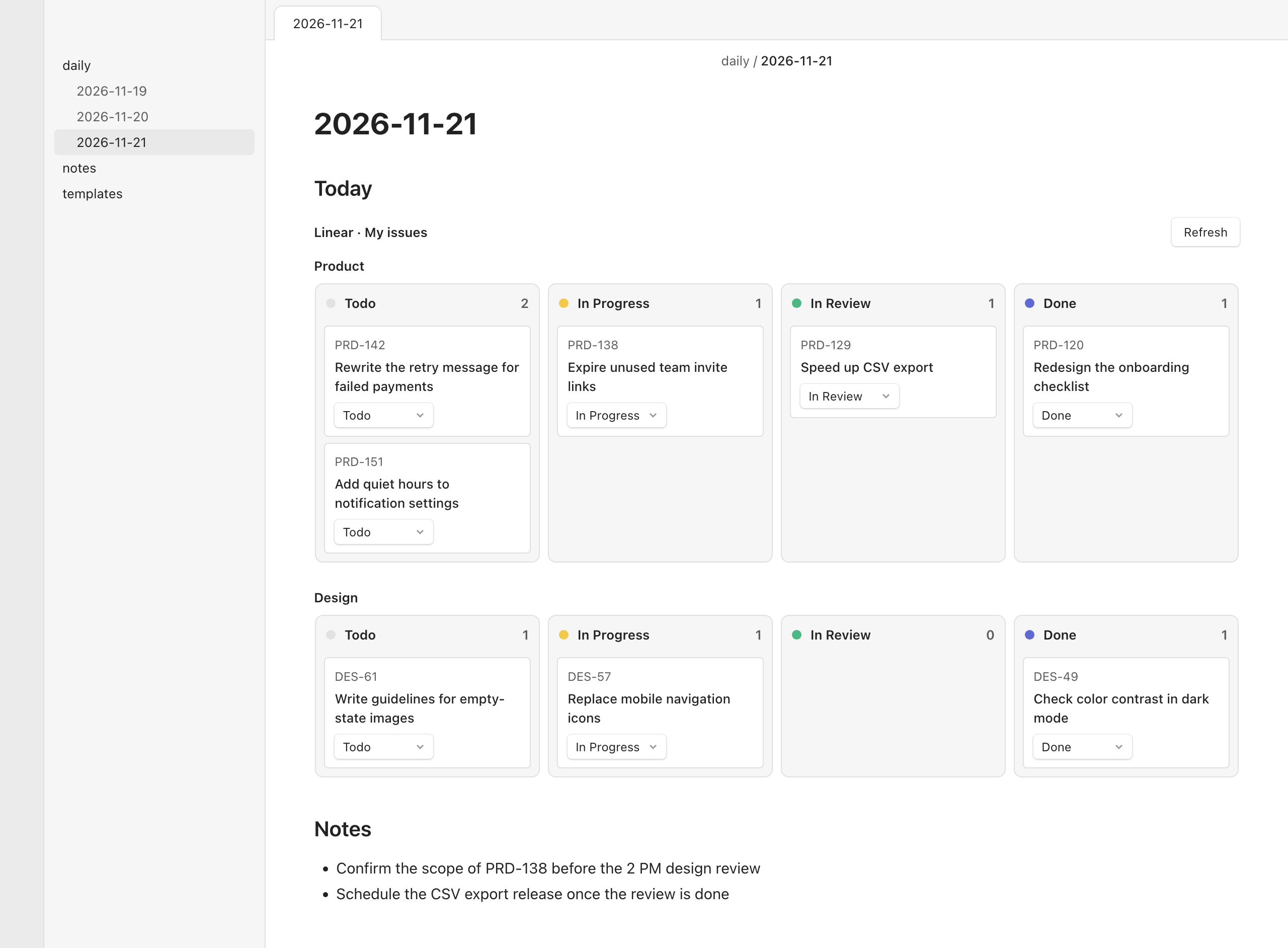
An Obsidian plugin that shows your assigned Linear issues as a kanban board inside daily notes. Move a card to another column to change the issue's status in Linear.
Connect to Linear
Enable the plugin in Obsidian 1.13.0 or later. In a daily note, click Connect Linear and enter a personal API key that can read and update issues. The key is kept in Obsidian's secret storage. To change the key, open Linear Daily Board in the plugin settings. See the Linear API documentation.
Use it in a daily note
Add the block below to a daily note or to your daily note template, then open the note in Reading view or Live Preview.
## Today

```linear-board
```
- The board loads the unarchived issues assigned to you. Each team's workflow states become the columns. Drag a card to another column of the same team, or use the status menu on the card. Click an issue title to open it in the web viewer in the right sidebar. This requires the core plugin Web viewer.
- Status changes are sent right away. An open board refreshes about once a minute, and Refresh reloads it immediately. If a save response is lost, the plugin checks the status in Linear again. The system "Duplicate" status is applied when you mark an issue as a duplicate in Linear.
- The board always shows the current state, whichever date the note is for.
- Daily notes widen to the full pane so the columns have room. Daily notes are found by the folder and date format set in the core plugin Daily notes.
- In the settings, you can choose which team and which status columns the board shows.
- The interface is available in English and Korean. It follows Obsidian's language until you pick one under Language in the settings.
Build and install
Run the following commands with Node.js 22.18 or later.
npm ci
npm test
npm run build
Copy main.js, manifest.json and styles.css to .obsidian/plugins/linear-daily-board/ in your vault, then enable the plugin in the Obsidian settings.
License
For plugin developers
Search results and similarity scores are powered by semantic analysis of your plugin's README. If your plugin isn't appearing for searches you'd expect, try updating your README to clearly describe your plugin's purpose, features, and use cases.