Live Life Recording
approvedby goryugocast
Record task start and finish times directly in Markdown. LLR (Live Life Recording) adds routine insertion and a lightweight daily summary sidebar. - This plugin has not been manually reviewed by Obsidian staff.
LLR — Live Life Recording



English site: https://goryugo.com/en/llr/ 日本語サイト: https://goryugo.com/topics/llr
An Obsidian plugin that records task start times, finish times, and daily flow directly in Markdown. One command — Toggle Task — covers create, start, and finish. No external database, no lock-in. Uninstall anytime; your records stay as plain text.

Why LLR?
There are many task plugins for Obsidian. LLR is different in four specific ways:
- Markdown is the only source of truth. Start / finish times, estimates, actuals all live in the task line itself. No sidecar JSON, no separate DB. You can
grepyour history. - One verb, three actions.
Toggle Taskcreates, starts, and finishes — no separate commands to remember. Long-press and Adjust-Time fill in the rest. - Routines as plain notes. One note per routine under a
routine/folder. Repeat patterns are written in human-readable shorthand (e.g.every 3 days from completionorevery week on mon). Completion auto-advancesnext_due. - AI-friendly by design. The full specification lives in
docs/as ~20 Markdown files. Point any AI at the folder and it can answer "how do I…?" without you reading manuals.
Spend your attention on recording, not on learning the tool.
Install
Community Plugins (recommended)
- Open Settings → Community Plugins → Browse
- Search for "LLR" and install
- Enable LLR
BRAT (latest beta)
- Install and enable the BRAT community plugin
- In BRAT settings, choose Add Beta plugin and enter
goryugocast/llr - Enable LLR in community plugins
Requires Obsidian 1.7.2 or later.
Quick Start
All you need to learn first is Toggle Task:
| Step | Action | Result |
|---|---|---|
| 1 | Run Toggle Task on an empty line | - [ ] appears |
| 2 | Run Toggle Task again | - [/] 09:00 - (start time inserted) |
| 3 | Run Toggle Task once more | - [x] 09:00 - 09:28 (28m) (elapsed time computed) |
That's it. The record is just a Markdown checkbox — edit timestamps by hand any time and LLR recalculates.
LLR avoids "fighting" normal editing. Auto-corrections only fire when you trigger them via commands or checkbox gestures, never on idle text changes.
See the cheatsheet for a quick reference (includes a "what do I do when…?" reverse-lookup table).
Features
Task line grammar
| State | Format |
|---|---|
| Unstarted | - [ ] HH:mm Task name (estimate) |
| Running | - [/] HH:mm Task name HH:mm - (estimate) |
| Done | - [x] HH:mm Task name HH:mm - HH:mm (est > actual) |
Estimates accept 30, 1.5h, 45m, 30 min — written inline in parentheses or as a bare token at the end.
Inline markers (full reference: recording format spec):
@done— for routines withstart_before, mark "this occurrence is already done" while the task is still in its pre-window.@MMDD/@M/D/@2026-05-30— reschedule a routine to a specific date.- Processed markers normalize to
→done/→YYYY-MM-DDso they're not re-fired.
Commands (10 total)
The three you'll use most:
| Command | What it does |
|---|---|
Toggle Task | Create → Start → Finish (the main verb) |
Adjust Time (1m) | Smart 1-minute nudge: with one timestamp on the line, the start time moves back 1m; with two, the end time does. Completed lines recompute duration automatically. |
Open Summary View | Show today's progress in the sidebar |
Auxiliary commands:
Start Task/Complete Task/Start Task at Previous TimeDuplicate Task/Skip TaskReschedule Routine/Insert Routine
A few more actions (interrupt, retro-complete, reset-keeping-estimate, fix duration drift in bulk) exist internally but are not exposed in the command palette — details in the commands spec below.
Full reference: commands spec.
Routines
Each note under a routine/ folder is one routine. Define repeat behavior in the YAML frontmatter, then run Insert Routine to expand today's due routines into your daily note.
---
estimate: 15            # minutes
section: 700            # groups under the 7:00 section header
repeat: every week on mon wed fri
next_due: 2026-05-25
start_before: 2         # show 2 days before next_due
---
To place the same routine in more than one part of the day, provide multiple section values (a comma-separated string or an array). LLR expands one task line per value while keeping every line linked to the same routine note:
section: 700, 1900 # insert under both the 7:00 and 19:00 section headers
next_due is optional for repeating routines. When it is absent, LLR derives the first effective due date from repeat; the stored next_due is created only after completion.
Future daily notes are safe to preview: LLR can show which routines belong there, but it will not advance next_due or consume @done / reschedule markers until that date is current.
A few repeat patterns:
1/3—every day/every 3 daysevery week on mon/every 2 weeks on mon wed fri— weeklyevery month on 1/every month on 5,10,15/every month on last day— monthly by dayevery month on 2nd sat/every month on last sat— monthly by Nth weekdayevery 3 days from completion/every 5 days from due— choose the anchornone/no/0— stop
Japanese shorthand (毎週月曜, 毎月1日, 第2土曜日, etc.) is also accepted for users who prefer it.
Once a routine is completed, next_due updates automatically. The full "is this routine due today?" decision tree is in the routine engine spec §3.6.
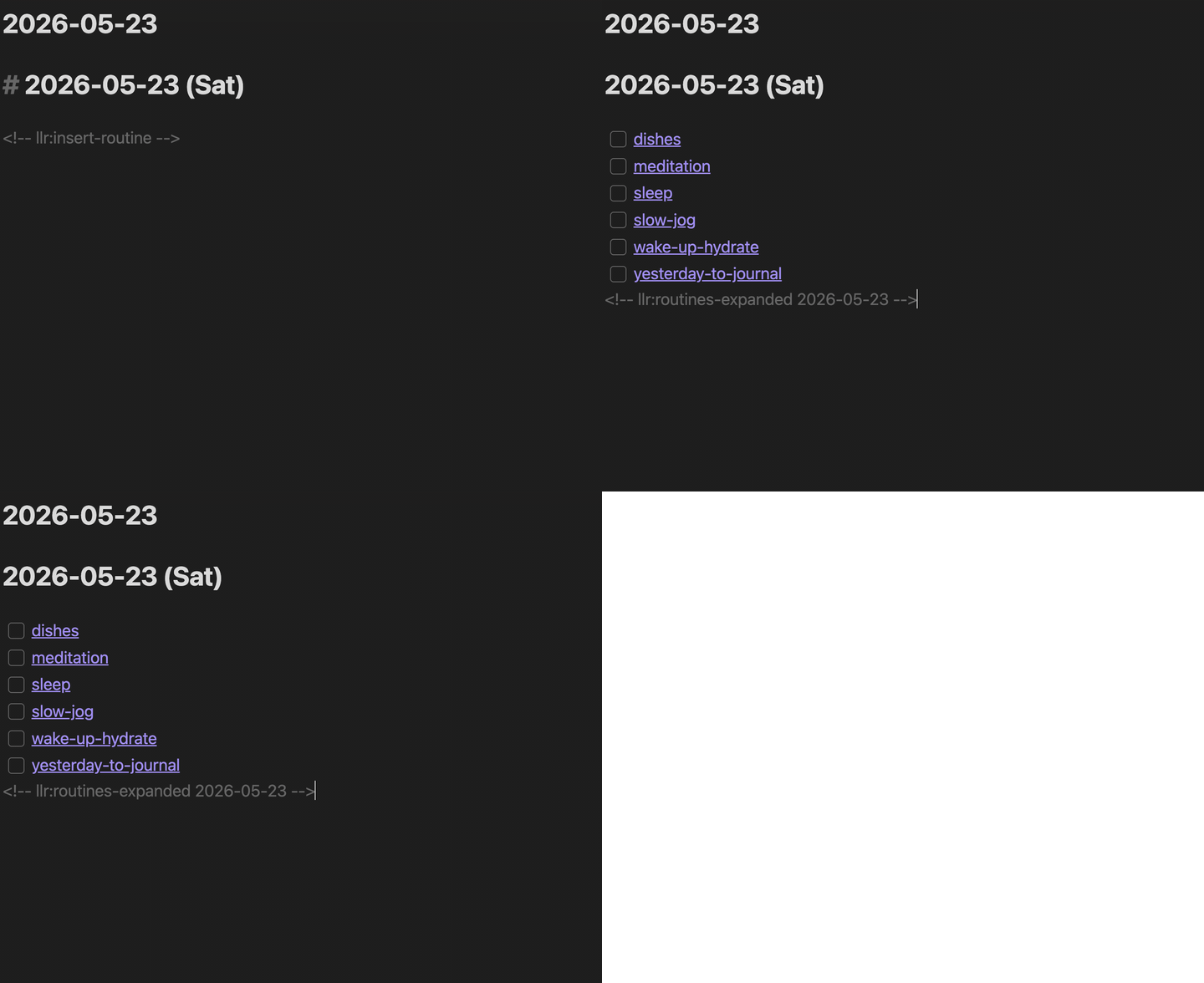
SRS (experimental)
Spaced repetition for regular notes — reread things you want to remember, at intervals that grow on their own. No grading, no flashcards: check it off and the interval expands.
- Enable SRS growth (experimental) in settings (off by default)
- Add
repeat: 1to the frontmatter of any note outside theroutine/folder — it can live anywhere in your vault - Due notes appear at the bottom of the daily-note routine insertion, up to SRS daily limit per day (default 3; extras carry over)
- Completing a note pushes
next_dueforward and multipliesrepeatby 2–3×, so a note you keep completing drifts from daily to weekly to monthly
If you complete a note late but still found it worth rereading, the elapsed days become the growth base — the same idea as Anki's handling of overdue cards. To stop reviewing a note, remove repeat (or set it to 0). To make it a daily habit instead, move it into routine/.
Details: SRS spec.
Summary View
Run Open Summary View for a sidebar overview of the day.
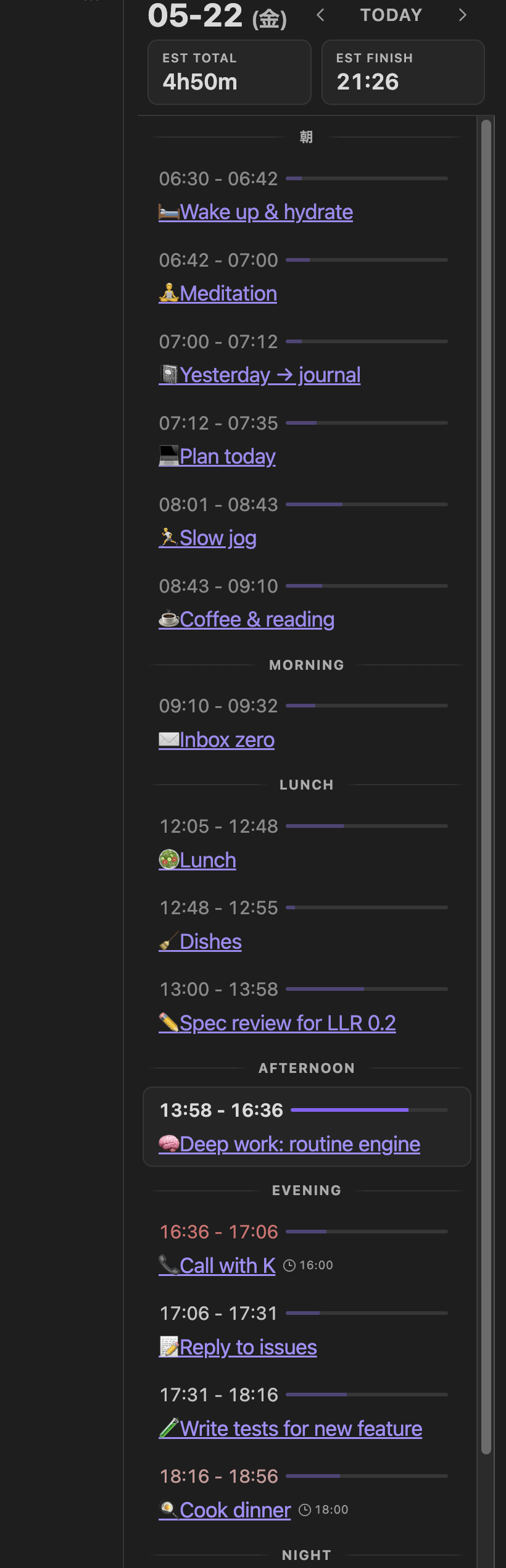
- Tasks stacked: completed → running → upcoming
EST. TOTALandEST. FINISHupdated dynamically as the day progresses- Tasks tagged
summary_role: sleepare excluded from the main totals; a separate sleep-aware finish time is shown alongside - A running task remains visible even when it sits below the sleep boundary, but it stays excluded from totals and is grouped with the other running tasks
- Click a row to jump to that line in the editor; click a
[[wikilink]]to open the linked note - Section dividers driven by the
Routine Sectionssetting (time + label pairs)
Details: sidebar summary view spec.
Mobile
Register Toggle Task in Obsidian's Mobile Toolbar (the icon row above the keyboard).
- Short press on a checkbox — Toggle Task (create / start / finish)
- Long press on a checkbox (~450 ms) — auxiliary actions (start aligned to the previous completion's end time, or revert one step while keeping the estimate)
- Haptic feedback included; long-press absorbs the subsequent click to avoid double-firing
- Enable
Large Mobile Checkboxesin settings for a bigger tap target - Checkbox override applies only inside a daily-note Markdown editor. Normal notes, non-Markdown views, sidebars, and modals keep Obsidian's standard behavior.
Status Bar
Shows three values:
total— sum of today's task estimatescursor— sum from the cursor position onwardend— current time + remaining estimates = projected finish time
Only end-of-line time tokens are counted, so numbers in the middle of text don't get accidentally aggregated.
Not a goal
LLR aims to make "writing it down in Markdown" feel cheap and natural. The following are intentionally out of scope:
- ⛔ Timers, alarms, notifications (use the OS or another plugin)
- ⛔ Calendar integration
- ⛔ Statistics, charts, dashboards (the canonical record is Markdown; analyze it with separate tools)
- ⛔ Heavyweight dedicated views (the sidebar Summary is the cap)
The full "can it do X?" list is in implementation summary §3.
Documentation
| Topic | Link |
|---|---|
| Index (start here) | docs/index.md |
| Quick manual | docs/クイックマニュアル.md |
| Cheatsheet (with reverse lookup) | docs/チートシート.md |
| Changelog | docs/CHANGELOG.md |
| Design philosophy | docs/specs/設計思想.md |
| Public site (EN) | https://goryugo.com/en/llr/ |
| Public site (JA) | https://goryugo.com/topics/llr |
The docs/ folder is structured to be fed to an AI assistant. Drop it into a Cursor / Claude / ChatGPT project to ask questions about behavior. Most spec files are written in Japanese, but AI tools translate transparently on the fly.
Development
npm install
npm run dev          # watch build
npm run build        # production bundle (main.js)
npm run build:sync   # bundle + sync to a local Obsidian vault
npm run lint         # eslint
npm test             # vitest (watch)
npx vitest run       # vitest (one-shot)
To cut a release, push a semver tag (e.g. 0.2.0). The .github/workflows/release.yml workflow builds, runs lint and tests, attests the artifacts, and creates a GitHub Release automatically.
Issues / Feedback
- Bug reports and feature requests: GitHub Issues
- Requests that fall under "Not a goal" above may be politely declined.
License
For plugin developers
Search results and similarity scores are powered by semantic analysis of your plugin's README. If your plugin isn't appearing for searches you'd expect, try updating your README to clearly describe your plugin's purpose, features, and use cases.