Local Any Files
approvedby shermantsang
Extract and download any external files from links to local files
Obsidian Plugin: Local any files




English | 简体中文
A powerful Obsidian plugin that helps you extractExternalLinks,downloadFileLocally and replaceExternalLinks.
It supports a wide range of file types and provides flexible configuration options for organizing your attachments.
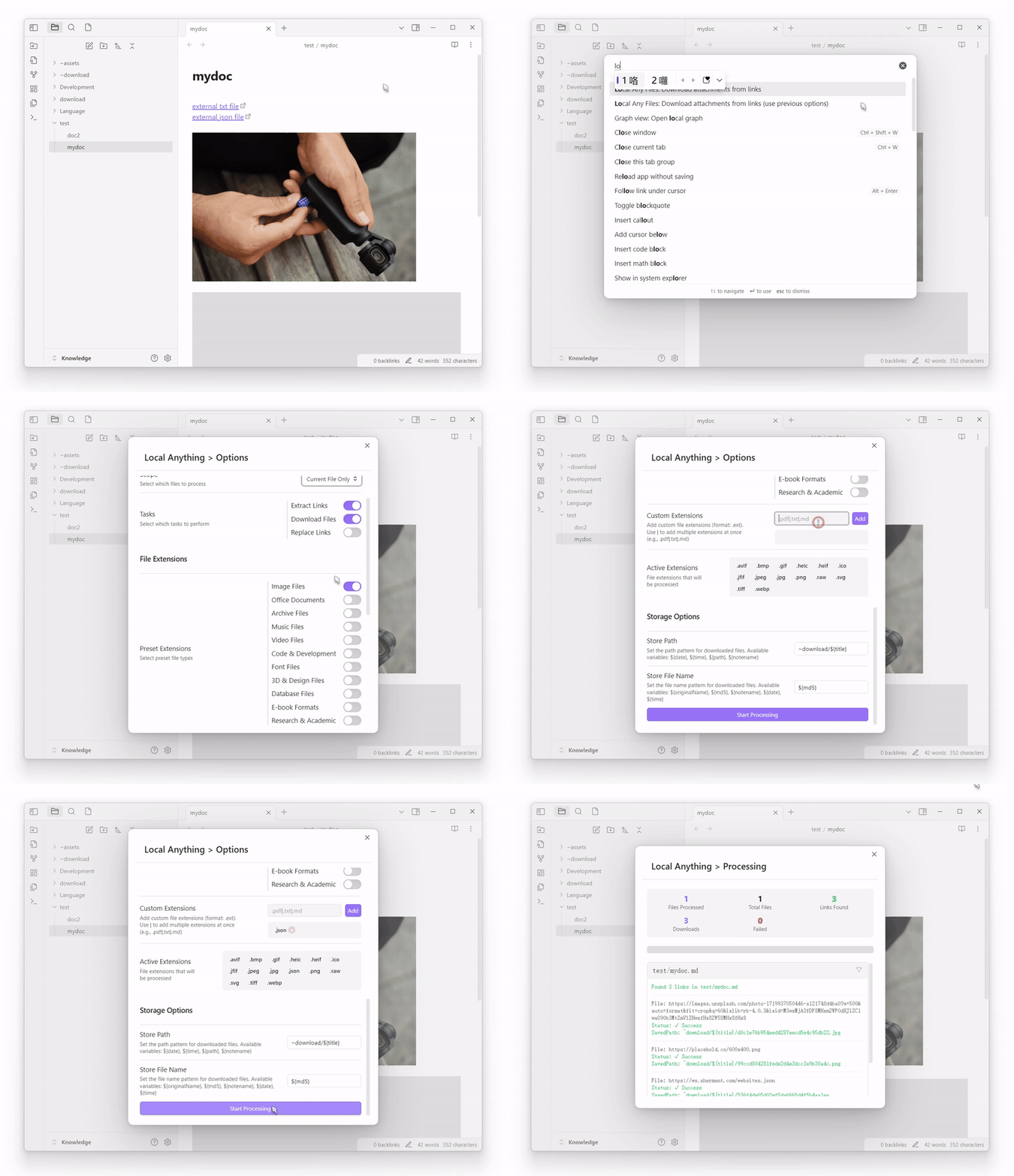
Features
-
Wide File Type Support: Preset groups for various file types.
- Images:
.png,.jpg,.jpeg,.gif,.bmp,.svg,.webp,.tiff,.ico,.raw,.heic,.heif,.avif,.jfif - Office Files:
.doc,.docx,.xls,.xlsx,.ppt,.pptx,.pdf,.odt,.ods,.odp,.rtf,.txt,.csv,.epub,.pages,.numbers,.key - Archives:
.zip,.rar,.7z,.tar,.gz,.bz2,.xz,.iso,.tgz,.z,.bzip2,.cab - Music:
.mp3,.wav,.flac,.m4a,.ogg,.aac,.wma,.aiff,.alac,.mid,.midi,.opus,.amr - Videos:
.mp4,.avi,.mkv,.mov,.wmv,.flv,.webm,.m4v,.mpg,.mpeg,.3gp,.ogv,.ts,.vob - Code Files:
.js,.ts,.jsx,.tsx,.html,.css,.scss,.json,.xml,.yaml,.yml,.md,.py,.java,.cpp,.c,.cs,.php,.rb,.go,.rs,.swift - Fonts:
.ttf,.otf,.woff,.woff2,.eot - Design Files:
.psd,.ai,.eps,.sketch,.fig,.xd,.blend,.obj,.fbx,.stl,.3ds,.dae - Databases:
.sql,.db,.sqlite,.mdb,.accdb,.csv,.tsv - Ebooks:
.epub,.mobi,.azw,.azw3,.fb2,.lit,.djvu - Academic:
.bib,.tex,.sty,.cls,.csl,.nb,.mat,.r,.rmd,.ipynb
- Images:
-
Smart Processing:
- Extracts links from your notes
- Downloads files locally
- Automatically replaces links with local paths
-
Intuitive Process View:
- Real-time progress tracking
- Clear success/failure indicators
- Detailed logs for each operation
- Visual progress bar for better feedback
-
Flexible Scope Options:
- Process current file only
- Process entire current folder
- Process all files in vault
- Process single items through context menu
-
Separated Tasks:
Extract External Links: Find all external links in your notesDownload File Locally: Download external files to your vaultReplace External Links: Update links to point to local files- Customize which tasks to run based on your needs
-
Customizable Store Path and File Name:
- Dynamic store path with variables support:
${path}: Current note's path${notename}: Current note's name
- Flexible file naming with variables:
${originalName}: Original file name${date}: Current date${time}: Current time${random}: Random string${extension}: File extension${year}: Current year${month}: Current month${day}: Current day${hour}: Current hour${minute}: Current minute${second}: Current second
- Dynamic store path with variables support:
Comparison with obsidian-local-images
While obsidian-local-images is a great plugin focused on image attachments, obsidian-local-any-files extends similar functionality to a much wider range of file types:
-
File Type Support:
obsidian-local-images: Focuses on image files onlyLocal any files: Supports images, documents, archives, media, code files, and many more
-
Processing Options:
obsidian-local-images: Processes images in the current noteLocal any files: Flexible scope options (current file, folder, entire vault, or single items)
-
Configuration:
obsidian-local-images: Basic image-focused settingsLocal any files: Extensive configuration options for file types, storage paths, and naming patterns
-
Organization:
obsidian-local-images: Standard image organizationLocal any files: Customizable storage paths with variables for better organization
Usage
Quick Start
- Install the plugin from Obsidian Community Plugins
- Configure desired file types in settings:
- Enable preset groups (images, documents, etc.)
- Add custom extensions if needed
Processing Files
Method 1: Command Palette
- Open Command Palette (Ctrl/Cmd + P)
- Search for "Local any files" or "Download attachments from links"
- Choose processing options in the modal
Method 2: Context Menu
- Right-click on a link in your note
- Select "Download to local" option
- Configure options in the modal
Configuration
Storage Path
- Default:
assets/${path} - Variables available:
${path}: Current note's path${originalName}: Original filename
Custom Extensions
- Add your own extensions in settings
- Format:
.ext(e.g.,.pdf,.custom) - Multiple extensions:
.pdf|.txt|.md
Support
For plugin developers
Search results and similarity scores are powered by semantic analysis of your plugin's README. If your plugin isn't appearing for searches you'd expect, try updating your README to clearly describe your plugin's purpose, features, and use cases.