Local Voiceover - Private TTS
approvedby giacolees
Speak selected text with local Inflect Micro v2 synthesis. - This plugin has not been manually reviewed by Obsidian staff.
Local Voiceover - Private TTS
Select a passage. Hear it in seconds. Never send your notes to a voice provider.
Local Voiceover turns the selected text in an Obsidian note into speech directly on your desktop. It runs Inflect Micro v2 locally through ONNX Runtime Web, preferring WebGPU with a WebAssembly fallback: no API key, account, Python installation, or uploaded note content.
Built for focused reading. Inflect Micro v2 is a compact 9.36 M-parameter English text-to-waveform model. Local Voiceover keeps its phonemizer and ONNX graphs in a worker, so long passages can synthesize without freezing the editor. The first run downloads roughly 38 MB of model graphs plus its runtime assets; later playback works from the local cache, including offline.
Other projects
- Obsidian Math Convert — convert math formula images to LaTeX locally with FormulaNet, Transformers.js, and ONNX; no API key required.
Demo
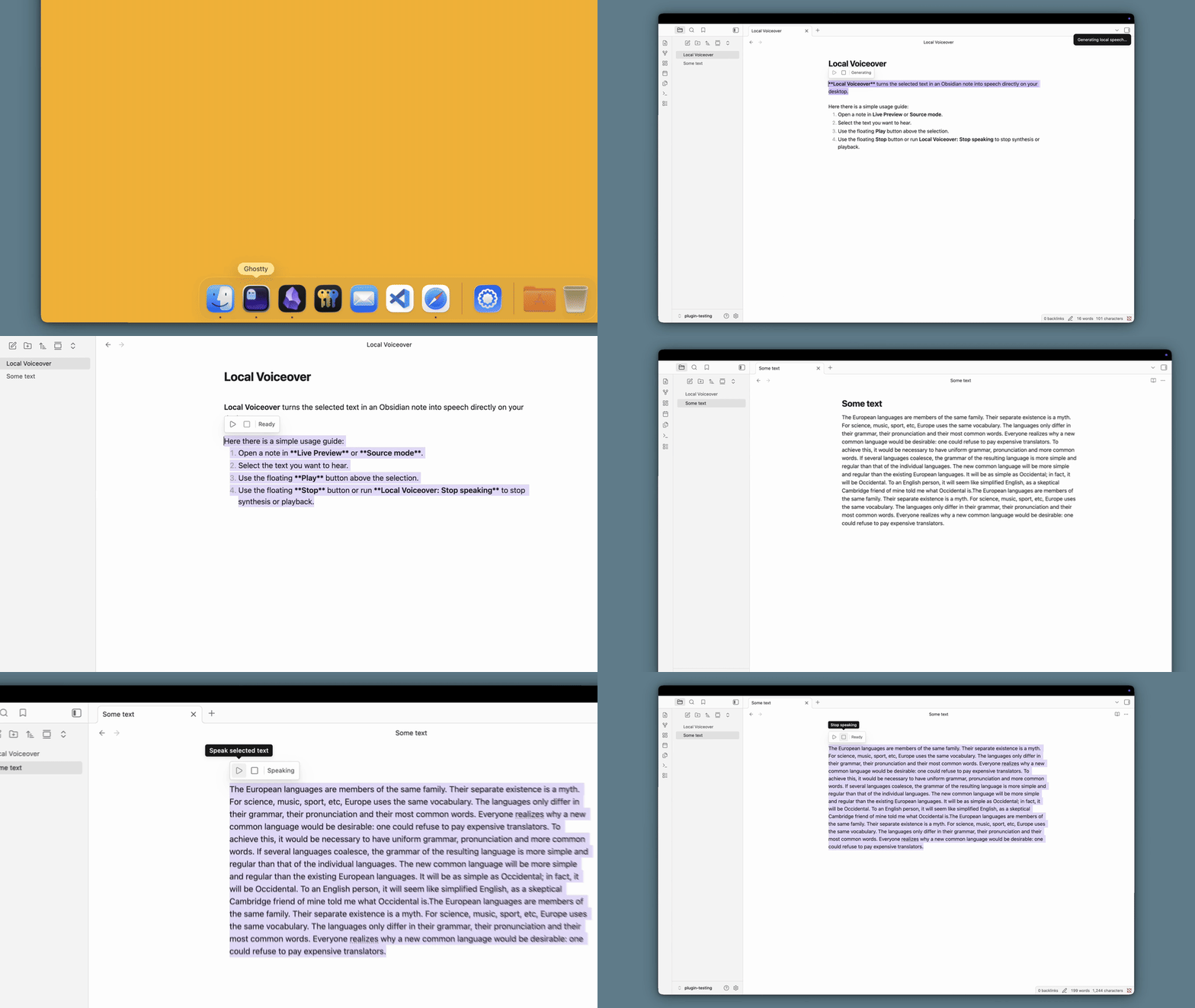
Why Local Voiceover?
Hosted TTS services require an account, an API key, and a copy of your writing on somebody else's server. Local Voiceover stays inside Obsidian:
- Private by default — selected text, phonemization, inference, and audio playback stay on your machine.
- Offline after the first download — the model graphs are cached in the plugin data directory.
- No setup burden — no provider configuration, Python runtime, or local server.
- Responsive notes — inference runs in a dedicated worker while you keep editing.
- Made for reading — speak one selected sentence or a longer passage, then stop whenever you need.
Usage
- Open a note in Live Preview or Source mode.
- Select the text you want to hear.
- Use the floating Play button above the selection, or run Local Voiceover: Speak selected text from the Command Palette.
- On first use, wait for the local model download and initialization.
- Use the floating Stop button or run Local Voiceover: Stop speaking to stop synthesis or playback.
The selection controls display Ready, Loading, Generating, or Speaking so you can see the current state.
Speech controls
In Settings → Local Voiceover, configure:
- Speed (
0.5–2.0, default1.0): lower is slower. - Variation (
0–1, default0.667): lower is steadier. - Seed (safe integer, default
0): the same seed repeats the stochastic sample on the same runtime; long passages useseed + chunkIndex.
How it works
Local Voiceover adapts the browser port of Inflect Micro v2 into an Obsidian plugin:
- It normalizes and splits selected English text into model-safe chunks.
- An eSpeak-compatible WebAssembly frontend converts chunks to phonemes.
- Two local ONNX graphs generate a 24 kHz mono waveform in a worker.
- Obsidian queues each completed chunk through Web Audio, allowing playback to begin before a long selection has fully synthesized.
The initial model download comes from the official owensong/Inflect-Micro-v2-ONNX export. The pinned ONNX Runtime Web assets are downloaded once from jsDelivr. Graph and runtime bytes are cached locally and verified against their stored SHA-256 cache manifest before reuse.
Model scope
Inflect Micro v2 provides one fixed English male voice. It is not voice cloning, multilingual TTS, or a streaming acoustic model. Pronunciation of unfamiliar names, abbreviations, and unusual phrasing can vary.
Installation
Community plugin
Once approved in Obsidian's community catalog, install from Settings → Community plugins → Browse and search for Local Voiceover.
From a GitHub release
- Download
main.js,manifest.json, andstyles.cssfrom the latest release. - Create
<vault>/.obsidian/plugins/local-voiceover/. - Put the three downloaded files in that directory.
- Enable Local Voiceover in Settings → Community plugins.
From source
git clone https://github.com/giacolees/obsidian-local-voiceover.git
cd obsidian-local-voiceover
npm install
npm run build
Copy or symlink the repository into <vault>/.obsidian/plugins/local-voiceover/, then enable it under Settings → Community plugins.
Development
npm run dev      # build the plugin bundles
npm run build    # type-check and build production assets
npm run lint     # ESLint checks
npm run check    # build, lint, markdown, unused-code, cycle, and duplicate checks
Releasing to Obsidian Community Plugins
- Bump the version with
npm version patch(orminor/major). - Push the commit and tag to GitHub.
- The release workflow runs all quality checks and attaches the Community Plugin-compatible
main.js,manifest.json, andstyles.cssfiles. - Submit the repository to the Obsidian community plugin list, or update the existing listing.
License and provenance
Local Voiceover is licensed under GPL-3.0-or-later because it bundles ephone, an eSpeak-NG WebAssembly frontend under GPL-3.0-or-later. See THIRD_PARTY_NOTICES.md, third_party/EPHONE_COPYING.txt, and UPSTREAM_INFLECT_LICENSE.
Inflect Micro v2 model weights and original runtime are released under Apache-2.0. The model weights are not bundled with this repository.
For plugin developers
Search results and similarity scores are powered by semantic analysis of your plugin's README. If your plugin isn't appearing for searches you'd expect, try updating your README to clearly describe your plugin's purpose, features, and use cases.