Log Keeper
approvedby jimjambimbam
Generate time stamps automatically as changes are made to a note.
Log Keeper


Track changes to your notes within your Obsidian Vault as you type. When the content of a note changes within a vault, a new time stamp is generated or an original time stamp is edited, depending on the settings. This log is then added to a note's YAML property.
 Example of the 'last-modified' property seen in Obsidian.
All time stamps are formatted according to the ISO 8601 standard format YYYY-MM-DDTHH:mm:ss where:
- YYYY: Is the current year (e.g. "2025" for the current year)
- MM: Is the current month (e.g. "04" for the 4th month)
- DD: Is the current day (e.g. "05" for the 5th day of the month)
- T: Separates the date and time values
- HH: Is the current hour from 0-23
- mm: Is the current minute from 0-59
- ss: Is the current second from 0-59
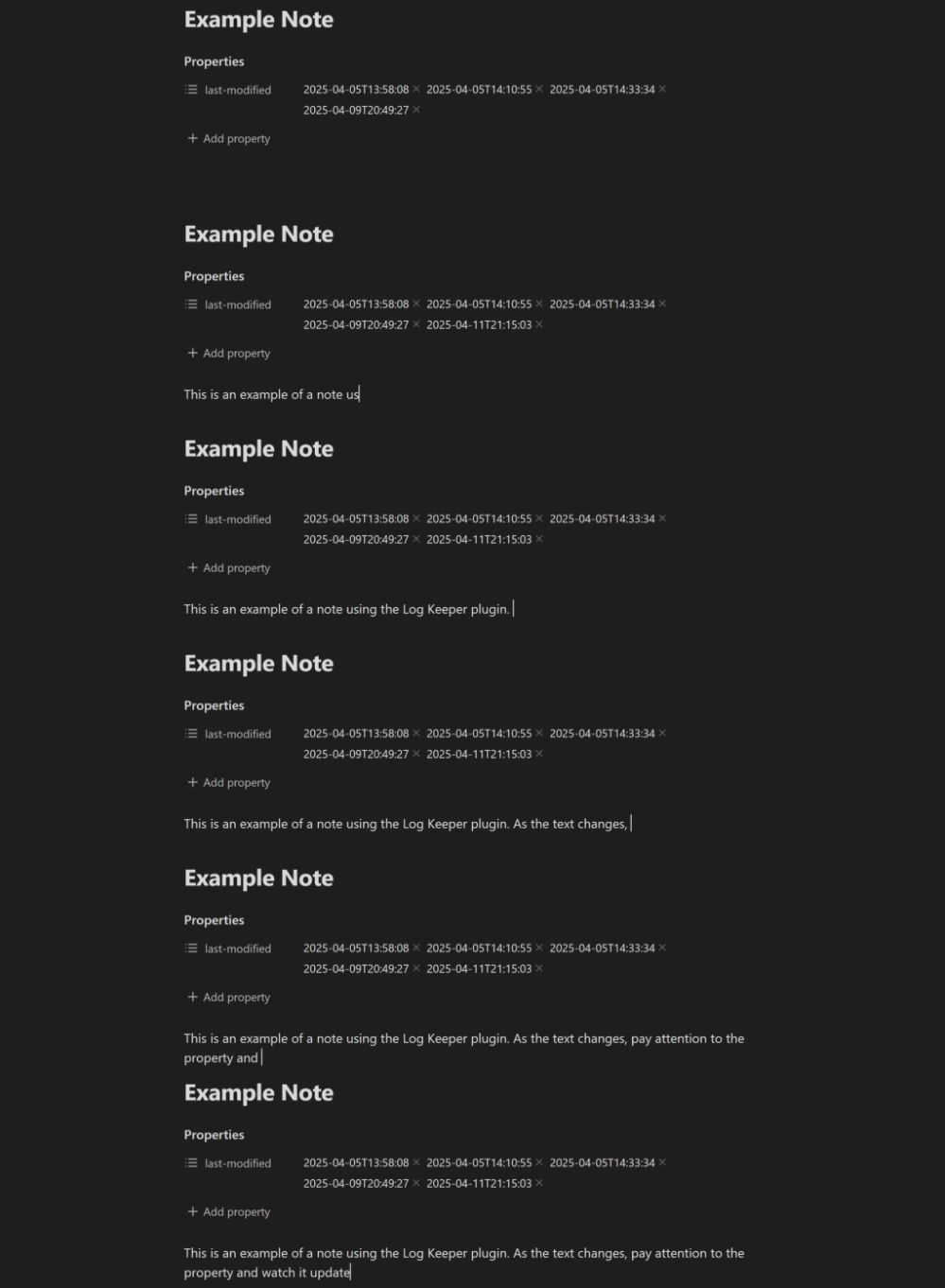 Example of the 'last-modified' property being updated in a note when the Log Keeper plugin is enabled.
Uses
Contribution Graph / Dataview
Combine Note Modification Tracker with other plugins such as Dataview and Contribution Graph to create a contribution graph like in Github.
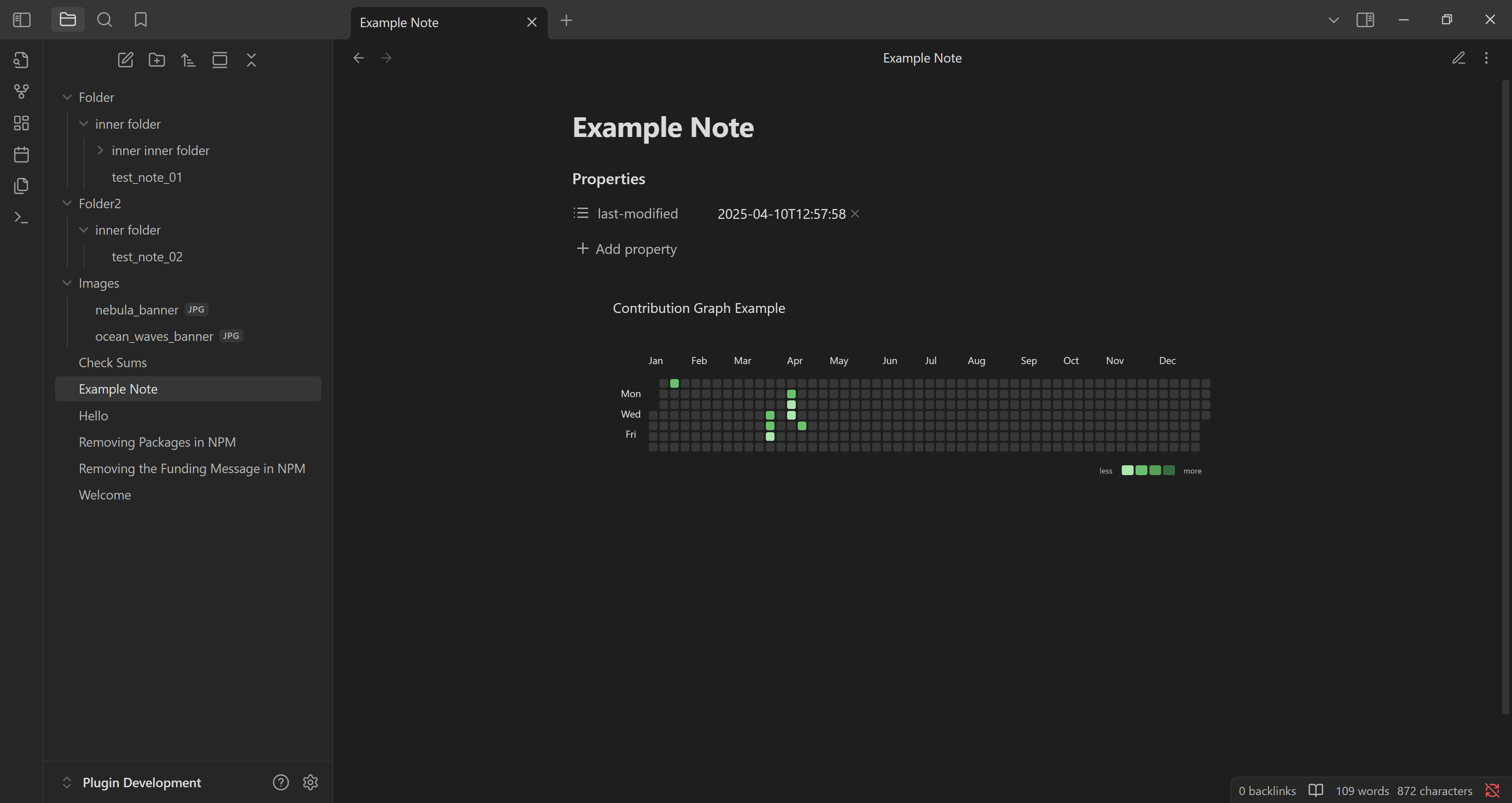
The snippet of javascript code can display a contribution graph from all the notes that contain a 'last-modified' property. Note: To make it work, remember to replace 'js' with 'dataviewjs' at the start of the code block.
    ```js
    // code goes here...
    ```
Becomes:
    ```dataviewjs
    // code goes here...
    ```
Code Snippet
const currentYear = new Date().getFullYear()
const from = currentYear + '-01-01'
const to = currentYear + '-12-31'
let data = []
let dates = []

// Must collect all the files that have data on file modification
let pages = dv.pages()
	.where(p => p["last-modified"])

// Grab all the dates, even duplicates, and push to an array.
for (let i = 0; i < pages.length; i++) {
	let page = pages[i]
	for (let j = 0; j < page["last-modified"].length; j++) {
		dates.push(page["last-modified"][j])
	}
}

// Reduce the array down to a key value pairs.
// Key is the date with the time component removed and,
// value is the number of times the key appears in the array.
let dateCount = dates.reduce((acc, date) => {
	let dateKey = date.toString().split("T")[0]

	acc[dateKey] = (acc[dateKey] || 0) + 1

	return acc
}, {})

// We manipulate the key value pairs so that they
data = Object.keys(dateCount).map(key =>
	({
		date: key,
		value: dateCount[key]
	}))

const calendarData = {
    title:  "Contribution Graph Example", // graph title
    data: data, // data
    fromDate: from, // from date, yyyy-MM-dd
    toDate: to // to date, yyyy-MM-dd
}
renderContributionGraph(this.container, calendarData)
Contributing
Feel free to contribute to this plugin however you want. Bug reports, bug fixes and feature requests are always welcome.
Goals
Listed in level of priority:
Plugin
- Add setting that allows users to format the time stamps of their notes using valid Momentjs syntax.
- Add commands to temporarily suspend time stamping if the user needs to make changes to the properties of a note, to avoid excessive updates. Time stamping will resume after a note is closed, or the command is called again.
- Add setting that allows users to change the property name used for storing time stamps.
- Add a command that allows users to change the property name that is used to track changes. For example, changing "last-modified" to "log date".
Github Repo
- Add a CONTRIBUTORS.md file for anyone that has contributed to repo.
- Add Github action that automatically adds contributors to CONTRIBUTORS.md file.
- Add CONTRIBUTOR.md file reference to README.md file.
For plugin developers
Search results and similarity scores are powered by semantic analysis of your plugin's README. If your plugin isn't appearing for searches you'd expect, try updating your README to clearly describe your plugin's purpose, features, and use cases.