by Omer Cooper
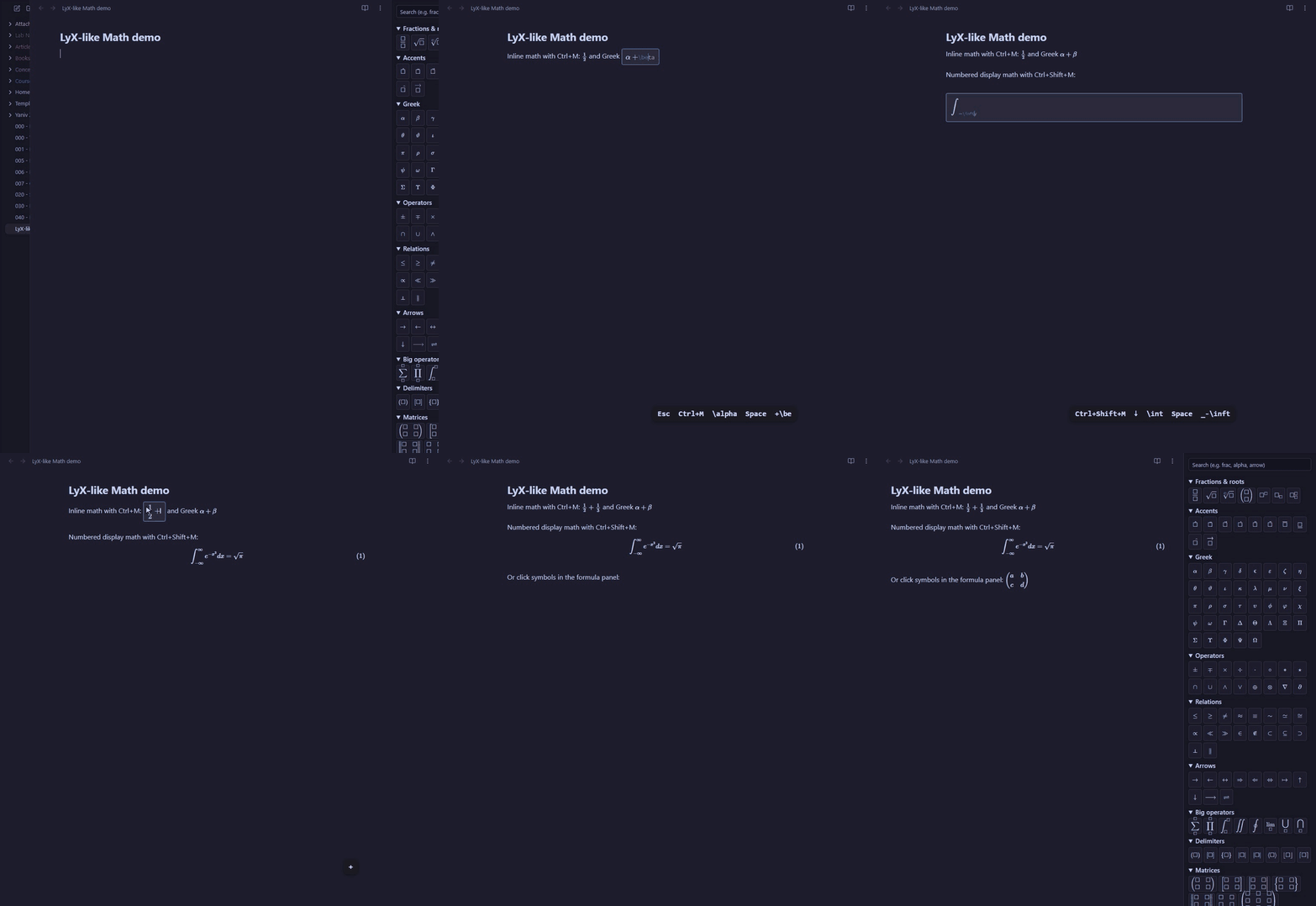
Type math like in LyX: edit formulas as rendered math, finish commands with Space, fill empty boxes, and number equations.
LyX-like Math
An Obsidian plugin that makes typing math feel like LyX: you edit the
formula as rendered math, \commands finish with Space, and wrappers like \frac and \sqrt
give you empty boxes to fill. Notes stay plain Markdown: formulas are saved as ordinary
$...$ and $$...$$ LaTeX, which Obsidian renders as usual.
This plugin was created by AI (Claude Code), directed and tested by Omer Cooper.
Desktop only. The math editor is MathLive 0.111.1 (MIT), bundled with its fonts, so it works offline.
Keys
| Key | What it does |
|---|---|
| Ctrl+M | New inline math $...$ at the cursor, or edit the formula under the cursor |
| Ctrl+Shift+M | New display math $$...$$: first choose Display math or Numbered display math |
\name then Space | Finishes the command as typed (no need to pick from a list) |
\name then a symbol | Finishes the command and types the symbol |
| Tab | Next empty box; after the last one, leaves the box |
| Esc | Close the editor and save, cursor after the formula |
| ← / → at the edge | Leave the formula before / after it |
| Ctrl+Enter | In a matrix: add a row |
| Ctrl+Shift+Enter | In a matrix: add a column |
Wrappers keep everything you type inside them until Space or Tab: \sqrt 4*5 gives
\sqrt{4*5}. Only LyX behaviour is on: no auto-conversion of alpha, /, ->, auto-paired
brackets and so on.
In Live Preview, clicking a formula opens it in the editor. Formulas the editor can't handle
(aligned, \label, multi-line blocks, unknown macros) are left alone and open as LaTeX text,
with a short notice.
Saved LaTeX
- Braces are always written:
\frac{4}{3},\sqrt{2},x^{2}, never\frac43orx^2. - A formula you open and close without changing keeps its original text exactly.
- Empty boxes are saved empty (
\frac{1}{}). - Display math is saved as
$$/ formula /$$on their own lines. - Matrices are saved on one line:
\begin{pmatrix}a & b\\ c & d\end{pmatrix}.
Numbered equations
Choosing Numbered display math adds \tag{n}. Numbers count the note's numbered equations
from the top, so inserting or deleting one renumbers the rest. Ctrl+Shift+M on an existing
display equation lets you switch numbering on or off. The command Renumber equations fixes
numbers after you edit tags by hand.
Formula panel
The Σ ribbon icon (or the command Open LyX formula panel) opens a sidebar of symbol
buttons grouped like LyX's math toolbar: fractions & roots, accents, Greek, operators,
relations, arrows, big operators, delimiters, matrices, functions, misc. There's a search box at the top (\ optional).
Clicking a button inserts into the open editor with the cursor in the first empty box; with no
editor open, it starts inline math at the note's cursor. The Matrices group also has + row
and + column buttons.
Settings
Copy unsaved formulas to the clipboard (on by default): if the note changes while you are editing a formula (it syncs, or its tab is closed), the formula can't be saved into it. It is always shown in a message; with this on, it is also copied to the clipboard so you can paste it back. This is the only clipboard access by the plugin, and it never reads the clipboard.
Install
From Obsidian (once the plugin is listed): Settings → Community plugins → Browse → search for LyX-like Math → Install → Enable.
Manually: download main.js, manifest.json and styles.css from the
latest release, put them in
<your vault>/.obsidian/plugins/lyx-like-math/, then in Obsidian: Settings → Community plugins
→ reload the list and enable LyX-like Math. The math fonts are inside styles.css; nothing
is downloaded at run time.
With BRAT: add the beta plugin
OmerCooper/lyx-like-math.
Ctrl+M and Ctrl+Shift+M can be changed under Settings → Hotkeys (search "math").
Development
Needs Node.js 18 or later.
npm install
npm run build       # main.js and styles.css
npm run deploy      # build + copy to your vault: put the plugin folder path in deploy-target.txt
npm test            # unit tests (vitest)
npm run e2e         # browser tests: real MathLive and CodeMirror in local Chrome (playwright-core)
npm run dev         # rebuild on change
To release: bump the version in manifest.json, package.json and versions.json, commit, then
push a tag with the same version (git tag 0.2.0 && git push origin 0.2.0). GitHub Actions
builds and publishes the release.
Design and plan: docs/superpowers/specs/2026-10-26-lyx-math-design.md,
docs/superpowers/plans/2026-10-27-lyx-math.md.
For plugin developers
Search results and similarity scores are powered by semantic analysis of your plugin's README. If your plugin isn't appearing for searches you'd expect, try updating your README to clearly describe your plugin's purpose, features, and use cases.