MarkTodo
approvedby Isaiah Centifanto
Markdown todos, designed for mobile. - This plugin has not been manually reviewed by Obsidian staff.
MarkTodo
Plain text that levels up only when you ask it to.
An Obsidian plugin for todo and project management on top of plain Markdown. A
todo is a normal checkbox — - [ ] Buy milk — and reads like you typed it.
Power (status, priority, due dates, reminders, stable identity) attaches only
to the todos that use it. The .md files are always the source of truth.
It pairs with a companion MarkTodo mobile app; both read and write the same files and agree on one grammar.
What's different
Three things here exist nowhere else.
A real standalone Android app. Almost every todo plugin for Obsidian is a
plugin and nothing else. The handful with a mobile story are just the desktop
plugin shrunk onto a phone — all sidebars, dense panels and hover menus.
MarkTodo's app is a real app in its own right, built for the phone it runs on,
reading and writing the same .md files under the same grammar.
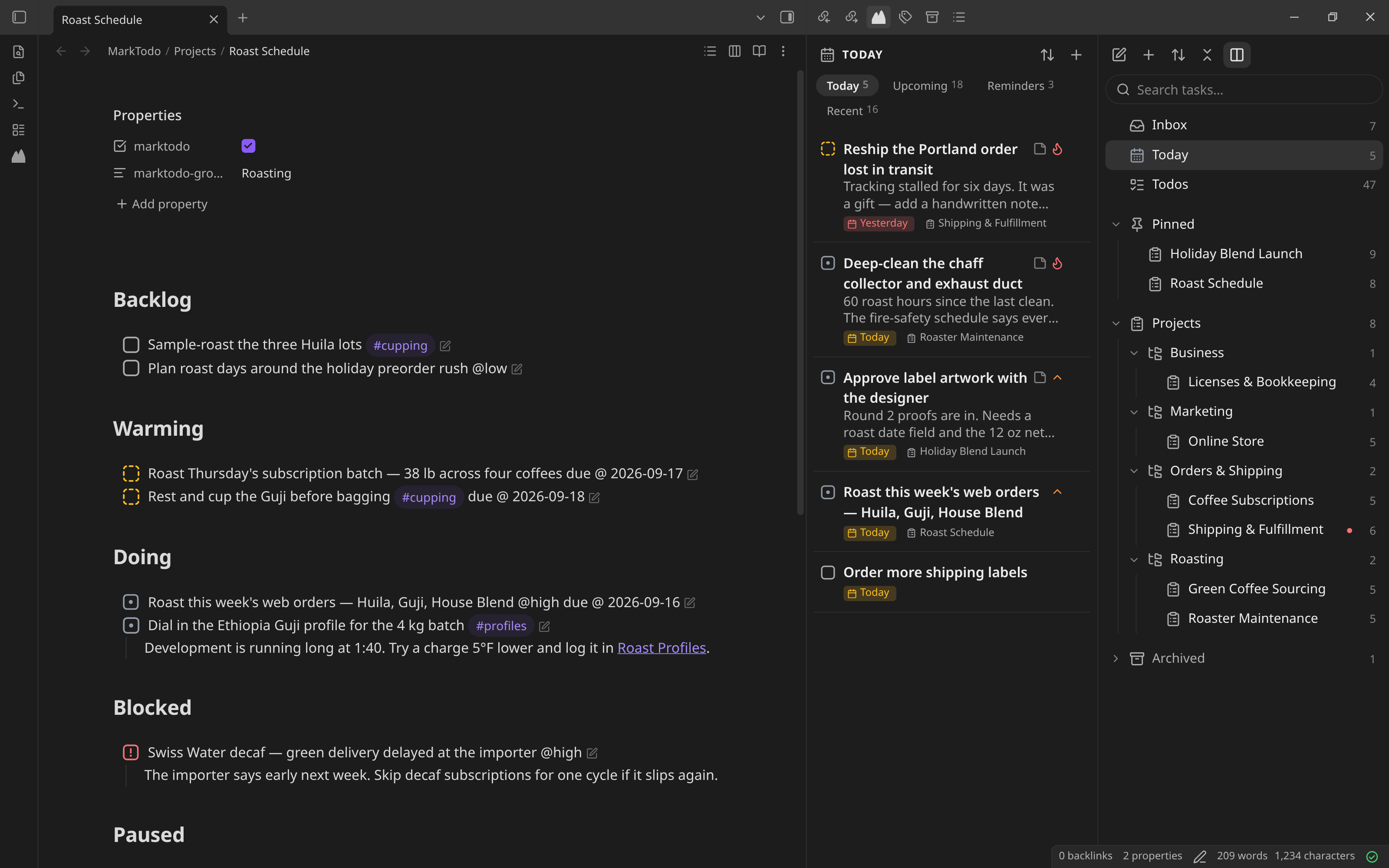
Three panes that slide instead of stacking. Your projects, your list, and the todo you're in sit side by side and slide. The list never disappears, and you never press Back to work out where you are.
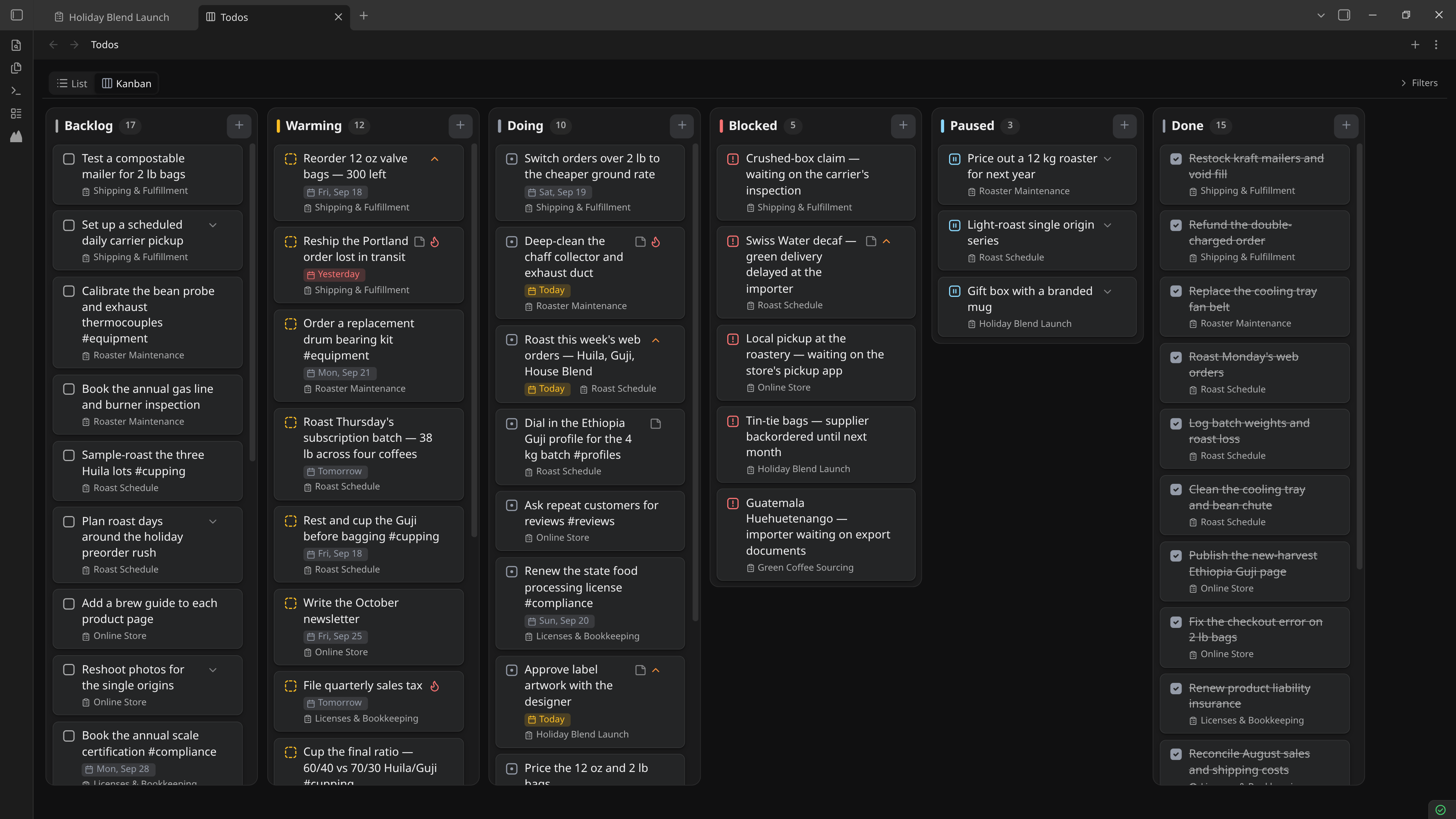
A vocabulary that keeps the distinctions that matter. Backlog, Warming, Doing, Blocked, Paused, Done — the six names, their order, and the split between the three you plan with and the three that mean work is live. Warming doesn't exist in any other tool: it's the decision that something is next, made once and written into the file instead of faked with a tag or a due date. Blocked and Paused stay separate, because "someone else stopped this" and "I stopped this" are not the same thing, and every tool that collapses them into one "on hold" loses the only distinction that matters.
The format
The checkbox glyph is the canonical status:
| Glyph | Status | Section heading |
|---|---|---|
[ ] | Backlog | ## Backlog |
[>] | Warming | ## Warming |
[/] | Doing | ## Doing |
[!] | Blocked | ## Blocked |
[-] | Paused | ## Paused |
[x] | Done | ## Done |
The six statuses and their names are fixed: a heading means the same thing in
every vault, on every device, in the plugin and in the app. They are not a
preference to rename, because the set of six is the point — Warming records
that a todo is next, and Blocked and Paused say who stopped the work.
Everything else is optional, inline text appended to the todo:
due @ 2026-09-20— a due datedone @ 2026-09-17— set automatically when a todo is marked donenotify @ 2026-09-19 09:00— a reminder@high(or@ph) — inline priority
Dates are normalized on save (due @ 2026-9-1 becomes due @ 2026-09-01),
and every write is round-trip safe — a todo's surrounding text is never
touched, and a write aborts rather than risk dropping a todo.
Projects
Every todo belongs to a project. Any todo not filed under a project shows up in the Inbox, which is a view, not a note — there's nothing to create or clean up. Projects, in-progress work, priorities and due dates are all just different views over the same Markdown.
Making todos
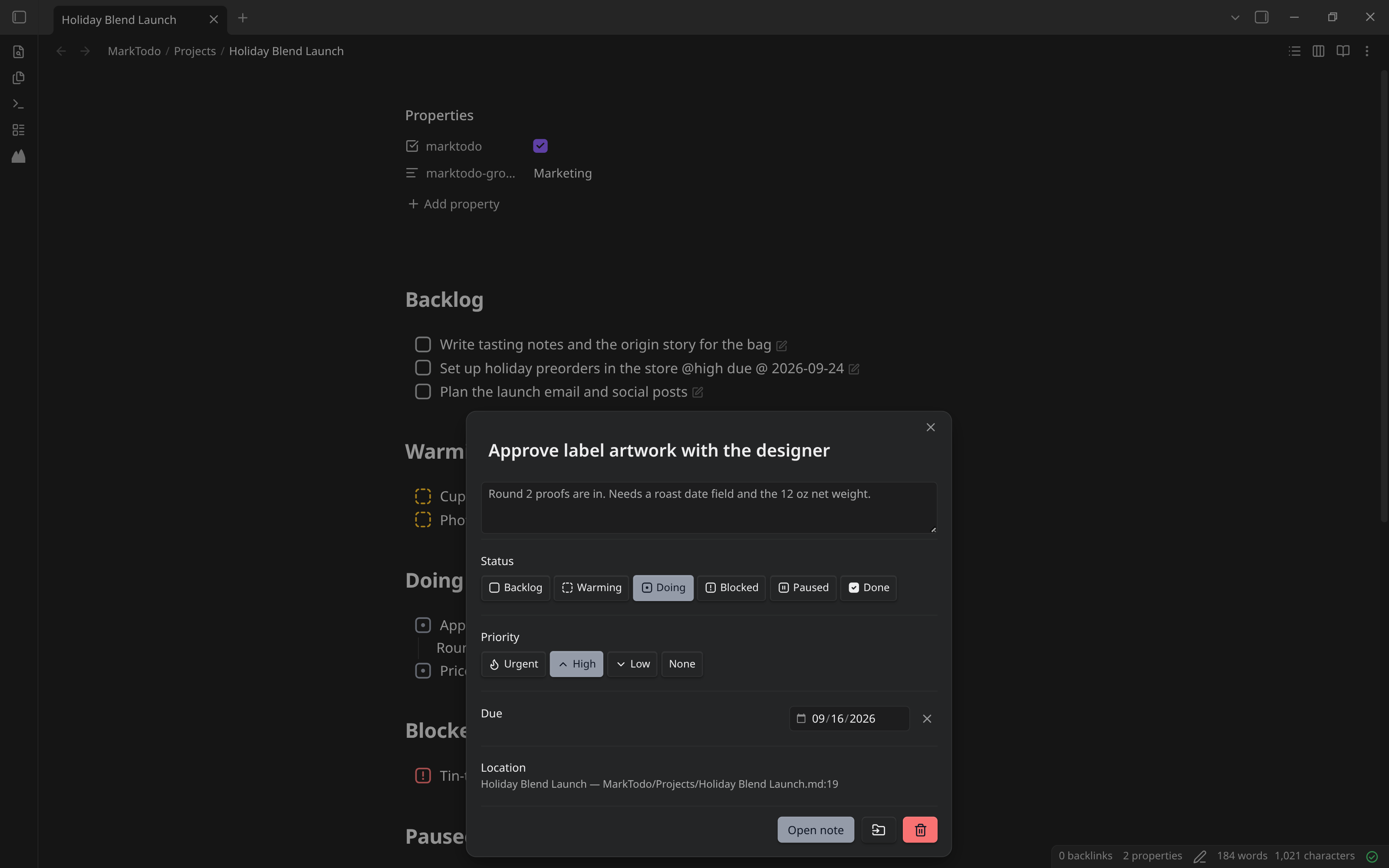
A plain checkbox is already a todo. A managed todo also carries a hidden
<!-- mt id=… --> tag, so MarkTodo can track it through edits and moves and
give it any of the six statuses.
- Type
mtodoat the end of any line, after a space (Buy milk mtodo). A pop-up offers Create todo here (Enter picks it), Open todo editor and, if you set a catch-all note, Send to catch-all note. A plain line or list item becomes a managed todo; an existing checkbox keeps its status. Change the trigger in Settings → Inline todo trigger. - Commands (Command palette):
- Convert current line to managed todo
- Adopt all todos in current note: manages every plain checkbox in it
- Insert managed todo at cursor
- Edit todo at cursor, also in the editor's right-click menu
- Add todo… opens the todo editor
MarkTodo sets no default hotkeys, so it never clashes with yours. Assign any of these in Settings → Hotkeys.
Phones, tablets and the companion app
On phones and tablets MarkTodo starts in Lightweight mode: managed checkboxes, the todo trigger and archive filing keep working, while the dashboard and boards are off so Obsidian stays quick. The first time, a pop-up offers the MarkTodo app for Android on Google Play. In Lightweight mode, opening the dashboard shows that pop-up instead. Settings also has "Get it on Google Play" buttons. To use the full plugin on a device, go to Settings → MarkTodo → On this device.
The app is not this plugin on a smaller screen. It puts your projects, your list, and the todo you're in in three panes side by side, and slides between them rather than stacking full-screen views you have to press Back out of — so the list you were reading is still there when you finish with a todo.
The full plugin on a phone, with On this device switched on:


Privacy
- It reads your notes. To find todos and projects, MarkTodo goes through every Markdown note in the vault. Folders listed under Settings → Excluded folders are skipped when it looks for todos.
- It edits notes in response to you: the todos you change, the projects you create, and the upkeep you turn on in Settings (keeping a project's status sections in step with its checkboxes, filing archived projects into the Archive folder). Changes that touch many notes, like moving the MarkTodo folder, ask first.
- No network. No accounts, telemetry or network requests. The Contact and Google Play buttons open links in your browser.
Status
Early beta (0.0.4), not yet published to Community Plugins.
Development
pnpm install
pnpm dev     # watch build
pnpm build   # production build (type-checks first)
pnpm test    # unit tests
pnpm check   # TypeScript
pnpm lint    # Obsidian's community-plugin review rules
To release, bump the version in manifest.json, package.json and
versions.json, then push a tag with the bare version (0.0.2). The Release
workflow builds, attests and publishes main.js, manifest.json and
styles.css.
See CONTRIBUTING.md before opening a pull request.
License
For plugin developers
Search results and similarity scores are powered by semantic analysis of your plugin's README. If your plugin isn't appearing for searches you'd expect, try updating your README to clearly describe your plugin's purpose, features, and use cases.