Simple Todo
approvedby elliotxx
A minimalist text-based todo manager (Text-Based GTD) for efficient task management.
★ 9 stars↓ 4,141 downloadsUpdated 1y agoMIT
Simple Todo
A minimalist text-based todo manager (Text-Based GTD) plugin for efficient task management in Obsidian.
English | 简体中文
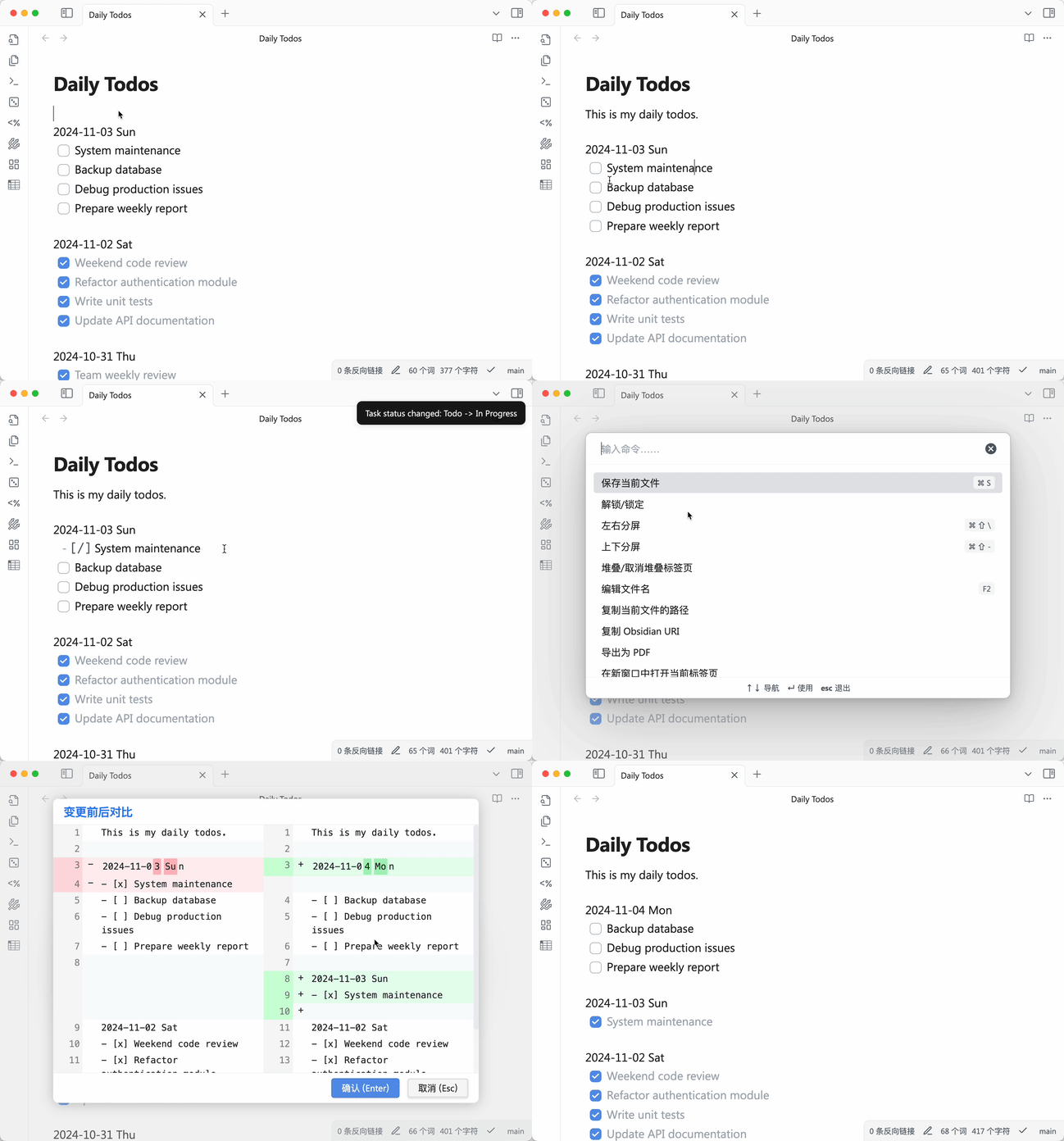
Features
- 📝 Pure text-based, fully compatible with Markdown syntax
- 🎯 Quick task creation, editing, and completion
- 🗂 Simple task categorization
- 📅 Date-based task organization
- 🔄 Task status toggle (Todo/In Progress/Done)
- 📦 Completed task archiving
- 🌐 Multi-language support (English, 简体中文)
Installation
- Open Settings in Obsidian
- Go to "Community Plugins"
- Disable "Safe Mode"
- Click "Browse" and search for "Simple Todo"
- Click Install
- Enable the plugin
Settings
Language
- Open plugin settings
- Select your preferred language from the dropdown menu
- Changes take effect immediately
Keyboard Shortcuts
Default shortcuts:
Ctrl/Cmd + Enter- Toggle todo status- Other commands can be configured in plugin settings
Usage
Basic Syntax
2024-10-30 Wed
- [ ] Create a todo task
- [x] Mark task as completed
- [/] Mark task as in progress
Note:
- Date format must be
2024-10-30 Wedto be recognized - Tasks must start with
- [ ]or- [x]or- [/]to be recognized as tasks
Supported Commands
Toggle Todo Status- Toggle task status (Todo -> In Progress -> Done -> Todo)Reschedule Previous Todos- Move unfinished tasks from the most recent day to todayArchive Completed Todos- Archive completed tasks (by month to simple-todo directory)
Task Status
- [ ]- Todo task- [/]- Task in progress- [x]- Completed task
Task Rescheduling
- Plugin searches for unfinished tasks from the most recent day, starting from cursor position
- If unfinished tasks are found, they will be moved under today's date
- If today's date doesn't exist, it will be created automatically
- After rescheduling, cursor will be positioned at the last task of today's block
Archiving
- Archive files are stored in the
simple-todo/directory - Files are named by month (e.g.,
simple-todo/archive-2024-03.md) - Archiving rules:
- Tasks are grouped by month
- A month can only be archived when all its tasks are completed
- Months with unfinished or in-progress tasks will be skipped with a notification
- Archive file format:
- Each file includes a month title
- Completed tasks are recorded chronologically
- Archived tasks are automatically removed from the original file
Date Format
- Format:
YYYY-MM-DD Weekday - Example:
2024-03-21 Thu - Date line must be on its own line
- Tasks must follow the date line
- Recommended to keep one empty line between date blocks, plugin will handle spacing automatically
Development Guide
Prerequisites
- Install Node.js (LTS version recommended)
- Install npm
- Clone the repository:
git clone https://github.com/elliotxx/obsidian-simple-todo.git
Development Workflow
- Install dependencies:
cd obsidian-simple-todo
npm install
- Create symlink to test vault:
# Windows (Administrator)
mklink /D "path/to/vault/.obsidian/plugins/obsidian-simple-todo" "path/to/your/project"

# macOS/Linux
ln -s "path/to/your/project" "path/to/vault/.obsidian/plugins/obsidian-simple-todo"
- Start development server:
npm run dev
-
In Obsidian:
- Open Settings > Community Plugins
- Turn off Safe Mode
- Refresh plugin list
- Enable "Simple Todo" plugin
-
After code changes:
- Files will auto-rebuild on save
- Press
Ctrl/Cmd + Rin Obsidian to reload
Building for Release
- Build production version:
npm run build
- Pre-release checklist:
- Update version in
manifest.json - Update version in
package.json - Update
versions.json - Commit all changes
- Create new release tag
- Update version in
Todo List
- Task Priority Management
- Support manual priority setting
- Support quick priority setting via hotkeys
- Auto-sort tasks based on priority
- Important but Not Urgent Task Management
- Support moving tasks to [Important but Not Urgent] list
- Daily random reminder of tasks from [Important but Not Urgent] list
- Hotkey Binding Enhancement
- Add default hotkeys for common operations
- Support custom hotkey configuration
Contributing
Issues and Pull Requests are welcome!
License
MIT License
For plugin developers
Search results and similarity scores are powered by semantic analysis of your plugin's README. If your plugin isn't appearing for searches you'd expect, try updating your README to clearly describe your plugin's purpose, features, and use cases.