MathLive in Editor Mode
approvedby mizarzh
MathLive input in editor mode
MathLive in Editor Mode
MathLive input in obsidian editor mode.
Features
- Basic input function
- Toggle mathlive display (global, block or inline)
- Macro (sort of), shortcuts and keybindings support
- Switch between mathlive and builtin mathjax
- Place inline MathLive before or after the source equation
- Different display modes
Usage
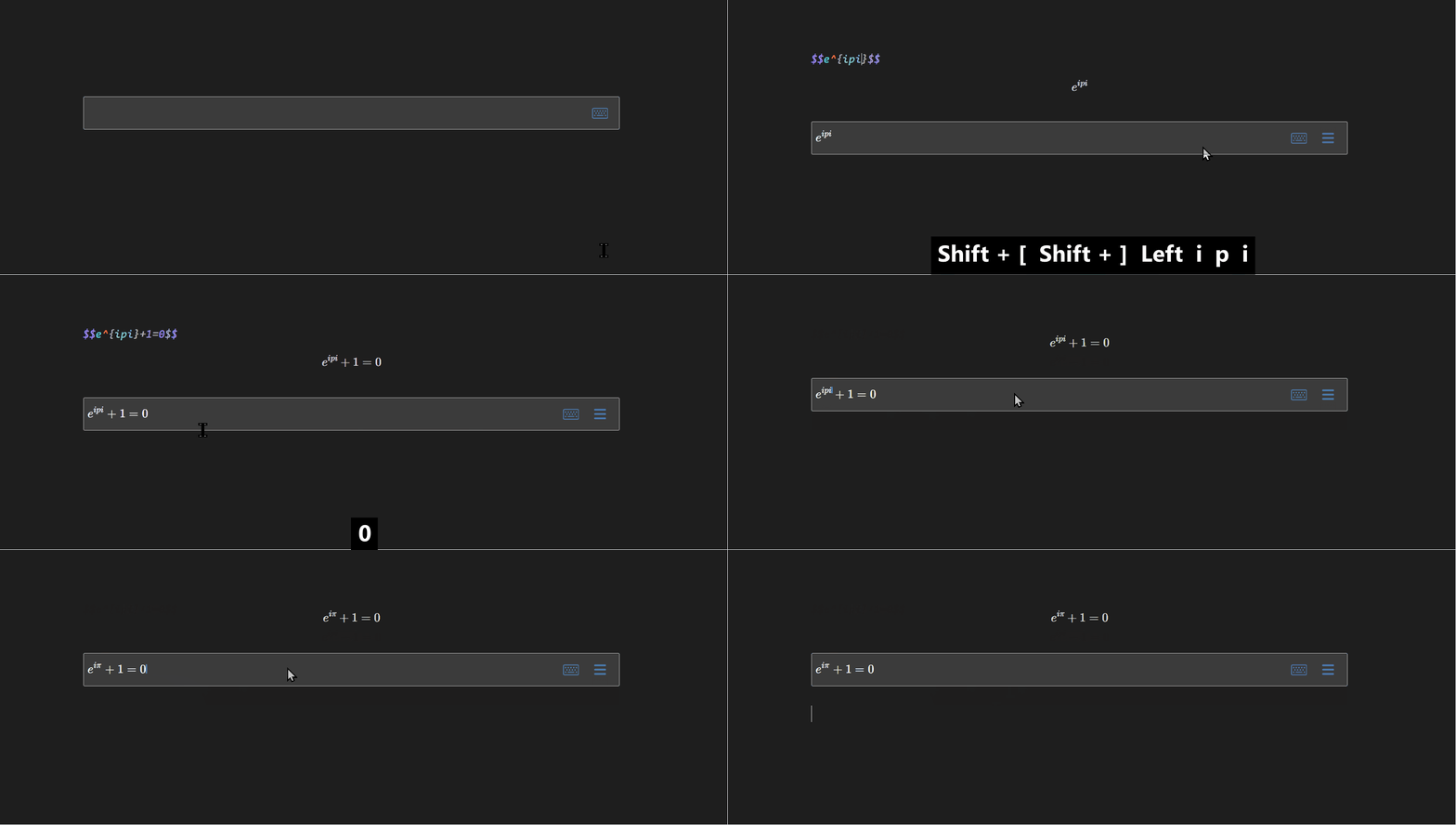
Edit the equation in mathlive block below the latex display block.
It is also possible to assign a hotkey to toggle the display of mathlive block.
Macro settings
When the MathLive macros setting is set, the new command is available in MathLive widgets but not in builtin mathjax block due to some designs of mathjax.
If you want the new command to also show up in builtin mathjax block, you can use the copy button in MathLive macros to copy latex \newcommand command, then paste it in mathjax block in every page or use a plugin to preload those new commands.
Bugfix TODO
- Input issue in tablet/phone
- Keep focus and immediate MathJax refresh with the inline MathLive field on the right. The current implementation is experimental and depends on internal editor behavior described below.
The Inline MathLive position setting selects Left or Right. Left is the default for compatibility and uses the normal CodeMirror update path. Right enables the experimental focus-preservation path.
Non-public APIs
The plugin currently uses two groups of members that are absent from their public API declarations:
- For right-side inline widgets and block widgets whose following cursor shares the decoration position,
src/mathlive-input-sync.tswrites CodeMirror's privateEditorView.inputState.composingproperty while MathLive is focused and around its transactions. Public CodeMirror exposes the read-onlyEditorView.composinggetter, but does not exposeinputStateor a setter. Access is feature-detected; blur restores the focus-lifetime value, and each transaction also restores its previous value infinally. src/setting.tsuses Obsidian settings internals to open and filter the Hotkeys tab:app.setting,openTabById(),activeTab,activeTab.headerComponent.components, andactiveTab.updateHotkeyVisibility(). These members are absent from the official Obsidian API. The positional component lookup is especially fragile.
No non-public MathLive method is currently called. window.mathVirtualKeyboard, Mathfield methods/events, Obsidian renderMath()/finishRenderMath(), and Obsidian's typed global DOM/string helpers are public APIs. DOM queries, CSS selectors, shadow-DOM access, and DOM mutation are implementation techniques rather than non-public method calls, so they are not classified as non-public APIs here.
After updating Obsidian or CodeMirror, manually verify continuous inline input, same-line block trailing-text navigation, focus retention, MathLive menu selection/dismissal, immediate source/MathJax updates, and the Set hotkey button. pnpm build cannot detect private-member changes.
For plugin developers
Search results and similarity scores are powered by semantic analysis of your plugin's README. If your plugin isn't appearing for searches you'd expect, try updating your README to clearly describe your plugin's purpose, features, and use cases.