Meeting Copilot
approvedby Alvaro Lobato
Integrated meeting transcription, note-taking, and summarization on macOS: Google Calendar sync, dual-channel recording, transcription, and AI summaries. Granola style meeting transcript. - This plugin has not been manually reviewed by Obsidian staff.
Meeting Copilot
Integrated meeting transcription, note-taking, and summarization for Obsidian on macOS: Google Calendar → dual-channel recording → transcription (remote or on-device Whisper) → AI summaries.
Installation
Community plugins: in Obsidian, open Settings → Community plugins → Browse, search for Meeting Copilot, then install and enable it.
BRAT (beta builds): install BRAT, then add:
alvarolobato/obsidian-meeting-copilot
Manual: download main.js, manifest.json, and styles.css from the latest release into .obsidian/plugins/meeting-copilot/, then enable the plugin.
On first recording, the plugin downloads its system-recorder helper and whisper runtime (see Helper downloads). Grant the macOS prompts, then quit and reopen Obsidian.
Optional: Tasks (action-item tracking). The meetings dashboard and agenda are both built-in views — no Dataview or other query plugin needed.
See Setup for Google Calendar, AI endpoint, transcription, and enrichment.
Features
- Dual-channel recording (system audio + mic)
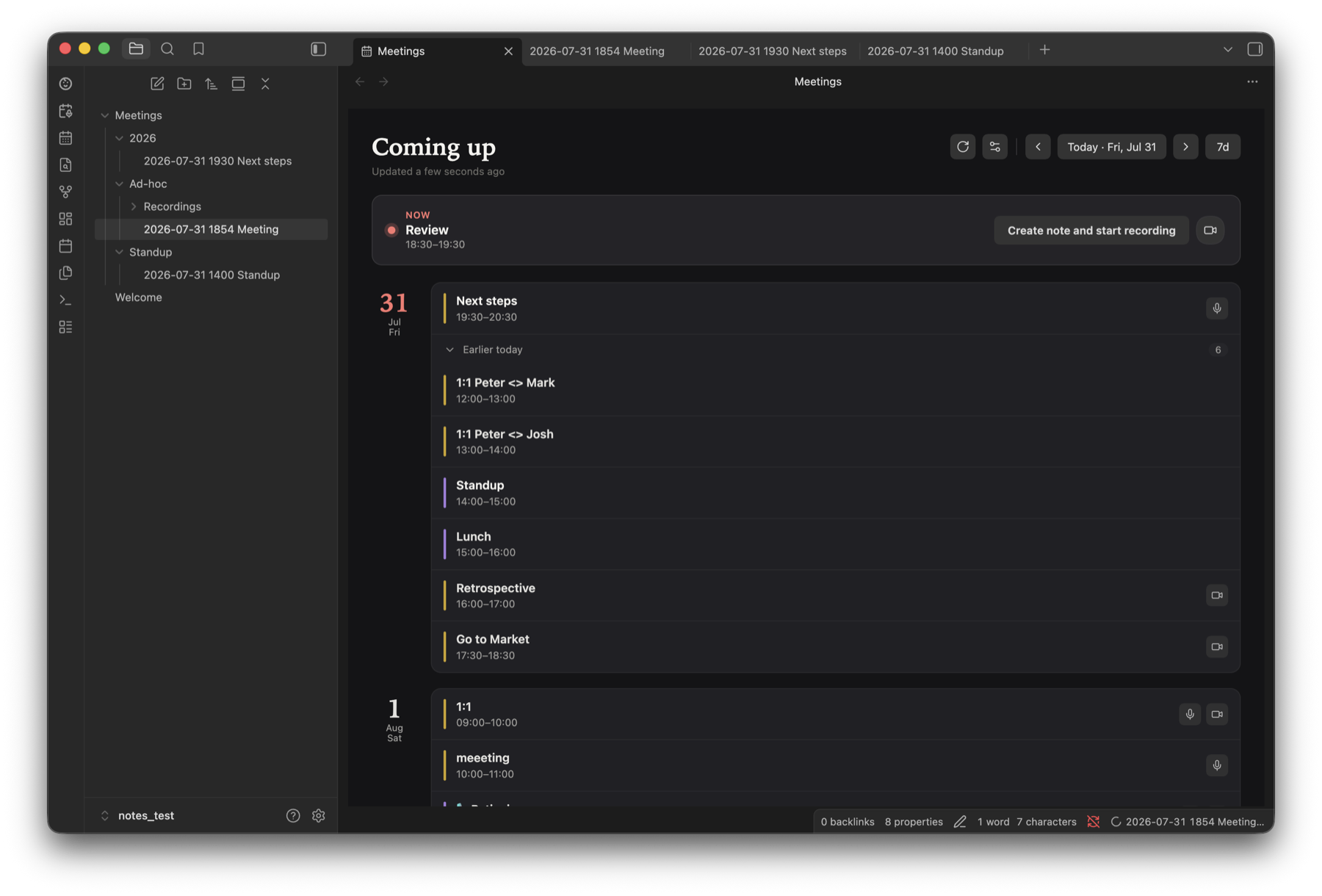
- Google Calendar sync and agenda sidebar
- Auto notes, transcript, and AI enrichment
- Local on-device Whisper (optional)
- Meetings dashboard and recording retention
More
- Setup — calendar, endpoint, transcription, enrichment, usage
- Development — build, release, debugging
- Organizing meeting notes
- Privacy policy and terms of service
Requirements
- macOS 13.3+ (Apple Silicon)
- Obsidian Desktop
- Google account (calendar)
- OpenAI-compatible endpoint (local or remote) when you use enrichment and/or remote transcription. Not needed for on-device Whisper with enrichment off.
Network use
Meeting Copilot talks to these remote services, only for the features you enable:
- Google Calendar API — reads your calendar (read-only) to build the agenda.
- Google Cloud Identity Groups API + People API — expands Google Group invitees into the individual people on the group, then resolves those people's display names from your Workspace directory — read-only, each independently toggleable under Settings → Meeting Copilot → General → Optional permissions (on by default); see Setup.
- OpenAI-compatible endpoint (your choice of provider, local or remote) — used for remote transcription and AI enrichment, only if you configure one. Not needed for on-device Whisper with enrichment off.
- AI command-line tool (optional) — if you pick Claude Code, Codex, OpenCode, or pi as the enrichment backend, the plugin runs that tool on your Mac, and the tool sends the note to its own provider.
- GitHub Releases — downloads the
system-recorderhelper, itswhisperruntime, and thefvad.wasmvoice-activity detector the first time each is needed (see Helper downloads). - Hugging Face — downloads the on-device Whisper model you pick (from
ggerganov/whisper.cpp), only when you use local transcription.
The plugin has no server of its own and collects no telemetry. See the privacy policy.
Helper downloads
Obsidian installs only main.js, manifest.json, and styles.css. Recording and on-device transcription need native macOS code, so the plugin downloads these files into its own plugin folder (.obsidian/plugins/meeting-copilot/) the first time they're needed:
| File | What it is | Downloaded from | When |
|---|---|---|---|
system-recorder | Swift helper that records system audio and the mic, lists microphones, and runs on-device transcription (source) | This repository's GitHub release for the installed plugin version | First recording, or refreshing the microphone list in settings |
whisper | whisper.cpp runtime library the helper links, saved as whisper.framework/Versions/Current/whisper | Same release | With the helper |
fvad.wasm | WebRTC voice-activity detector (@echogarden/fvad-wasm) | Same release | First transcription that separates your voice from others |
models/*.bin | On-device Whisper model | Hugging Face | When you press Download under Settings → Transcription, or on the first local transcription |
- Checksum-verified. Every download is checked against a SHA-256 checksum built into that plugin version, and discarded if it doesn't match. The recorder helper is re-checked before each recording, on-device transcription, or microphone refresh. The other files aren't re-hashed after download; they're downloaded again only if their size changes.
- Pinned to the plugin version. The plugin never fetches a "latest" build. The helper only changes when you update the plugin itself; models are downloaded once and reused.
- Built in the open. Release files are built from this repository by GitHub Actions and carry signed build provenance. Check one with
gh attestation verify system-recorder -R alvarolobato/obsidian-meeting-copilot. - Visible. A notice shows while the helper or runtime downloads, and model download progress shows in settings. The small voice-activity detector downloads without a notice.
File and system access
Meeting Copilot is desktop-only and uses Node.js APIs beyond Obsidian's vault API. It uses them only for the following.
Filesystem
- Plugin folder — stores the helper files and models listed above, plus
directory-cache.json: the Google Workspace names and group members already looked up, so they aren't requested again. It syncs to your other devices if you sync.obsidian/plugins. - System temp folder — short-lived working files while recording, transcribing, and running an AI command-line tool, removed afterwards.
- Your vault — recordings, transcripts, and meeting notes are saved in the vault folders you configure.
Processes
system-recorder— records audio, lists microphones, and runs on-device transcription.pgrep— checks whether a Zoom call is running (theCptHostprocess). Runs every 10 seconds by default (configurable) while meeting detection and Zoom detection are on (both on by default).osascript— checks Chrome, Brave, Edge, or Arc tabs for an active Google Meet call, only when Google Meet detection is on (off by default). macOS asks once for Automation permission.- Your AI command-line tool (
claude,codex,opencode, orpi) — only if you pick one as the enrichment backend: to enrich notes and to list its models. The plugin looks for it at the path you set, on yourPATH, in common install locations (Homebrew,/usr/local/bin, and version managers such as Volta, asdf, fnm, and nvm), and in npm's global folder (found withnpm config get prefix). open— opens the Notifications or Screen & System Audio Recording pane in macOS System Settings, when you use the button that offers to.
Local network listener
- Google sign-in — while you sign in, a temporary web server listens on
127.0.0.1(a random port, not reachable from other machines) to receive the callback from your browser. It closes as soon as sign-in finishes or is cancelled.
Obsidian and browser APIs
- Vault-wide file list — finds meeting notes for the agenda, dashboard, and notes-with-issues list, matches recordings to their notes, and finds old recordings for retention cleanup.
- Clipboard — writes a meeting link when you choose Copy meeting link. It never reads the clipboard.
- Local storage — Google OAuth tokens and any client secret are kept in Obsidian's per-vault local storage, so they're never written to the synced
data.json. All other settings use the normal plugin data file.
macOS permissions — macOS asks for these on behalf of Obsidian, because the helper runs as part of it. Look for Obsidian, not system-recorder, under System Settings → Privacy & Security:
- Microphone — records your side of the meeting.
- Screen & System Audio Recording (called Screen Recording on older macOS) — captures system audio.
- Automation — Google Meet detection only.
- Notifications — meeting prompts.
After granting Microphone or Screen Recording, quit and reopen Obsidian.
Attribution
Meeting Copilot is an integrated meeting workflow built from permissively licensed open-source parts. It vendors and adapts code from the projects below — you do not need to install them separately. Full license texts are in THIRD_PARTY_NOTICES.md.
| Component | Source | Author | License | What we use |
|---|---|---|---|---|
| Recorder & calendar | System Recording | Yuto Takagi | 0BSD | Dual-channel ScreenCaptureKit recorder (swift-helper/), Google Calendar integration, and parts of the core plugin scaffolding |
| Agenda sidebar | Meetings Plus | Jacob Holm | 0BSD | Meeting agenda view (day grouping, meeting rows, status header, date picker, and related UI/styles) |
| Remote transcription | AI Transcriber | Musashino Software | MIT | Transcription engine under src/transcribe/vendor/ (audio chunking, VAD, Whisper/GPT-4o clients, cleaners, transcript merge, dictionary correction). Driven headlessly by Meeting Copilot — no AI Transcriber plugin required |
Not from AI Transcriber: on-device Whisper transcription runs in Meeting Copilot's own system-recorder Swift helper (whisper.cpp over Metal), not the vendored engine above.
License
0BSD — see LICENSE and THIRD_PARTY_NOTICES.md.
For plugin developers
Search results and similarity scores are powered by semantic analysis of your plugin's README. If your plugin isn't appearing for searches you'd expect, try updating your README to clearly describe your plugin's purpose, features, and use cases.