Mengshi Cockpit
approvedby 孙鹏飞
猛士驾驶舱 — Calendar, Projects, Todos, Gantt, Feishu, Sessions integrated workbench - This plugin has not been manually reviewed by Obsidian staff.
Mengshi Cockpit
An all-in-one Obsidian workbench plugin — Calendar, Projects, Todos, Gantt, Feishu (Lark), and Claude Code Sessions in a single interactive dashboard.
A Chinese translation is available at README.zh-CN.md.



Features
| Tab | Name | What it does | Highlights |
|---|---|---|---|
| 📅 | Calendar | Monthly grid with daily summaries and status; click to jump to or create a daily note | Mon–Sat grid, one-click note creation, inline status editing |
| 📂 | Projects | Auto-scan project folders, two-dimensional categorization, card view | Auto-discovers projects, editable tags/categories, maintainable links |
| ✅ | Todos | Aggregates - [ ] tasks from multiple sources; checking a box writes back to the source file | Groups by project, collapses completed items, skips template noise |
| 📊 | Gantt | Gantt timeline, drag scheduling, multi-phase, milestones | Today line, phase bars, two-way README sync |
| 📡 | Feishu | Feishu Wiki / Drive browsing, project categorization, link checks, smart meeting notes | Deep scan, auto-categorization, access stats, file moves |
| 💬 | Sessions | Visualize Claude Code sessions, group by project, task workflow | Turn details, title editing, archiving, one-click resume |
🖊 Quick capture: a bottom FAB offers "Diary / Todo" quick entry (not a separate panel).
Demo
| Calendar | Gantt |
|---|---|
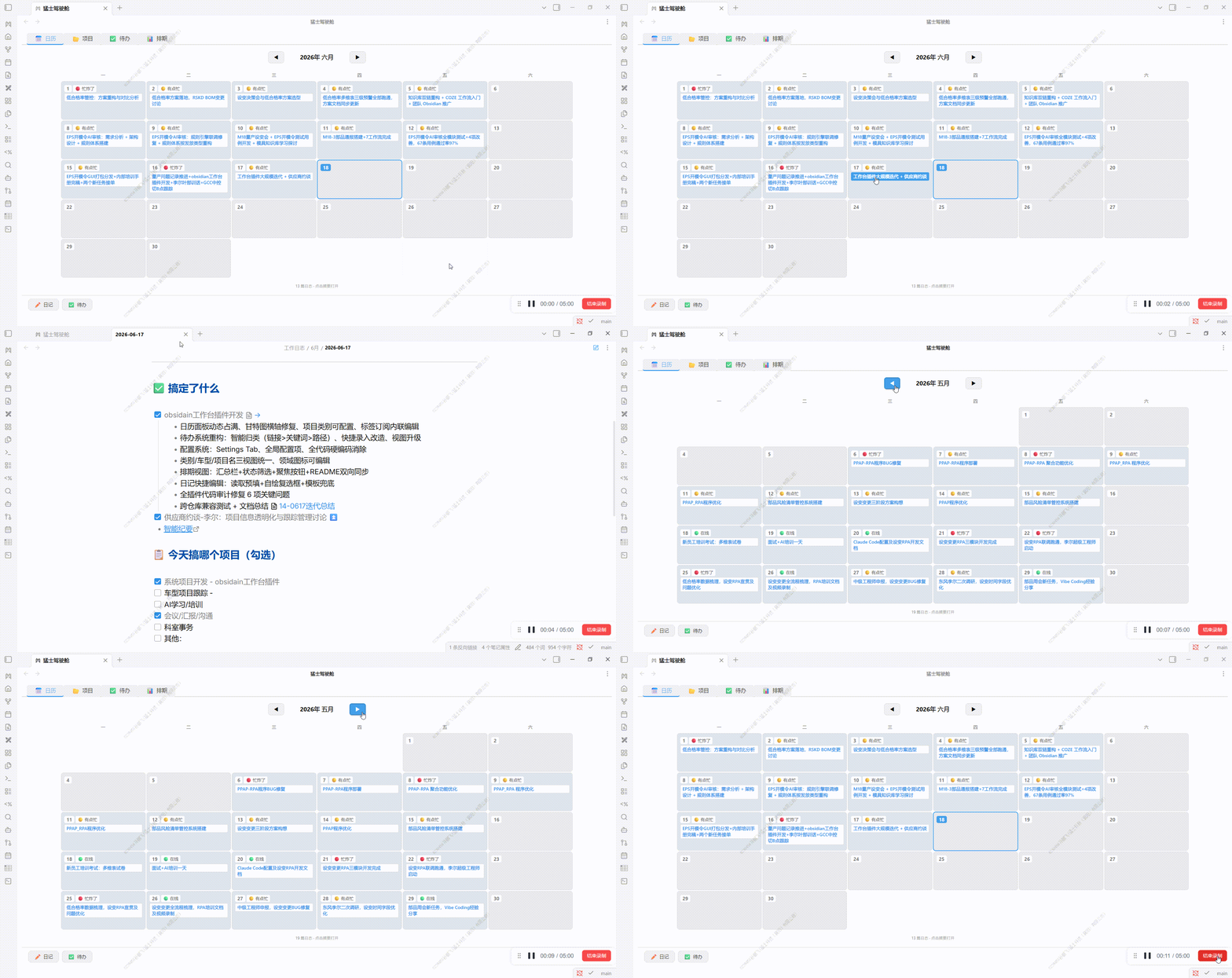 | 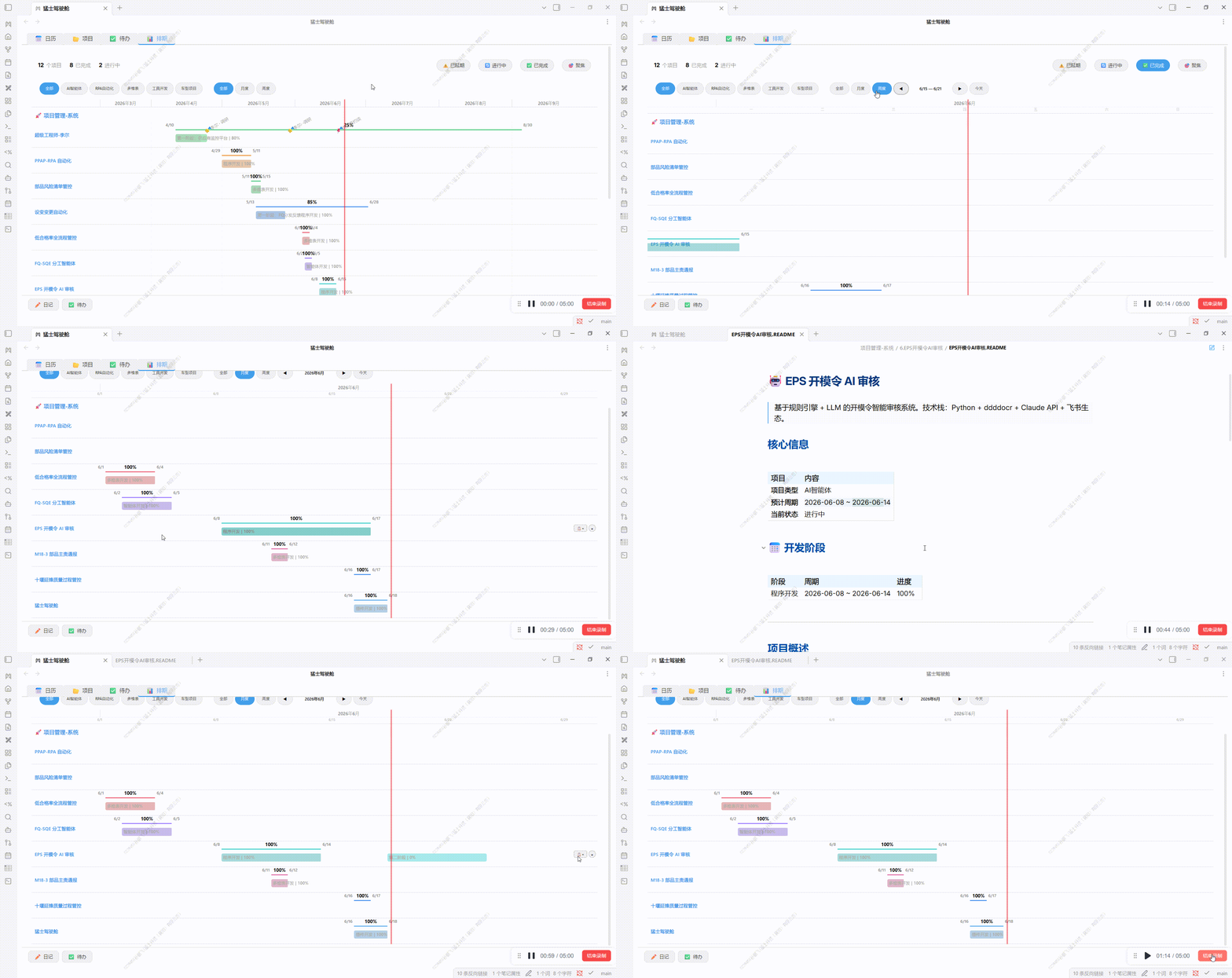 |
Installation demo: see
assets/demo/插件安装.gif.
Installation
From Obsidian Community Plugins (recommended)
- Open Obsidian → Settings → Community plugins → turn off Restricted mode
- Community plugins → Browse → search Mengshi Cockpit → Install and enable
- A shield-shaped icon appears in the ribbon; click it to open the workbench
Manual install (Release)
- Download the latest
main.js,manifest.json,styles.cssfrom Releases - Put them into
.obsidian/plugins/mengshi-workbench/in your vault - Settings → Community plugins → Enable
Build from source
git clone https://github.com/Spenf710/obsidian-mengshi-cockpit.git
cd obsidian-mengshi-cockpit
npm install
# Build directly into your vault's plugin folder (recommended):
OBSIDIAN_VAULT="C:/path/to/your/vault" npm run build
# Or build to ./dist and copy manually:
npm run build
Output directory priority: OBSIDIAN_VAULT env var → local .obsidian → ./dist.
Setup
The plugin works out of the box, but configure it under Settings → Mengshi Cockpit for the best experience:
| Setting | Description | Default |
|---|---|---|
| Work log folder | Folder for daily notes | Empty → "工作日志" |
| Diary template | Template used for new notes | templates/工作日志.md |
| Project roots | Project-type folders (multiple allowed) | Empty → add manually |
| Default categories / tags | Vocabulary for project classification | 通用 / 其他 |
| Tabs | Toggle the 6 tabs independently | All on |
Feishu (optional)
The Feishu panel relies on the external lark-cli tool (install and log in yourself):
npm install -g @larksuite/cli
lark-cli auth login
The plugin auto-detects lark-cli (with a npx fallback); a guide is shown when it is missing.
Sessions (optional)
The Sessions panel reads local Claude Code session records (~/.claude/projects/) — no setup needed. "Loop / Open in Claude" requires the Claude Code CLI; buttons show a hint when it is absent.
Privacy & Data
- Everything is processed locally: it reads your vault's
.mdfiles, optionally reads~/.claude/projectssession JSONL, and calls Feishu cloud APIs (vialark-cliusing your own credentials) only when you open the Feishu panel. - Nothing is uploaded to third parties: Feishu calls only happen when you perform a panel action (browse / search / stats).
- Settings (including personal overrides) are stored in
.obsidian/plugins/mengshi-workbench/data.json.
Development
npm run dev    # watch mode + static file sync
npm run build  # production build
- Source:
src/main.ts(plugin shell) +src/data/*(data layer) +src/views/*(view layer) - Build: esbuild bundle →
main.js; standalonestyles.css;manifest.jsonversion aligned with the release tag
Platform
| Item | Details |
|---|---|
| Minimum version | Obsidian ≥ 1.7.2 |
| Desktop | ✅ (requires Node runtime; Loop / Sessions / Feishu CLI / Gantt are desktop-first) |
| Mobile | Not published (isDesktopOnly: true) |
Credits & License
- The logo is an original military-style creation with no third-party copyright dependencies.
- Released under the MIT License.
For plugin developers
Search results and similarity scores are powered by semantic analysis of your plugin's README. If your plugin isn't appearing for searches you'd expect, try updating your README to clearly describe your plugin's purpose, features, and use cases.