by kieran-FENG
Write Mermaid diagrams without the syntax. Pick a type, fill in plain lines, insert. 22 types, live preview.

Merchart
An Obsidian plugin that makes Mermaid diagrams practical: write plain lines, watch them render, insert in one click.
- Write Mermaid without the syntax. One line per node, indentation for nesting, live preview while you type. 22 diagram types, all of them.
- Chinese input gets extra handling. If you write Chinese, identifiers are generated for you, full-width punctuation is normalized, and your text stays as labels. The parser errors Chinese usually causes cannot happen.
- Ready for Obsidian 1.15 and Pele. Diagrams render through Pele, Obsidian's new renderer, and the preview follows automatically. No setting to change.
中文说明见 README.zh.md
Features
- 22 diagram types, covering everything Obsidian's renderer supports
- A full template for every type: shapes, groups, styling, comments and relation kinds are all spelled out, so adding something means editing a line instead of re-reading the syntax docs
- Built for Chinese input: identifiers are generated for you, full-width punctuation is normalized, labels keep your text
- Live preview while you type
- Seven commands: one general inserter plus one per common type, all bindable to hotkeys
- Tab indents, Shift+Tab outdents, selection-aware block indent
- Resizable dialog with zoomable preview (Ctrl/Cmd + wheel, double-click to reset), remembered as a share of the window so it survives a monitor change
- Bilingual UI, follows Obsidian's language setting
- Reverse editing: put the cursor inside an existing diagram and Merchart turns it back into the structured input (flowchart, sequence, pie, timeline, mindmap)
- Edit from the block itself: put the cursor inside a diagram and a pencil button appears on the fence line. One click, no command to remember.
- Takes your selection: select text in the note, open the dialog, it lands in the input box
- Fills an existing block: with the cursor inside an open
```mermaidfence, it inserts only the body
Screenshots
The interface follows Obsidian's language setting. Same layout either way.
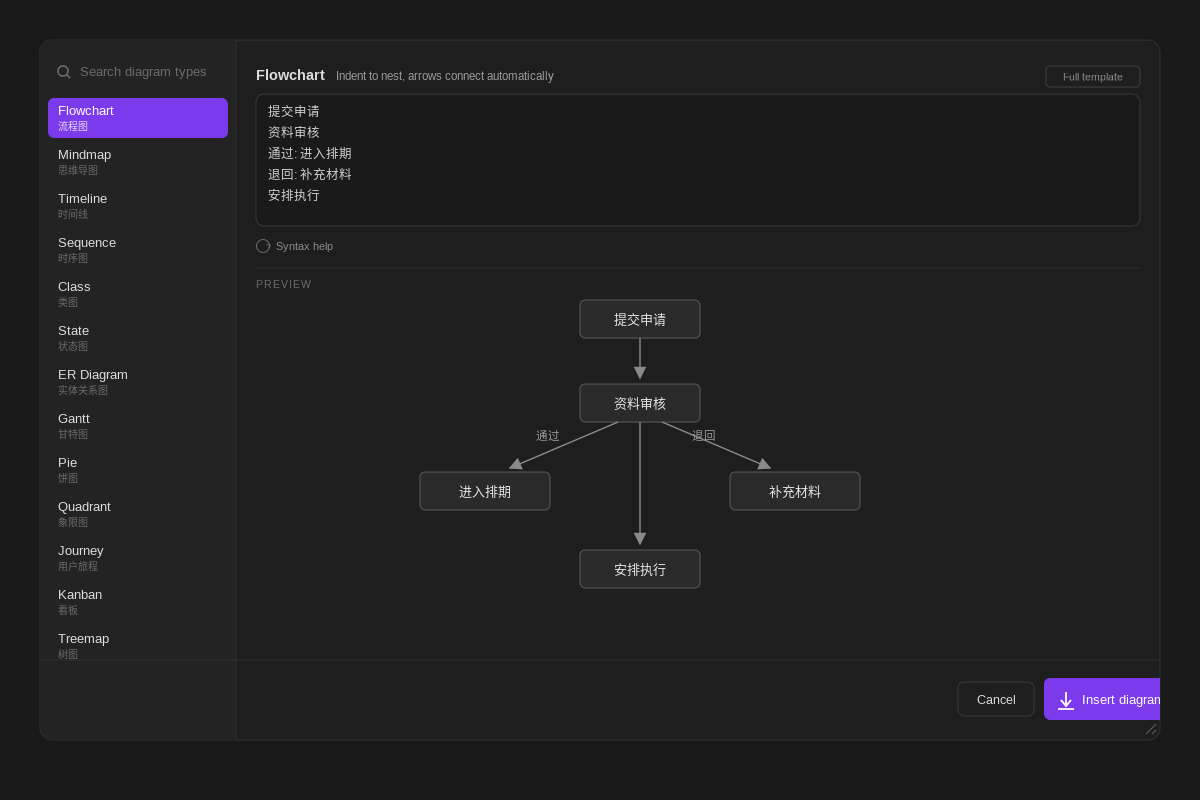
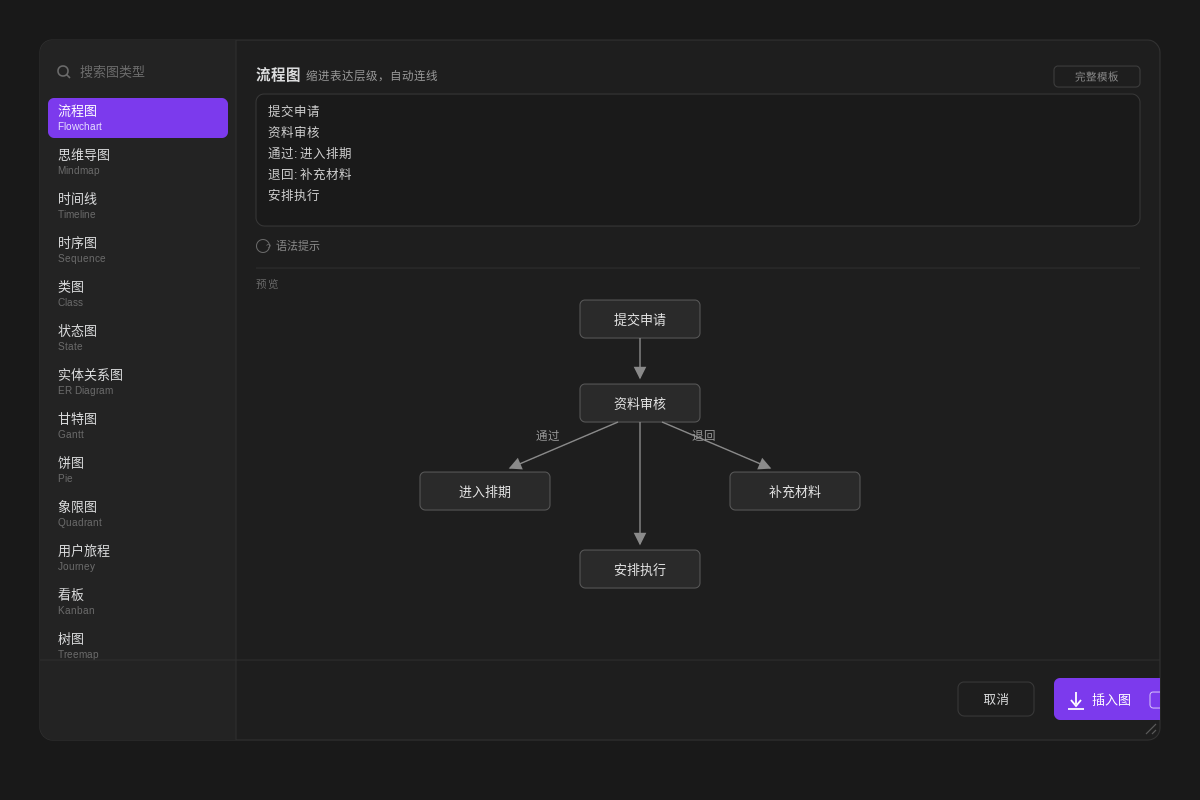
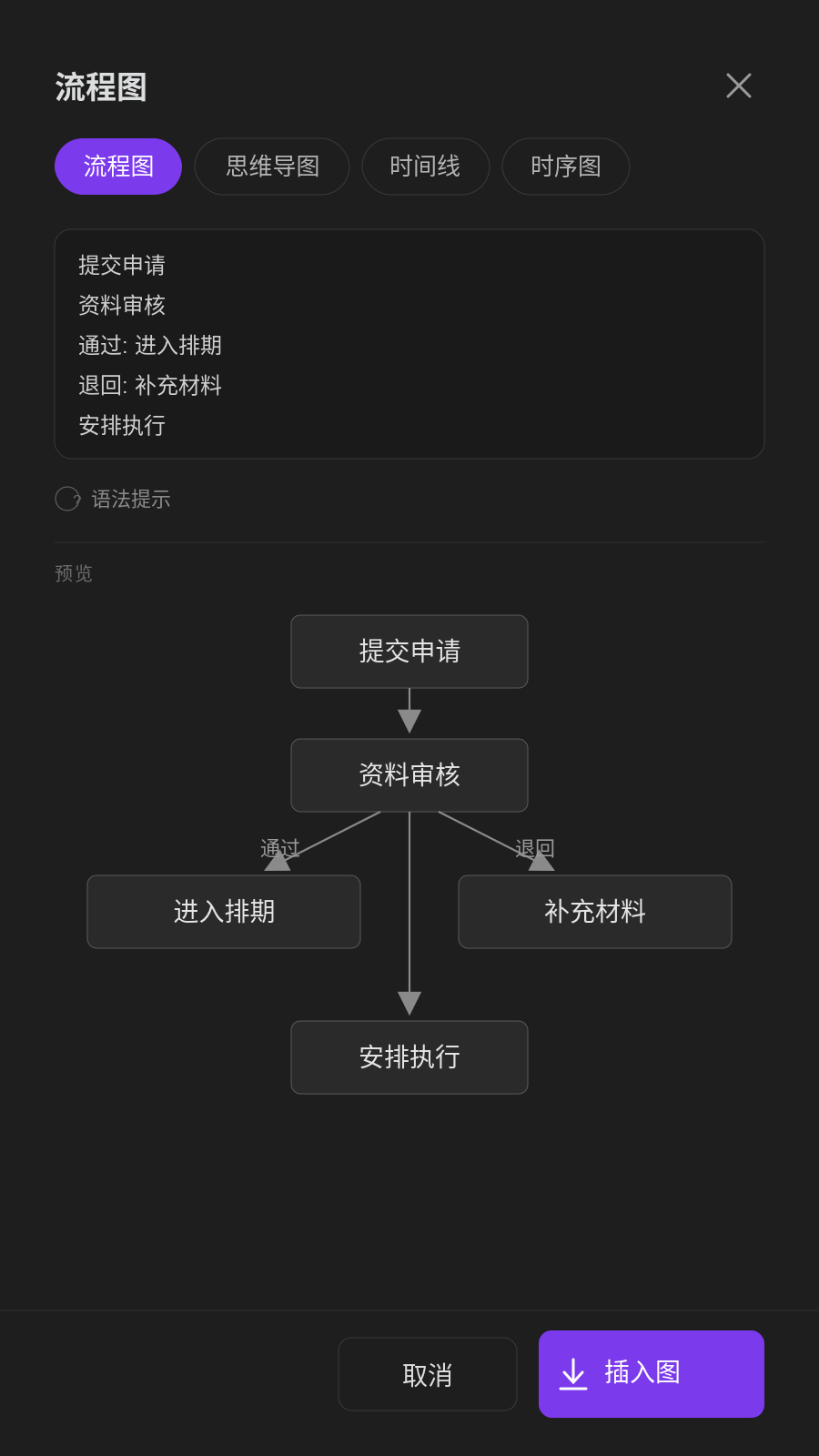
On a phone the dialog goes full screen and the type list becomes a horizontal strip:
Why it is Chinese-friendly
Mermaid's parser requires ASCII identifiers. Three failures hit Chinese users constantly:
| What you type | What Mermaid says |
|---|---|
branch 内容线 in a Git graph | Lexical error: Unrecognized text |
医生,门诊,60 in a Sankey diagram | Expecting 'COMMA', got 'NON_ESCAPED_TEXT' |
text: 所有发布内容需经审核 in a requirement | Lexical error |
Merchart handles all three before the parser ever sees the text:
- Identifiers become ASCII. Nodes, branches, entities and axes get
n1,p1,t1style ids; your Chinese goes into the label. - Full-width punctuation is folded.
,:;()【】|and friends are converted first. - Quotes and brackets inside labels are escaped, so a label containing
"or[cannot truncate the statement.
One exception worth stating plainly: Sankey node names must be ASCII. Obsidian 1.15's renderer only accepts printable ASCII inside a Sankey cell, so a Chinese node name fails to parse even when quoted. When a name is not ASCII the plugin draws a flowchart version instead: same flows, values on the arrows, arrow widths scaled by volume.
You write what you mean; the plugin produces what the parser accepts.
Install
Not in the community store yet. Manual install:
- Download
main.js,manifest.jsonandstyles.cssfrom the latest release. - Drop them into
<vault>/.obsidian/plugins/merchart/. - Enable Merchart under Settings → Community plugins.
Usage
Open the inserter from the command palette (Insert diagram), the editor right-click menu, or one of the per-type commands. Pick a type on the left, type in the middle, watch it render underneath.
To revise an existing diagram you do not need a command: put the cursor inside the mermaid block and a pencil button appears on the fence line. Click it to edit. The button disappears when the cursor leaves the block.
| Key | Action |
|---|---|
Ctrl / Cmd + Enter | Insert |
Tab | Indent, or indent every selected line |
Shift + Tab | Outdent |
| Drag bottom-right corner | Resize the dialog |
Diagram types
Sixteen take structured input; six are editable templates because their syntax is declarative. The sixteen structured ones get a Full template button next to the title, which swaps in the complete Mermaid code and back again.
| Type | Input format |
|---|---|
| Flowchart | indented lines, name{} for decisions, label: name for edge labels |
| Mindmap | indented lines, first line is the root |
| Timeline | time : event |
| Sequence | A > B : message |
| Class | Name: member, member, then A > B : label |
| State | A > B : trigger, [*] for start and end |
| ER diagram | Entity: field, field, then A > B : label |
| Gantt | task | start | duration, after some task works |
| Pie | item : value |
| Quadrant | x: low --> high, y: low --> high, then Name: 0.7, 0.3 |
| Journey | section: name, then action: score |
| Kanban | columns at the margin, cards indented |
| Treemap | root first, then name: value |
| Radar | axes: a, b, c, then Serie: 1, 2, 3 |
| Sankey | source > target : value; ASCII names give a Sankey, Chinese names fall back to a flowchart |
| XY chart | x: ... then bar: 2026, 40, 85 / line: 2025, 30, 70; a single series uses y: ... with type: bar or line |
| Git graph, C4, Requirement, Block, Packet, Architecture | editable templates |
Settings
| Setting | Default | What it does |
|---|---|---|
| Default diagram on open | Remember last | Follow the last type you used, or pin one |
| Indent width | 2 spaces | Spaces inserted by Tab |
| Close after inserting | On | Turn off to keep drawing in the same dialog |
| Add blank lines around the block | On | Keeps the fence from sticking to surrounding text |
| Live preview | On | Turn off for manual refresh on heavy diagrams |
Compatibility
Obsidian 1.4 or newer. On 1.15 and later Mermaid blocks render through Pele, Obsidian's own renderer, and the preview follows automatically. The plugin does not depend on which renderer is in use.
Works on desktop and mobile. On narrow screens the dialog goes full screen, the type list turns into a horizontal strip at the top, and the drag handle is hidden since there is no pointer.
Known limits
- Six types only offer code templates, with no structured form (the other sixteen can switch over).
- Sankey node names are ASCII only, a renderer limit; Chinese names fall back to a flowchart with values on the arrows, which is not a real Sankey.
- XY charts have no data labels; add a table when the exact numbers matter.
- Reverse editing covers five types, and only when the code round-trips exactly; anything with subgraphs, styling or comments opens as code instead of being quietly simplified.
Development
npm install
npm run build          # typecheck + bundle to main.js
npm run lint           # run the obsidianmd rules the community review uses
npm test               # 22 diagram types, 22 edge cases and 22 full templates, rendered through Pele
Every generated diagram is rendered through pele during tests, so a syntax regression fails the build instead of showing up as a broken diagram in your vault.
License
MIT
For plugin developers
Search results and similarity scores are powered by semantic analysis of your plugin's README. If your plugin isn't appearing for searches you'd expect, try updating your README to clearly describe your plugin's purpose, features, and use cases.