Draw a Mermaid
approvedby yaye.work
Build mermaid flowcharts visually. Enuf said. - This plugin has not been manually reviewed by Obsidian staff.
Draw a Mermaid
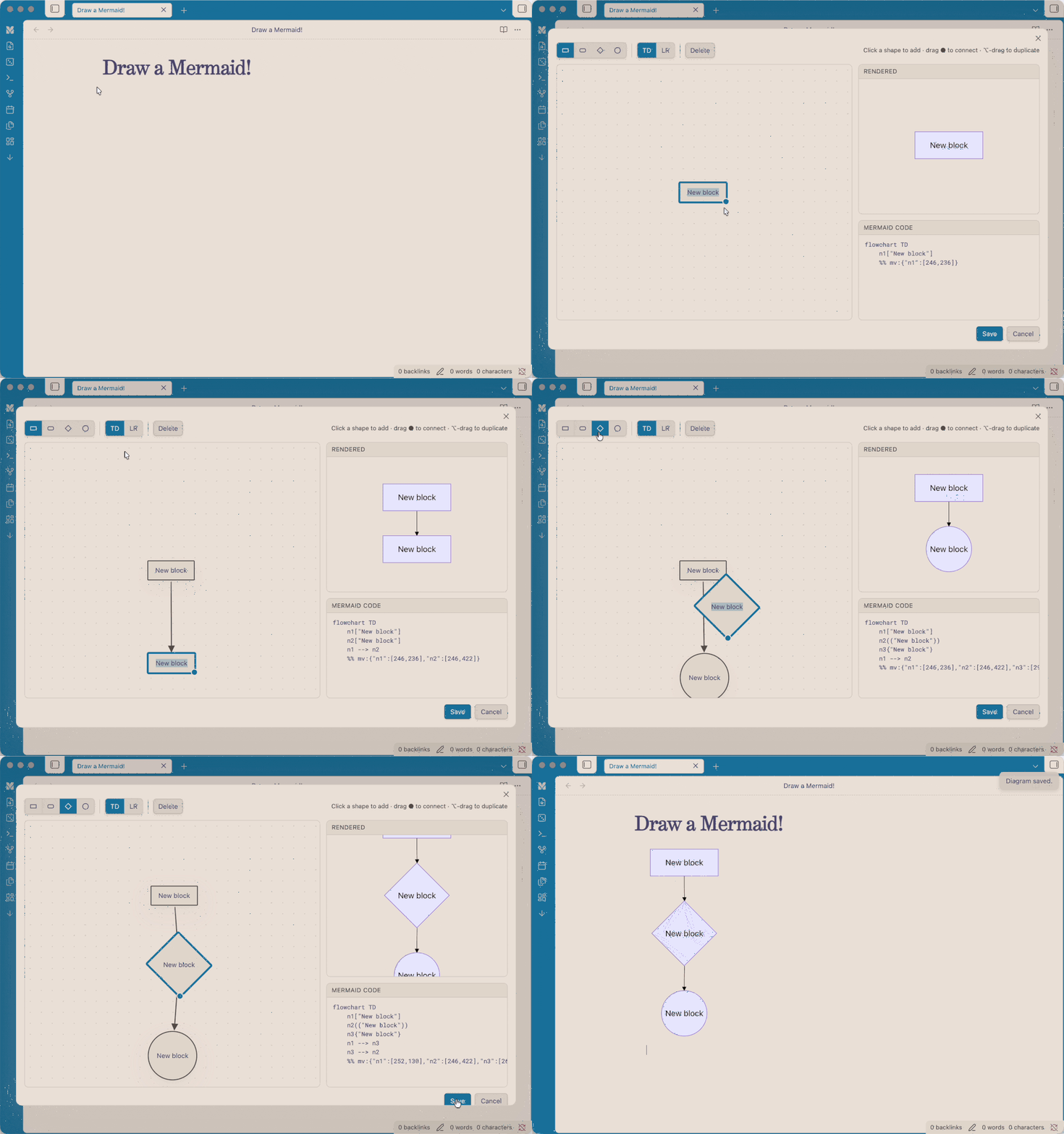
Build mermaid flowcharts visually inside Obsidian: drag blocks and connectors on a canvas, rename them inline, and let the plugin generate the mermaid code for you. A live preview renders as you build.
Features
- Visual-first canvas: the canvas is the source of truth; mermaid code is generated from it.
- Add blocks by clicking a shape (rectangle, rounded, diamond, circle).
- Connect blocks by dragging the ● handle onto another block. Drop on empty space to spawn a new connected block; drop onto an existing arrow to splice a block into that connection.
- Rename a block by double-clicking it, or a connector by double-clicking the arrow.
- Multi-select with a rubber-band marquee (or Shift-click) for bulk move, reshape, duplicate, and delete.
- ⌥/Alt-drag to duplicate a block or a whole selection.
- Live output: rendered diagram and generated mermaid code update in real time.
- Layout persistence: your block positions are stored in a
%% mv:comment in the block, so reopening restores the canvas.
Usage
- Click the ribbon icon ("Draw a Mermaid") to start a blank diagram; on save it's inserted into the active note (or a new note).
- Hover any rendered
mermaidblock in a note and click the pencil button to edit it visually. - Command palette: "Edit mermaid diagram at cursor" and "Insert mermaid diagram (visual editor)".
Direction TD = top-down, LR = left-to-right; this only affects how the rendered diagram is auto-laid-out.
Installation
From Community Plugins (once approved)
Settings → Community plugins → Browse → search "Draw a Mermaid".
Manual
Copy main.js, manifest.json, and styles.css into
<vault>/.obsidian/plugins/mermaid-visual/, then enable it in Settings → Community plugins.
Development
npm install
npm run dev    # watch build
npm run build  # production build (type-check + bundle)
About
I'm a designer main, so when I realised I have write code for a visual chart, I almost deleted Obsidian(/s). Alas, I got claude's help to build this visual mermaid tool, hope it can help people like me who are looking for a tool like this.
License
MIT © yaye.work
For plugin developers
Search results and similarity scores are powered by semantic analysis of your plugin's README. If your plugin isn't appearing for searches you'd expect, try updating your README to clearly describe your plugin's purpose, features, and use cases.