Molren
approvedby Josh
Render 2D chemical structures from SMILES, molfile, SDF, or reaction(rxn) in your notes, powered by RDKit.js. - This plugin has not been manually reviewed by Obsidian staff.
Molren


Molren renders 2D chemical structures from SMILES in your Obsidian notes. Write a SMILES string (or a molfile, SDF, or reaction) in a fenced code block and Molren draws the structure inline. It uses RDKit.js, which runs locally, so nothing is uploaded.
Website: molren.amberlogica.com. Support: Buy me a coffee.
The structures stay as plain text, so they stay searchable and work with version control. The image is generated on the fly, offline.
Install
In Obsidian: Settings → Community plugins → Browse, search Molren, then Install and Enable.
Other ways to install
- BRAT: to test the latest pre-release, add
quiachonj/molrenin the BRAT plugin. - Manual: download
main.js,manifest.json, andstyles.cssfrom a release into<your-vault>/.obsidian/plugins/molren/, then reload Obsidian. - From source: see Development.
[!IMPORTANT] Molren is desktop-only and requires Obsidian 1.4.0 or later.
Usage
Molren reads fenced code blocks and draws what's inside. The language tag on the fence tells Molren what kind of input to expect.
-
In any note, add a code block tagged
smileswith one structure:```smiles CCO ``` -
Switch to Reading or Live Preview. Molren draws ethanol inline.
-
Edit the SMILES and the image updates.
Several molecules (a grid)
Put one SMILES per line to get a responsive grid, and add a caption after the first space:
```smiles
CCO Ethanol
CC(=O)O Acetic acid
c1ccccc1 Benzene
```
Lines starting with # are treated as comments, so you can annotate a block:
```smiles
# Common solvents
CCO Ethanol
CC(C)=O Acetone
```
Stereochemistry
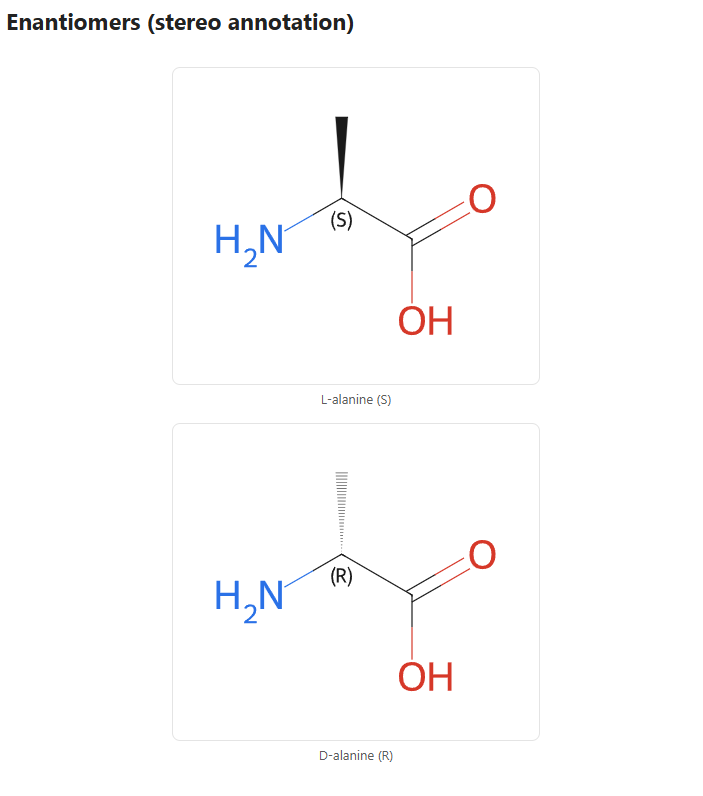
Stereo bonds and R/S and E/Z labels are drawn automatically. You can turn the labels off in Settings.
```smiles
C[C@H](N)C(=O)O L-alanine
```
Molfiles and SDF
Use a mol block for a single molfile. Molren keeps its authored coordinates. Use an sdf block for a multi-record SDF, where each record becomes a card and its title line becomes the caption.
```mol
  (paste the full molblock here, ending in "M  END")
```

```sdf
  (paste SDF records separated by $$$$)
```
Reactions
Use a rxn block for reaction SMILES (reactants>>products, or reactants>agents>products). Reactions render as wide, full-width rows.
```rxn
CC(=O)O>[H+]>CC(=O)OCC Fischer esterification
```
Not sure which fence? Use chem
A chem block auto-detects whether its contents are SMILES, a molfile, SDF, or a reaction. It's useful when pasting mixed content.
Fences at a glance
| Fence | Input | Output |
|---|---|---|
smiles | one or more SMILES (one per line) | a single card or a grid |
mol | a single molfile / molblock | one card, coordinates kept |
sdf | an SDF file (records split by $$$$) | a grid, one card per record |
rxn | reaction SMILES (with >>) | full-width reaction rows |
chem | any of the above, auto-detected | the right result for the input |
[!NOTE] In
smilesandrxnblocks, text after the first space becomes a caption,#lines are comments, and a trailing CXSMILES|...|extension is kept as part of the structure. If a line can't be read, that block shows a small inline error (for example⚠ Molren: invalid SMILES). One bad line won't stop the others.
New to SMILES? Copy the "Canonical SMILES" from a compound's PubChem or Wikipedia page, or draw a structure in a free editor like Ketcher and export SMILES.
Settings
Settings → Community plugins → Molren:
| Setting | What it does | Default |
|---|---|---|
| Image width | Width each structure is drawn at (also the grid column width) | 350 |
| Image height | Height each structure is drawn at | 300 |
| Stereo annotations | Show or hide R/S and E/Z labels | On |
Features
- Multiple input formats: SMILES, molfile/molblock, SDF, and reactions, plus an auto-detecting
chemfence. - Grids with captions: one structure per line, laid out responsively.
- Stereochemistry: R/S and E/Z annotations, toggleable.
- Theme-aware: structures recolor for light and dark themes live, with no re-render.
- CoordGen layouts with tuned draw options.
- Local and offline: RDKit runs in WebAssembly, so nothing leaves your vault.
- Inline errors instead of blank boxes, plus cached rendering.
Architecture
fence (smiles│mol│sdf│rxn│chem)
      │
      ▼
 parse.ts  →  detect format, split into structure specs (+ captions)
      │
      ▼
  svg.ts   →  RDKit → SVG (molecules + reactions), theme recolor
      │
      ▼
renderer.ts →  layout (single│grid│reaction stack), cache, mount
| File | Responsibility |
|---|---|
src/main.ts | Plugin entry. Registers the smiles/mol/sdf/rxn/chem fences. |
src/parse.ts | Format detection and parsing block text into structure specs. |
src/svg.ts | RDKit to SVG conversion (molecules and reactions) and theming. |
src/renderer.ts | Obsidian/DOM bridge: layout, caching, and mounting. |
src/rdkit.ts | Lazy, one-time RDKit wasm init from the inlined (base64) wasm bytes. |
src/settings.ts | Settings tab (dimensions, stereo annotations). |
Development
npm install      # installs deps and pulls in the RDKit wasm
npm run dev      # esbuild watch → main.js (wasm inlined)
npm test         # vitest
npm run lint     # eslint (incl. Obsidian plugin rules)
npm run format   # prettier --write
npm run build    # type-check + production bundle
npm run check    # format:check + lint + test + build (what CI runs)
To develop against a real vault, symlink molren/ into a test vault's
.obsidian/plugins/, then reload Obsidian (Ctrl+R) after each build.
Implementation notes
[!IMPORTANT] Molren is desktop-only (
isDesktopOnly: true) and targetsminAppVersion1.4.0, so it uses the classic settings-tab API rather than the declarative one from 1.13.
- wasm delivery. The RDKit
.wasm(~7 MB) is inlined intomain.jsas base64 (esbuildbase64loader), decoded withatobat load, and passed toinitRDKitModule({ wasmBinary }). This is required because community-store and BRAT installs only downloadmain.js/manifest.json/styles.css. Extra release assets aren't fetched, so the wasm can't ship as a separate file. - Coordinates. SMILES carry none, so Molren generates a CoordGen 2D layout. Molfiles and SDF bring their own, which are preserved. The choice is made per structure via RDKit's
has_coords(), not by fence. - Theming. RDKit bakes fixed colors into the SVG. Molren rewrites any dark near-grayscale "ink" (bonds, carbons, dummy atoms drawn as
#191919, annotations) plus O/N as CSS variables, so one cached SVG adapts to light and dark live. - SVG insertion. Parsed via
DOMParser+importNode(notinnerHTML) per Obsidian's guidelines. - RDKit types. The shipped
@rdkit/rdkittypes omit the reaction API and the CJS default export, so both are declared locally insrc/rdkit.ts.
Roadmap
- CoordGen depictions with tuned draw options
- Multiple structures per block (grid)
- molfile / SDF input
- Reaction rendering
- Theme-aware (dark mode) coloring
- Interactive structure editor (evaluating Ketcher vs Kekule.js)
- Optional 3D view (Mol* / 3Dmol.js) for macromolecules
Support
License
MIT. RDKit.js is distributed under the BSD-3-Clause license.
For plugin developers
Search results and similarity scores are powered by semantic analysis of your plugin's README. If your plugin isn't appearing for searches you'd expect, try updating your README to clearly describe your plugin's purpose, features, and use cases.