Mols2Bases
unlistedby Anton Siomchen
Molecule visualization for Bases — render SMILES/MOL structures in a grid view and import SDF/CSV files.
Mols2Bases
Molecule visualization for Obsidian Bases — render SMILES/MOL structures in a grid view, search by text or SMARTS substructure, and import SDF/CSV files.
Requires Obsidian 1.10.0+.
Features
- Molecule Grid View — Custom Bases view rendering molecular structures as SVG cards via RDKit.js
- Text & SMARTS Search — Filter molecules by name/properties or by substructure pattern with match highlighting
- SDF Import — Parse SDF files into one-note-per-molecule with YAML frontmatter
- CSV Import — Parse CSV files (with a
smilescolumn) into notes with frontmatter - Rendering Options — Configurable bond width, transparent background, comic mode, hydrogen removal, coordinate handling
- Lazy Rendering — IntersectionObserver-based deferred rendering for large datasets
See docs/features.md for the full list.
Usage
1. Import your data
Open the command palette (Ctrl/Cmd + P) and run one of the import commands:
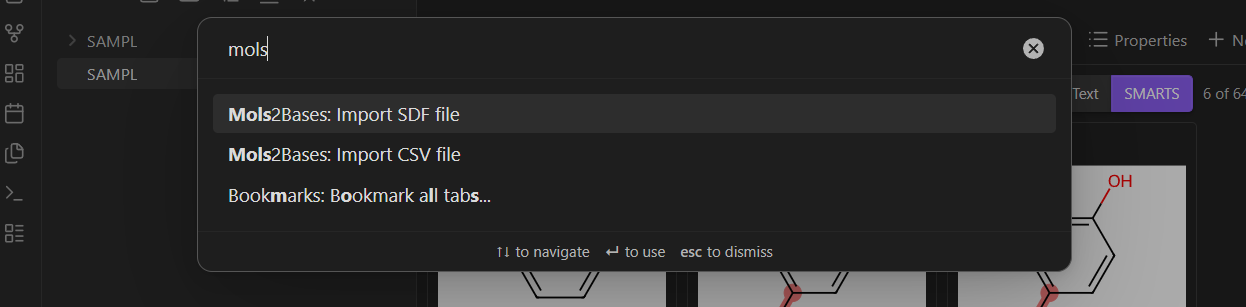
- Mols2Bases: Import SDF file — each molecule becomes a note with SMILES (converted via RDKit), MOL block (optional), and all SDF properties stored as YAML frontmatter.
- Mols2Bases: Import CSV file — each row becomes a note. The plugin auto-detects the
smilescolumn (case-insensitive) and adds all other columns as frontmatter properties.
Both commands create a folder of notes and a .base file that ties them together.
Note: The plugin works best with files under ~5,000 compounds. Larger datasets may degrade Obsidian's performance — test with your setup before importing very large files.
2. Browse the molecule grid
Open the generated .base file. Switch the view layout to Molecules — you'll see a grid of SVG-rendered structure cards with labels underneath.
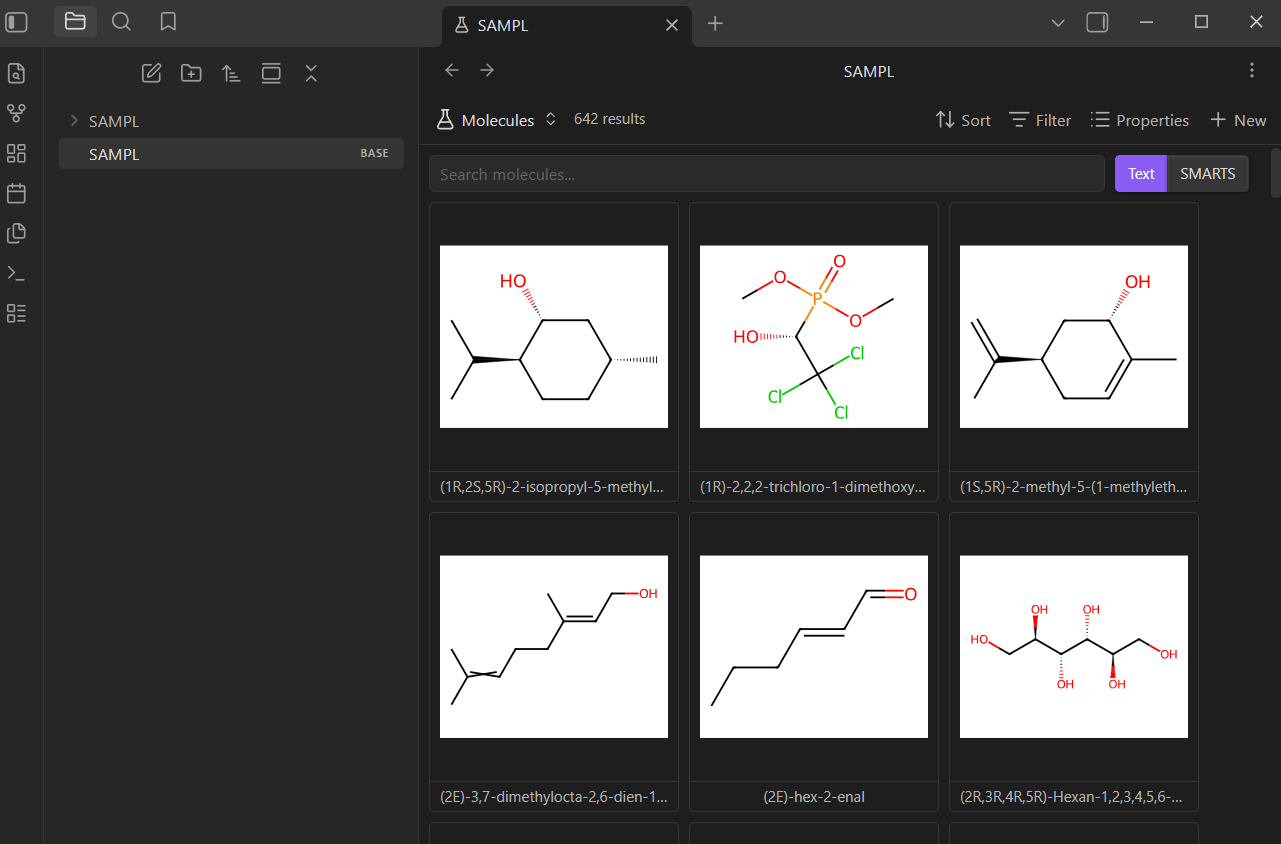
Click any card to open the corresponding note. Hover to see a larger preview with additional properties.
3. Search
Use the search bar at the top of the grid:
- Text mode — case-insensitive filter across file names and all frontmatter properties.
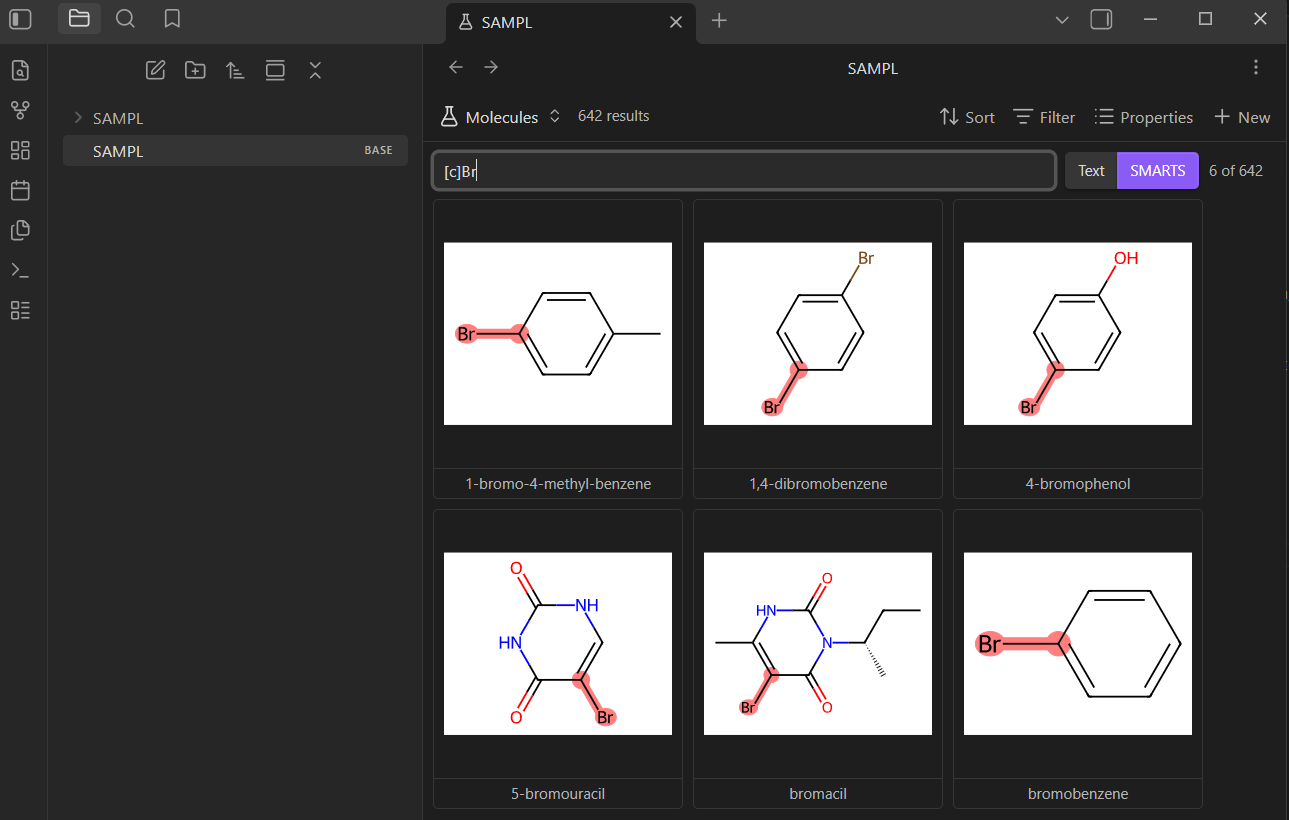
- SMARTS mode — toggle to SMARTS to filter by substructure pattern. Matching atoms and bonds are highlighted directly in the SVGs. A counter shows how many molecules match (e.g. "6 of 642").
4. Configure the view
Click the view options button to adjust per-view settings:
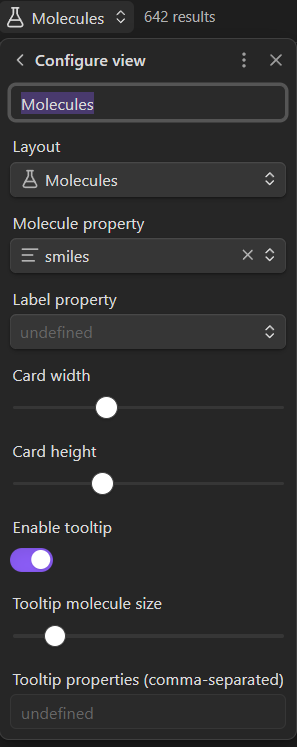
- Molecule property — which frontmatter field to render (
smilesby default). Change this if your CSV uses a different column name for molecular structures. - Label property — which field to display as the card label.
- Card width / height — adjust card size with sliders.
- Tooltip — toggle hover previews and configure which properties to show.
5. Plugin settings
Global settings are available under Settings > Mols2Bases:
| Setting | Default | Description |
|---|---|---|
| Remove hydrogens | off | Strip H atoms before rendering |
| Use original coordinates | on | Use input coords; off regenerates 2D layouts |
| Bond line width | 1.0 | Thickness of bonds in depictions |
| Transparent background | off | Remove white background (better for dark themes) |
| Comic mode | off | Hand-drawn style rendering |
| Lazy render | on | Only render molecules when scrolled into view |
| Highlight all SMARTS matches | off | Highlight every match, not just the first |
| Align on SMARTS search | off | Align molecules to matched substructure |
| Search delay | 300ms | Debounce delay for search input |
| Store MOL block | on | Include full MOL block in frontmatter on SDF import |
Installation
Note: Mols2Bases is currently under review for the Obsidian Community Plugins directory. In the meantime, install it manually using the steps below.
Manual install from release
- Go to the latest release and download
main.js,manifest.json, andstyles.css. - In your vault, create the folder
.obsidian/plugins/mols2bases/if it doesn't exist. - Copy the three downloaded files into that folder.
- Open Obsidian, go to Settings → Community plugins, and enable Mols2Bases.
Alternatively, you can use the BRAT plugin to install directly from this repository and receive automatic updates.
RDKit WASM
The plugin depends on RDKit.js for molecule rendering. On first use, it automatically downloads RDKit_minimal.js and RDKit_minimal.wasm (~7MB total) from the unpkg CDN and caches them in the plugin directory. Subsequent loads use the cached files with no network required.
Building from Source
npm install
npm run build   # production build
npm run dev     # development build with sourcemaps
Acknowledgments
Inspired by mols2grid by Cédric Bouysset — an interactive molecule viewer for Jupyter notebooks. The grid-based molecule browsing concept, feature ideas like SMARTS filtering with match highlighting, and several planned features in this plugin were directly influenced by mols2grid.
Molecule rendering is powered by RDKit.js.
For plugin developers
Search results and similarity scores are powered by semantic analysis of your plugin's README. If your plugin isn't appearing for searches you'd expect, try updating your README to clearly describe your plugin's purpose, features, and use cases.