MTG Deck
approvedby Samir Boulema
Display your MTG decks and card lists in your notes. - This plugin has not been manually reviewed by Obsidian staff.
MTG Deck
An Obsidian plugin for Magic: The Gathering players. Paste a decklist into a code block and get a richly formatted, interactive deck view — with card previews, mana costs, prices, type grouping, and more.
✨ Features
- Instant rendering — card names appear immediately, card data loads in the background
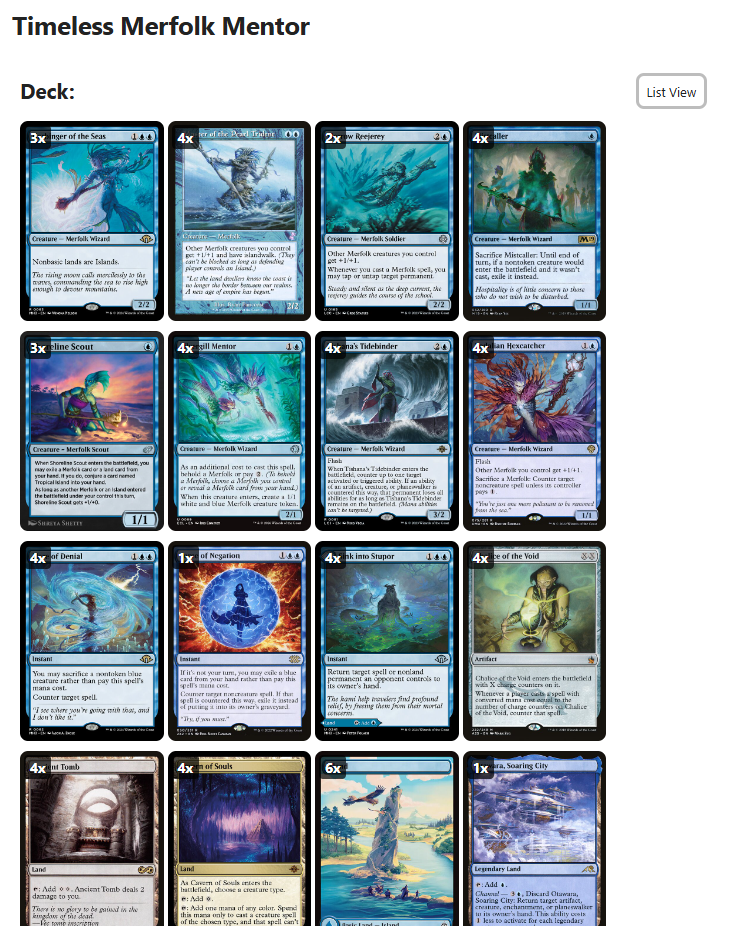
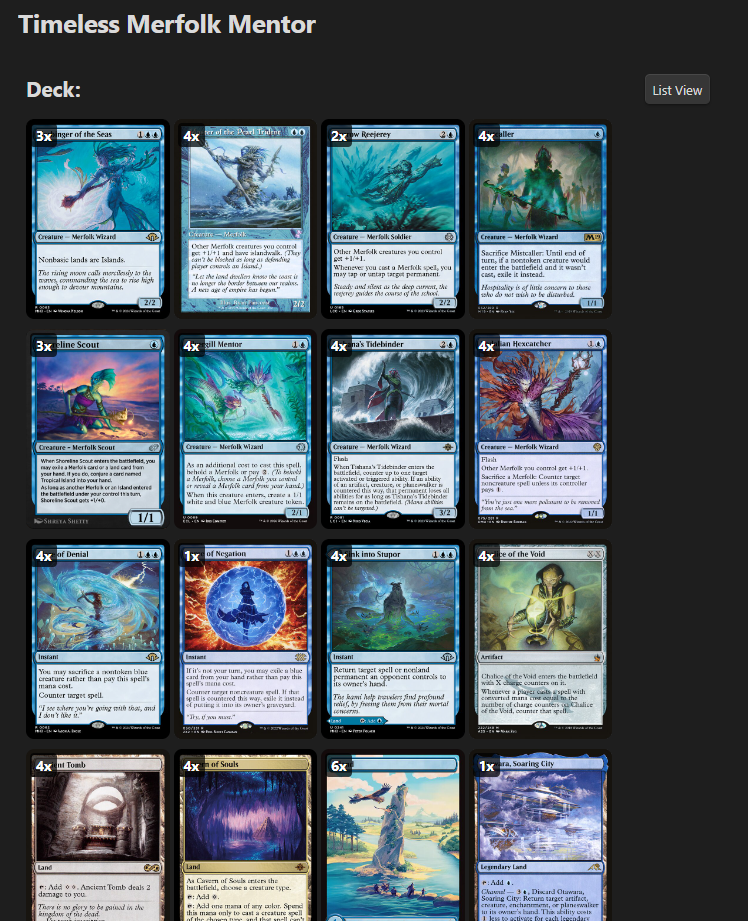
- Card previews — hover over any card to see a preview image
- Double-faced card support — click the preview image to flip between card faces
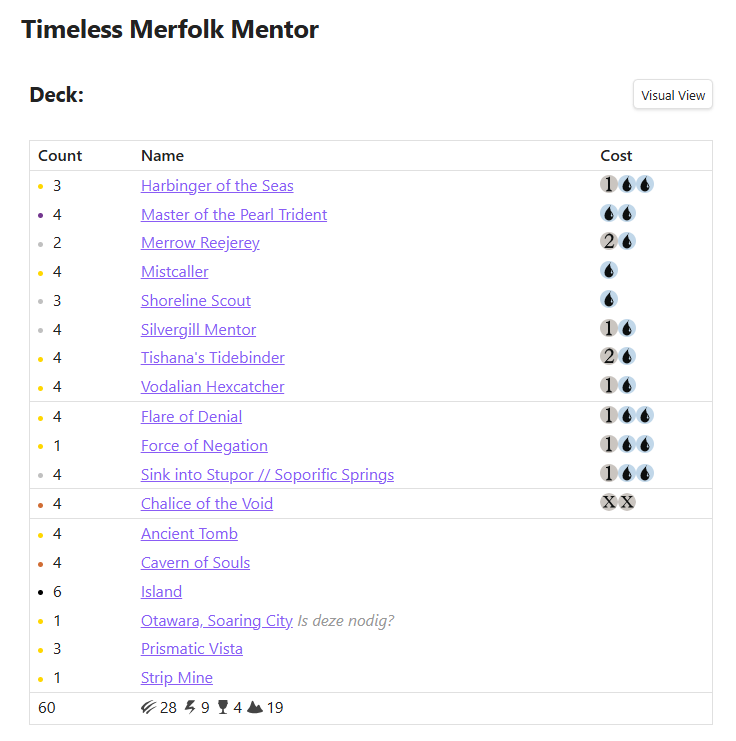
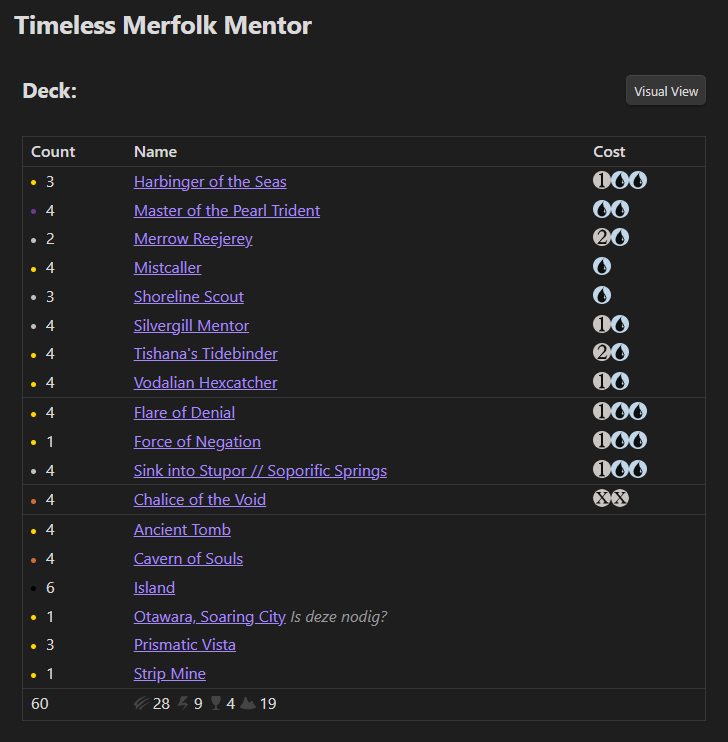
- Mana cost symbols — displays official mana symbols from Scryfall
- Rarity indicators — colored dot before each card count (black = common, silver = uncommon, gold = rare, orange = mythic)
- Type grouping — cards are automatically sorted and grouped by type (Planeswalker, Creature, Instant, Sorcery, Artifact, Enchantment, Land)
- Type summary — footer shows a count per card type with official card type icons
- Card prices — shows prices in USD, EUR, or TIX via Scryfall
- Visual grid view — toggle between list view and a visual grid of card images per section
- Collection tracking — tracks how many copies you own and highlights missing cards
- Buylist — automatically generates a buylist of missing cards
- Format validation — validates card legality per format (Modern, Legacy, Standard, etc.)
- Multiple decklist formats — supports standard MTGO, Arena, and Moxfield export formats
- Hyperlinked card names — optionally link card names to their Scryfall page
- Section support — supports multiple sections (Deck, Sideboard, Commander, etc.)
🖼️ Screenshots
⬇️ Installation
Obsidian Community Plugin Directory
- Open Obsidian and go to Settings → Community Plugins
- Click Browse and search for
MTG Deck - Click Install, then Enable
You can also install it directly from the Obsidian Community Plugin page.
BRAT (Beta)
To get the latest beta version, install using BRAT (Beta Reviewers Auto-update Tool).
- Install BRAT from Settings → Community Plugins → Browse, search for
BRAT, install and enable it - Open Settings → BRAT and click Add Beta Plugin
- Enter the repository URL:
https://github.com/sboulema/mtg-deckand click Add Plugin - Enable the plugin under Settings → Community Plugins
🤲 Usage
Create a code block with the language set to mtg-deck:
```mtg-deck
Deck:
4 Ragavan, Nimble Pilferer
4 Dragon's Rage Channeler
4 Murktide Regent
4 Counterspell
4 Brainstorm
4 Ponder
4 Force of Will
4 Daze
4 Lightning Bolt
4 Wasteland
12 Island
4 Volcanic Island
4 Scalding Tarn

Sideboard:
2 Pyroblast
2 Red Elemental Blast
3 Surgical Extraction
2 Grafdigger's Cage
2 Flusterstorm
4 Back to Basics
```
Supported Decklist Formats
Standard format:
4 Lightning Bolt
4 Ragavan, Nimble Pilferer (MH2) 138
Headed format:
Deck:
4 Lightning Bolt

Sideboard:
2 Pyroblast
Arena format:
About
Name My Deck Name
Deck
4 Lightning Bolt
Sideboard
2 Pyroblast
💬 Comments
Inline comments can be added with #:
4 Otawara, Soaring City # Is this necessary?
1 Boseiju, Who Endures # Maybe cut?
Full-line comments start with # :
# Creatures
4 Ragavan, Nimble Pilferer
🔍 Format Validation
To validate a decklist against a format, append the format name to the code block language:
```mtg-deck-modern
4 Lightning Bolt
4 Ragavan, Nimble Pilferer
...
```
The following rules are validated in the section footer:
- Card legality — flags banned/not legal/restricted cards
- Deck size — flags when the deck is too small or too large for the format
- Sideboard size — flags when the sideboard exceeds the maximum for the format
- Number of copies — flags when a card is included more than the allowed times (4/1), handles cards like Hare Apparent!
- Commander rules — flags when a card is not a legal commander, or cards in the deck that are outside of the color identity
⚙️ Settings
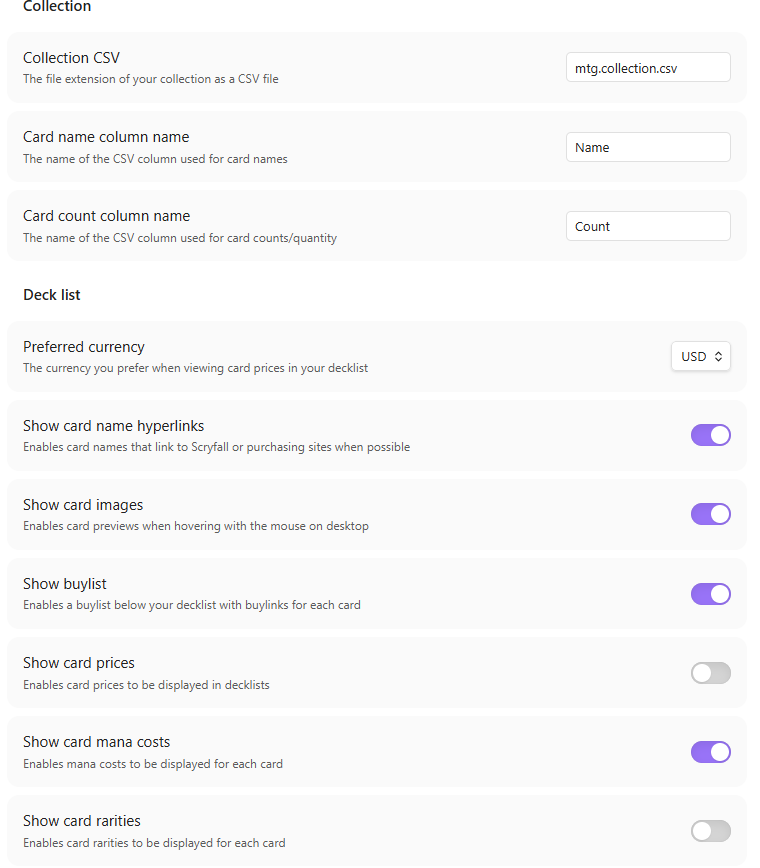
Open Settings → MTG Deck to configure the plugin:
| Setting | Description |
|---|---|
| Show mana costs | Display mana cost symbols in a Cost column |
| Show card prices | Display card prices in a Price column |
| Preferred currency | Choose between USD ($), EUR (€), or TIX (Tx) |
| Show card previews | Show card image on hover |
| Show card names as hyperlinks | Link card names to their Scryfall page |
| Show buylist | Show a buylist section for missing cards |
| Collection folder | The folder containing your collection CSV files |
| Card name column name | The name of the CSV column used for card names |
| Card count column name | The name of the CSV column used for card counts/quantity |
Settings per deck
```mtg-deck-show:prices
...
```
```mtg-deck-modern-show:prices,manacosts
...
```
Supported show values:
| Value | Description |
|---|---|
prices | Show card prices |
manacosts | Show mana cost symbols |
previews | Show card preview on hover |
hyperlinks | Show card names as hyperlinks |
rarities | Show rarity indicators |
buylist | Show buylist section |
📦 Collection Tracking
This plugin tracks how many copies of each card you own by reading CSV files from a configurable folder. Cards where you don't own enough copies are highlighted in red, and a count shows owned vs. needed (e.g. 2 / 4). A Buylist section is automatically shown at the bottom when you're missing cards.
Collection CSV files must have at least two columns: one for the card name and one for the count. Column names are configurable in settings and default to Name and Count. Multiple CSV files are supported — the plugin merges all files in the configured folder and its subfolders.
Example CSV File
Name,Count
Delver of Secrets // Insectile Aberration,8
"Otawara, Soaring City",4
"Rona's Vortex",2
Ledger Shredder,5
Viewing Your Collection
You can view your entire collection in two ways:
Command — open the command palette and run MTG Deck: View collection. This opens a modal with your full collection, showing counts per collection file, mana costs, and rarity indicators. A search box lets you filter by card name.
Code block — embed your collection in any note using the mtg-collection code block:
```mtg-collection
```
This renders an inline table with all your cards, per-file counts, a grand total column, and a search filter. Card data is loaded from Scryfall and a progress indicator shows loading status.
🔍 Obsidian Plugin Scorecard
Network Requests
This plugin makes network requests to the Scryfall API to fetch card data, images, and prices. Requests are only made when rendering a decklist or collection code block and are batched to minimize the number of calls. Fetched card data is cached for the duration of the session. No user data is sent to Scryfall — only card names and set codes are used to identify cards.
Vault Access
This plugin enumerates files in your vault to find collection CSV files in the configured collection folder and its subfolders. Only files with the .csv extension are read. No other vault files are accessed.
CSS
Some styles use !important to override Obsidian's built-in styles where necessary, specifically to ensure card preview images are not clipped in edit mode. These overrides are minimal and scoped as tightly as possible.
🙏 Credits
Built with the Obsidian Plugin API and Scryfall API.
This is a fork of the original obsidian-mtg plugin.
For plugin developers
Search results and similarity scores are powered by semantic analysis of your plugin's README. If your plugin isn't appearing for searches you'd expect, try updating your README to clearly describe your plugin's purpose, features, and use cases.