My Todo
approvedby amanxarora
Sorting based personal todo system with categories, weekly and daily planning for Obsidian. - This plugin has not been manually reviewed by Obsidian staff.
My Todo
Defeat task overwhelm. Streamline your focus from categories to daily action, natively in Obsidian.



🎯 The Core Pitch
Most task managers suffer from the backlog trap: you capture everything, your lists grow indefinitely, and daily planning becomes a source of anxiety rather than action.
My Todo is a minimalist, high-velocity task pipeline designed specifically for Obsidian. It bridges the gap between high-level organization and immediate, frictionless focus. By introducing a structured Category → Weekly → Daily planning loop, My Todo ensures that your long-term goals are effortlessly channeled into today's execution queue—without the clutter.
[!TIP] Built for developers, thinkers, and builders. My Todo stays out of your way, operating with speed, clean hotkeys, and native Obsidian feel.
📸 Visual Demos
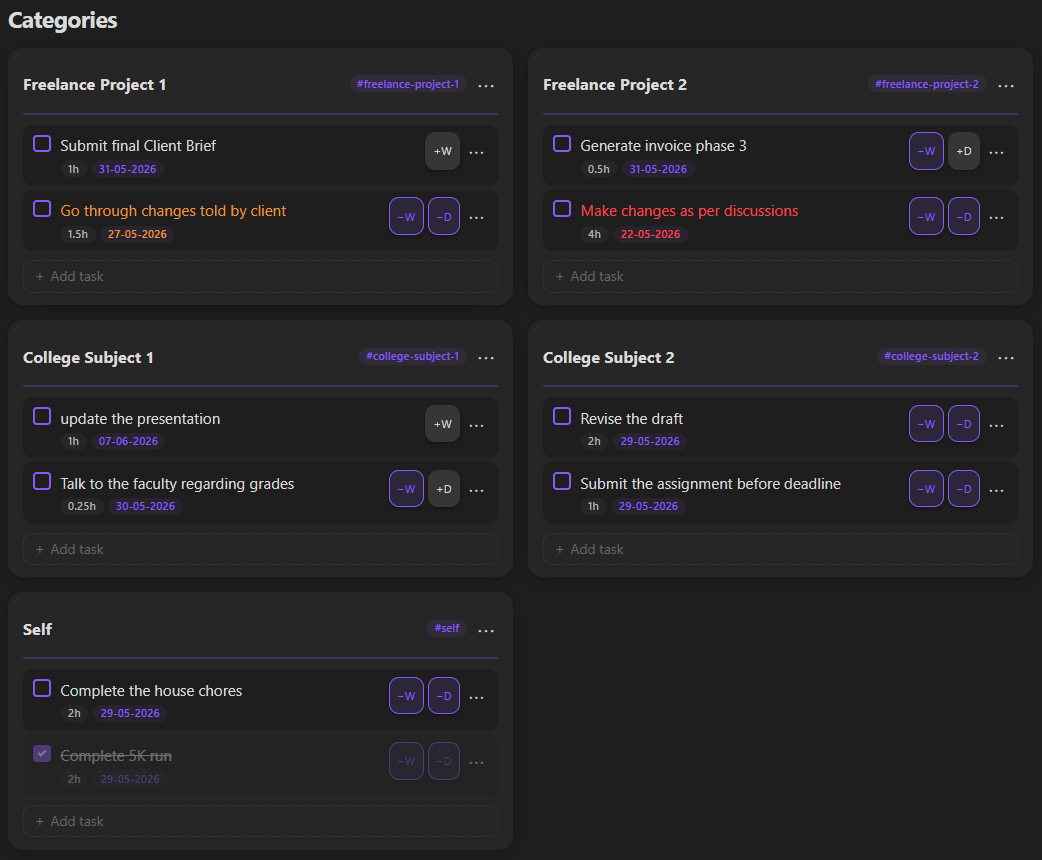
Category Board
Organize your universe by custom tags. See your backlogs at a glance without feeling overwhelmed.
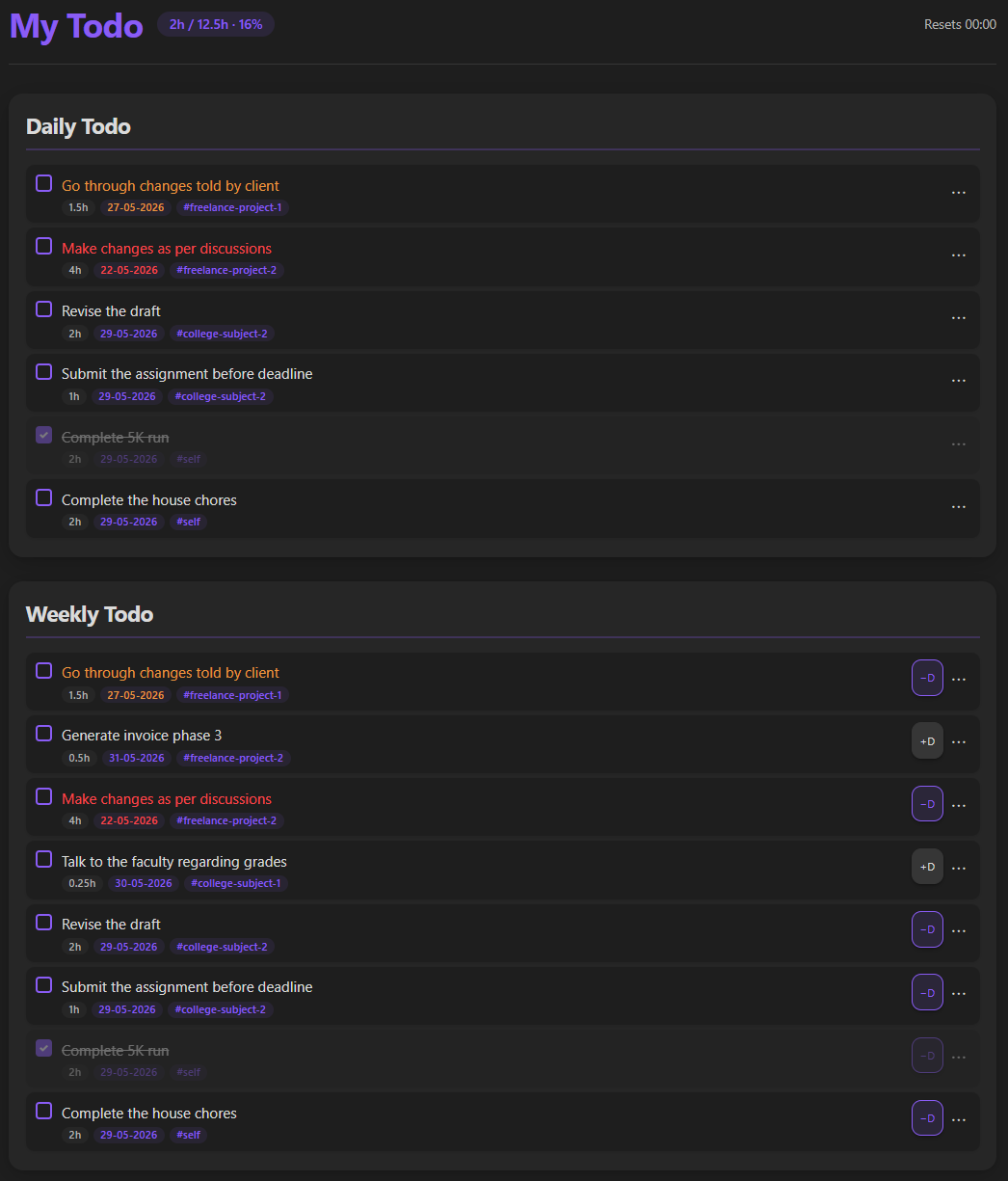
Weekly & Daily Planner
Frictionlessly promote tasks from your high-level categories into weekly priorities and daily commitments.
Productivity Heatmap
Visualize your daily momentum over time. A subtle, satisfying way to build and maintain consistency.

✨ Key Features
🗂️ Organized Category Board
- Custom Tag Associations: Bind specific Obsidian tags directly to dedicated category columns.
- Instant Ingestion: Any task tagged in your vault is automatically captured, structured, and presented in the Kanban-style Category Board.
- Frictionless Sorting: Keep your ideas, projects, and chores logically partitioned.
🔄 The Frictionless Planning Loop
- Promote in One Click: Drag, drop, or use rapid shortcuts to escalate tasks from raw Categories into your Weekly Plan, and then into Daily Focus.
- Zero Overhead: No manual copy-pasting or file editing required. Move tasks across planning horizons instantly.
- Intelligent Rollover: Automatically rolls over incomplete tasks or clears completed items at a custom daily threshold time of your choosing.
⚡ Live Sync & Hot-Reload
- Event-Driven Listeners: Instant, real-time UI updates when task lists are modified by external tooling (such as the Gemini CLI).
- Bi-directional Integrity: Always trust your todo view. External edits reflect instantly in the Obsidian UI without requiring a reload or manual file refresh.
🧭 Smart Navigation & Deep-Linking
- Double-Click to Trace: Double-click any task in your Weekly or Daily Planner to smoothly scroll down and flash-highlight its parent category.
- Context Preservation: Never lose track of why a task exists. Jump from immediate action items directly to their high-level categorical context in milliseconds.
🎨 Theme-Adaptive UI
- Obsidian-Native Swatches: Fully integrates with the active Obsidian accent color theme.
- Seamless Dark & Light Modes: Clean typography, custom borders, and beautiful, minimalist components that feel like an official core feature, not a third-party add-on.
🚀 Installation
My Todo is officially live on the Obsidian Community Plugins directory!
Option 1: Direct Install (Recommended)
- Open Obsidian Settings in your vault.
- Navigate to Community Plugins and click Browse.
- Search for My Todo.
- Click Install, then click Enable.
Option 2: Manual Installation (For Beta/Custom Builds)
If you wish to run a pre-release or custom build:
- Download the latest release asset bundle (
main.js,manifest.json,styles.css) from the Releases page. - Create a folder in your vault at
.obsidian/plugins/my-todo. - Move the downloaded files into that folder.
- Open Obsidian, go to Settings > Community Plugins, and toggle My Todo on.
🛠️ Workflows & CLI Integration
My Todo is built with open architectures in mind. Because tasks are saved in structured, clean markdown files, you can seamlessly read and write to your planning queues using external CLI utilities.
[!NOTE] If you utilize custom automation (e.g. sync scripts, terminal task injectors, or AI co-pilots like Gemini CLI), the Live Sync Hot-Reload feature ensures that your Obsidian pane refreshes instantly the moment a disk-level change is detected.
💬 Support & Feedback
This is an active open-source project! If you encounter any bugs, have feature requests, or want to share how you're using My Todo to streamline your life:
- 🐛 Open an Issue on GitHub
- 🌟 Star the repository to show your support!
🔗 Connect with Me
I'm Aman Arora, an architect, designer, systems building developer building tools to help people focus and create. If you like this plugin, let's connect!





📄 License
This project is licensed under the MIT License.
For plugin developers
Search results and similarity scores are powered by semantic analysis of your plugin's README. If your plugin isn't appearing for searches you'd expect, try updating your README to clearly describe your plugin's purpose, features, and use cases.