Nextcloud Tasks
approvedby Juan Ferranti
Read, create, edit and complete your Nextcloud Tasks in a note, over CalDAV. Your tasks stay on the server: no markdown mirror, no checkboxes in your notes, nothing that can drift out of sync. - This plugin has not been manually reviewed by Obsidian staff.
✅ Nextcloud Tasks for Obsidian
Read, create, edit and complete your Nextcloud Tasks right inside a note — over CalDAV, with no copy of your data in the vault.
🧠 The one idea
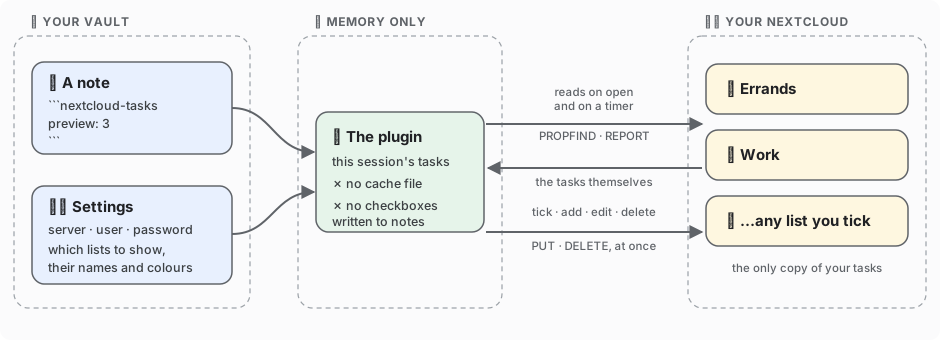
There is exactly one copy of every task, and it lives in Nextcloud.
Other CalDAV plugins mirror markdown checkboxes into your notes and sync them — two copies, forever at risk of drifting apart. This one writes nothing to disk, not even a cache: it fetches, shows, and writes your change straight back.
Plain JavaScript, no dependencies, no native code — the same build runs on desktop and phone. 📱
🚀 Install & set up
From Obsidian: Settings → Community plugins → Browse, search Nextcloud Tasks, install, enable.
Manually: drop main.js, manifest.json and styles.css from the
latest release into
<vault>/.obsidian/plugins/nextcloud-tasks/, then enable it under Settings → Community plugins.
| # | Step | |
|---|---|---|
| 1️⃣ | Make an app password in Nextcloud → Settings → Security | Never your account password. It can be revoked on its own, and it is the only credential stored. |
| 2️⃣ | Fill in the settings in Obsidian → Nextcloud Tasks | Address is the base only: https://cloud.example.com, not /remote.php/dav. |
| 3️⃣ | Press Load | Every list on your account appears. Tick the ones you want, rename the headings, pick colours, drag them into order. No list yet? Create list makes one on the server. |
| 4️⃣ | Set the refresh interval | 5 minutes by default, Never if you prefer by hand. It only runs while a task list is on screen, so it costs nothing while you write. |
| 5️⃣ | Stuck? Press Test connection | It reports every discovery step separately, so a failure points at one line instead of "could not connect". |
🏷️ Any lists, any names. No fixed categories, no folder convention. Each list you tick gets a heading, a colour and a short key — the key is what a note refers to. Two lists or nine, in whatever order you drag them, is all the same to the plugin.
📝 Show tasks in a note
```nextcloud-tasks
all
preview: 3
```
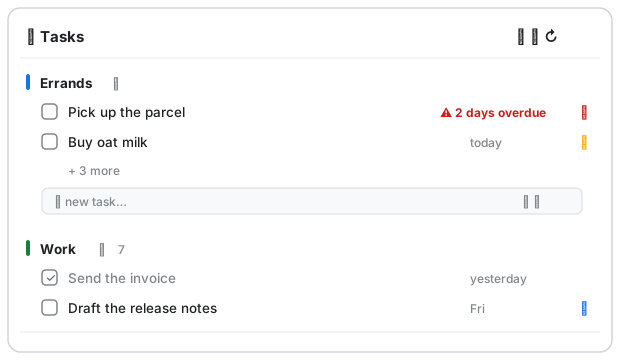
Every ticked list gets its own heading, even when empty. Past preview: rows, the heading grows an
arrow and the number it is holding back — click to unfold, click to fold away.
Each list ends in a blank row: type a title, press Enter, and the task is on the server. The two small buttons on that row set a due date and a priority first; Esc clears it. Nothing you type is lost to a background refresh. ✍️
Every line inside the block is optional:
| Line | What it does |
|---|---|
all (or an empty block) | 📚 every ticked list, grouped by list — the default |
list: errands | 📋 one list only, by its key (os: still works in old notes) |
preview: 3 | 👁️ rows per list before the +n more line; preview: 0 shows everything |
limit: 8 | ✂️ hard ceiling on rows in total, applied before lists are split — a busy list can eat it all, so preview is usually what you want |
due: today | 📅 due today — overdue is always included, or it would vanish silently |
due: week | 🗓️ due within seven days, overdue included |
done: true | ☑️ show completed tasks too |
title: Shopping | 🏷️ your own heading for the panel |
German values (due: heute, due: woche, done: ja) are accepted, so a note keeps its meaning if
you switch Obsidian's language.
Rows sort the way you would triage them: overdue first, then by due date, undated last, ties falling back to your list order. The panel header carries ➕ new task, 📋 new list and ↻ refresh.
👆 Working with a task
- ☑️ Tick the box to complete it — written to the server immediately. The row stays on screen with a line through it until you leave the note, so you can see what you did and undo a misclick.
- ✏️ Click the title to edit title, due date and priority. Only what you actually changed is written, so a repeat rule, reminder, description or subtask the plugin doesn't show stays untouched. (Moving a task to another list happens in Nextcloud, not here.)
- 🗑️ Delete lives in the same dialog, behind one confirmation.
Commands: New task · Refresh tasks · Test connection.
📱 On your phone
Add a CalDAV account with the same address, username and app password to your phone's built-in reminders app: notifications and widgets without Obsidian running, and anything you tick there shows up here on the next refresh. The plugin itself also runs in the Obsidian mobile app.
🌍 Languages: English and German, following Obsidian's setting (or forced in the plugin settings).
🛠️ Development
npm install
npm run lint     # eslint-plugin-obsidianmd — the rules the directory review runs
npm test         # core, render and bundle suites: no install, no network, no credentials
npm run build    # bundles src/ into main.js
VAULT="/path/to/your/vault" bash scripts/deploy-to-vault.sh          # deploy a local build

NC_URL=https://cloud.example.com NC_USER=alice NC_APP_PASSWORD=xxxxx \
  node scripts/live-check.mjs                                        # against a real server
live-check creates, reads, completes and deletes one test task: it proves the server speaks
CalDAV, not that your device passes the verbs through — that's what Test connection is for.
⚠️ main.js is generated. Edit src/, never the bundle.
🔍 Design notes — things that look like details and are not
- Nothing is written to disk, not even as a cache. The fetched list lives in memory for the session. That is what makes "your tasks live in Nextcloud" literally true, and why there is no file that can go stale.
- Completing or editing rewrites the original calendar object line by line, copying every other
byte through. Regenerating from a parsed model would silently drop
RRULE,VALARM,CATEGORIES,RELATED-TOand everyX-property other clients wrote. The tests assert byte identity of untouched lines, for both writers. - An edit sends only the fields you changed. Leaving the date alone differs from clearing it:
the first never mentions
DUE, so a task due at a particular time keeps that time when you fix a typo in its title. The second removes the line. - Completion is judged in the client, because three clients express it three ways:
STATUS, a bareCOMPLETED:, orPERCENT-COMPLETE:100. A server-side filter that gets this wrong hides tasks, which is worse than showing one too many. - Priority follows RFC 5545 — 1 is most urgent, 0 unset: 1–4 high, 5 medium, 6–9 low, each with a coloured flag. Flagging only the top band is what made an earlier version look broken.
- Discovery walks the real chain,
current-user-principal→calendar-home-set→ the collections in it, instead of guessing/remote.php/dav/calendars/<user>/. Fifteen lines, and a whole class of username-casing bug disappears. - XML is read without caring about namespace prefixes. Nextcloud's
d:andcal:are not contractual. - If
REPORTis refused, the client falls back toPROPFINDplus oneGETper object and remembers that for the session, so a platform blocking the verb still works. - Everything goes through
requestUrl, which bypasses CORS and works on iOS.
📄 MIT — see LICENSE.
For plugin developers
Search results and similarity scores are powered by semantic analysis of your plugin's README. If your plugin isn't appearing for searches you'd expect, try updating your README to clearly describe your plugin's purpose, features, and use cases.