Node Tree Graph
approvedby Zheng YUAN
Visualize your vault as a hierarchical heading-based graph. Break notes into granular nodes based on their internal heading structure. - This plugin has not been manually reviewed by Obsidian staff.
Node Tree Graph


Visualize your vault as a hierarchical heading-based graph. Break notes into granular nodes based on their internal heading structure.
📌 User Guides
Core Concepts
By default, Obsidian’s built-in graph view treats each .md file as a single node. This plugin breaks down your markdown documents into a hierarchical node tree:
- Root Node: The markdown file itself (just like Obsidian’s default graph).
- Leaf Nodes: Level $N$ headings ($H_1$ to $H_6$) inside the file, representing sub-topics and sections.
This gives you control over how granular your graph visualization can be, allowing you to trace connections between specific sections of different notes without losing context.
Key Features
- Max Heading Levels: Choose how deep the graph searches (from $H_1$ up to $H_6$).
- Flexible Link Rollup: When headings are hidden, links associated with those hidden sections can automatically roll up to the nearest visible ancestor node or be cleanly discarded.
- Hover Filtering: Highlight related nodes when hovering:
- Neighbor Direction: Search
Downward(children),Upward(parents), orBoth. - Neighbor Depth: Limit how many connections away the search reaches.
- Neighbor Direction: Search
- Fully customizable Visuals & Physics.
- Nodes: coloring mode, base node radius, and relative scales for ($H_1$ to $H_6$).
- Edges: width, color, style, and alpha.
- Font: font family, size, color, option to scale with node size, and size multiplier.
- Physics: simulation related settings.
Example
The following example is created using a obsidian-test-vault.
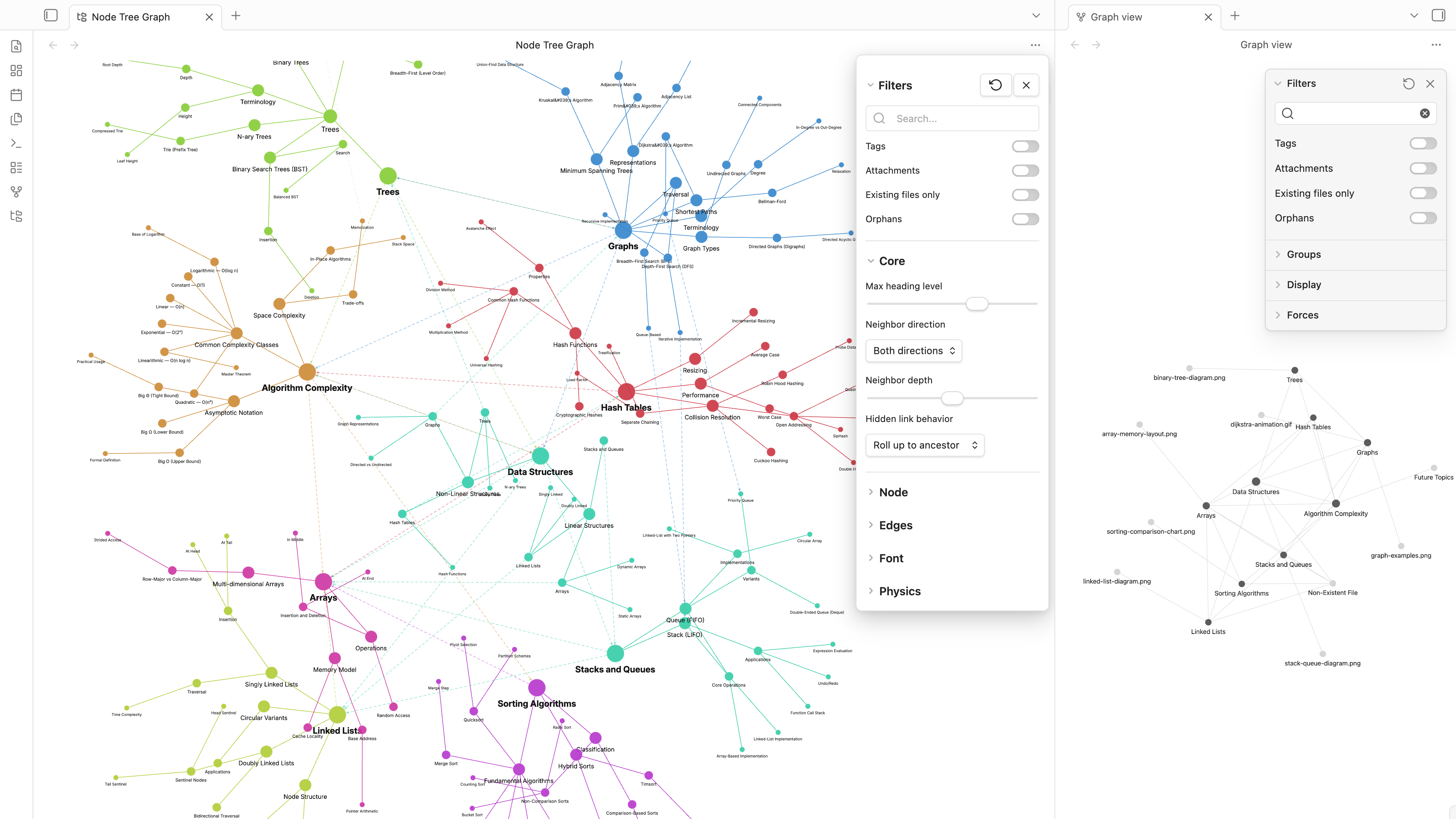
Installation
From the Community Plugin Directory [TBD]
- Open
Obsidian→Settings→Community plugins - Search for Node Tree Graph
- Click Install, then Enable
Manual Installation
- Download
main.js,manifest.json, andstyles.cssfrom the latest release - Copy them into
{vault}/.obsidian/plugins/node-tree-graph/ - Enable the plugin in
Settings→Community plugins
Search Filter Syntax
The search input in the Filters section follows Obsidian's official search syntax to filter which file trees appear in the graph:
| Syntax | Matches | Example |
|---|---|---|
path:text | File path contains text | path:cs101 |
file:text | File name contains text | file:Algorithm |
tag:name | File has exact tag name | tag:exam |
[property] | File has frontmatter property property | [author] |
[property:val] | Property equals val exactly | [status:draft] |
[property:<n] | Numeric property less than n | [count:<5] |
[property:>n] | Numeric property greater than n | [count:>3] |
[property:null] | Property exists but is empty | [author:null] |
"multi word" | Quoted strings preserve spaces | file:"Algorithm Complexity" |
OR | Match any of the adjacent terms | tag:exam OR tag:homework |
- | Exclude matching files | -tag:draft |
| Space | AND logic between groups | tag:cs file:Algorithm |
Examples
| Query | Result |
|---|---|
tag:exam | Files with the exam tag |
tag:exam OR tag:homework | Files with either exam or homework tag |
tag:cs tag:beginner | Files with BOTH cs AND beginner tags |
path:cs101 tag:exam | Files under cs101/ AND tagged exam |
-tag:draft | Files NOT tagged draft |
[author] | Files that have an author property |
[course:cs201] | Files where course equals cs201 |
file:"Data Structures" | File named exactly "Data Structures" |
Autocomplete suggestions appear automatically when typing tag:, file:, path:, or [.
Developer Guides
Project Structure
src/
├── main.ts                     # Plugin entry point
├── settings.ts                 # PluginSettingTab + DEFAULT_SETTINGS
├── types.ts                    # TypeScript type definitions
├── ui/
│   ├── graph-view.ts           # ItemView (graph pane)
│   ├── graph-renderer.ts       # PixiJS renderer + simulation
│   ├── popup-panel.ts          # Settings/filter popup overlay
│   ├── node-sprites.ts         # Node shape + label creation
│   ├── physics.ts              # Force-directed simulation
│   ├── search-autocomplete.ts  # Autocomplete for search filters
│   ├── control-panel.ts        # Sidebar control panel (stub)
│   ├── debug-overlay.ts        # Performance metrics overlay (stub)
│   ├── legend.ts               # Mini legend (stub)
│   └── onboarding.ts           # First-run onboarding (stub)
├── utils/
│   ├── tree-manager.ts         # Cache + tree→graph conversion + search filter
│   ├── parser.ts               # Markdown → NodeTree parser
│   ├── cache.ts                # LRU cache manager
│   ├── colors.ts               # Color resolution
│   ├── shapes.ts               # Shape resolution
│   ├── sanitize.ts             # Label formatting
│   ├── constants.ts            # Plugin constants
│   └── rollup.ts               # Link rollup logic
└── commands/
    └── index.ts                # Command palette commands
Components
- Settings panel.
- Popup panel: the popup panel by clicking the gear icon from canvas.
- Tooltip panel: the popup panel when typing in search input box.
How It Works
- Parser (
src/utils/parser.ts): Each markdown file is parsed into aNodeTree: headings form the hierarchy, wiki links and embeds are assigned to their owning heading block based on line position. Frontmatter properties and tags are extracted. - Tree Manager (
src/utils/tree-manager.ts): Maintains an LRU cache of parsed trees, listens for vault metadata changes, and regenerates graph nodes and edges on demand. The search filter operates at this level — excluded trees never become graph nodes. - Graph Renderer (
src/ui/graph-renderer.ts): PixiJS WebGL renderer draws nodes as colored geometric shapes with text labels, connected by tree edges (parent→child) and link edges (wiki links). Node visibility is driven by the pipeline: orphan/file-level filtering → tag/attachment toggles → hover dimming. - Force Simulation (
src/ui/physics.ts): Semi-implicit Euler integration with many-body repulsion, spring attraction, centering force, tree separation multiplier, and simulated annealing (alpha decay).
Development Build
git clone https://github.com/zhengyuan-public/obsidian-node-tree-graph.git
cd obsidian-node-tree-graph
npm install
npm run build
Then symlink or copy the repo into your vault's .obsidian/plugins/ directory.
Localization (i18n)
Node Tree Graph supports multiple languages. The interface language is automatically detected from your Obsidian settings.
Supported languages:
| Language | Code | Coverage |
|---|---|---|
| English | en | ✓ |
| Chinese Simplified | zh | ✓ |
| Chinese Traditional | zh-TW | ✓ |
| German | de | ✓ |
| Japanese | ja | ✓ |
| French | fr | ✓ |
| Korean | ko | ✓ |
| Spanish | es | ✓ |
| Portuguese (Brazil) | pt-BR | ✓ |
| Russian | ru | ✓ |
Contributing translations
The initial translations were translated by AI from English and may contain inaccuracies. If you're a native speaker of any of these languages, we'd love your help improving them! To contribute:
- Copy
src/i18n/en.tsas a reference for all available keys - Edit the translation file for your language in
src/i18n/<code>.ts - Submit a pull request with your changes
New languages are also welcome, just create a new file following the same format and register it in src/i18n/index.ts.
Adding a new language:
// src/i18n/it.ts
const it: Record<string, string> = {
  'view.display-name': 'Grafo ad Albero',
  'filter.tags': 'Etichette',
  // ...translate all keys from en.ts
};
export default it;
Then register it in index.ts:
import it from './it';
const locales = { ..., it };
Tech Stack
Known Issues & Roadmap
Needs Fixing
| # | Issue | Details |
|---|---|---|
| 1 | Search filter bugs | Some filter combinations produce incorrect results. The tokenizer and OR/AND grouping logic need review against real-world queries. |
| 2 | Simulation tuning | Default physics parameters (repulsion, attraction, damping) need further tuning. The author is having trouble finding optimal combinations for different vault sizes. |
| 3 | Mobile support | The plugin has not been tested on Obsidian Mobile (iOS/Android). PixiJS WebGL rendering and touch interactions may need adjustments. |
| 4 | Large vault performance | Not tested on vaults with 1000+ notes or 10,000+ headings. Progressive viewport loading is implemented but untuned. |
| 5 | Search syntax gap | OR operator uses , internally; should align with Obsidian's OR keyword. Property exact match uses = instead of :. Grouping with () is not yet supported. |
| 6 | Tag edges in orphan detection | Glossary.md-style files with tags are incorrectly treated as non-orphans because tag edges count as wiki links. |
| 7 | Popup panel styling | Custom CSS overrides on sliders/toggles can conflict with Obsidian themes. Needs theme-variable-only approach. |
Not Yet Implemented
| # | Feature | Details |
|---|---|---|
| 8 | Physics presets | The Presets dropdown (Default / Compact / Spread) is a placeholder. It should save and restore physics parameter snapshots. |
| 9 | Control panel | src/ui/control-panel.ts stub only. Sidebar with quick-access controls. |
| 10 | Debug overlay | src/ui/debug-overlay.ts stub only. FPS counter, node count, memory usage overlay. |
| 11 | Legend | src/ui/legend.ts stub only. Mini legend showing shape/color meanings. |
| 12 | Onboarding | src/ui/onboarding.ts stub only. First-run welcome modal with quick setup. |
| 13 | property: filter | Obsidian's native property:value syntax is not supported yet (only bracket [prop] syntax works). |
| 14 | line: / section: filters | Obsidian's content-level filters not implemented — our filters operate at file level only. |
| 15 | Regex search | /pattern/ syntax from Obsidian's search is not supported. |
| 16 | content: filter | File body content search not implemented. |
| 17 | Export graph state | GraphStateExport type is defined but no export UI exists. |
For plugin developers
Search results and similarity scores are powered by semantic analysis of your plugin's README. If your plugin isn't appearing for searches you'd expect, try updating your README to clearly describe your plugin's purpose, features, and use cases.