Note Favicon
approvedby mdklab
Extracts a URL from the frontmatter of notes and displays an associated favicon image next to the note title in the file tree. Supports standard URLs and base64-encoded images.
Note Favicon Plugin
Obsidian Plugin – Note Favicon
Description
This Obsidian plugin extracts a URL from the frontmatter of your notes and displays an associated favicon image next to the note title in the file tree. It supports both standard URLs and base64-encoded images, making it easy to visually distinguish notes at a glance.
Features
- Favicon Display: Automatically display favicons next to note titles based on URLs provided in the frontmatter.
- Base64 Image Support: Allows embedding base64-encoded images directly in the frontmatter for greater flexibility.
- Dynamic Updates: Icons update in real-time as metadata is added, modified, or removed.
Installation
From GitHub
- Download the latest release from the Releases page.
- Extract the contents to your Obsidian vault's plugins folder (
.obsidian/plugins). - Enable the plugin in Obsidian's community plugin settings.
From Obsidian
Not available yet.
Usage
-
Add a
faviconfield to the frontmatter of any note. Example:--- favicon: http://www.example.com ---Or use a base64-encoded image:
--- favicon: data:image/png;base64,iVBORw0KGgoAAAANS... --- -
The favicon will automatically appear next to the note title in the file tree once added.
Example
Here is how a note frontmatter with a favicon URL looks:
---
favicon: https://developer.mozilla.org/en-US/
---
This will show the StackOverflow favicon next to the note in the file tree.
Another example with base64 images:
---
favicon: data:image/png;base64,iVBORw0KGgoAAAANSUhEUgAAABAAAAAQCAYAAAAf8/9hAAACm0lEQVQ4jWWSTYhWdRjFz/P8P+577zhOUpothFYTfSC0G4lwNUGBoMhAU4RBUBQEtXAWru6EKI20ihYtcmFazQwi7cRNGxdFgStpoRi5cdGXovO+9/6/TouZV8bXs/vD8xzOc/4/YEJtSwWAC6e5a/VMuPrDSrg6ObNd8uiTAgjPnhzum6rc6s4d9sDd+/EXk+TTFOyNt1r5e9LATi6fP9W/4Ct3yRqZDREAzLfFliV1qQLwxnhuvKXbwvBcyz3G4rI1MptzzsMu3yrgHyJ4rRnY11dX4hIgJCiPGIzvdlV4xTm/r4+hrytjiLxmWOab2jajPhUCJ775/K9pmUxw/fpmF2rMroEHQJEukgrzOwXzMYKlUCm0DZ6a3t6BAsD6uuS1BZrIcOXBRvypHjgfYiql5A6QmUxABFRIZUx8BqCQm2c87GDjRUxbdd9R9IvQxxvTjTNUeQIo/1oDAdENKmtT4jwgXF7eSr2wQAMAVR2PPP2kfRUlv5uKfD1VI6hgINQ1bxG9d3WIpajRj8+e4u62lQJQZFzibB2uDSr3UsrMKXNRGO9u/rJMiaBQymFn3XtWgVGI5xeP+3cAigWA55t8xHm7vw8p7Gic3xill0mzt6ntsVGf1Du9Per0k6jpz5kp+1kXsHfMgwJAQZmpnEJEsggJyIyoelVYghnQZ6sKF5nx63/3wpWSZRkQtqDKlhO+X0lf1ZX5UBV4MAwnBJhrGn9oOIoFIL33NvbxJkfu4Jst7oxZ0C0subhkP+r6eKEPBRb+N1Wdi5GAoIiI5FRIwe7Q3+8fA2mse0P3fig8nDXMVc7WMSXWlXMiarxTEeHPx07v/OcxkMb6oJXh28ftj531X2biOZJHR104WXK5VkoBIevb0QeA/wGJbEKYYXTTdwAAAABJRU5ErkJggg==
---
This will show the Obsidian favicon next to the note in the file tree.
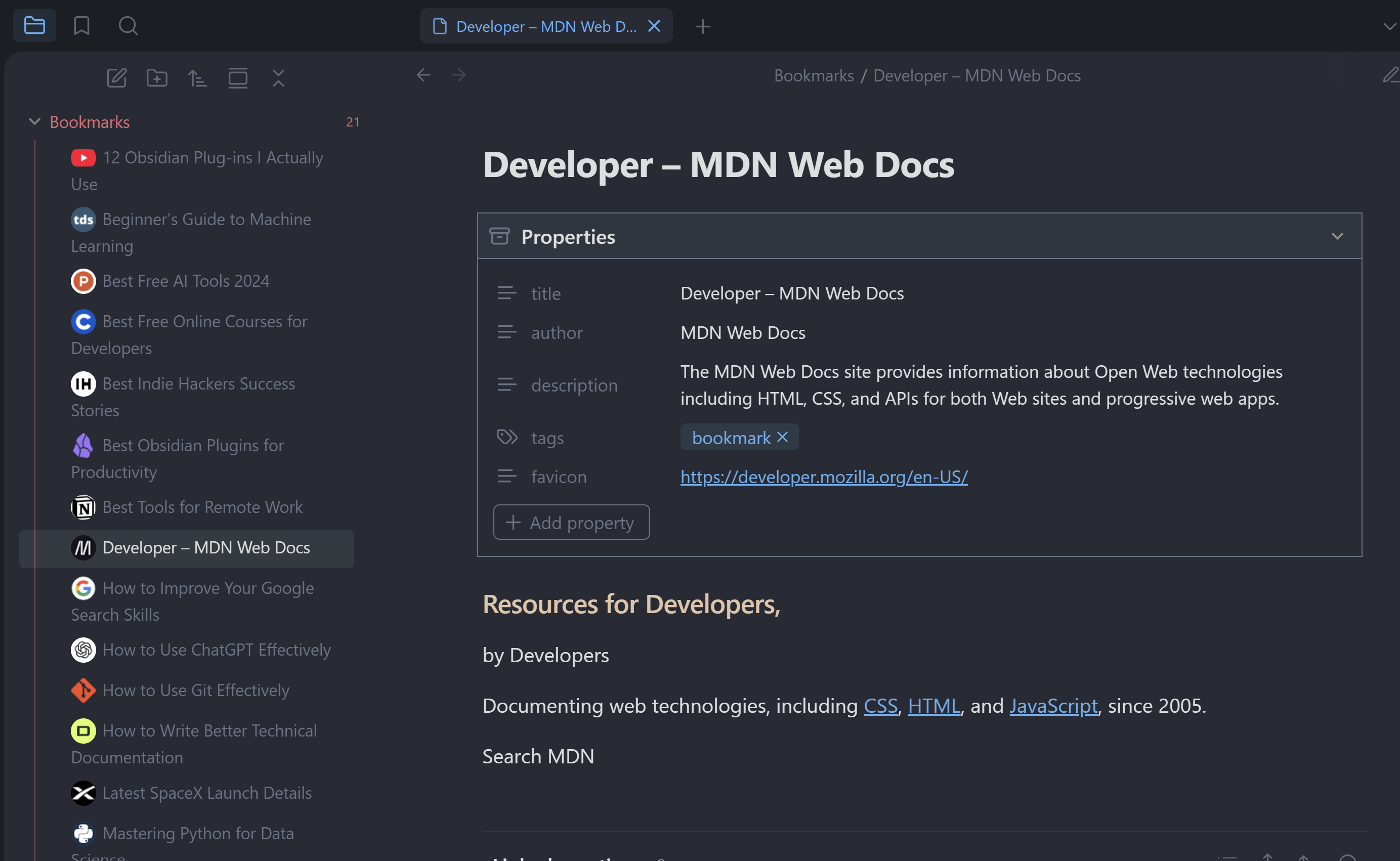 Favicon displayed next to note titles in the file tree.
Permissions
This plugin requires the following permissions:
- Read Vault: To access the metadata of the notes.
- Modify Workspace: To update the file tree and display the icons.
Privacy and External Requests
This plugin fetches favicons from Google's service (https://www.google.com/s2/favicons). When a note contains a URL in its frontmatter, the plugin makes an external request to Google's favicon service to retrieve the favicon associated with the domain.
Privacy Considerations
- External Requests: The plugin sends the domain of the URL to Google's favicon service to fetch the favicon image.
- Data Privacy: Users should be aware that using this feature involves making external requests, which may have privacy implications depending on the content of the URLs.
- Base64 Images: To avoid external requests, users can embed base64-encoded images directly in the frontmatter.
- Caching: The plugin caches the favicons to reduce the number of requests made to Google's service.
- Data Collection: The plugin does not collect any data or send any information to third parties.
Contributing
Contributions are welcome! Please feel free to submit a pull request or report issues in the GitHub repository.
Support
If you find this plugin useful, consider sponsoring me to support future development.
License
This project is licensed under the MIT License. See the LICENSE file for details.
For plugin developers
Search results and similarity scores are powered by semantic analysis of your plugin's README. If your plugin isn't appearing for searches you'd expect, try updating your README to clearly describe your plugin's purpose, features, and use cases.