Numerals
approvedby ryanc
Turn any code block into an advanced calculator. Evaluate math expressions on each line of a code block, including units, currency, and optional TeX rendering.
Numerals


Numerals turns Obsidian notes into living calculations. Use math blocks or inline expressions to calculate with units, currencies, variables, functions, frontmatter, Dataview metadata, and values from other notes.
| Channel | Availability |
|---|---|
| Stable 1.10.2 | Available through Obsidian's Community Plugins browser. The guide below describes this published release. |
| Recovery preview 1.11.0 | Under development for Obsidian 1.13+. Not yet published, including through BRAT. See the preview features. |
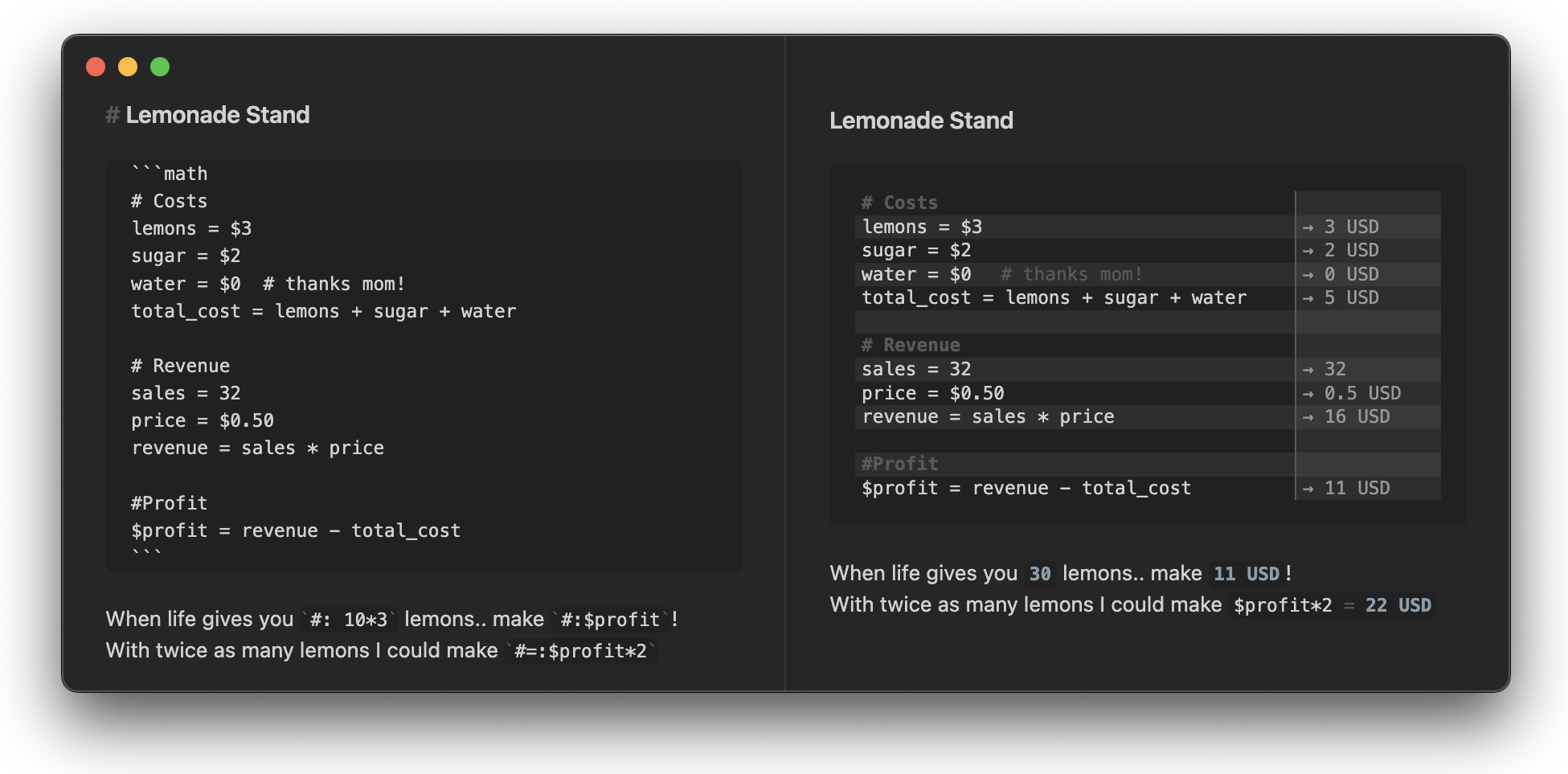
At a Glance
Examples use the default $ → USD mapping and US English number formatting. Separators follow your selected number format.
| Feature | Example |
|---|---|
| Inline calculations | `#: 3ft * 4ft` -> 12 ft^2 |
| Show-your-work equations | `#=: 2 * (3ft + 4ft)` -> 2 * (3 ft + 4 ft) = 14 ft |
| Full math blocks | 2.235 m / s |
| Units and conversions | 100 km/hr in mi/hr -> 62.137 mi / hr |
| Currency math | $100/hr * 3 days -> 7,200 USD |
| Note-wide variables | $rate = $150/hr, then `#: $rate * 40hr` |
| Cross-note references | [[Client Settings]].rates.hourly * 8hr |
| Result insertion | @[profit] = $2,400 - $850 becomes @[profit::1,550 USD] = $2,400 - $850 |
Quick Start
Add a math code block anywhere in a note:
```math
revenue = $2,400
expenses = $850
profit = revenue - expenses =>
```
Or calculate directly in a sentence:
The project total is `#: $150/hr * 8hr`.
Use equation mode when the calculation itself is important:
The room perimeter is `#=: 2 * (12ft + 10ft)`.
Stable Features
Inline Calculations
Inline Numerals expressions are ordinary inline code with a trigger prefix:
| Syntax | Renders as | Best for |
|---|---|---|
`#: 3ft * 4ft` | 12 ft^2 | Showing just the answer |
`#=: 3ft * 4ft` | 3 ft * 4 ft = 12 ft^2 | Showing the expression and answer |
Inline calculations work in Live Preview and Reading mode. They support the same math engine, number formatting, units, currency symbols, variables, frontmatter, and Dataview values as math blocks.
Both trigger prefixes and the equation separator are configurable in Numerals settings. Inline TeX triggers belong to the unpublished recovery preview; stable supports TeX rendering in math blocks.
Math Blocks
Numerals math blocks are ideal for longer calculations:
```math
# Lemonade stand
cups = 120
price = $1.50
revenue = cups * price
lemons = $18
sugar = $7
profit = revenue - lemons - sugar =>
```
Use => to highlight important results. Lines without a highlighted result can be dimmed or hidden depending on your settings.
Units, Currency, and Functions
Numerals uses mathjs for calculations and adds Obsidian-friendly preprocessing for currency symbols and readable number input.
| Type | Examples |
|---|---|
| Units | 1ft + 12in -> 2 ft |
| Conversions | 72 degF to degC -> 22.222 degC |
| Currency | $1,000 * 2 -> 2,000 USD |
| Rates | $100/hr * 3 days -> 7,200 USD |
| Functions | sqrt(144), sin(pi/2), log(1000, 10) |
| Bases | 0xff + 0b100 -> 259 |
| Fractions | fraction(1/3) + fraction(1/4) -> 7/12 |
Currency symbols can be customized in settings. Numerals treats currencies as units: it does not fetch exchange rates or automatically convert between currencies.
Note-Wide Variables
Prefix a variable or function with $ to make it available across the whole note:
```math
$rate = $150/hr
$discount(x) = x * 0.9
```

Estimate: `#: $rate * 40hr`
Discounted: `#: $discount($rate * 40hr)`
Note-wide variables work across math blocks and inline expressions.
Previous Results
Use @prev to refer to the previous result:
```math
base = 100
base * 1.2
@prev * 1.08
```
Inline expressions can use @prev too:
First year: `#: 100 * 1.2`
Second year: `#: @prev * 1.08`
Totals
Use @total or @sum to add previous results up to the last blank line or heading/comment:
```math
$12
$18
$25
@total =>
```
Frontmatter and Dataview Metadata
Frontmatter is opt-in by default. Select the note properties Numerals should read with the numerals property:
---
numerals: [price, quantity]
price: 29.99
quantity: 150
---

`#=: price * quantity`
Use numerals: all to expose all frontmatter properties to Numerals. $-prefixed frontmatter values are automatically available as note-wide variables.
Dataview inline fields and metadata can also be used in calculations when Dataview is installed. Expose the desired fields with the same numerals property selection, or enable Always process all frontmatter in settings.
Cross-Note References
Reference frontmatter and Dataview metadata from other notes with [[note]].property. In the referenced note, expose the needed properties with numerals too; for this example, numerals: [rates, taxRate]:
```math
hours = 12 hr
subtotal = [[Client Settings]].rates.hourly * hours
tax = subtotal * [[Client Settings]].taxRate
total = subtotal + tax =>
```
Nested properties use dot notation:
[[config]].rates.hourly
[[project/invoice]].lineItems.total
Cross-note references work in math blocks and inline expressions. When referenced metadata changes, Numerals rerenders dependent inline values.
Result Insertion
Use @[label] to write a result back into the raw note as Dataview-style inline metadata:
```math
@[profit] = $2,400 - $850
```
With US English number formatting, Numerals updates the value inside the label and keeps the assignment and expression:
```math
@[profit::1,550 USD] = $2,400 - $850
```
Auto-Complete
Auto-complete suggestions work in math blocks and inline Numerals expressions. Suggestions can include:
- Variables from the current block
- Note-wide
$variables - Frontmatter and Dataview metadata
- Cross-note properties after
[[note]]. - mathjs functions and constants
- Greek letters by typing
:, such as:mu->μ
Click to Edit in Live Preview
Rendered math blocks remain easy to edit. Click or tap a rendered Numerals line in Live Preview to focus the matching source line.
Stable Display Options
Numerals is designed to fit naturally with Obsidian themes and supports multiple render styles.
Render Style
Choose a default render style in settings, or set it per block:
| Block language | Style |
|---|---|
math | Uses your configured default |
math-plain | Plain text |
math-tex | TeX-style rendering |
math-highlight | Syntax-highlighted input |

Layouts
Choose how results appear next to calculations:
- Two panes: input and result in separate columns.
- Answer to the right: compact inline result display.
- Answer below: result appears on the next line.


Number Formatting
Configure how rendered numbers are displayed:
- System formatted: follows your local system separators.
- Fixed: full precision with no thousands separator.
- Exponential: scientific notation.
- Engineering: exponent is a multiple of 3.
- Formatted: choose a specific thousands/decimal style.
Rounding Values
To round a calculated value in stable 1.10.2, use mathjs round. For units and currencies, supply the unit as the third argument:
| Expression | Result |
|---|---|
round(123.456, 2) | 123.46 |
round(3.241 cm, 1, cm) | 3.2 cm |
round(12.345 GBP, 2, GBP) | 12.35 GBP |
Rounding changes the value used by later calculations. Number formatting changes how a value is displayed.
Currency Display in Stable
Stable 1.10.2 uses the general Rendered number format setting for currency results. It has no separate currency-precision or symbol-display control. For example, $1,000 * 2 renders as 2,000 USD with US English number formatting; stable does not automatically add two currency decimal places.
The $ symbol currency mapping, ¥ symbol currency mapping, and Custom currency mapping settings select the units used for currency input. They do not fetch exchange rates.
Installation
Install Numerals from Obsidian's Community Plugins browser for stable 1.10.2.
The 1.11.0 recovery candidate is not yet published. A future prerelease will be available for testing through BRAT, with installation details in its release notes. Installing BRAT today does not make these preview features available.
Recovery Preview — Not Yet Published
The following features are being prepared for 1.11.0, targeting Obsidian 1.13+. They are absent from Community Plugins stable 1.10.2. If you cannot find these settings in stable, you have not missed a setup step.
| Preview setting | Purpose |
|---|---|
| Currency precision | Use standard currency decimal places, or follow the general number format. |
| Currency display | Show a configured currency symbol or a currency code. |
| Custom currency decimal places | Choose precision for a custom currency mapping. |
| TeX result trigger | #$: renders an inline result with MathJax. |
| TeX equation trigger | #$=: renders an inline expression and result with MathJax. |
The recovery candidate defaults to configured symbols, including for upgrades without a saved display choice. A valid saved code/symbol preference is preserved. Currency-standard precision uses the currency's conventional decimal places; compound rates such as GBP / hour keep the general number format and code. Result insertion always writes currency codes, even when the displayed result uses a symbol.
The preview also adds block-level formatting directives:
```math
@format comma-period
@decimalPlaces 2
subtotal = 1234.5
third = 1 / 3
```
@format selects the displayed number format: system, fixed, exponential (or scientific), engineering, comma-period, period-comma, space-comma, or indian. @decimalPlaces sets 0–20 decimal places and takes precedence over currency-standard precision; @decimalPlace is an alias. These directives affect displayed and inserted results while retaining the calculated values in scope. They are not supported in stable 1.10.2.
Reliable top-to-bottom evaluation of note-wide variables is also planned for recovery. That work is still in progress and is not a shipped guarantee.
Development
Numerals is an Obsidian community plugin written in TypeScript and bundled with esbuild.
Use Node 24 (see .nvmrc) and the committed npm lockfile for maintenance builds. Pull requests to master run the same checks for code and documentation changes while preserving the default-branch package, lockfile, plugin source and styles baseline. That baseline includes unreleased merged features; the distribution manifest and compatibility mappings continue to identify stable 1.10.2.
Local Commands
npm ci
npm run dev
npm test
npm run lint
./node_modules/.bin/tsc --project tsconfig.json
./node_modules/.bin/tsc --project tsconfig.test.json
./node_modules/.bin/tsc --project tsconfig.scripts.json
node --test tests/maintenance/*.test.mjs
npm run build
node scripts/check-reproducible-build.mjs
node scripts/check-stable-maintenance.mjs
Versioning
Maintenance preserves package.json and package-lock.json byte-for-byte from the default-branch baseline, and preserves manifest.json and versions.json as the stable 1.10.2 distribution metadata. Do not run version-bump commands here. Candidate version changes belong on chore/recovery-1.11 and must follow that branch's reviewed procedure.
Mathjs Symbol Suggestions
Auto-complete suggestions for mathjs functions and constants are kept as a static list in src/mathjsUtilities.ts.
When upgrading mathjs, run:
npm run symbols:check
If the check finds intentional changes, run:
npm run symbols:update
Review the generated diff and adjust explicit exclusions in scripts/mathjs-symbols.ts for documented symbols that should not appear in suggestions.
Releases
Publication from this stable maintenance branch is disabled. The tag workflow and npm run release, npm run release:beta and npm run release:production fail without publishing or updating metadata.
Only the owner may prepare BRAT prereleases from the reviewed chore/recovery-1.11 branch, using its own validation and publication workflow. Stable remains 1.10.2; production promotion, moving existing tags and replacing published assets are prohibited. Keep this branch's publication-denial files separate from the recovery publisher.
The publication denial applies to commits containing these entrypoints. Historical tags retain their historical workflows; the owner-only reviewed recovery tagging policy still applies.
Installed candidate acceptance
GitHub requires a manually dispatched workflow to exist on the default branch before it can be selected on another branch. The default .github/workflows/installed-acceptance.yml only registers Installed candidate acceptance, with required string inputs selection (owner-reviewed bounded artifact-selection JSON) and plan (reviewed allowlisted .plan.json filename). This stub always fails with fixed guidance, including when copied to another branch; it never reads the inputs, checks out code, downloads artifacts or runs an app. Only the owner may dispatch the separately reviewed chore/recovery-1.11 version, which must independently validate the selected ref, artifact and plan. See GitHub's manual workflow documentation. Registration does not perform acceptance or authorize publication.
Related
Other Obsidian calculation plugins may fit different workflows:
- obsidian-calc for calculator-style expression evaluation and result insertion.
- obsidian-mathpad for a fuller computer algebra system inside Obsidian.
Numerals is also inspired by calculator-as-notes apps such as Numi, Numbr, and Soulver.
For plugin developers
Search results and similarity scores are powered by semantic analysis of your plugin's README. If your plugin isn't appearing for searches you'd expect, try updating your README to clearly describe your plugin's purpose, features, and use cases.