S-Calc
approvedby Abdulkader Safi
A live calculator code block: write expressions and see each line's result, with units, currencies, percentages, and dates. - This plugin has not been manually reviewed by Obsidian staff.
S-Calc
A calculator you write in a note. Put expressions in an s-calc code block and
each line's result appears on the right, in your theme's accent color, updating
live as you type.
By Abdulkader Safi.
Usage
Add a fenced block with the s-calc language:
```s-calc
Price: $10
Fee: 4 GBP in Euro
sum in USD - 4%

next friday + 2 weeks
20 ml in tea spoons
20% of what is 30 cm
```
Each line is evaluated in order. The result shows to the right of the line.
Preview
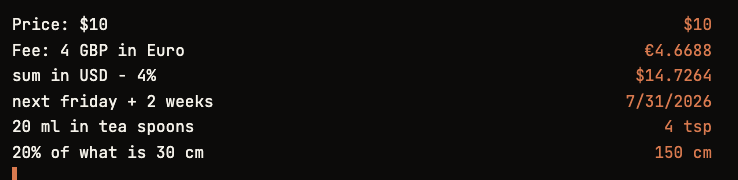
What it can do
- Arithmetic with parentheses:
2 + 3 * 4,(10 + 5) / 3. - Labels and variables:
Price: 10orPrice = 10, then reusePriceon a later line. sumandprev:sumis the running total of the lines above,previs the previous line's result.- Percentages:
120 - 15%,20% of 30,20% of what is 30. - Units and conversion:
20 ml in tea spoons,5 km in miles,2 kg in lb. - Currencies with live rates:
4 GBP in Euro,100 USD in JPY,50 KWD in LBP. Every currency the rate feed returns is supported, referenced by ISO code (USD, EUR, GBP, KWD, LBP, …) or common name (dollar, euro, pound). - Dates in plain language:
next friday,next friday + 2 weeks,today + 90 days.
Blank lines and lines starting with # or // are ignored.
Notes
- Currency rates are fetched once per session from a free public endpoint (no API key). Currency lines fill in as soon as the rates load.
- For inches, write
inch(the bare wordinis used for conversions). - Multi-word currency names may not parse; use the ISO code (e.g.
LBP).
Develop
Requires Node.js v18 or newer.
npm install      # install dependencies
npm run dev      # rebuild main.js on change
npm run build    # production build
npm run test     # run the engine self-check
npm run lint     # lint with ESLint
For local testing, develop inside your vault at
VaultFolder/.obsidian/plugins/s-calc/, then enable the plugin in
Settings → Community plugins and reload.
License
Released under the MIT license. See LICENSE.
For plugin developers
Search results and similarity scores are powered by semantic analysis of your plugin's README. If your plugin isn't appearing for searches you'd expect, try updating your README to clearly describe your plugin's purpose, features, and use cases.