Giraffe
approvedby Justin Magaram
Insert feelings and needs into your notes. Scan by category (Angry, Sad… Connection, Play…) or focus on one word at a time, with definitions. Based on Center for Nonviolent Communication (NVC) lists. - This plugin has not been manually reviewed by Obsidian staff.
Giraffe - Nonviolent Communication (NVC) Tools
Insert feelings and needs into your Obsidian notes. Scan categories of emotions (Angry, Sad, Joyful…) and needs (Connection, Autonomy, Play…), or slow down and focus on one word at a time. Helpful definitions throughout. Based on Center for Nonviolent Communication (NVC) lists.
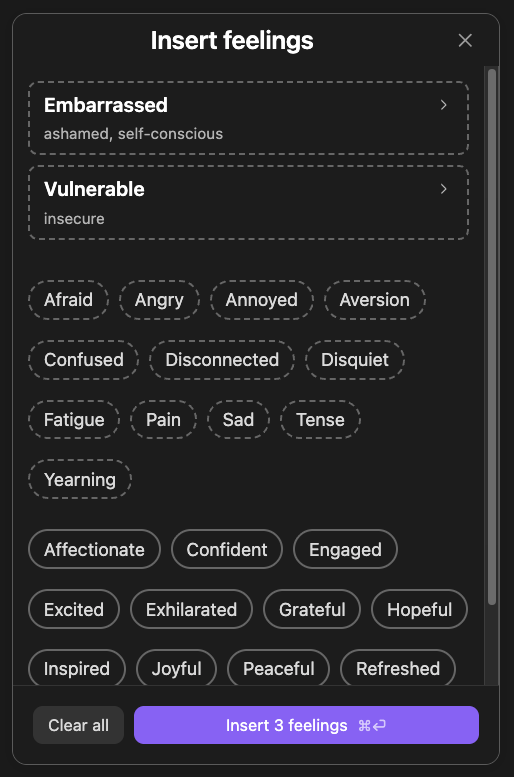
Useful for journaling, or for sitting with something that happened and working out what it was actually about. The words come from Nonviolent Communication, the practice Marshall Rosenberg developed, which starts from the idea that what you feel points at a need — one that is being met, or one that is not. Four commands write a whole note built on that idea, for making sense of something, hearing someone out, forgiving yourself, or saying thanks.
Every word comes with a definition
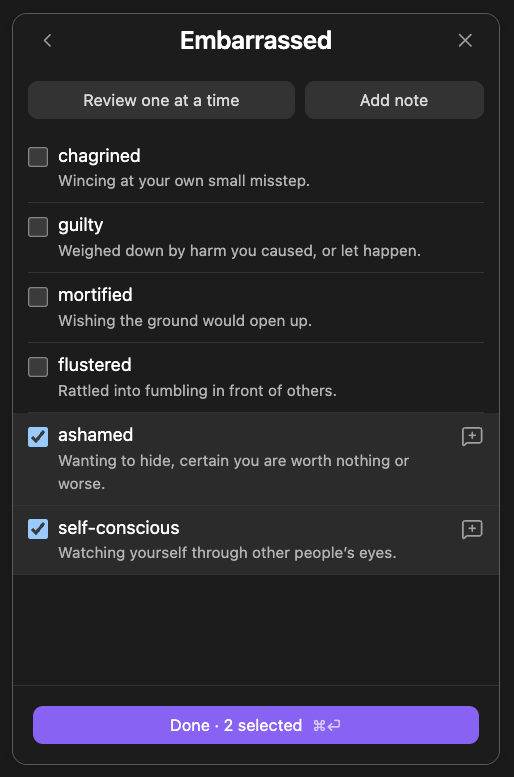
Open a category and you get all of it at once, each word with a line saying what it means. That is the part that does the work: mortified, flustered and chagrined are not the same thing, and seeing them side by side is how you find which one you actually mean.
Or ask to be walked through the category a word at a time, which is slower and surfaces the words you would never have picked off a list.
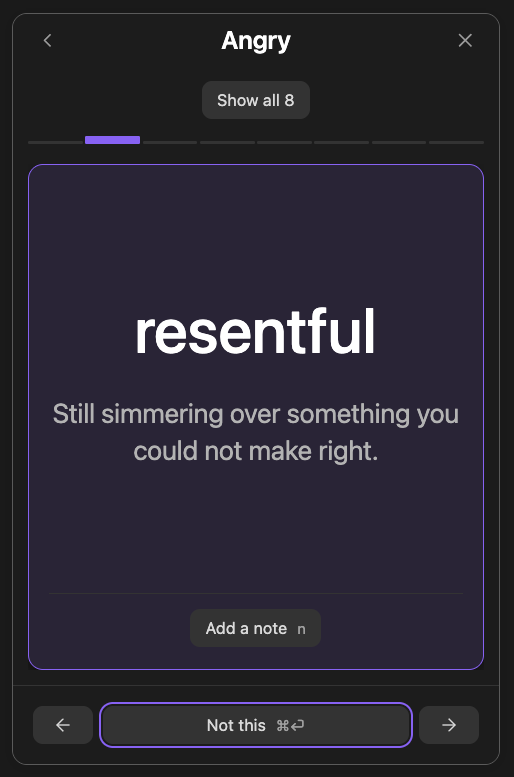
Either way you come out the other side with more vocabulary than you went in with. "I feel bad" turns into something you can do something with.
Say more about the words you picked
Any feeling or need word you chose can carry a note of your own — who it was about, what set it off, what you noticed.
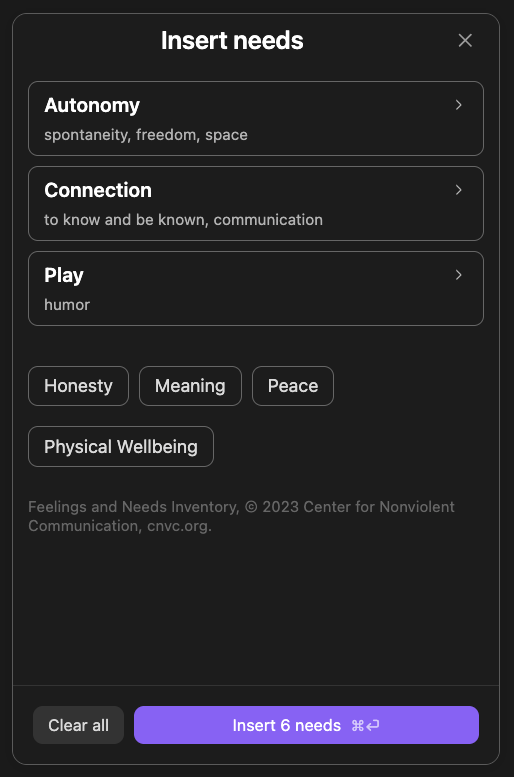
Needs
On the phone and at the desk
The picker is built for thumbs — big targets, one screen at a time — because
some of this gets done on a phone, in the moment, away from a desk. At a desk it
is built for hands that never leave the keyboard: arrows walk the list, n
opens a note on whatever you are looking at, and ⌘↵ commits the screen. You
stay in the flow you came in with.
Installing it
From inside Obsidian: Settings → Community plugins → Browse, search for Giraffe, install, and enable.
Using it
Put the cursor where the words should go and run one of these from the command palette:
- Insert feelings…
- Insert needs…
- Make sense of it
- Hear them
- Forgive yourself
- Thank them
All six need an open note, so none of them is available when there is nowhere to write. The first two open the picker: choose a category, pick the words that fit, and press Insert. The other four each write a whole note for you to fill in — see below.
A block you already wrote keeps a ⋯ menu in its corner: Edit… reopens it in the picker, several layout options are available, and you can choose Convert to Markdown to turn it into plain markdown text for good.
Four notes to fill in
The other four commands each write a page rather than a list of words. Each one walks the questions Nonviolent Communication asks — what happened, what you feel, what you need, and what you might ask for — turned a different way, with a folded note under each heading saying what belongs there and what does not. The folded notes all have the same shape, so once you have read one you can skim the rest: the title names the distinction that matters at that step, the first line says what to write, and the last puts a wrong line beside a right one. One small story, a pair of unanswered texts, runs through all four, seen from each side in turn.
The feelings and needs sections arrive as empty blocks reading Pick feelings… and Pick needs…. Click one and the picker opens on it, and what you choose lands in that block rather than wherever the cursor happened to be.
Make sense of it
Use it when something has happened, usually with another person, and you are flooded with feelings and thoughts you cannot sort out. It is for getting clear before you say or do something that makes it worse, and for finding a way through that brings you closer to the other person and to what you need. The folded notes cover how to describe an event the way a camera would, why ignored is a thought rather than a feeling, why I need him to call is a strategy rather than a need, and what separates a request from a demand. Each question builds on the one before, and not every section has to be filled in.
Hear them
The same four questions, turned towards the other person. Use it when someone has said or done something that stung and you are tempted to strike back, walk away, or grovel. It asks what they said, what they might be feeling, what they might be needing, and what you could say back, before you decide how to respond. The folded notes cover the ground that is different on this side — a guess at a feeling or need is held lightly, and what you say back is a question they can correct rather than a diagnosis. Understanding them does not require agreement, taking responsibility for their feelings, or continuing the conversation.
Forgive yourself
For something you said or did and wish you had not. It takes the same four questions to your own action and splits the needs question in two, the way Nonviolent Communication does: which of your needs the action left unmet, which is the mourning, and which need you were trying to meet when you did it, which is the self-forgiveness. Hold both and the lesson sticks. It ends with one next step rather than a promise never to do it again, and the folded notes cover the traps on the way — that a verdict on yourself teaches as little as a verdict on anyone else, and that an apology which has to be accepted is a demand.
Thank them
The same questions without the request, for when someone did something that mattered and thanks does not say it: what they did, what it stirred in you, and which need of yours it met. The folded notes draw the line Nonviolent Communication draws between praise and appreciation — that you're so thoughtful is a judgment, kind but still a judgment, while what their action did for you is the part they cannot get anywhere else — and end with saying it to them rather than about them, with no but and no request tucked in behind.
Writing your own templates
An empty block is a real thing you can type, so a daily note or a Templater template of your own can hold one and have it waiting:
## How I feel

```nvc-feelings
```
Any fence reading nvc-feelings or nvc-needs with nothing inside it draws as
that same Pick feelings… control. There is nothing to install for this and
no file to copy — the plugin ships none. Type the fence and it works.
Attribution
The feelings and needs, and the categories they sit under, come from the Center for Nonviolent Communication's Feelings and Needs Inventory, © 2023 Center for Nonviolent Communication, cnvc.org. CNVC gives permission to copy and share it and asks to be credited; the plugin carries that credit under the categories in both pickers, and anything built from this code inherits the same obligation.
The definitions are not CNVC's. The inventory is a bare word list with no glosses — every definition here was written for this project, and any quarrel with one is with us.
License
MIT, for this project's own code.
That covers the code only. The CNVC word lists keep their own terms, described under Attribution above — the MIT license does not relicense them.
Building it
See CONTRIBUTING.md for running the plugin from source, the component gallery it is built out of, and how releases are cut.
For plugin developers
Search results and similarity scores are powered by semantic analysis of your plugin's README. If your plugin isn't appearing for searches you'd expect, try updating your README to clearly describe your plugin's purpose, features, and use cases.