Emotion Picker
approvedby Daniel Nikolaev
Choose an emotion from a list to insert into a note.
★ 56 stars↓ 9,717 downloadsUpdated 1y agoMIT
Obsidian Emotion Picker
Paste an emotion / feeling into note, using customizable list of emotions (or sensible default one).
Click on an emotion to insert it as text at the current cursor position.
Available options (default values can be set in Settings tab):
- add comma after (convenient if entering more than one emotion)
- insert as [[link]]
- insert as #tag
- capitalize the word before inserting
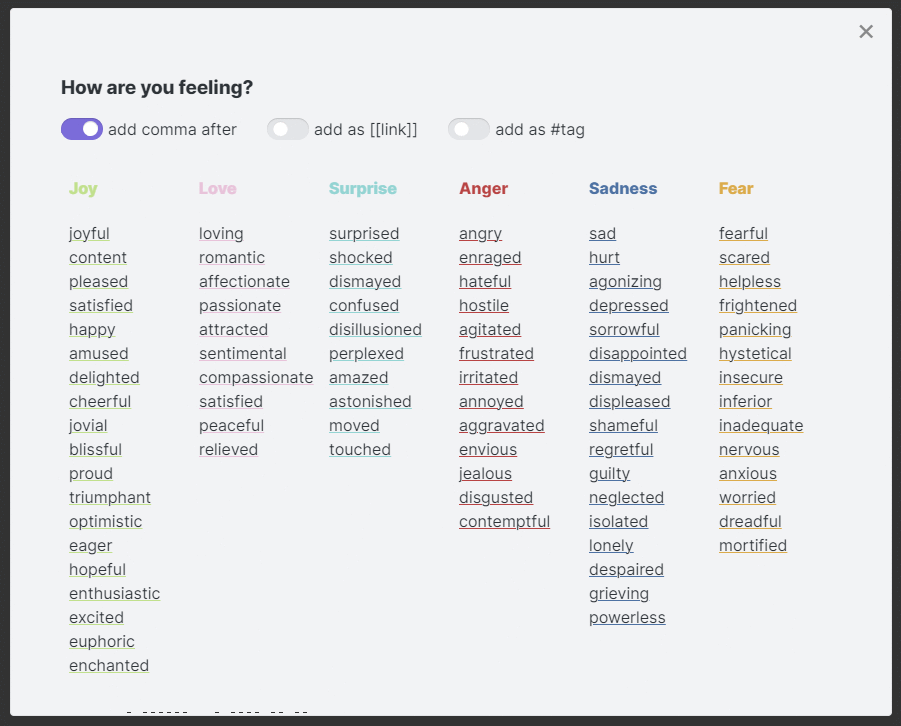
The primary purpose is to provide an easier way to add entries to daily journal, emotions / mood tracker, etc.
For plugin developers
Search results and similarity scores are powered by semantic analysis of your plugin's README. If your plugin isn't appearing for searches you'd expect, try updating your README to clearly describe your plugin's purpose, features, and use cases.