File Cooker
approvedby PageClear
Deal batch notes from search results,current file, or Dataview query string.
Cook your notes like a chef: pick the ingredients, fire the pan, confirm before it's served ✅
File Cooker
File Cooker is an Obsidian plugin for batch file operations. Treat a batch of files (from search results, clipboard, current file links, Dataview / Bases queries …) as ingredients, then run a single command to move, rename, edit properties, delete, merge, sync to flomo, or add to Canvas — like cooking them in one pan.
- 🧺 Any source: clipboard · current file · search results · Dataview query · Bases query · context menu
- 🍳 Rich operations: move / rename / edit properties / delete / merge / create / sync to flomo / copy links / add to Canvas
- 🛡️ Confirm before acting: every operation shows a confirmation modal; destructive ones (delete) are highlighted in red
- 📱 Mobile friendly: not desktop-only (
isDesktopOnly: false)
✨ Features
- Batch edit properties: add / modify / delete frontmatter properties;
tags/alias/cssclassessupport comma-separated multi-value edits and-prefix to remove a single value; no MetaEdit plugin needed (built-in since v1.8.0) - Batch move / rename: organize selected files into a target folder or rename them in one go
- Batch merge: merge multiple files into one target file (YAML ignored)
- Batch create: materialize unresolved links of the current file into real files
- Sync to flomo: sync file links, file content, or current selection (requires flomoAPI)
- Copy links: copy Dataview / Bases result links to the clipboard
- Add to Canvas: batch-add files, text / selection, or Dataview tasks into a target canvas
- ⭐ Bases integration (new in v2.0.0): run file operations directly on Bases query results
- ⭐ Context menu (new in v2.0.0): right-click access from editor and file explorer
- Presentation mode (new in v1.9.0): one-click larger font and wider editor for screen sharing
📸 Screenshot
Demo: search results + clipboard + Dataview query — all sources share the same "Select → Cook → Confirm" flow.
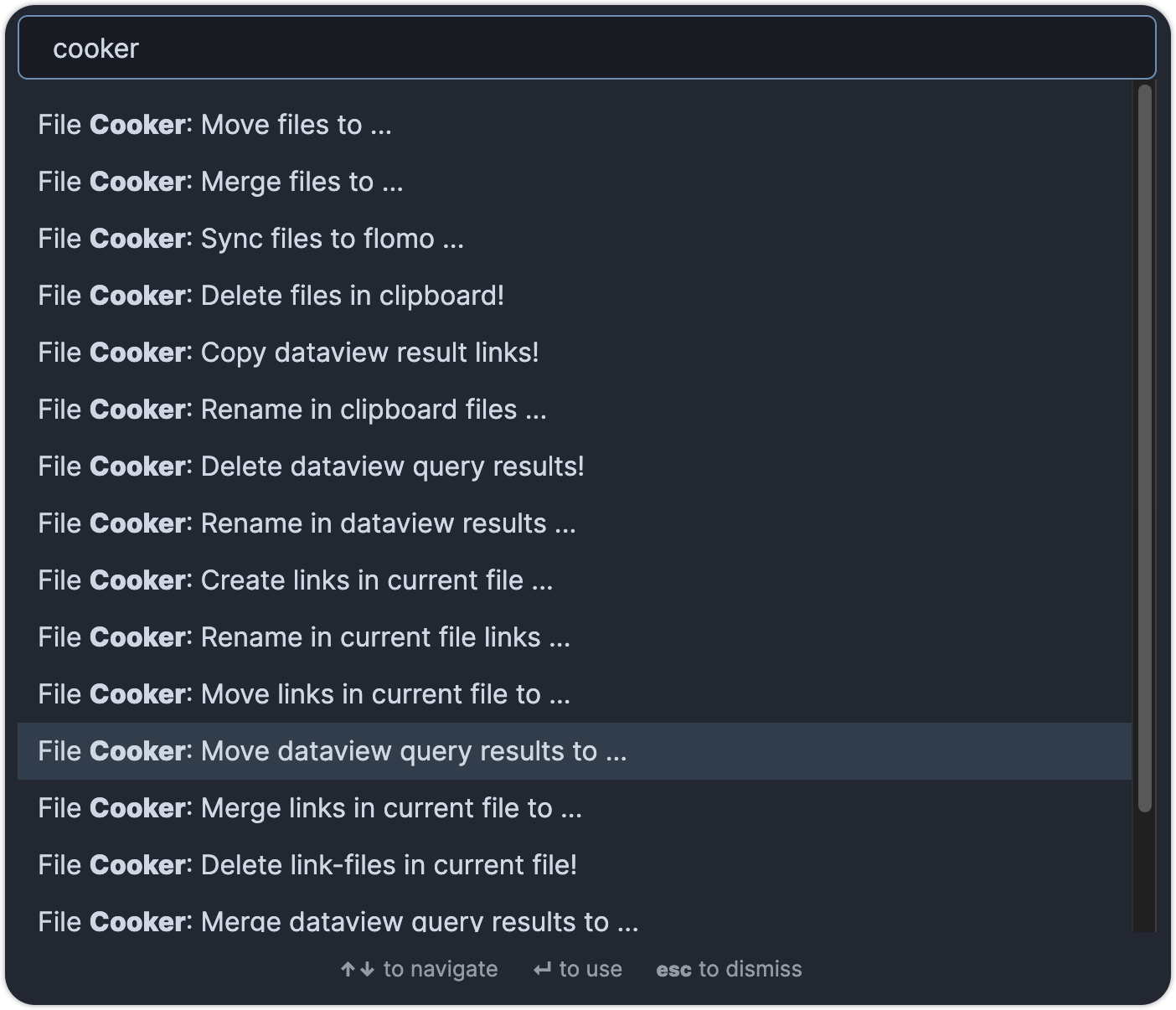
🍳 How it works: Select → Cook → Confirm
- Select: pick a batch of files from any supported source
- Cook: run the matching operation command
- Confirm: review the targets in the confirmation modal, then execute
Supported input sources
| Source | How to use | Notes |
|---|---|---|
| 📋 Clipboard | Copy file links (e.g. search results) first, then run clipboard commands | Plain text content can also be added to Canvas |
| 📄 Current file | Open a file, then run current-file-link commands | Reads links / unresolved links / content / selection |
| 🔍 Search results | Open the Obsidian search panel, then run search results commands | Operates directly on the results in the panel |
| 📊 Dataview query | Select a DQL or DataviewJS query in the editor, then run Dataview commands | Requires the Dataview plugin; DataviewJS supported since v1.7.1 |
| 🗄️ Bases query | Open a Bases view, then run Bases commands | New in v2.0.0; only rows mappable to real files are processed |
| 🖱️ Context menu | Right-click in the editor or file explorer | New in v2.0.0 |
Supported operations
| Operation | Example command | Notes |
|---|---|---|
| 📁 Move | Move ... to folder | Batch move to a target folder |
| ✏️ Rename | Rename ... | Batch rename |
| 🏷️ Edit properties | Edit Properties ... | Add / modify / delete frontmatter, multi-value supported |
| 🗑️ Delete | Delete ... ! | Destructive — highlighted red in the confirmation modal |
| 🔗 Merge | Merge ... to ... | Merge into a target file |
| 🆕 Create | Create links ... | Create files from unresolved links |
| 📤 Sync to flomo | Sync ... to flomo | File links / content / selection |
| 📋 Copy links | Copy ... links! | Copy result links to the clipboard |
| 🖼️ Add to Canvas | Add ... to canvas | Files / text / tasks |
Bases integration (new in v2.0.0)
When a Bases data source is available, File Cooker provides a Bases command group aligned with the Dataview file commands (move / rename / edit properties / delete / merge / sync to flomo / copy links / add to canvas / add task).
Behavior boundaries:
- File-only mapping: only rows that can be mapped to real vault files are processed
- Ignore non-file rows: unmapped rows are skipped, and a notice reports the ignored count
- No row writes: File Cooker does not modify Bases row fields in this flow
Context menu (new in v2.0.0)
- Editor context menu:
File Cooker > Selection: sync the selection to flomo / add it to a canvas (only when a selection exists)File Cooker > Current file links: run link-based batch operations from the current file
- File explorer context menu:
File Cooker > Target file: rename / edit properties / delete the right-clicked file
Notes: destructive actions (like delete) still require confirmation. If no active file exists, current-file-link operations are safely blocked with a notice.
⚙️ Settings
| Setting | Purpose | Default |
|---|---|---|
| Limit | Maximum number of files processed per batch | 300 |
| flomoAPI | flomo API endpoint, used to sync notes to flomo | empty |
flomo sync commands will notify "Please config flomoAPI first!" when the API is not configured.
📦 Installation
Method 1: Community plugins (recommended)
- Settings → Third-party plugin → turn off Safe mode
- Click Browse, search for File Cooker
- Click Install, then enable the plugin
Method 2: Manual installation
- Download the latest release
- Extract the
obsidian-file-cookerfolder into<vault>/.obsidian/plugins/Note: on some machines the
.obsidianfolder is hidden. On macOS pressCommand+Shift+Dotto reveal it. - Reload Obsidian and enable the plugin in Settings
Requirements
- Obsidian ≥ 1.12.3 (since v2.0.0)
- Dataview plugin: only needed for the "Dataview query" source
- flomoAPI: only needed for "Sync to flomo" commands
- Everything else works out of the box with no extra dependencies
🛡️ Safety & limits
- Always confirm: every command opens a confirmation modal before any change is made
- Delete is highlighted: delete commands are marked in red in the confirmation modal
- Batch limit: a single batch is limited to 300 files by default (adjustable in Settings)
- Visible failures: no files, no active file, missing config, etc. are always reported via Notice — never silently
💬 Feedback & support
Questions or suggestions? Feel free to add me on WeChat: IvyOdds, or open an issue on GitHub Issues.
If File Cooker helps you, please share it with your Obsidian friends 🙏
📜 License
- MIT License — see LICENSE
- Issues and pull requests are welcome
📝 Changelog
2.0.0
- New Bases query source for batch file operations (file-only rows; no Bases field writes)
- New context menu entries (editor: selection / current file links; file explorer: target file)
- Upgraded Obsidian dependency to 1.12.3
1.9.0
- New presentation mode: one-click larger font and wider editor for screen sharing
1.8.1
- Multi-value property editing:
tags/alias/cssclassesbatch add/remove via comma-separated values
1.8.0
- Built-in batch property editing — no MetaEdit plugin required
1.7.8
- New search results commands, operate directly on the search panel results
1.7.7
- Add Dataview tasks to Canvas
1.7.6
- Add text to Canvas
1.7.1
- Support DataviewJS page queries
1.7.0
- Batch-add files to Canvas
1.0 ~ 1.6
- Core capabilities: move, rename, merge, delete, create from unresolved links, sync to flomo, copy links
☕ Buy me a coffee


For plugin developers
Search results and similarity scores are powered by semantic analysis of your plugin's README. If your plugin isn't appearing for searches you'd expect, try updating your README to clearly describe your plugin's purpose, features, and use cases.