Hotkeys for templates
approvedby Vinzent
Add commands to insert specific templates with a hotkey.
Hotkeys for templates
Plugin for Obsidian
How to use
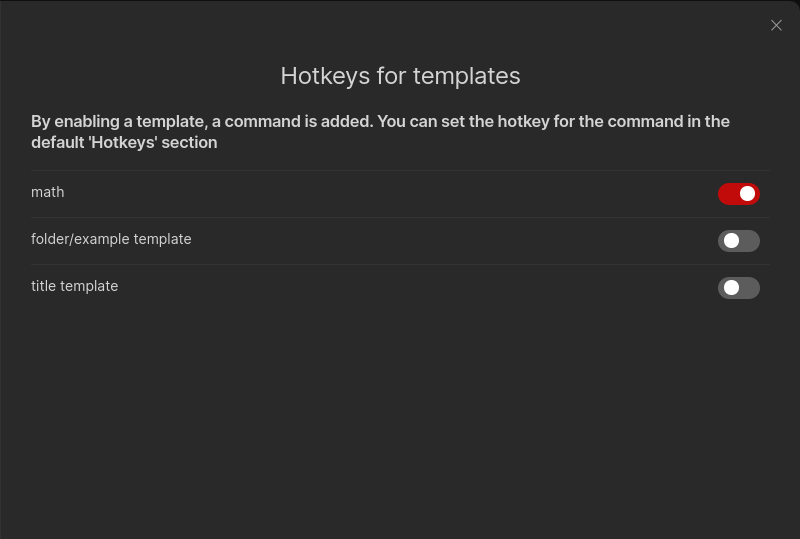
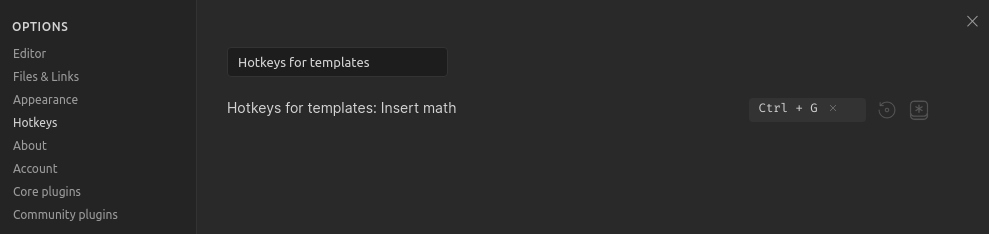
This plugin lists all of your template files in its settings pane. You have to enable the template files, which you want a command for. Then you can set a hotkey for the command through the default "Hotkeys" section in the settings. Just search for "Hotkeys for templates".
Important: You have to enable and set a template folder in the core template plugin settings. Search for it in the help vault if you don't know the core plugin.
Supported templates:
- Templates from the core templates plugin
- Templates from the Templater plugin
Compatibility
Custom plugins are only available for Obsidian v0.9.7+.
Installing
From Obsidian
- Open settings -> Third party plugin
- Disable Safe mode
- Click Browse community plugins
- Search for "Hotkeys for templates"
- Install it
- Activate it under Installed plugins
From GitHub
- Download the latest release
- Move
manifest.jsonandmain.jsto<vault>/.obsidian/plugins/obsidian-hotkeys-for-templates - Go to settings and disable safe mode
- Enable
Hotkeys for templates
If you find this plugin useful and would like to support its development, you can support me on Ko-fi.

For plugin developers
Search results and similarity scores are powered by semantic analysis of your plugin's README. If your plugin isn't appearing for searches you'd expect, try updating your README to clearly describe your plugin's purpose, features, and use cases.